Our Top Picks
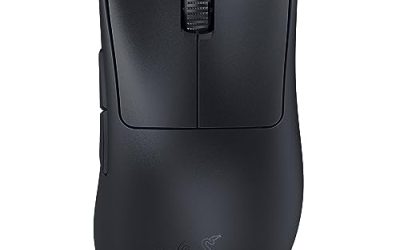
 Razer DeathAdder Essential Ergonomic Wired Gaming Mouse5.01 x 2.86 x 1.69 inches0.3 poundsCheck on Amazon
Your first gaming mouse sets the baseline for everything after it, and the real decision is which tier of hardware you actually need. Entry level does not mean toy hardware: it means a genuine gaming optical sensor, switches that register clicks reliably, and a shape you can learn on, without paying for esports polling rates or exotic extras you will not feel yet.

This guide is for new PC gamers, players upgrading from a bundled office mouse, and anyone buying a first mouse for a younger player. The picks were chosen from their Amazon listings and compared on feature tier as listed: sensor class, switch type, weight and button layout. They range from a classic full-size ergonomic shell to a 59 g honeycomb ultralight, so there is a sensible starting point for every hand and grip.
Quick Picks
As an Amazon Associate we earn from qualifying purchases
| Product | Best for | Key spec from title |
|---|---|---|
| Logitech G203 Lightsync | Simple starter with stored settings | 8,000 DPI, On-Board Memory |
| Razer DeathAdder Essential | Full-size comfort for bigger hands | 6,400 DPI optical sensor |
| HyperX Pulsefire Haste | First step into ultralight mice | 59 g, up to 16,000 DPI |
| Redragon M711 Cobra | Most buttons and RGB at this tier | 10,000 DPI, 7 programmable buttons |
| SteelSeries Rival 3 | Crisp split-trigger main clicks | 8,500 CPI TrueMove Core sensor |
How to Choose
Sensor class: enough is genuinely enough
Entry level sensors have become very good. The listings here run from 6,400 DPI on the DeathAdder Essential to 16,000 DPI on the Pulsefire Haste, and every one of them is a named gaming optical sensor that tracks fast movements without the spin-outs of old office mice. For a first mouse, what matters is clean tracking at the sensitivity you actually play at, not the size of the maximum figure. Pick the shape and switches you like; the sensors in this tier will not hold back a new player in any mainstream game.
Switch type and click feel
The main buttons are where a gaming mouse earns its keep, and listings state the switch hardware plainly. The DeathAdder Essential uses mechanical switches with rubber side grips for control, while the Pulsefire Haste lists TTC Golden micro dustproof switches, a step up in feel and sealing. The Rival 3 splits its main triggers so each click registers distinctly. As a beginner, prioritise a click that feels crisp and consistent over exotic switch technology; your aim habits will form around whatever you learn on, so start with something trustworthy.
Weight and shape for learning good habits
Weight shapes how you aim. Traditional shells like the DeathAdder Essential, a full-size ergonomic design listed at 5.01 by 2.86 by 1.69 inches, suit palm grips and larger hands. The 59 g Pulsefire Haste sits at the opposite end: a honeycomb ultralight that makes low-sensitivity arm aiming easier to learn. Neither is wrong for a first mouse, but they teach different habits. If you play shooters, lighter usually helps; if you play slower strategy or MMO titles, a bigger shell with more buttons may serve you better.
Buttons, lighting and what to skip for now
A first mouse needs the two main clicks, a wheel and ideally two side buttons for common binds. The M711 Cobra lists 7 programmable buttons and full RGB backlighting, the most extras here, while the G203 adds On-Board Memory so settings persist on the mouse itself. What you can safely skip at this tier: very high polling rates, wireless charging and swappable parts. Spend your attention on fit and reliability first, because those decide whether you enjoy the upgrade from an office mouse at all.
The 5 Best Options
Logitech G203 Lightsync
The G203 is the default recommendation for a first gaming mouse because it gets the fundamentals right in a compact shell. The listing states an 8,000 DPI sensor and 6 programmable buttons, enough for the extra binds most games ask for, and On-Board Memory means your sensitivity and button settings are stored on the mouse rather than living in one PC’s software. LIGHTSYNC RGB adds some desk personality without affecting play. It suits smaller to medium hands and fingertip or claw grips, and its wired connection keeps setup to a single plug.
Specs
- 8,000 DPI gaming sensor
- 6 programmable buttons
- LIGHTSYNC RGB lighting
- On-Board Memory as stated in the listing title
- Listed as compatible with PC, Mac and laptops
- Wired USB connection
Best for: First-time buyers who want a compact, set-and-forget wired mouse with stored settings.
Watch out for: The listing does not state a weight, and the compact shell can feel small if you have large hands and a palm grip.
ASIN: B07YN82X3B
Razer DeathAdder Essential
The DeathAdder Essential brings a famous ergonomic shape down to the entry tier. Its listing describes a 6,400 DPI optical sensor, 5 programmable buttons, mechanical switches and rubber side grips, all in the classic full-size DeathAdder shell listed at 5.01 by 2.86 by 1.69 inches. That size is its strength: players with medium to large hands who palm grip get a supportive, relaxed shape that smaller mice cannot offer. The sensor ceiling is the lowest here, which in practice still covers the sensitivities most players use, making this the comfort-first starting point.
Specs
- 6,400 DPI optical sensor
- 5 programmable buttons
- Mechanical switches
- Rubber side grips
- Full-size ergonomic shell, dimensions as listed: 5.01 x 2.86 x 1.69 in
- Wired connection
Best for: Bigger hands and palm grippers who want a roomy, simple first gaming mouse.
Watch out for: The full-size shell is not a small-hands fit, and the 6,400 DPI ceiling is the most modest sensor figure in this guide.
ASIN: B094PS5RZQ
HyperX Pulsefire Haste

The Pulsefire Haste is where entry level meets the ultralight trend. At 59 g as listed, its hex honeycomb shell weighs far less than a typical starter mouse, and the sensor reaches up to 16,000 DPI, the highest figure in this guide. HyperX lists TTC Golden micro dustproof switches and a flexible HyperFlex cable that resists drag, two details usually found a tier up. For a new player curious about the light, fast style of mouse that competitive shooters favour, this is the most direct way in without leaving the entry tier behind.
Specs
- 59 g weight as listed
- Hex honeycomb shell design
- Up to 16,000 DPI sensor
- TTC Golden micro dustproof switches as listed
- HyperFlex USB cable
- Wired connection
Best for: New shooter players who want to learn on a genuinely ultralight mouse from day one.
Watch out for: The open honeycomb shell lets in dust and crumbs more easily than a solid shell, so it needs the occasional clean.
ASIN: B08NSJFNSS
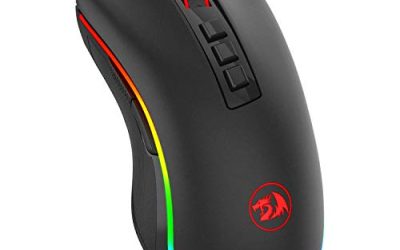
Redragon M711 Cobra

The M711 Cobra is the feature-stacked option of the group. Its listing promises a 10,000 DPI sensor and 7 programmable buttons, the most buttons here, wrapped in full 16.8 million colour RGB backlighting. That combination suits players who split time between shooters and button-heavy games and want one mouse that covers both while they figure out their preferences. It is a wired mouse with a conventional solid shell, so there are no batteries or receivers to manage. For a beginner who values visible extras and customisation over minimal weight, the Cobra is the natural pick.
Specs
- 10,000 DPI adjustable optical sensor
- 7 programmable buttons
- 16.8 million colour RGB backlighting as listed
- Wired USB connection
- Solid shell design
Best for: Beginners who want the most buttons and lighting at this tier for mixed game genres.
Watch out for: The listing does not state a weight, so check the live page if you are specifically hunting for a light mouse.
ASIN: B0751D11BL
SteelSeries Rival 3
The Rival 3 earns its place through click design. SteelSeries lists split trigger buttons, which keep the main clicks feeling separate and responsive, paired with a TrueMove Core optical sensor at 8,500 CPI and 6 programmable buttons. The listing describes an ergonomic shape and names support for Windows, Mac, Linux and Xbox, the broadest platform list in this guide. Prism RGB lighting adds colour without dominating the design. If you are upgrading from a mushy office mouse and want your first gaming mouse to feel noticeably sharper with every click, start here.
Specs
- 8,500 CPI TrueMove Core optical sensor
- 6 programmable buttons
- Split trigger main buttons
- Brilliant Prism RGB lighting
- Ergonomic shape as described in the listing title
- OS support as listed: Windows, Mac, Linux and Xbox
- Wired connection
Best for: Players who care most about crisp main clicks and wide platform compatibility.
Watch out for: Weight is not stated in the listing, so confirm it on the live page if a light shell is a priority.
ASIN: B08176SM7C
Which One Fits Your Situation
You are buying your very first gaming mouse
Start with the G203 Lightsync. It covers every fundamental, stores your settings on the mouse itself, and its compact shell suits the fingertip and claw grips most new players settle into. If your hands are clearly large, swap it for the DeathAdder Essential instead, because a shell that fits teaches better habits than one you have to curl around.
You mainly play shooters and want to aim properly
Take the Pulsefire Haste. Its 59 g honeycomb shell and flexible cable make low-sensitivity aiming easier to learn, and its 16,000 DPI ceiling leaves unlimited room to tune. Players who prefer a solid shell can choose the Rival 3 for its split-trigger clicks, which reward the deliberate, single-shot clicking that tactical shooters demand.
You play a bit of everything, including MMOs
The M711 Cobra fits a mixed library best. Seven programmable buttons give you room for MMO abilities and MOBA items alongside shooter binds, and the 10,000 DPI sensor handles every genre’s sensitivity range. It is also the most customisable-looking pick here, with full RGB backlighting, which matters if your setup is part of the fun.
The mouse is for a younger or smaller-handed player
Choose between the compact G203 and the 59 g Pulsefire Haste, both of which suit smaller hands better than a full-size shell. The DeathAdder Essential still works for older kids with bigger hands who want a simple, durable wired mouse with few buttons to manage, but it should not be the default for small hands.
Common Mistakes
- Judging entry level mice by maximum DPI alone, when shape, weight and switch feel change your play far more.
- Buying a full-size ergonomic shell for small hands, which forces an awkward grip and tired fingers.
- Paying for flagship features like ultra-high polling before you have the monitor and habits to notice them.
- Assuming a honeycomb mouse is fragile or a solid mouse is automatically better; both designs here are built for daily play.
- Skipping the listing details: several of these mice do not state a weight, so check the live page before deciding on weight alone.
Frequently Asked Questions
What makes a mouse entry level rather than high end?
Tier is about feature scope, not basic quality. Entry level mice use proven optical sensors in the 6,400 to 16,000 DPI range as listed here, standard mechanical or micro switches, and wired connections. Higher tiers add wireless systems, flagship sensors, optical switches and extreme polling rates. For learning and most gaming, the entry tier covers everything that affects results.
Is 6,400 DPI enough for gaming?
Yes, for the way almost everyone plays. Sensitivity settings in games translate to an effective DPI far below that ceiling, so a 6,400 DPI sensor like the DeathAdder Essential’s has headroom to spare. Tracking quality and a comfortable shape influence your aim much more than a larger maximum number would.
Should a beginner start with a light mouse or a standard one?
Either works, but they encourage different styles. A light mouse like the 59 g Pulsefire Haste makes fast, low-sensitivity aiming easier and is popular for shooters. A standard shell like the DeathAdder Essential feels steadier and suits palm grips. If you are unsure, begin with the shape that fits your hand and grip first.
Do I need software to use these mice?
Every mouse here works when plugged in, with buttons and sensitivity available out of the box. Companion software adds finer control over DPI steps, button assignments and lighting where supported. The G203’s listed On-Board Memory is a useful middle ground, since settings you save are stored on the mouse and travel with it between computers.
FAQ
What makes a mouse entry level rather than high end?
Is 6,400 DPI enough for gaming?
Should a beginner start with a light mouse or a standard one?
Do I need software to use these mice?
More from Amazon
Programs that pair well with the guide above. Offers and eligibility are set by Amazon and may change.
Free shipping on eligible items, Prime Video and more. Eligible new members can start with a free trial.
Start a Prime free trialAd-free music streaming. Eligible new subscribers can start with a free trial.
Try Music Unlimited freeA Prime membership for ages 18-24 with a trial period. Eligibility is set by Amazon.
See Prime for Young AdultsAudiobooks and podcasts to listen to on the go. Eligible new members can start with a free trial.
Try Audible freeAs an Amazon Associate we earn from qualifying purchases.