Our Top Picks
StarCraft 2 asks more of a mouse than almost any other game. A long macro game means hundreds of actions per minute, constant boxing of units, camera jumps and rapid-fire clicking on small targets, so the real decision is whether a shell stays comfortable and accurate through that pace for hours. Weight, switch feel and sensor consistency matter far more here than raw button counts.


This guide is for RTS players who want a mouse built around speed and control rather than extra features. Every pick below was chosen from its Amazon listing details: small or medium shells, light weights where stated, proven optical sensors and click switches described in the listing copy. None of them carries an MMO-style side grid, because StarCraft 2 rewards a clean grip and unobstructed clicks.
Quick Picks
As an Amazon Associate we earn from qualifying purchases
| Product | Best for | Key spec from title |
|---|---|---|
| Logitech G203 Lightsync | Wired simplicity with stored settings | 8,000 DPI, On-Board Memory |
| Logitech G305 Lightspeed | Wireless play with very long battery life | HERO sensor, 12,000 DPI |
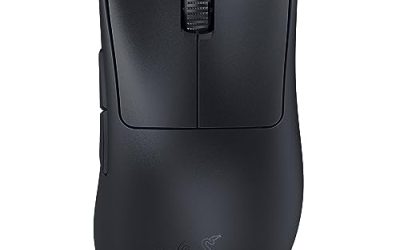
| Razer Cobra | The lightest shell for fingertip control | 58 g, Gen-3 optical switches |
| SteelSeries Rival 3 | Split-trigger clicks on a wired budget shape | 8,500 CPI TrueMove Core sensor |
How to Choose
Shell size and weight for high-APM play
StarCraft 2 movement is mostly wrist and fingertip work: short flicks, tiny corrections and constant repositioning. A small or medium shell lets your fingers steer the mouse instead of your whole arm, and a lighter mouse reduces the effort of thousands of small movements across a long session. The listings here span wired models with no stated weight up to the Cobra at 58 g, so match the shell to your hand size and grip first. If you palm grip with a large hand, try before you commit, because compact RTS shapes can feel cramped.
Switch feel and click durability
In an RTS, the main buttons are your most-used input by a wide margin, so switch character matters more than side buttons. Optical switches, like the Gen-3 units in the Razer Cobra, actuate with light rather than a physical contact, while conventional mechanical switches give a firmer, more tactile break. Listings state switch type plainly, so use that wording rather than lifespan figures quoted elsewhere. What you want is a crisp, consistent click that does not feel mushy after months of ladder sessions, plus split-trigger designs like the Rival 3’s that keep the buttons responsive.
Sensor behaviour at RTS sensitivities
Most StarCraft 2 players run moderate sensitivity settings, well inside what any modern optical sensor handles cleanly. The DPI ceilings in these listings, from 8,000 on the G203 to 12,000 on the G305, are far beyond what the game needs, so treat them as headroom rather than a target. Tracking consistency at your actual setting matters more: a sensor that holds a steady line during fast box-selects and does not jitter at slow creep. Every pick here uses a named gaming optical sensor recorded in its listing, which is the baseline worth insisting on.
Wired certainty versus wireless freedom
A wired mouse never needs charging and never drops a connection mid-game, which is why two of the four picks here plug in. Modern gaming wireless, though, has closed the response gap, and the G305 adds the practical bonus of up to 250 hours on a single AA battery as listed, so battery anxiety barely applies. The trade-off is tidiness and desk freedom against one less thing to manage. For tournament-style focus, wired is the set-and-forget choice; for a clean desk or a laptop setup, the G305’s receiver-based wireless is easy to live with.
The 4 Best Options
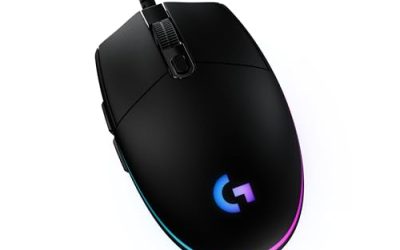
Logitech G203 Lightsync
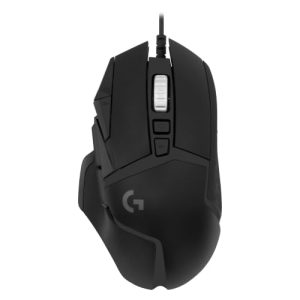
The G203 Lightsync is the straightforward wired pick for players who want a proven shape and nothing in the way. Its listing highlights 6 programmable buttons, which is plenty for control-group tweaks and camera hotkeys without crowding the shell, and the stated On-Board Memory means your settings travel with the mouse between PCs. LIGHTSYNC RGB is there if you want it, but the core appeal is a compact, ambidextrous-leaning shell with an 8,000 DPI sensor that covers RTS sensitivities with room to spare. It suits players who plug in at one desk and stay there.
Specs
- 8,000 DPI gaming sensor
- 6 programmable buttons
- LIGHTSYNC RGB lighting
- On-Board Memory as stated in the listing title
- Listed as compatible with PC, Mac and laptops
- Wired USB connection
Best for: Players who want a wired mouse with stored settings and no charging routine.
Watch out for: The listing does not state a weight, so check the live page if shell weight is a deciding factor for you.
ASIN: B07YN82X3B
Logitech G305 Lightspeed
The G305 takes the same compact philosophy wireless. Its HERO sensor is listed at 12,000 DPI, and the headline figure for RTS players is endurance: up to 250 hours of play from one AA battery, so a full season of laddering fits between battery swaps. The shell measures 116.6 by 62.15 by 38.2 mm as listed, a genuinely small footprint that fingertip and claw players tend to like for rapid boxing, and the USB receiver stores inside the mouse for travel. Six programmable buttons cover the extra binds most StarCraft 2 players actually use.
Specs
- HERO sensor, 12,000 DPI
- 6 programmable buttons
- LIGHTSPEED wireless via USB receiver, 1 ms report rate as listed
- Up to 250-hour battery life on one AA battery
- 99 g including the AA battery
- Dimensions as listed: 116.6 x 62.15 x 38.2 mm
- Built-in receiver storage
Best for: Wireless players who hate charging schedules and want a small, light shell.
Watch out for: It runs on a replaceable AA battery rather than a rechargeable cell, and there is no Bluetooth, so laptops need the receiver in a port.
ASIN: B07CMS5Q6P
Razer Cobra

At 58 g as listed, the Cobra is the lightest mouse in this guide, and that shows in fast RTS movement: quick flicks between the minimap, production and your army take noticeably less effort. Razer’s Gen-3 optical switches headline the listing, giving fast, light actuations suited to rapid repeat clicking, and the 8,500 DPI optical sensor tracks well beyond RTS needs. The 100 percent PTFE feet and flexible Speedflex cable keep the wired connection from dragging during sweeps. This is the pick for fingertip players who prioritise raw agility over extra buttons or wireless freedom.
Specs
- 58 g weight as listed
- Razer Gen-3 optical switches
- 8,500 DPI optical sensor
- Chroma RGB underglow
- 100 percent PTFE mouse feet
- Speedflex cable, wired connection
Best for: Fingertip and claw players who want the lightest, fastest-clicking shell here.
Watch out for: It is wired only, and the compact shell may feel small for palm grippers with larger hands.
ASIN: B0C51J2ZXN
SteelSeries Rival 3
The Rival 3 approaches StarCraft 2 through its click design: the listing calls out split trigger buttons, a construction that keeps the main clicks distinct and responsive under rapid use. Its TrueMove Core optical sensor is listed at 8,500 CPI, comfortably covering the sensitivity range RTS players use, and 6 programmable buttons handle the usual extra binds. The listing describes an ergonomic shape and also lists support for Windows, Mac, Linux and Xbox, which makes it a flexible spare for mixed setups. Prism RGB lighting rounds out a wired mouse aimed at players who value click feel over extras.
Specs
- 8,500 CPI TrueMove Core optical sensor
- 6 programmable buttons
- Split trigger main buttons
- Brilliant Prism RGB lighting
- Ergonomic shape as described in the listing title
- OS support as listed: Windows, Mac, Linux and Xbox
- Wired connection
Best for: Players who want a wired mouse built around crisp, separated main clicks.
Watch out for: The listing does not state a weight, so confirm dimensions and weight on the live page if you have a strict preference.
ASIN: B08176SM7C
Which One Fits Your Situation
You play long ladder sessions at one desk
Choose the G203 Lightsync or the Rival 3. A wired connection removes charging and battery checks entirely, and both mice keep their buttons simple enough that nothing interferes with your grip during long macro games. The G203 adds On-Board Memory for stored settings, while the Rival 3 counters with its split-trigger clicks. Either way, you get a compact shell that stays comfortable through repeated sessions without feature bloat.
You want wireless without a charging routine
The G305 is the natural fit. Its listed 250-hour battery life on a single AA means you swap a battery a few times a year rather than plugging in every week, and the receiver stores inside the shell when you move rooms or travel. The small footprint suits the fingertip movements StarCraft 2 rewards, and the HERO sensor’s 12,000 DPI ceiling is far more than the game asks for.
You play a fast, aggressive micro-heavy style
Pick the Razer Cobra. At 58 g it is built for constant small corrections, army splitting and rapid target switching, and the Gen-3 optical switches are made for fast repeat clicks. The PTFE feet and flexible cable keep that speed usable on a wired connection. If your APM comes from relentless micro rather than calm macro, this is the shell that gets out of your way.
You split time between a PC and other systems
The Rival 3’s listing explicitly covers Windows, Mac, Linux and Xbox, making it the easiest pick to move between machines without checking compatibility each time. The G203 and G305 listings also state PC and Mac support. If your StarCraft 2 time happens on more than one computer, start with the mouse whose listing names your systems outright.
Common Mistakes
- Buying an MMO mouse with a 12-button side grid for StarCraft 2, then fighting the extra buttons instead of using clean keyboard hotkeys.
- Chasing the highest DPI figure and playing at a sensitivity so high that box-selects and unit clicks overshoot.
- Choosing a large, heavy shell for a fingertip style, which makes the constant small corrections of RTS play tiring.
- Assuming a wireless mouse needs nightly charging, when listed battery figures like the G305’s 250 hours tell a different story.
- Ignoring switch type in the listing, even though the main buttons take more clicks in RTS than in any other genre.
Frequently Asked Questions
Does StarCraft 2 need a mouse with lots of side buttons?
No. Ability commands and control groups live on the keyboard in StarCraft 2, so a standard layout with a couple of side buttons is enough for most players. The mice here carry 6 programmable buttons as listed, which covers camera locations or push-to-talk without adding a thumb grid that can cause misclicks during fast play.
Is a higher DPI sensor better for RTS games?
Only up to the point your sensitivity setting uses. Most RTS players run moderate settings, so sensors listed at 8,000 to 12,000 DPI already provide far more range than the game needs. Consistent tracking, a comfortable shell and reliable clicks improve your control more than a larger DPI number on the box.
Wired or wireless for competitive StarCraft 2?
Both work at a high level. Wired mice like the G203 and Cobra remove batteries and pairing from the equation, while the G305’s LIGHTSPEED connection is listed with a 1 ms report rate and very long battery life. Choose based on your desk setup and whether you prefer never thinking about power or never dealing with a cable.
What grip style suits StarCraft 2?
Fingertip and claw grips dominate RTS play because they allow fast, small movements and quick lift-offs. The compact shells in this guide, especially the 58 g Cobra and the small G305, suit those grips. Palm grip players with larger hands should check listed dimensions carefully, since compact mice can feel cramped over long sessions.
FAQ
Does StarCraft 2 need a mouse with lots of side buttons?
Is a higher DPI sensor better for RTS games?
Wired or wireless for competitive StarCraft 2?
What grip style suits StarCraft 2?
More from Amazon
Programs that pair well with the guide above. Offers and eligibility are set by Amazon and may change.
Free shipping on eligible items, Prime Video and more. Eligible new members can start with a free trial.
Start a Prime free trialAd-free music streaming. Eligible new subscribers can start with a free trial.
Try Music Unlimited freeA Prime membership for ages 18-24 with a trial period. Eligibility is set by Amazon.
See Prime for Young AdultsAudiobooks and podcasts to listen to on the go. Eligible new members can start with a free trial.
Try Audible freeAs an Amazon Associate we earn from qualifying purchases.