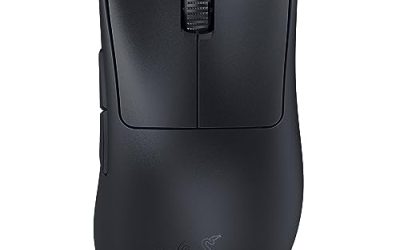
Our Top Picks
 Logitech G Pro X Superlight 2 Lightspeed WirelessClassic1.57 x 2.5 x 4.92 inches0.1 poundsCheck on Amazon
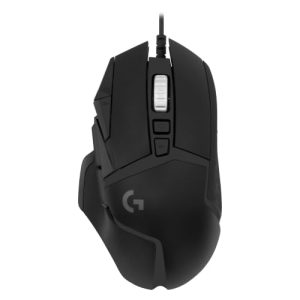
 Logitech G502 X Plus Wireless RGB Gaming MouseWireless7.1 x 4.6 x 2.7 inches0.84 poundsCheck on Amazon
Rechargeable sounds like a single feature, but it hides the decision that actually matters: how a mouse behaves across a whole week of play. One model sips power for weeks between charges, another drains faster because of its lighting, and a third lets you keep playing on the cable while it tops up. The listings also differ on the basics, including which ones charge over USB-C at all, so the port and the stated battery figure deserve as much attention as the sensor.
Every mouse below charges over USB-C as its Amazon listing states, and none of them runs on replaceable AA cells. The five picks cover very different players: two lightweight flagships built for competitive play, a heavier feature-loaded all-rounder, a cross-platform mouse that also speaks Bluetooth and works with Mac as listed, and an MMO mouse whose swappable side panels change how many buttons you carry. Battery figures are quoted exactly as each listing states them.
Quick Picks
As an Amazon Associate we earn from qualifying purchases.
| Product | Best for | Key spec from title |
|---|---|---|
| Logitech G Pro X Superlight 2 | Competitive players who charge rarely and briefly | USB-C charging, 60 g, 8K report rate |
| Razer Viper V3 Pro | Battery life with flagship speed | Up to 95 hr battery, USB-C rechargeable |
| Logitech G502 X Plus | Feature seekers who play while charging | USB-C, up to 120 hr battery as listed |
| Keychron M3 | PC and Mac players on one desk | Up to 70 hours, 2.4 GHz, Bluetooth and wired |
| Razer Naga V2 Pro | MMO players who need the longest runtime | Up to 300 hr on Bluetooth as listed |
How to Choose
Read the stated battery life carefully
Battery figures on listings are measured under specific conditions, and the conditions matter as much as the number. One pick here lists 120 hours of constant motion but only 37 hours with its RGB lighting switched on, which is the honest way to present it and the way you should read every claim. Ask yourself which mode you will actually use. A mouse rated for weeks of play at low polling with lighting off may need charging every few days at maximum settings. Compare the figures as listed, then discount them toward your own settings rather than taking the headline at face value.
Check the charge port and the cable
USB-C is the standard worth insisting on, because it means the cable that charges your phone or headset probably charges your mouse too, and every pick in this guide lists USB-C charging. Older micro-USB mice still circulate in budget listings and leave you hunting for a second cable. Also look at what the cable connection means for play: a rechargeable mouse that works wired while charging never forces a break, while one that only charges on a dock or only connects wirelessly can strand you mid-session. The listing states the connection modes, so check them before assuming.
Weight changes how charging feels
Rechargeable batteries add mass, and the spread in this guide is wide, from 54 g flagships to a 134 g MMO mouse. Heavy mice tend to carry larger batteries and longer runtimes, which is a genuine trade rather than a flaw. Light mice charge quickly and suit players who top up in short bursts between sessions. Think about your routine honestly. If you plug in overnight without fail, runtime barely matters. If you forget for days at a time, the longest stated battery life in this guide belongs on your shortlist even at the cost of extra grams.
Wireless modes decide your flexibility
A rechargeable mouse may connect by a low-latency 2.4 GHz receiver, by Bluetooth, by cable, or by all three, and the listing spells out which. Bluetooth is the mode that matters for laptops and Macs, because it needs no receiver and no spare port. The 2.4 GHz modes are the ones built for gaming response. Two picks here offer both, which makes them easy to move between a gaming PC and a work machine. Decide whether one desk or several devices is your reality, then match the connection list to it instead of paying for modes you will never switch on.
The 5 Best Options
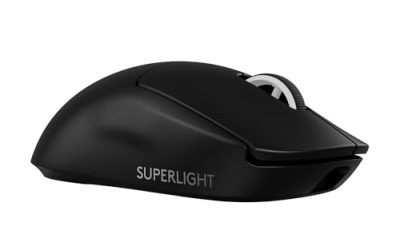
Logitech G Pro X Superlight 2
Logitech’s flagship treats charging as an occasional chore rather than a routine: USB-C charging as listed, a 60 g shell, and a LIGHTSPEED connection with an 8K report rate when you are playing rather than plugged in. The HERO 2 sensor is rated at 44,000 DPI on the listing, and LIGHTFORCE hybrid switches keep clicks feeling deliberate. Five programmable buttons cover the essentials without cluttering the shell. For competitive players, the appeal is the whole package working together: a mouse light enough for flicks that also disappears from your maintenance routine for long stretches at a time.
Specs
- Weight: 60 g
- Sensor: HERO 2, 44,000 DPI
- Report rate: 8 kHz (8K polling)
- Charging: USB-C as listed
- Connection: LIGHTSPEED wireless
- Switches: LIGHTFORCE hybrid switches
- Buttons: 5 programmable
- Compatibility: PC/Mac as listed
Best for: Competitive players who want a flagship that rarely asks for the cable.
Watch out for: The listing does not headline a battery-hours figure alongside its charging spec, so judge endurance by the USB-C convenience and check the live listing for current battery wording.
ASIN: B09NBWL8J5
Razer Viper V3 Pro
The Viper V3 Pro pairs the strongest endurance claim among the lightweights, up to 95 hours as listed, with USB-C recharging and a 54 g symmetrical shell. Its Focus Pro 35K optical sensor and true 8K polling through the included HyperPolling dongle put it at the sharp end of competitive specifications, while Gen-3 optical switches handle the clicking. Eight programmable controls give more binding room than most ultralight mice offer. If your priority is a mouse that plays at the highest listed polling rate yet still goes well over a week between charges for most players, this is the one built around that balance.
Specs
- Weight: 54 g
- Sensor: Focus Pro 35K optical, 35,000 DPI
- Polling: true 8K with included HyperPolling dongle
- Battery: up to 95 hours as listed
- Charging: USB-C rechargeable as listed
- Switches: Gen-3 optical switches
- Buttons: 8 programmable controls
- Connection: HyperSpeed wireless
Best for: Players who want flagship speed and the longest stated runtime in a light shell.
Watch out for: Running 8K polling draws more power than standard rates, so your real interval between charges will be shorter than the headline figure if you use it constantly.
ASIN: B0CW25XR5R
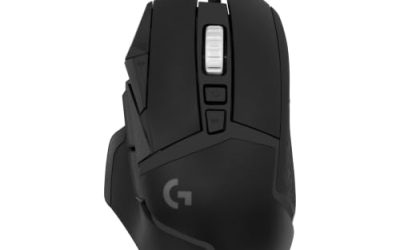
Logitech G502 X Plus
This is the rechargeable pick for players who want features first. The listing states up to 120 hours of battery in constant motion and 37 hours with its LIGHTSYNC RGB on, charged over USB-C, with POWERPLAY wireless charging support for compatible pads. Thirteen programmable controls, LIGHTFORCE switches and the HERO 25K sensor sit in a 106 g ergonomic shell with a thumb rest shape the G502 line is known for. Because it works over its cable, a low battery never ends a session; you plug in and keep playing while it charges. Lighting fans get their glow, at a stated cost in hours.
Specs
- Weight: 106 g
- Sensor: HERO 25K, 100 to 25,600 DPI
- Battery: 120 hours constant motion, 37 hours with RGB on, as listed
- Charging: USB-C; POWERPLAY compatible
- Switches: LIGHTFORCE hybrid optical-mechanical
- Buttons: 13 programmable controls
- Lighting: LIGHTSYNC RGB, 8 zones
- Connection: LIGHTSPEED wireless
Best for: Players who want buttons, lighting and play-while-charging in one mouse.
Watch out for: At 106 g it is nearly twice the weight of the flagships here, and the RGB mode cuts the stated battery life dramatically.
ASIN: B092CB69Q4
Keychron M3

Keychron’s M3 is the flexible option in this guide: the listing states 2.4 GHz wireless, Bluetooth 5.1 and a wired type-C connection, up to 70 hours of use, and support for both macOS and Windows. Its PAW3395 sensor reaches 26,000 DPI, the shell weighs 79 g in an ergonomic design, and a programmable macro button adds a little customisation beyond the standard layout. For a desk shared between a gaming PC and a Mac or laptop, that connection list does the heavy lifting. It recharges over the same type-C connection it can play through, keeping the setup to a single cable.
Specs
- Weight: 79 g
- Sensor: PAW3395, 26,000 DPI
- Battery: up to 70 hours as listed
- Connections: 2.4 GHz, Bluetooth 5.1, wired type-C
- Charging: USB-C (type-C) as listed
- Extras: programmable macro button
- Compatibility: macOS and Windows as listed
Best for: Players splitting time between a gaming PC and a Mac or laptop.
Watch out for: The 70-hour figure is the shortest stated runtime in this guide, so heavy users will charge more often than with the flagships.
ASIN: B09MYW2ZX5
Razer Naga V2 Pro

The Naga V2 Pro is the endurance outlier and the button outlier at once. Razer lists up to 150 hours on HyperSpeed wireless and up to 300 hours on Bluetooth, figures no other pick here approaches, alongside three magnetic swappable side plates that give you 12, 6 or 2 buttons and up to 20 programmable buttons in total. The Focus Pro 30K sensor, Gen-3 optical switches and HyperScroll Pro wheel sit in a 134 g shell, and it connects by HyperSpeed, Bluetooth or USB-C wired. For MMO and MOBA players who bind everything and charge almost never, nothing else in this guide is shaped like it.
Specs
- Weight: 134 g
- Sensor: Focus Pro 30K optical
- Battery: up to 150 hours HyperSpeed, up to 300 hours Bluetooth, as listed
- Buttons: up to 20 programmable, 3 swappable side plates (12, 6 or 2 buttons)
- Switches: Gen-3 optical switches
- Scroll wheel: HyperScroll Pro
- Connections: HyperSpeed wireless, Bluetooth, USB-C wired
Best for: MMO players who want maximum buttons and maximum time between charges.
Watch out for: At 134 g it is the heaviest mouse here by a wide margin, and the extra side plates are parts you need to store rather than lose.
ASIN: B0BGJTLFN5
Which One Fits Your Situation
You compete and charge as rarely as possible
The Razer Viper V3 Pro is your pick. It combines the longest stated battery life of the lightweight flagships, up to 95 hours, with USB-C charging and a 54 g shell, so it fits a routine of charging every week or two without giving up 8K polling when a match matters. The Logitech flagship is the alternative if you prefer its shape.
Your desk runs both a PC and a Mac
Choose the Keychron M3. Its listing covers 2.4 GHz for gaming, Bluetooth 5.1 for the second machine, a wired type-C mode, and explicit macOS and Windows support, so one mouse genuinely serves both computers. The 70-hour stated runtime is enough for a work week for most people, and recharging happens over the same cable standard both machines already use.
You play long sessions and hate interruptions
The Logitech G502 X Plus removes the interruption problem rather than just delaying it. Its stated 120-hour figure is the longest gaming-mode runtime among the all-rounders here, and when it does run low you can plug in the USB-C cable and keep playing while it charges. POWERPLAY support, as listed, suits players who want charging handled by the pad itself.
You play MMOs and bind half your keyboard to your thumb
The Razer Naga V2 Pro was designed for you. Swappable side plates let the same mouse carry a 12-button grid for raid nights and a simpler panel for shooters, and the listed Bluetooth runtime of up to 300 hours means charging becomes a monthly event. Accept the 134 g weight as the price of that flexibility.
Common Mistakes
- Assuming rechargeable means USB-C, then discovering an older listing charges over micro-USB and needs its own cable.
- Comparing battery headlines without checking the conditions, when one figure assumes lighting off and another assumes constant motion.
- Forgetting that maximum polling rates drain the battery faster, then blaming the mouse for short runtime at 8K.
- Buying a receiver-only mouse for a laptop with no spare ports, when a Bluetooth model from the same guide would connect directly.
- Letting a rechargeable mouse sit empty for months between uses, which is harder on its battery than regular top-up charging.
Frequently Asked Questions
How long do rechargeable gaming mice last between charges?
It depends on the model and settings, and the listings here show the spread: stated figures run from up to 70 hours on the Keychron M3 to up to 300 hours on Bluetooth for the Naga V2 Pro. Lighting and high polling rates shorten real intervals, so treat each listing figure as a best case measured under its stated conditions.
Can I play while a rechargeable mouse is charging?
On the picks here that list a wired mode, yes. The G502 X Plus and Keychron M3 both connect by cable as well as wirelessly, and the Naga V2 Pro lists a USB-C wired connection, so plugging in continues the session while the battery refills. Check the connection list on any other listing before assuming it works the same way.
Is USB-C charging worth insisting on?
For most players, yes. Every mouse in this guide charges over USB-C as listed, which means one cable standard covers your mouse, headset and phone, and replacements are easy to find anywhere. Older micro-USB mice still appear in budget listings and add a cable you will eventually lose at the worst moment.
Why are AA-powered mice not in this guide?
Because they are not rechargeable. Popular models such as the Logitech G305 and Razer Orochi V2 run on replaceable AA or AAA cells, as their listings state, so they belong in a battery-life comparison rather than a rechargeable one. If you prefer swapping cells instantly over plugging in, those models are worth a separate look.
FAQ
How long do rechargeable gaming mice last between charges?
Can I play while a rechargeable mouse is charging?
Is USB-C charging worth insisting on?
Why are AA-powered mice not in this guide?
More from Amazon
Programs that pair well with the guide above. Offers and eligibility are set by Amazon and may change.
Free shipping on eligible items, Prime Video and more. Eligible new members can start with a free trial.
Start a Prime free trialAd-free music streaming. Eligible new subscribers can start with a free trial.
Try Music Unlimited freeA Prime membership for ages 18-24 with a trial period. Eligibility is set by Amazon.
See Prime for Young AdultsAudiobooks and podcasts to listen to on the go. Eligible new members can start with a free trial.
Try Audible freeAs an Amazon Associate we earn from qualifying purchases.