Our Top Picks
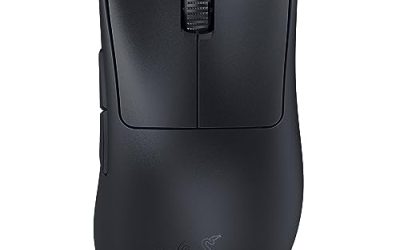
 Razer DeathAdder Essential Ergonomic Wired Gaming Mouse5.01 x 2.86 x 1.69 inches0.3 poundsCheck on Amazon


Your first gaming mouse sets the tone for every match you play. A good beginner mouse feels comfortable from the first session, tracks smoothly across the pad, and does not ask you to learn complicated software before you can enjoy a game. The five mice below all meet that bar. They come from brands with long track records in PC gaming, they use proven sensors, and they keep setup simple enough that you can plug one in and start playing within minutes.
As an Amazon Associate, we earn from qualifying purchases.
Quick Answer
If you want one safe first pick, start with the Logitech G203 Lightsync for its light weight, simple six-button layout, and friendly shape. If you prefer wireless freedom, the Logitech G305 Lightspeed is the easy upgrade. The Logitech G502 HERO suits players who want extra buttons, the Razer DeathAdder Essential fits larger hands, and the Razer Cobra is the lightest option here.
How to Choose
Start with your hand. A mouse that is too large will tire your wrist, and a mouse that is too small will cramp your fingers. Most beginners do best with a medium-sized mouse in the 85 to 121 gram range. Light mice feel quick and easy to flick, while heavier mice feel planted and steady. There is no correct weight, only the weight that feels natural after an hour of play.
Next, think about shape. Right-handed ergonomic mice curve to support your palm and thumb, which feels relaxing during long sessions. Ambidextrous mice are symmetrical and suit players who switch grips or use their left hand. If you rest your whole palm on the mouse, look for a taller shell. If you grip with your fingertips or the front of your hand, a lower and shorter shell will feel better. Grip style matters more than brand, so pay attention to how you actually hold a mouse during a game.
Sensor sensitivity is measured in DPI, and every mouse on this list offers far more DPI than a beginner needs. A modern optical sensor tracks cleanly at the sensitivity most new players use, which is usually somewhere in the low to mid range. Do not chase the highest DPI number. Instead, look for a sensor from a known family, such as the Logitech HERO line or the Razer optical sensors used below, because those have years of steady performance behind them.
Buttons are the next decision. Two side buttons cover the most common beginner needs, such as reloading, crouching, or swapping weapons. Mice with many more buttons, like the G502 HERO, are useful if you play games with lots of abilities, but every extra button is one more control to remember. Beginners who mainly play shooters or action games will be happy with five or six buttons, while players who enjoy MMOs or strategy games may want the extra controls sooner.
Wired versus wireless is simpler than it used to be. A wired mouse never needs charging and costs less for the same sensor, which makes it the sensible default for a first purchase. A wireless mouse removes the cable drag that can distract you during fast movements, and modern wireless gaming mice respond just as quickly as wired ones. If you choose wireless, check the battery life and whether it uses a replaceable battery or a built-in rechargeable cell.
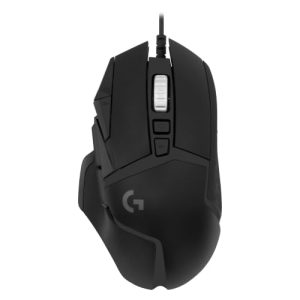
Logitech G502 HERO

The Logitech G502 HERO is the most versatile mouse on this list, and it is the best choice for a beginner who wants one mouse that can grow with them. Its right-handed ergonomic shape fills the palm comfortably, and the textured side grips keep it steady during long sessions. The eleven programmable buttons sound like a lot, but you can ignore most of them at first and use only the two thumb buttons while you learn the game. Later, when you start playing titles with more abilities or items, the extra buttons are already there waiting.
The HERO 25K sensor is the strongest sensor in this roundup, tracking from 100 to 25,600 DPI with no smoothing or acceleration in its published specifications. That range is far beyond what any beginner needs, but it means the sensor will never be the weak link as your aim improves. The dual-mode scroll wheel is a genuine highlight: spin it freely to scroll through long inventories or web pages, then click it back into precise stepped mode for weapon switching.
Weight tuning is the other feature that sets the G502 HERO apart. Five removable 3.6 gram weights sit in a compartment under the mouse, so you can start light and add weight until the mouse feels planted under your hand. At 121 grams before adding weights, it is the heaviest mouse here, which suits palm-grip players and anyone who likes a solid, deliberate feel. If you prefer a feather-light mouse, this is not the right pick.
Specs
| Feature | Detail |
|---|---|
| Sensor | HERO 25K optical, 100 to 25,600 DPI |
| Buttons | 11 programmable buttons |
| Weight | 121 grams, plus five removable 3.6 gram weights |
| Connection | Wired |
| Lighting | LIGHTSYNC RGB |
| Memory | On-board memory for up to 5 profiles |
| Grip style | Right-handed ergonomic, palm and claw |
Logitech G305 Lightspeed
The Logitech G305 Lightspeed is the best wireless pick for a beginner, and it is the easiest way to cut the cord without learning anything new. It uses the same comfortable shape as the wired G203, so it feels familiar from the first minute, and it runs on a single AA battery that lasts up to 250 hours in its published specifications. That means you can play for months before thinking about the battery, and when the time comes, you simply swap in a fresh cell. There is no charging cable to remember and no dock to keep on your desk.
The HERO 12K sensor tracks up to 12,000 DPI, which is more than enough for any beginner, and the LIGHTSPEED wireless link is built for gaming, so the mouse responds as promptly as a wired one. Six programmable buttons cover the essentials: two main clicks, a clickable scroll wheel, a DPI button behind the wheel, and two thumb buttons. The layout is clean and easy to memorize, and the on-board memory stores your settings on the mouse itself.
At 99 grams, the G305 sits in the middle of this list for weight, light enough for quick flicks but solid enough to feel controlled. The small USB receiver stores inside the battery compartment, which is a thoughtful touch if you carry the mouse to a friend’s house or a laptop.
Specs
| Feature | Detail |
|---|---|
| Sensor | HERO 12K optical, up to 12,000 DPI |
| Buttons | 6 programmable buttons |
| Weight | 99 grams |
| Connection | LIGHTSPEED wireless, USB receiver |
| Battery | Single AA, up to 250 hours |
| Lighting | None |
| Memory | On-board memory |
| Grip style | Ambidextrous, palm and claw |
Logitech G203 Lightsync
The Logitech G203 Lightsync is the simplest and most approachable mouse in this roundup, which makes it our top pick for a true first-timer. It is small, light at 85 grams, and shaped to suit most hands, and its six-button layout is so straightforward that you can learn every control in a single session. The rainbow LIGHTSYNC lighting along the side and logo adds a touch of color to your desk, and you can set it to a single steady color if you prefer a calmer look.
The 8,000 DPI sensor is more than capable for beginner play, and the mouse tracks cleanly at the sensitivity settings most new players use. The two thumb buttons sit exactly where your thumb rests, so actions like melee attacks or ability casts become second nature quickly. The cable is light and flexible enough that it does not tug during normal play, and the mouse works the moment you plug it in, with no software required for the basics.
What makes the G203 stand out for beginners is how little it asks of you. There is no weight system to tune, no battery to manage, and no wireless receiver to keep track of. You plug it in, pick a sensitivity with the button behind the scroll wheel, and play.
Specs
| Feature | Detail |
|---|---|
| Sensor | Optical, up to 8,000 DPI |
| Buttons | 6 programmable buttons |
| Weight | 85 grams |
| Connection | Wired |
| Lighting | LIGHTSYNC RGB |
| Memory | On-board memory |
| Grip style | Ambidextrous, palm and claw |
Razer DeathAdder Essential
The Razer DeathAdder Essential is the classic ergonomic mouse, and it is the best pick here for players with larger hands. Its tall, curved right-handed shell supports the palm fully, which reduces strain during long sessions, and the rubber side grips keep your thumb and fingers in place even when your hands get warm. The shape has been refined over many years, and it remains one of the most comfortable designs you can buy at this level.
The 6,400 DPI optical sensor is the lowest maximum sensitivity on this list, but that number is misleading if you read it as a weakness. Most beginners play well below that ceiling, and the sensor tracks cleanly at everyday settings. The five programmable buttons keep things simple: two main clicks, a clickable scroll wheel, and two thumb buttons. The mechanical switches are rated for up to 10 million clicks in Razer’s published specifications, so the mouse is built to last through years of daily play.
The DeathAdder Essential is also the most understated mouse here in the best sense. The green LED lighting on the scroll wheel and logo is a single color, so there is no rainbow cycling to distract you, and the braided cable feels durable without being stiff.
Specs
| Feature | Detail |
|---|---|
| Sensor | Optical, up to 6,400 DPI |
| Buttons | 5 programmable buttons |
| Weight | 96 grams |
| Connection | Wired |
| Lighting | Green LED |
| Switches | Mechanical, rated up to 10 million clicks |
| Memory | On-board memory |
| Grip style | Right-handed ergonomic, palm |
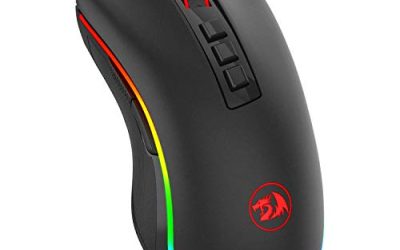
Razer Cobra

The Razer Cobra is the lightest mouse on this list at 58 grams, and it is the best choice for a beginner who wants fast, effortless movement. The weight difference is immediately noticeable: the mouse glides with very little effort, which makes quick turns and flick shots feel easier, especially in fast shooters. Despite the low weight, the shell feels solid, and the symmetrical shape suits both palm and claw grips, so it adapts to how you naturally hold a mouse.
The 8,500 DPI optical sensor tracks precisely at beginner sensitivity settings, and the Gen-3 optical switches respond with a crisp, light click. Chroma RGB lighting runs along the underside of the mouse, casting a soft glow onto the desk that looks impressive in a dim room, and the 100 percent PTFE mouse feet help the Cobra slide smoothly across most pads. The Speedflex cable is soft and light, so it stays out of the way during play.
The Cobra is also a good pick for younger players or anyone with smaller hands, because the light weight and compact shape reduce fatigue over long sessions. It has fewer buttons than the G502 HERO, which keeps the learning curve gentle, and its on-board memory stores your settings on the mouse.
Specs
| Feature | Detail |
|---|---|
| Sensor | Optical, up to 8,500 DPI |
| Buttons | Programmable buttons |
| Weight | 58 grams |
| Connection | Wired, Speedflex cable |
| Lighting | Chroma RGB with underglow |
| Switches | Razer Optical Mouse Switches Gen-3 |
| Feet | 100 percent PTFE mouse feet |
| Memory | On-board memory |
| Grip style | Symmetrical, palm and claw |
Who Should Skip It
Not every mouse on this list fits every player, and knowing when to pass is just as useful as knowing what to buy. If you have small hands, skip the Logitech G502 HERO and the Razer DeathAdder Essential, because both are built for medium to large hands and will feel bulky under a small palm. If you play with your left hand, skip those two as well, since both are shaped for right-handed use, and look at the ambidextrous G203, G305, or Cobra instead.
If you travel often or play on a laptop in different places, skip the wired-only mice and choose the G305 Lightspeed, because a wireless mouse with a receiver that stores inside the body is far easier to pack. If you know you will play MMO or strategy games with many abilities, skip the five-button DeathAdder Essential and pick the eleven-button G502 HERO. Finally, if you dislike RGB lighting, skip the G203 and the Cobra and choose the G305, which has no lighting at all, or the DeathAdder Essential, which uses a single calm green glow.
FAQ
Do I need a high DPI mouse as a beginner?
No. Every mouse on this list offers far more sensitivity than a beginner uses, and most new players settle somewhere in the low to mid range. A proven sensor that tracks cleanly matters much more than a big maximum DPI number, so choose based on shape, weight, and comfort instead.
Is a wireless gaming mouse good for a first mouse?
Yes, as long as you pick one built for gaming, like the Logitech G305 Lightspeed on this list. Its wireless link responds as promptly as a wired connection, and the long battery life means you will rarely think about power. If you prefer zero maintenance, though, a wired mouse is still the simplest choice.
How many buttons does a beginner gaming mouse need?
Five or six buttons cover the needs of most beginners, including two side buttons for common actions such as reloading or swapping weapons. More buttons help in games with many abilities, but they also add controls to memorize, so start simple and add buttons only when a game actually needs them.
Wired or wireless: which should I choose first?
Choose wired if you want the lowest fuss and the lowest cost, since a wired mouse never needs charging and works the moment you plug it in. Choose wireless if cable drag bothers you or you move your setup often. Either choice works well for a first mouse, so let your desk and habits decide.
Final Verdict
The best gaming mouse for beginners is the one that disappears in your hand and lets you focus on the game, and all five mice here do that in different ways. Start with the Logitech G203 Lightsync if you want the simplest possible first mouse, or the Logitech G305 Lightspeed if you want wireless freedom without extra upkeep. Pick the Logitech G502 HERO if you want extra buttons and weight tuning to grow into, the Razer DeathAdder Essential if you have larger hands and want classic comfort, or the Razer Cobra if you want the lightest and fastest feel on this list. Any of the five is a solid first step, so choose the shape and weight that sound most comfortable to you and start playing.
Product and ASIN Reference
| Product | ASIN |
|---|---|
| Logitech G502 HERO | B07GBZ4Q68 |
| Logitech G305 Lightspeed | B07CMS5Q6P |
| Logitech G203 Lightsync | B07YN82X3B |
| Razer DeathAdder Essential | B094PS5RZQ |
| Razer Cobra | B0C51J2ZXN |
FAQ
Do I need a high DPI mouse as a beginner?
Is a wireless gaming mouse good for a first mouse?
How many buttons does a beginner gaming mouse need?
Wired or wireless: which should I choose first?
More from Amazon
Programs that pair well with the guide above. Offers and eligibility are set by Amazon and may change.
Free shipping on eligible items, Prime Video and more. Eligible new members can start with a free trial.
Start a Prime free trialAd-free music streaming. Eligible new subscribers can start with a free trial.
Try Music Unlimited freeA Prime membership for ages 18-24 with a trial period. Eligibility is set by Amazon.
See Prime for Young AdultsAudiobooks and podcasts to listen to on the go. Eligible new members can start with a free trial.
Try Audible freeAs an Amazon Associate we earn from qualifying purchases.