Our Top Picks
 Logitech G Pro X Superlight 2 Lightspeed WirelessClassic1.57 x 2.5 x 4.92 inches0.1 poundsCheck on Amazon
 Razer DeathAdder V3 Pro Wireless Gaming Mouse1000 Hz5.01 x 2.65 x 1.69 inches0.1 poundsCheck on Amazon


Escape from Tarkov rewards patience, positioning, and precise aim. Fights are often decided by a single well placed shot, and a mouse that tracks cleanly at low sensitivity makes those shots far more repeatable. A sensor that skips, a shape that cramps the hand during a long raid, or a cable that drags at the wrong moment can all turn a quiet extract into a lost kit. The right mouse removes those variables so the player can focus on sound, timing, and target selection.
Tarkov players tend to run low sensitivity settings, which means large arm movements and long mouse travel across the pad. That style favors light mice with flawless sensors, consistent polling, and a shape that stays comfortable for hours. This guide looks at five gaming mice that fit that style, from featherweight wireless flagships to a wired classic with more buttons than any other mouse on this list.
As an Amazon Associate, we earn from qualifying purchases.
How to Choose
Pick a flawless sensor first
The sensor is the single most important part of a mouse for Tarkov. A flawless optical sensor tracks at a one to one ratio with no smoothing, filtering, or acceleration, so the crosshair goes exactly where the hand moves it. Every mouse in this guide uses a top tier optical sensor rated for high DPI ceilings and high tracking speeds. For Tarkov, most players run a low DPI setting, often between 400 and 800, so the sensor must stay accurate at the bottom of its range, not just at the top. All five options here do that.
Keep the weight low for long raids
A Tarkov raid can last forty minutes or more, and low sensitivity play means constant arm movement. A mouse under 70 grams reduces fatigue across that time and makes fast flicks to a new target easier. Three of the mice in this guide weigh under 65 grams.
Match the shape to the grip
Grip style matters more than brand. Palm grip players rest the whole hand on the mouse and need a taller, longer shell. Claw grip players arch the fingers and need a shape with a defined hump. Fingertip grip players hold the mouse with fingertips only and need a short, light shell. The DeathAdder shape suits palm and claw grips, the Viper shape suits claw and fingertip grips, and the Superlight shape suits all three.
Check the polling rate and connection
Polling rate is how often the mouse reports its position to the computer each second. A 1000 Hz polling rate reports one thousand times per second and is the standard for competitive play. Some mice in this guide support 8000 Hz polling, which reports eight thousand times per second for even smoother tracking.
Count the buttons for Tarkov binds
Tarkov has more useful binds than a typical shooter. Leaning left and right, switching fire modes, checking magazines, healing, and swapping weapons can all sit on mouse buttons. A mouse with five buttons covers the basics, while a mouse with eleven buttons covers nearly every bind a player might want. Think about which actions deserve a thumb button before choosing between a minimal shell and a button heavy design.
Logitech G PRO X Superlight 2
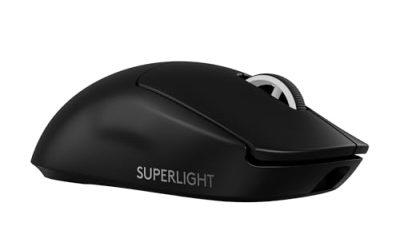
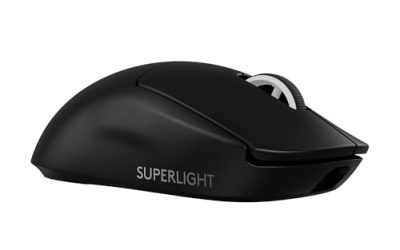
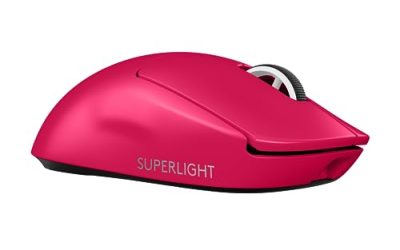
The Logitech G PRO X Superlight 2 is the lightest flagship mouse in this guide and the most direct answer for Tarkov players who want a wireless mouse that feels like nothing in the hand. At 60 grams, it moves with very little effort, which suits the wide arm sweeps of low sensitivity play. The symmetrical shape works for palm, claw, and fingertip grips, and the large PTFE feet glide smoothly across cloth pads.
The HERO 2 sensor is the headline feature. It tracks up to 44,000 DPI with a high maximum speed and acceleration ceiling, and it holds that accuracy at the low DPI settings Tarkov players actually use. The mouse supports an 8000 Hz polling rate, so cursor updates arrive far more often than the 1000 Hz standard. LIGHTSPEED wireless keeps latency low enough that the connection feels wired, and USB-C charging matches modern setups. Five programmable buttons keep the layout clean, with two side buttons for lean binds or healing.
For Tarkov specifically, the Superlight 2 shines in long raids. The low weight reduces arm fatigue across forty minutes of play, and the clean sensor tracking makes small adjustments at long range reliable. Players who want a minimal, precise tool will find little to complain about here.
| Spec | Detail |
|---|---|
| Brand | Logitech G |
| Model | G PRO X Superlight 2 |
| Sensor | HERO 2 |
| Max DPI | 44,000 |
| Polling rate | Up to 8000 Hz |
| Weight | 60 g |
| Connection | LIGHTSPEED wireless, USB-C charging |
| Programmable buttons | 5 |
| Battery life | Not stated |
| ASIN | B09NBWL8J5 |
Who It Suits
This mouse suits Tarkov players who want the lightest possible wireless mouse with a top tier sensor and no distractions. It is a good fit for claw and fingertip grip players, and for palm grip players with medium to large hands. It suits anyone who values clean tracking and long session comfort over extra buttons.
Razer DeathAdder V3 Pro
The Razer DeathAdder V3 Pro is the ergonomic pick in this guide, built around the DeathAdder shape that has been a favorite for right handed palm and claw grip players for years. At 63 grams, it is nearly as light as the Superlight 2 while offering a taller, more supportive shell. The shape fills the palm and gives the thumb a natural resting place, which helps during long raids.
The Focus Pro 30K optical sensor tracks up to 30,000 DPI and is rated for high tracking speed and acceleration, with no smoothing or acceleration added to the input. Optical Switches Gen-3 remove the mechanical contact from the click mechanism, which keeps clicks consistent and removes the risk of double click faults. HyperSpeed wireless provides a low latency connection, and the battery lasts up to 90 hours of play. Five programmable buttons cover the standard layout, and the mouse supports an 8000 Hz polling rate with the optional HyperPolling dongle.
For Tarkov, the DeathAdder V3 Pro suits players who hold the mouse for hours and want the shell to support the hand rather than disappear under it. The ergonomic shape reduces strain during long sessions, and the sensor tracks cleanly at low DPI for precise long range shots.
| Spec | Detail |
|---|---|
| Brand | Razer |
| Model | DeathAdder V3 Pro |
| Sensor | Focus Pro 30K optical |
| Max DPI | 30,000 |
| Polling rate | 1000 Hz (8000 Hz with optional HyperPolling dongle) |
| Weight | 63 g |
| Connection | HyperSpeed wireless |
| Programmable buttons | 5 |
| Battery life | Up to 90 hours |
| Switches | Optical Switches Gen-3 |
| ASIN | B0B6XZLNHQ |
Who It Suits
This mouse suits right handed Tarkov players who use a palm or claw grip and want an ergonomic shell that supports the hand through long raids. It is a good fit for players who value comfort and a proven shape alongside a top tier sensor. It suits anyone who finds flat symmetrical mice tiring over time.
Logitech G502 HERO

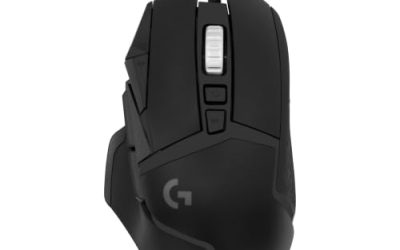
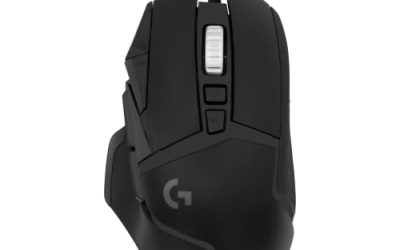
The Logitech G502 HERO is the wired classic in this guide and the best choice for Tarkov players who want the most buttons. Eleven programmable buttons give room for nearly every bind the game offers, from leaning and fire mode switching to healing and weapon selection. The dual mode hyper fast scroll wheel switches between precise click steps and free spin, which suits both careful looting and fast weapon cycling.
The HERO 25K sensor tracks up to 25,600 DPI with no smoothing, filtering, or acceleration, and it stays accurate at the low DPI settings used for precise Tarkov aiming. Five removable 3.6 gram tuning weights let the player adjust the balance and total weight, from 121 grams up to 139 grams, so the mouse can feel planted or nimble depending on preference. Onboard memory stores up to five profiles directly on the mouse, so settings travel with the hardware. The wired connection means no battery to charge and no wireless signal to manage.
For Tarkov, the G502 HERO suits players who bind heavily and want every action under a finger. The shape is large and suits palm grip players best, with a thumb rest and a wide body that fills the hand. The weight is higher than the wireless flagships here, which some players prefer for stability during slow, deliberate aiming.
| Spec | Detail |
|---|---|
| Brand | Logitech G |
| Model | G502 HERO |
| Sensor | HERO 25K |
| Max DPI | 25,600 |
| Polling rate | 1000 Hz |
| Weight | 121 g (up to 139 g with tuning weights) |
| Connection | Wired |
| Programmable buttons | 11 |
| Tuning weights | Five 3.6 g weights |
| Onboard memory | Up to 5 profiles |
| ASIN | B07GBZ4Q68 |
Who It Suits
This mouse suits Tarkov players who want the most programmable buttons and a wired connection with no battery concerns. It is a good fit for palm grip players with medium to large hands who like a heavier, stable mouse. It suits anyone who binds many actions to the mouse and values onboard profiles.
Razer Viper V2 Pro

The Razer Viper V2 Pro is the symmetrical lightweight pick in this guide, built for players who use claw or fingertip grips and want the fastest possible flicks. At 58 grams, it is the lightest mouse on this list, and the right handed symmetrical shape keeps the profile low and neutral. The shell has no rubber side grips, which gives a clean surface that suits players who reposition the mouse often.
The Focus Pro 30K optical sensor tracks up to 30,000 DPI with high tracking speed and acceleration ratings, and it performs cleanly on a wide range of surfaces. Optical Switches Gen-3 provide a fast click with a long rated click life and no double click risk. HyperSpeed wireless keeps the connection responsive, and the battery lasts up to 90 hours. On mouse DPI controls let the player switch between five DPI stages without opening software, which is useful for changing sensitivity between sniping and close quarters fighting. The mouse also supports a higher polling rate with the optional HyperPolling dongle.
For Tarkov, the Viper V2 Pro suits players who play aggressively and need fast target switching. The low weight makes flicks to a new threat quick, and the symmetrical shape works well for claw and fingertip grips. The on mouse DPI control is a practical feature for Tarkov, where a player might want one sensitivity for long range scoping and another for clearing a building.
| Spec | Detail |
|---|---|
| Brand | Razer |
| Model | Viper V2 Pro |
| Sensor | Focus Pro 30K optical |
| Max DPI | 30,000 |
| Polling rate | 1000 Hz (8000 Hz with optional HyperPolling dongle) |
| Weight | 58 g |
| Connection | HyperSpeed wireless, wired via USB-C cable |
| Programmable buttons | 5 |
| Battery life | Up to 90 hours |
| Switches | Optical Switches Gen-3 |
| ASIN | B09VCR969M |
Who It Suits
This mouse suits Tarkov players who use claw or fingertip grips and want the lightest wireless mouse available. It is a good fit for aggressive players who flick between targets and change DPI stages on the fly. It suits anyone who wants a clean symmetrical shell with a top tier sensor.
Logitech G PRO X Superlight
The original Logitech G PRO X Superlight remains a strong choice for Tarkov, and it is the proven option in this guide. At under 63 grams, it is light enough for fast aim while keeping the neutral symmetrical shape that works for palm, claw, and fingertip grips. Large PTFE feet give a smooth glide, and the hyper minimal design keeps the shell free of extra buttons that could be pressed by accident.
The HERO 25K sensor tracks up to 25,600 DPI with no smoothing, filtering, or acceleration, and it is the same sensor family that made the Superlight a tournament staple. LIGHTSPEED wireless provides a low latency connection, and the battery lasts up to 70 hours. Five programmable buttons cover the standard layout, and the mouse charges over micro USB. The shape has been used by professional players for years, which means its ergonomics are well understood and widely trusted.
For Tarkov, the original Superlight is a safe, proven pick. It does everything the Superlight 2 does at a slightly lower ceiling, and the difference in play is small for most players. The light weight suits long raids, the sensor tracks cleanly at low DPI, and the neutral shape fits most hands.
| Spec | Detail |
|---|---|
| Brand | Logitech G |
| Model | G PRO X Superlight |
| Sensor | HERO 25K |
| Max DPI | 25,600 |
| Polling rate | 1000 Hz |
| Weight | Under 63 g |
| Connection | LIGHTSPEED wireless |
| Programmable buttons | 5 |
| Battery life | Up to 70 hours |
| ASIN | B087LXCTFJ |
Who It Suits
This mouse suits Tarkov players who want a proven lightweight wireless mouse with a long track record. It is a good fit for all three grip styles and for players who prefer a neutral shape with no extra features. It suits anyone who wants tournament proven hardware without chasing the newest model.
FAQ
What DPI should I use for Tarkov?
Most Tarkov players use a low DPI setting, commonly between 400 and 800, paired with a low in game sensitivity. Low DPI gives finer control for small aim adjustments at long range, which matters for headshots across open ground. The exact number depends on hand size, grip, and pad space, so start at 800 DPI and lower it until small adjustments feel precise without making large turns too slow. All five mice in this guide track accurately at low DPI.
Is a wireless mouse good enough for Tarkov?
Yes, modern wireless gaming mice use low latency connections that match wired responsiveness for practical play. The wireless mice in this guide use LIGHTSPEED or HyperSpeed wireless, both designed for competitive gaming with minimal delay. The main trade off is battery life, so charge the mouse between sessions or keep a cable nearby. Players who want zero battery management can choose the wired G502 HERO instead.
How many buttons do I need on a mouse for Tarkov?
Five buttons cover the basics: left click, right click, middle click, and two side buttons for leaning or healing. Eleven buttons, like those on the G502 HERO, cover nearly every bind the game offers, including fire mode, magazine checks, and weapon switching. More buttons help only if the player actually binds them, so think about which actions deserve a mouse button before choosing a button heavy design.
Does polling rate matter for Tarkov?
Polling rate affects how smoothly the cursor updates, and a 1000 Hz polling rate is the standard for competitive play. An 8000 Hz polling rate updates eight times more often, which can feel smoother on high refresh rate monitors. The difference is subtle in Tarkov, where positioning and timing matter more than raw tracking speed, but players with high refresh rate displays may notice the smoother motion. Either rate works well for the game.
Final Verdict
The best gaming mouse for Tarkov is the Logitech G PRO X Superlight 2, because it combines the lightest weight in its class with a top tier sensor and an 8000 Hz polling rate. It suits the low sensitivity, long session style that Tarkov rewards, and its neutral shape works for every grip style. Players who want an ergonomic shell should look at the Razer DeathAdder V3 Pro, which offers the same class of sensor in a palm friendly shape with a long battery life.
Players who bind heavily should choose the Logitech G502 HERO, with eleven programmable buttons and a wired connection that never needs charging. Aggressive players who flick between targets will prefer the Razer Viper V2 Pro, the lightest mouse in this guide with on mouse DPI controls for switching sensitivity mid raid. The original Logitech G PRO X Superlight remains a proven, reliable option for anyone who wants tournament tested hardware.
Product and ASIN Reference
| Product | ASIN |
|---|---|
| Logitech G PRO X Superlight 2 | B09NBWL8J5 |
| Razer DeathAdder V3 Pro | B0B6XZLNHQ |
| Logitech G502 HERO | B07GBZ4Q68 |
| Razer Viper V2 Pro | B09VCR969M |
| Logitech G PRO X Superlight | B087LXCTFJ |
FAQ
What DPI should I use for Tarkov?
Is a wireless mouse good enough for Tarkov?
How many buttons do I need on a mouse for Tarkov?
Does polling rate matter for Tarkov?
More from Amazon
Programs that pair well with the guide above. Offers and eligibility are set by Amazon and may change.
Free shipping on eligible items, Prime Video and more. Eligible new members can start with a free trial.
Start a Prime free trialAd-free music streaming. Eligible new subscribers can start with a free trial.
Try Music Unlimited freeA Prime membership for ages 18-24 with a trial period. Eligibility is set by Amazon.
See Prime for Young AdultsAudiobooks and podcasts to listen to on the go. Eligible new members can start with a free trial.
Try Audible freeAs an Amazon Associate we earn from qualifying purchases.