Key takeaways
- The best gaming mouse for World of Warcraft puts 12 thumb buttons under your hand for spells and cooldowns. Compare Razer, Corsair, SteelSeries and UtechSmart.
As an Amazon Associate, we earn from qualifying purchases made through links on this page.
World of Warcraft asks more of a mouse than almost any other game. A raid rotation can involve a dozen rotational abilities, defensive cooldowns, interrupts, potions, mounts, and target macros, and high-end play rewards you for keeping your left hand on movement keys instead of stretching it across the number row. That is exactly the problem an MMO mouse solves: it moves a full grid of twelve buttons under your thumb, so your spellbook lives on the mouse and your keyboard hand stays free for movement and modifiers.
The four mice in this guide all have twelve-button side panels (or the option of one), and all are proven shapes for long raid nights and Mythic+ sessions. They differ in connection, weight, and flexibility: a flagship Razer with swappable side plates, a wireless Corsair with an adjustable sliding grid, an unusually light SteelSeries built for MMO and MOBA play, and a value-focused UtechSmart with a full grid and both wired and wireless modes.
Below, we explain what actually matters for WoW specifically, then take each mouse in turn with its strengths, its specs, and the compromises it makes.
What to Look for in a World of Warcraft Mouse
A twelve-button thumb grid is the core feature. Twelve buttons map neatly onto an action bar, and with Shift and Ctrl modifiers your thumb alone can cover three full bars. Look for buttons that are angled, textured, or varied in shape so you can identify them by touch; in a raid you never look at the mouse.
It has to survive your whole rotation, not just fit it. WoW sessions run for hours, so weight and shape matter as much as button count. Heavier MMO mice around 130 to 150 g feel planted and suit palm grips, while lighter designs under 100 g reduce wrist fatigue for players who also move the mouse a lot for camera control.
Software and onboard profiles matter. Razer Synapse, Corsair iCUE, SteelSeries GG, and UtechSmart’s software let you bind abilities, macros, and modifier layers. Profiles stored on the mouse itself are valuable if you play on more than one computer, and per-character or per-spec profiles are easy to build once your grid layout is set. Note that complex macros must stay within Blizzard’s rules: one keypress should perform one action, and these mice are used for keybinds, not automation.
Wireless is now a genuine option. Modern 2.4 GHz connections from Razer, Corsair, and SteelSeries are effectively indistinguishable from wired in play, and they remove cable drag during long sessions. Check the battery rating in the connection mode you will actually use, since 2.4 GHz drains faster than Bluetooth.
Sensor specs are the least important part. Every mouse here tracks far beyond what WoW requires. Spend your attention on the grid layout, the shape, and the software instead of chasing the highest DPI number.
Plan the learning curve. A thumb grid takes most players one to two weeks to become automatic. Start by binding a few cooldowns, add rotational abilities gradually, and keep rarely used buttons for mounts, potions, and utility. Every mouse in this guide rewards that patience with a noticeably calmer left hand.
The Best Gaming Mice for World of Warcraft
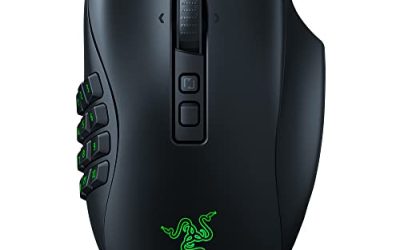
Razer Naga V2 Pro

ASIN: B0BGJTLFN5 — View on Amazon
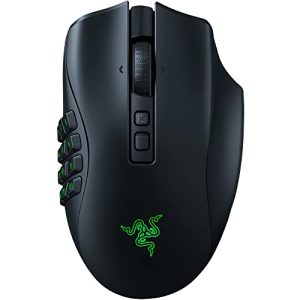
The Naga V2 Pro is the most flexible MMO mouse available, because its side panel is magnetic and swappable. Three plates come in the box: a twelve-button plate for WoW and other MMOs, a six-button plate for battle royale and MOBA layouts, and a two-button plate for general gaming. You can raid on the full grid at night and swap to the two-button plate for shooters the next day, on the same mouse.
For WoW specifically, the twelve-button plate has raised, angled buttons that are easy to separate by touch. Razer HyperSpeed wireless connects over 2.4 GHz with battery life rated up to 150 hours in that mode and up to 300 hours over Bluetooth, and the Focus Pro 30K optical sensor and third-generation optical switches are flagship grade. The HyperScroll Pro wheel can be adjusted for tactility and even programmed. At 134 g with the twelve-button plate fitted, it is a substantial mouse that suits palm and relaxed claw grips.
- Sensor: Razer Focus Pro 30K optical, up to 30,000 DPI
- Buttons: 19 plus 1 with the 12-button plate (swappable 2, 6, and 12-button plates included)
- Connection: HyperSpeed 2.4 GHz wireless, Bluetooth, wired USB-C
- Battery: Up to 150 hours (2.4 GHz), up to 300 hours (Bluetooth)
- Weight: Approximately 134 g with 12-button plate
- Dimensions: Approximately 119.5 x 75.2 x 43.5 mm
Who it’s for: WoW players who also play other genres and want one mouse whose side panel adapts, plus anyone who wants the longest wireless battery life in this group.
Limitations: The flagship feature set comes with flagship complexity, Synapse is required for full configuration, and the weight will feel heavy to players coming from a light FPS mouse.
Corsair Scimitar Elite Wireless

ASIN: B0CCVYHZ9N — View on Amazon
The Scimitar line is the other classic WoW choice, and the Elite Wireless keeps the feature that made it famous: the Key Slider. The twelve-button side panel physically slides forward or backward and locks in place, so the grid sits exactly under your thumb whatever your hand size or grip. The buttons are textured in alternating rows, which makes blind identification during a pull much more reliable.
Corsair’s Marksman optical sensor reaches 26,000 DPI, and the mouse connects through Slipstream 2.4 GHz wireless, Bluetooth, or a USB cable, with battery life rated up to 150 hours. At about 114 g it is noticeably lighter than the wired Scimitar, which helps during long progression nights. iCUE handles bindings and profiles, and profiles can be stored on the mouse. For players who found other grids slightly out of reach, the sliding panel is a genuine ergonomic advantage rather than a gimmick.
- Sensor: Corsair Marksman optical, up to 26,000 DPI
- Buttons: 16 total, including 12 side buttons on the adjustable Key Slider panel
- Connection: Slipstream 2.4 GHz wireless, Bluetooth, wired USB
- Battery: Up to 150 hours
- Weight: Approximately 114 g
- Dimensions: Approximately 119.6 x 77 x 42.4 mm
Who it’s for: Dedicated WoW and MMO players who want a wireless mouse and a thumb grid they can physically position to match their hand.
Limitations: The side panel does not swap for other layouts, iCUE is a heavy piece of software, and the wide body is less nimble in fast camera work than the lighter SteelSeries below.
SteelSeries Aerox 9 Wireless

ASIN: B09VNPB6Q1 — View on Amazon
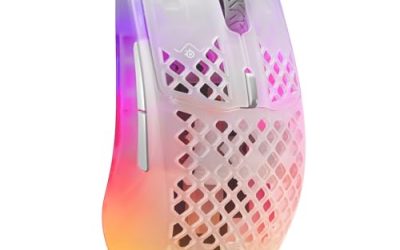
The Aerox 9 Wireless solves the traditional MMO mouse problem, which is weight. At 89 g it is dramatically lighter than the Naga and Scimitar while still carrying a twelve-button side panel, laid out in a three-by-four arrangement designed to be reachable without rocking the mouse. The perforated shell keeps the weight down and the AquaBarrier coating gives the internals an IP54 rating against splashes and dust, which is welcome on a desk that also holds raid-night drinks.
The TrueMove Air sensor, developed with PixArt, reaches 18,000 CPI, and Quantum 2.0 wireless offers both 2.4 GHz and Bluetooth, with battery life rated up to 80 hours on 2.4 GHz and up to 180 hours on Bluetooth. Eighteen programmable buttons cover a full action bar plus modifiers. The trade-off for the light weight is a smaller battery and a perforated shell that not everyone enjoys under the palm.
- Sensor: SteelSeries TrueMove Air optical, up to 18,000 CPI
- Buttons: 18 programmable, including 12 side buttons
- Connection: Quantum 2.0 wireless (2.4 GHz and Bluetooth), wired USB-C
- Battery: Up to 80 hours (2.4 GHz), up to 180 hours (Bluetooth)
- Weight: 89 g
- Dimensions: Approximately 128.8 x 68.2 x 42.6 mm
Who it’s for: WoW players who move the mouse constantly for camera control and want a full thumb grid without the traditional MMO mouse bulk.
Limitations: The perforated shell lets in dust and is not to every taste, battery life on 2.4 GHz is the shortest here, and the side buttons are smaller than the Naga’s.
UtechSmart Venus Pro RGB Wireless

ASIN: B07XP4K152 — View on Amazon
The Venus Pro is the accessible route into MMO mice: a full twelve-button side panel, dual wired and 2.4 GHz wireless operation, and a large ergonomic shell, in a package aimed at players who do not want to pay flagship prices for their first grid mouse. Sixteen programmable buttons in total cover an action bar with room for utility binds, and the PixArt PMW3335 optical sensor tracks up to 16,000 DPI, which is more than WoW will ever ask for.
Battery life is rated up to 70 hours in wireless mode, and the mouse keeps working over its cable while it charges. The shell is broad and tall, suiting palm grips, and the side buttons are arranged in the familiar angled grid. UtechSmart’s software handles bindings and DPI profiles. It lacks the refinement of the three bigger brands in switch feel and software polish, but as a way to learn a thumb grid and transform your keybinds, it delivers the essential experience.
- Sensor: PixArt PMW3335 optical, up to 16,000 DPI
- Buttons: 16 programmable, including 12 side buttons
- Connection: 2.4 GHz wireless and wired USB
- Battery: Up to 70 hours (wireless)
- Weight: Approximately 164 g
- Dimensions: Approximately 125 x 75 x 44 mm
Who it’s for: Players buying their first MMO mouse who want the full twelve-button grid and wireless freedom without flagship cost.
Limitations: It is the heaviest mouse here, the software is basic compared with Razer or Corsair, and there is no Bluetooth option.
Comparison Table
| Mouse | ASIN | Connection | Side Buttons | Battery (2.4 GHz) | Weight |
|---|---|---|---|---|---|
| Razer Naga V2 Pro | B0BGJTLFN5 | 2.4 GHz, Bluetooth, wired | 12 (swappable plates) | Up to 150 hours | 134 g |
| Corsair Scimitar Elite Wireless | B0CCVYHZ9N | 2.4 GHz, Bluetooth, wired | 12 (sliding panel) | Up to 150 hours | 114 g |
| SteelSeries Aerox 9 Wireless | B09VNPB6Q1 | 2.4 GHz, Bluetooth, wired | 12 | Up to 80 hours | 89 g |
| UtechSmart Venus Pro | B07XP4K152 | 2.4 GHz, wired | 12 | Up to 70 hours | 164 g |
Frequently Asked Questions
How many side buttons do I actually need for WoW?
Twelve is the standard because it mirrors an action bar, and with Shift and Ctrl modifiers your thumb can reach three bars without moving your keyboard hand. Most players bind rotational abilities to the easiest buttons first, then cooldowns, interrupts, and utility to the rest.
Can I use macros on an MMO mouse in World of Warcraft?
Keybinds are fine, and simple in-game macros written in WoW’s own macro system are fine. What Blizzard prohibits is automation: one physical press must not perform a sequence of timed actions for you. Use the mouse software for bindings and the game’s macro editor for the rest.
Is wireless reliable enough for raiding?
Yes. The 2.4 GHz connections on the Naga V2 Pro, Scimitar Elite Wireless, and Aerox 9 are built for competitive play and feel no different from wired in a raid. Keep the receiver close to the mouse with a clear path, and charge between sessions.
How long does it take to learn a thumb grid?
Most players need one to two weeks of regular play before the grid feels automatic. Bind a few abilities at a time, run easier content while you adapt, and resist the urge to move bindings around while you are learning.
Which of these is best for small hands?
The Aerox 9 Wireless, thanks to its light weight and narrower body, is the easiest for smaller hands to control. The Scimitar Elite Wireless helps too, because its sliding panel brings the grid closer to your thumb.
Conclusion
For World of Warcraft, the mouse is a second keyboard, and the twelve-button grid is what transforms your play. The Razer Naga V2 Pro is the most versatile choice, with swappable plates and the longest battery life. The Corsair Scimitar Elite Wireless earns its place with the adjustable Key Slider that fits the grid to your thumb. The SteelSeries Aerox 9 Wireless is the pick for players who want MMO buttons at FPS-mouse weight. The UtechSmart Venus Pro delivers the full grid experience at the most accessible level. Whichever you choose, give the grid two honest weeks, and your left hand will thank you on every pull.
More from Amazon
Programs that pair well with the guide above. Offers and eligibility are set by Amazon and may change.
Free shipping on eligible items, Prime Video and more. Eligible new members can start with a free trial.
Start a Prime free trialAd-free music streaming. Eligible new subscribers can start with a free trial.
Try Music Unlimited freeA Prime membership for ages 18-24 with a trial period. Eligibility is set by Amazon.
See Prime for Young AdultsAudiobooks and podcasts to listen to on the go. Eligible new members can start with a free trial.
Try Audible freeAs an Amazon Associate we earn from qualifying purchases.