Our Top Picks
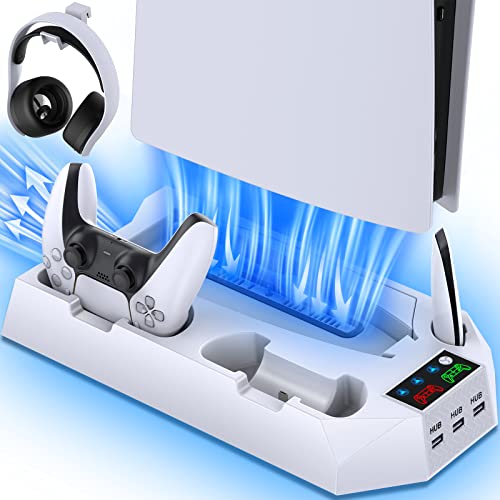

The best overall pick here is the RGB cooling and charging station with the auto-adjusting fan, because it combines a stand, a built-in fan with three manual levels plus an automatic mode, and controller charging in one base that its listing says fits Slim and Pro consoles in disc and digital versions. A cooling stand, in this context, is a base that holds the console and adds a fan, usually alongside a charging dock for DualSense controllers. If you want to charge two controllers at once, the dual-controller station is the closest alternative; if you want a plain horizontal rest, look at the horizontal stands further down.
Quick List
- LED Cooling and Charging Station – best for a straightforward stand with a three-level fan and LED accents
- RGB Auto-Fan Charging Station – best for a hands-off fan that adjusts itself
- Dual-Controller Cooling Station – best for households that charge two controllers at the same time
- Horizontal Slim/Pro Cooling Stand – best for lying the console flat under a TV or on a shelf
- Cooling Station with 3 USB Hubs – best for adding extra USB ports beside the console
- Scalable Horizontal Cooling Station – best for a flexible horizontal stand with controller charging
Which One Is Right for You?
| If you… | Choose |
|---|---|
| want a fan that speeds up and slows down on its own | RGB Auto-Fan Charging Station |
| charge two DualSense controllers every day | Dual-Controller Cooling Station |
| keep the console on a shelf and want it horizontal | Horizontal Slim/Pro Cooling Stand or Scalable Horizontal Cooling Station |
| run out of USB ports near the console | Cooling Station with 3 USB Hubs |
| want simple lighting and a three-level fan with no extras | LED Cooling and Charging Station |
| own the original standard PS5 as well as a Slim or Pro | Cooling Station with 3 USB Hubs, which names all three variants |
All six listings pitch the same core idea: a stand, a fan and controller charging. The differences are in the details, so start with the console you own, then think about whether you want the console upright or flat, and finally decide how many controllers you charge at once. Remember that a stand is mostly a convenience and tidiness purchase, and that the console is designed to ventilate itself with open space around it.
All 6 Picks in Detail
1. LED Cooling and Charging Station – Best for a Simple Three-Level Fan Stand
As an Amazon Associate we earn from qualifying purchases at no extra cost to you.

This is the plain-spoken option in the group. The listing describes a PS5 stand and cooling station with LED lighting, a controller charging station and a three-level cooler fan, and it adds a skin accessories kit to the package. It names the PS5, Slim and Pro, which is helpful, because stand fit depends on the console’s shape. If you want the basics without a long list of extras, this is where to begin.
It suits a player who wants a tidy place to rest the console and a spot for a controller, with a fan they can switch between low, medium and high. Because the lighting is described as LED rather than full RGB, expect simpler glow effects, but confirm the color options on the product page. The skin kit mentioned in the name is a decorative extra rather than a performance feature.
One more point to weigh: a listing that lumps in a skin accessories kit is partly selling decoration. Treat the stand, fan and charging dock as the core product and the skins as a bonus you may or may not use. That framing keeps expectations realistic and makes comparisons with the other five stands fairer.
- Names PS5, Slim and Pro consoles in the listing
- Three-level cooler fan
- Controller charging station built in
- LED lighting
- Number of controllers charged and fan noise level: confirm on listing
Pros
- Simple feature set that is easy to understand
- Fan speed can be set by the player
Cons
- Fan is manual rather than automatic
- Charging capacity is not stated in the visible name
Compared with the auto-fan model next, you trade automatic control for a simpler, more predictable fan.
2. RGB Auto-Fan Charging Station – Best for a Fan That Adjusts Itself

The headline detail on this listing is the fan: it is described as built in with three levels and an auto-adjusting mode, which means you can leave it alone rather than reaching for a switch each time you play. It also advertises RGB lights, a controller charger and compatibility with disc and digital consoles in the Slim and Pro line-up. The name also mentions accessories for PlayStation 4 chargers, which is an odd phrase, so confirm on the product page whether that refers to anything beyond the PS5 controllers.
This pick suits players who like set-and-forget gear. An automatic mode is helpful in a living room where the console runs light menus one hour and demanding games the next, since the fan is not spinning faster than it has to. Lighting is the other differentiator, and you can usually switch it off if the glow is distracting in a dark room.
If you do pick this model, take a moment to learn how the automatic mode behaves in your room, because ambient temperature affects how often a thermostat-style fan runs. A quiet bedroom may make even a low hum noticeable, so check whether the lights and fan can be turned off independently of charging.
- Built-in fan with three levels and an auto mode, per the listing name
- RGB lighting
- Controller charger included
- Works with disc and digital consoles named in the listing
- Number of charging slots and noise level: confirm on listing
Pros
- Automatic fan mode reduces fuss
- Lighting adds a finished look
Cons
- RGB effects may not suit every setup
- Charging capacity is not clear from the name
Its closest rival is the first station on this list, which has a manual fan; pick this one if you prefer automation.
3. Dual-Controller Cooling Station – Best for Charging Two Controllers

If two people share the console, the key phrase in this listing is dual controller charging station. The name covers the PS5, PS5 Slim and PS5 Pro and then refers to accessories that include controller items, though the text is cut off, so check what comes in the box. Having two charging bays removes the daily argument over whose controller gets the dock, and it keeps a spare pad topped up for the next session.
It suits couch co-op households, parents with more than one player, and anyone who has run out of battery halfway through a match. Because the listing is for a stand and cooling station, the fan question remains the same as with the other models: it adds airflow around the base, but it does not replace clear space around the console.
Because the title is truncated, the safest approach is to read the full listing for the contents of the box. Look for the type of cable or charging contacts, a note about power input, and whether the controllers charge while the console is in rest mode, since that is the detail most households care about.
- Names PS5, PS5 Slim and PS5 Pro in the listing
- Dual controller charging station
- Cooling station with fan: speed levels, confirm on listing
- Extra accessories mentioned but truncated: confirm on listing
- Lighting and noise level: confirm on listing
Pros
- Two controllers charge at once
- Names all three console variants
Cons
- Included accessories are unclear from the visible name
- Fan details are not spelled out
Versus the USB hub model below, this one is about charging, while that one is about connecting.
4. Horizontal Slim/Pro Cooling Stand – Best for Laying the Console Flat

This listing is explicit about orientation: a horizontal cooling stand for disc and digital consoles, with a dual controller charger and a three-level cooling fan. It names the Slim and Pro rather than the original standard console, so owners of the 2020 model should confirm compatibility before buying. A horizontal stand makes sense when the console sits in an entertainment unit with limited height, or when you prefer a low profile under the TV.
It suits people who want the console flat and still want charging and a fan. A low horizontal position can leave less open space above the console, so check that the shelf leaves clearance above and around it. The fan is described as having three levels, so you can drop it to the quietest setting for movie nights.
Orientation also affects how the disc drive and ports are reached. With a horizontal layout, check that the disc slot and the front USB port remain accessible, and that the stand does not trap the cables at the back. A small gap behind the console for the power and HDMI leads makes setup much easier.
- Horizontal design, per the listing name
- Names PS5 Slim and Pro
- Dual controller charger
- Three-level cooling fan
- Original standard PS5 fit and noise level: confirm on listing
Pros
- Low profile for shelves and media units
- Dual charging and a fan in one base
Cons
- Does not name the original standard console
- Needs clear space around the console to be useful
Compared with the scalable horizontal model further down, this one is the more direct, fixed-layout choice.
5. Cooling Station with 3 USB Hubs – Best for Extra USB Ports

The distinctive detail here is the mention of three USB hubs, alongside a cooling fan and controller charging. It is also the one listing that names Slim, Standard and Pro together, which makes it the safest bet if you own more than one console generation or plan to upgrade later. The additional ports are useful for plugging in a headset dongle, a charging cable or a storage device nearby, though what the ports can actually do is something to confirm.
It suits tidy-minded players who like to keep accessories at the console without reaching behind the TV. A word of caution applies: extra ports on an accessory are not a substitute for the console’s own ports when you need full speed, so the USB hub function is best treated as a convenience for charging and low-demand devices until the listing confirms otherwise.
Think of the hub as a convenience for low-demand devices rather than a way to add storage. Sony’s guidance for external game storage calls for a direct connection to the console without a hub, so a drive should not be plugged into a hub on the stand and expected to behave as extended storage.
- Names Slim, Standard and Pro, disc and digital
- Cooling fan included
- Controller charging station
- Three USB hubs listed
- USB speed and power output: confirm on listing
Pros
- Names all three console variants
- Adds ports within reach
Cons
- USB specifications are not stated
- More features mean more to check before buying
Unlike the dual-controller model, it favors ports over a second charging bay, so decide which you use more.
6. Scalable Horizontal Cooling Station – Best for a Flexible Horizontal Layout

The final listing is another horizontal stand and cooling station with controller charging, and it adds the word scalable to describe the stand. In accessory listings, that usually points to an adjustable fit, though the name here is cut off, so confirm what the adjustment does. It covers the PS5, Slim and Pro and includes a three-level fan according to the visible title.
It suits players who like the idea of an adjustable stand and want to keep the console lying flat. If you move between the original console and a Slim or Pro, flexibility is a plus, but verify that the listing explicitly supports both body shapes. As with all stands, the fan helps move air near the base, while the console still needs breathing room.
Because adjustable stands rely on moving parts, it is worth checking that the locking mechanism holds the console firmly once set. A wobble in a horizontal layout is more annoying than in a fixed one, and a stable base is the main reason to buy a stand in the first place.
- Horizontal stand and cooling station, per the listing name
- Names PS5, Slim and Pro
- Controller charging station
- Three-level fan
- What “scalable” refers to: confirm on listing
Pros
- Adjustable-sounding design for different consoles
- Flat layout suits shelves
Cons
- The meaning of “scalable” is not defined in the name
- Charging capacity is not stated
It is the most similar to the Slim/Pro horizontal stand above, with adjustability as the selling point instead of a fixed fit.
Specs Compared
| Product | Consoles named | Orientation | Fan | Controller charging | Extras named |
|---|---|---|---|---|---|
| LED Cooling and Charging Station | PS5, Slim, Pro | Confirm on listing | 3-level | Yes, count: confirm on listing | LED lighting, skin kit |
| RGB Auto-Fan Charging Station | PS5, Slim, Pro (disc and digital) | Confirm on listing | 3-level plus auto | Yes, count: confirm on listing | RGB lights |
| Dual-Controller Cooling Station | PS5, Slim, Pro | Confirm on listing | Confirm on listing | Dual | Accessories, confirm on listing |
| Horizontal Slim/Pro Cooling Stand | Slim, Pro (disc and digital) | Horizontal | 3-level | Dual | None named |
| Cooling Station with 3 USB Hubs | Slim, Standard, Pro (disc and digital) | Confirm on listing | Yes, levels: confirm on listing | Yes, count: confirm on listing | 3 USB hubs |
| Scalable Horizontal Cooling Station | PS5, Slim, Pro | Horizontal | 3-level | Yes, count: confirm on listing | Scalable design |
How We Chose These
This guide is based on research into catalog listings rather than physical use of any of the stands. We read each listing name for the consoles it names, the fan details, the number of charging bays and any extras, and we weighed those claims against the general ventilation and clearance guidance that comes with the console. Where a listing is cut off or does not state a figure such as noise level, we say to confirm it on the product page. Ranking reflects how clearly a listing communicates its fit and features, how many players it suits and how well its extras match common household needs.
What to Look For
Do you actually need a cooling stand?
The PS5 is designed with its own fan and vents, and most owners will never need extra cooling in normal use. The practical benefits of a stand are tidiness, stable placement and controller charging. The fan is a bonus that may matter more in a warm room, in a closed cabinet, or after long sessions. If the console is already sitting in the open with space around it, treat the fan as optional and the charging dock as the main feature.
Match the console variant
The PS5 comes in the original standard version, the 2023 Slim and the Pro, in disc and digital editions, and the bodies are shaped differently. A stand built for one may not seat another properly. Look for the exact variants in the listing: one entry here names Slim, Standard and Pro together, while another names only Slim and Pro. If the listing does not say, assume it does not fit until you confirm it.
Fan levels, noise and airflow
Three-level fans generally offer low, medium and high settings. The lowest setting is the one you will use most, so quiet operation at that level matters more than the top speed. An automatic mode is a welcome convenience. A good rule is to leave at least a few inches of open space behind and above the console, and to keep vents clear of dust, since a fan cannot push air through a blocked intake.
Charging bays and ports
A single bay is enough for one player, but a dual bay is worth having when two controllers are in rotation. Check whether the dock charges through contacts or through cable connectors, because the connection style affects how reliably a controller seats. For USB hubs, ask what the ports are for: charging, headsets or storage, and at which speed.
Placement, power and safety
Keep the console and stand on a hard, level surface, never on a rug, bed or couch cushion that can block the vents. Leave a few inches of clearance at the back and top, and keep the power adapters of both the console and the stand out of tight, enclosed spaces where they can trap heat. Use the cable that comes with the stand, plug it into a protected outlet or a surge-protected strip, and unplug it if it ever smells hot or the fan stops spinning. Dust is the other long-term factor, so wipe the stand and clean the fan blades periodically with the power off.
A worked example
Say a family has a PS5 Slim in a media unit, two players and a TV above. A dual-controller horizontal stand solves the charging, holds the console low, and the fan can stay on its lowest setting. If the same family later upgrades to a Pro, they should check that the stand names the Pro before buying anything new.
Questions
Does a PS5 need a cooling fan stand?
Not usually, since the console cools itself and works best with open space around it. A stand adds convenience, charging and optional extra airflow.
Will a cooling stand fit a PS5 Pro or Slim?
Only if the listing names that model. Stands are shaped for specific bodies, so confirm the exact variant before ordering.
Are these stands loud?
Most listings do not state noise levels, so confirm it before buying. Fans with several speed levels let you pick the quietest setting for everyday play.
Can I charge controllers on a cooling stand?
Yes, every listing here includes a controller charging function, though the number of bays varies. Check whether you get one or two docks for DualSense controllers.
Can a cooling stand damage my console?
A well-fitted stand should not, but a poor fit can scratch the finish or block vents. Check that the console sits securely, that the stand’s connectors do not strain the ports, and that nothing covers the intake and exhaust areas.
Should I leave the fan running all the time?
It depends on the room and the habit. Many players run it only during longer sessions or in warm rooms, while an automatic mode handles this for you. If the fan is audible during quiet scenes, switch to the lowest level or turn it off.
Update History
- October 20, 2026 – Initial publication; product set drawn from current catalog listings.
- Check the product page for current specifications and availability before buying.
Sources
- Retailer listing titles and specification fields for each product named above
- Manufacturer support and product pages for PlayStation consoles, used for model names and the Slim and Pro distinction