Key takeaways
- Own a PS5 Pro and want everything in one dock: OIVO or Rysker.
- Own a Slim and want the lowest cost: FASTSNAIL.
- Game in a quiet room or bedroom: Rysker with Auto mode, or any stand on its lowest speed.
- Use a DualSense Edge: check that the charging dock lists Edge compatibility; Rysker and OIVO’s newer vertical stand address it more clearly.
- Keep the console horizontal in a TV unit: a horizontal model built for your console revision, plus an open back on the shelf.
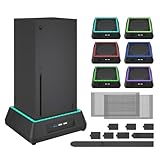
The best cooling fans for PS5 are vertical cooling stands that explicitly support your console revision, with the OIVO PS5 Stand and Cooling Station the most versatile pick for original, Slim and Pro owners, the FASTSNAIL vertical stand the best value for PS5 Slim and Pro, and the Rysker stand the choice if you want an automatic fan mode. Set expectations first, though: the PS5 already has a large internal fan, so an external fan is a helper that keeps air moving at the intake and exhaust, not a fix for a console jammed into a closed cabinet.
Our top picks


As an Amazon Associate we earn from qualifying purchases at no extra cost to you. Ratings are shown as listed on Amazon.
What an External Fan Can and Cannot Do
Every PS5 model pulls cool air in through the front and sides and pushes hot air out the back. The console’s own fan speeds up as internal temperatures rise. A cooling stand helps in two ways: it lifts the console off a surface so intake vents breathe freely, and its fan adds airflow around the base to prevent hot air pooling. What it cannot do is overcome blocked vents, dust-clogged intakes or an enclosed shelf with no ventilation. Placement has a bigger effect than any accessory.
| Factor | Effect on PS5 temperature and noise | Cost to fix |
|---|---|---|
| Clearance of about 4 in (10 cm) around vents | Large | Free |
| Cleaning dust from vents and dust catchers | Large on older consoles | Free |
| Open shelf instead of closed cabinet | Large | Free to low |
| Cooling stand with fan | Small to moderate | $20-$50 |
| Room temperature | Moderate | Varies |
Compatibility Comes First
The PS5 now exists in three shapes: the original 2020 model, the smaller PS5 Slim from 2023 and the PS5 Pro from 2024, each in disc and digital versions. Stands are molded to fit a specific base, so a stand made only for the original console will not hold a Slim or Pro securely. Check the listing for your exact model before buying.
The Best PS5 Cooling Fan Stands
OIVO PS5 Stand and Cooling Station: best all-round
OIVO’s vertical stand uses an adjustable bracket that lists support for the original PS5, Slim and Pro. It has a three-speed fan, a dual DualSense charging dock, extra USB ports for accessories and slots for game discs. It is the most complete package for keeping a tidy setup. Note that OIVO’s horizontal stand is a different product designed only for the original 2020 PS5.
FASTSNAIL Vertical Cooling Stand: best value for Slim and Pro
FASTSNAIL designs separate stands for the newer consoles, with a three-speed fan rated below about 50 dB at high speed, controller charging and a low price. Because it is shaped for the Slim and Pro, fit is snug. A horizontal FASTSNAIL version with auto fan operation suits people who lay the console flat.
Rysker Cooling Stand: best for automatic fan control
Rysker adds an AUTO mode that adjusts fan speed based on temperature, so the fan is not running at full speed during menu browsing or streaming. It supports the original, Slim and Pro and includes controller charging. The two-year warranty is longer than most competitors, which counts for an accessory with a moving part.
CYKOARMOR Cooling Stand: budget pick for all three consoles
CYKOARMOR’s stand fits the original, Slim and Pro with a basic fan and controller charging at the lower end of the price range. The fan is audible on high, and charging both controllers takes around three hours, but it covers the basics for less.
Kytok Cooling Stand: larger fan, faster charging
Kytok’s stand uses a larger turbo-style fan and advertises around two-hour controller charging. It is a good middle ground for people who want quicker charging than the budget stands offer.
Side-by-Side
| Stand | Original PS5 | PS5 Slim | PS5 Pro | Fan modes | Controller charging | Price range |
|---|---|---|---|---|---|---|
| OIVO vertical | Yes | Yes | Yes | 3 speeds | 2 controllers | $30-$45 |
| FASTSNAIL vertical | Model-specific | Yes | Yes | 3 speeds | 2 controllers | $20-$30 |
| Rysker | Yes | Yes | Yes | 3 speeds + Auto | 2 controllers | $35-$50 |
| CYKOARMOR | Yes | Yes | Yes | Multi-speed | 2 controllers | $25-$35 |
| Kytok | Yes | Yes | Yes | Multi-speed | 2 controllers | $25-$40 |
Which Stand for Your Setup
- Own a PS5 Pro and want everything in one dock: OIVO or Rysker.
- Own a Slim and want the lowest cost: FASTSNAIL.
- Game in a quiet room or bedroom: Rysker with Auto mode, or any stand on its lowest speed.
- Use a DualSense Edge: check that the charging dock lists Edge compatibility; Rysker and OIVO’s newer vertical stand address it more clearly.
- Keep the console horizontal in a TV unit: a horizontal model built for your console revision, plus an open back on the shelf.
Getting the Most From a Cooling Stand
- Power the stand from the console’s USB port so it turns on and off with the PS5. Some stands also accept a wall adapter if you want charging in rest mode.
- Start on low or auto. A fan running at full speed can be louder than the PS5 itself, which defeats the purpose during quiet scenes.
- Leave space at the back. The exhaust side needs the most clearance. Even with a fan, a back panel against the wall recirculates hot air.
- Clean every few months. On the original PS5, remove the side plates and vacuum the two dust catchers. On all models, wipe intake vents and blow out the stand’s own fan grille, which collects dust too.
- Watch for vibration. If the stand rattles, check the bracket fit; a loose console amplifies fan noise.
Signs You Need Better Cooling
The PS5’s fan getting noticeably louder in demanding games, warm air pooling around the shelf, or an on-screen overheating warning are signals to act. Start with placement and dust, then add a stand. If warnings continue with good ventilation and clean vents, contact PlayStation support rather than relying on accessories, since persistent overheating may indicate a hardware issue.