Key takeaways
- Compare the best Nintendo Switch cases and screen protectors, from carry bundles to slim shells, with fit notes for Switch 2 and the original.
For most people with a new console, the CoBak 3-in-1 carrying case bundle is the safest all-round starting point: it pairs a large travel case with two screen protectors and thumb grip caps, so the console is covered both in the bag and in the hands. A “case” here means anything that shields the body of the console or carries it, while a “screen protector” is a thin tempered glass or film layer over the display. Players who only want the display covered should look at the amFilm alignment-frame protector instead, and anyone still on the original Switch needs the Teyomi silicone case, because most of this list is sized for the Switch 2.
Quick List
- amFilm OneTouch Protector – best for a glass-only upgrade with a guided, bubble-free install
- CoBak 3-in-1 Carry Bundle – best for travel with a large case and spare protectors
- 16-in-1 Switch 2 Game Kit – best for buyers who want every extra in a single box
- Teyomi Silicone Grip Case – best for original Switch owners who want a soft, shock-absorbing cover
- FYOUNG Slim Hard Case Set – best for a slim shell with a bundled screen protector and thumb grips
- FYOUNG Upgrade Dockable Case – best for players who want a shell and protector set built around a dockable cover
Which One Is Right for You?
| If you… | Choose |
|---|---|
| carry your console in a backpack or on flights | CoBak 3-in-1 Carry Bundle |
| already own a case and only need display protection | amFilm OneTouch Protector |
| want a bundle with many small accessories included | 16-in-1 Switch 2 Game Kit |
| still play on the original Switch | Teyomi Silicone Grip Case |
| prefer a slim hard shell over bulky padding | FYOUNG Slim Hard Case Set |
| like the idea of a cover you can leave on in the dock | FYOUNG Upgrade Dockable Case |
| want soft silicone grip rather than hard plastic | Teyomi Silicone Grip Case |
| worry most about scratches from keys and coins in a bag | CoBak 3-in-1 Carry Bundle or amFilm OneTouch Protector |
The first decision is which console you own, because Switch 2 and original Switch accessories are not interchangeable. After that, decide whether you want a carrying case, a body cover, a screen protector or some mix of the three. If you travel, a case plus a protector matters more than a stylish cover; if the console lives on a desk or in the dock, a body cover and a protector are usually enough.
All 6 Picks in Detail
1. amFilm OneTouch Protector – Best for a Guided, Bubble-Free Glass Install
As an Amazon Associate we earn from qualifying purchases at no extra cost to you.

This is the pick for someone who wants the display protected and nothing else. The listing is written for the Nintendo Switch 2 (2025) and describes tempered glass with an auto-alignment tray, a 30-second install claim and a bubble-free, scratch-resistant finish. The alignment tray is the real selling point: most failed installs come from placing a loose sheet a millimeter off-center, and a frame that locks to the console removes that guesswork. Because it covers only the screen, it pairs naturally with a separate carrying case.
It suits players who bought a case separately, who already like their body cover, or who simply want a clean look without extra plastic around the edges. It also suits parents buying for a child, because the display is the part most likely to pick up fingerprints, scratches and pressure marks over time. If you tend to misalign adhesive products, the guided tray is the feature to weigh most heavily, and it is worth reading the instructions fully before you peel anything.
- Designed for the Nintendo Switch 2 (2025), per the listing name
- Tempered glass construction
- Auto-alignment installation aid
- Pack count and glass thickness: confirm on listing
- Touchscreen response: confirm on listing
Pros
- Alignment tray makes installation more forgiving
- Does not add bulk to the console body
Cons
- Protects the screen only, not the corners or the back
- Does not include any carrying solution
Compared with the CoBak bundle, this is the simpler purchase, but you give up the travel case and spare protectors.
2. CoBak 3-in-1 Carry Bundle – Best for Travel and Spare Protectors

The CoBak listing leads with a large-capacity carrying case for the Switch 2 and bundles in two screen protectors and thumb grip caps. The name also references a game card storage count that is cut off in the listing text, so confirm how many cards it holds before you count on it. A hard-sided carry case is the right answer when the console shares a bag with chargers, a dock cable and a controller, since pressure and abrasion are the threats rather than a drop from desk height.
Who it suits: commuters, students and frequent flyers who need the console, a few games and a handful of cables to arrive in the same condition they left. The bundled protectors mean you can protect the screen on day one and keep a spare for later. The thumb grip caps are a small extra, but they help with long sessions on the sticks, and they are easy to remove if you decide you dislike the extra height.
- Made for the Nintendo Switch 2 (2025), per the listing name
- Large-capacity carrying case
- Two screen protectors included
- Thumb grip caps included
- Game card slot count: confirm on listing
Pros
- Covers transport, screen and thumbsticks in one purchase
- Extra protectors cover a failed first install
Cons
- A larger case takes more bag space than a slim sleeve
- The case does not protect the console while you are playing
Next to the 16-in-1 kit, it is a more focused bundle with fewer novelty extras, which is usually the better trade.
3. 16-in-1 Switch 2 Game Kit – Best for an Everything-in-One-Box Bundle

This kit is built around quantity. The listing name promises sixteen items for the Switch 2, including a carrying case, a screen protector with an alignment frame and steering wheel attachments, with more pieces listed beyond what the title shows. That makes it a fit for a gift or for a household where several people share a console. The caution is that bundles with many small parts tend to vary in quality from piece to piece, so judge it by the case and protector, which are the parts you will rely on every day.
Who it suits: gift buyers, families, and anyone who enjoys novelty accessories alongside the practical ones. The steering wheel attachments hint at an emphasis on racing games with the Joy-Con, which is fun for casual players but irrelevant to anyone focused purely on protection. Sort the kit into must-have and nice-to-have pieces as soon as it arrives: the case and protector go into daily use, and the remainder can wait in a drawer until a game calls for them.
- Sixteen accessories, per the listing name
- Carrying case included
- Screen protector with alignment frame
- Steering wheel attachments listed
- Full contents list and materials: confirm on listing
Pros
- One purchase covers protection and fun extras
- Alignment frame helps with screen protector installation
Cons
- Several pieces may go unused
- Quality can be uneven across a large kit
Compared with the CoBak bundle, you get more pieces here, but the CoBak is the tighter choice if protection is the only goal.
4. Teyomi Silicone Grip Case – Best for the Original Switch
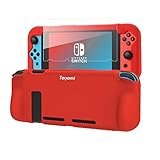
The Teyomi listing is written for the original Nintendo Switch rather than the Switch 2, and it should not be bought for the newer console. It is a protective silicone case with a grip cover, a tempered glass screen protector and two game card slots, with shock absorption mentioned in the listing. Silicone is a sensible choice if you play handheld often, because it adds friction to the grips and cushions small knocks. Because the listing only says “Nintendo Switch,” confirm that your exact model (standard, Lite or OLED) matches before ordering.
Who it suits: owners of the original console, especially households with children, where soft edges and a firm grip matter more than a slim profile. The two game card slots on the cover are handy for keeping a couple of favorites within reach. Because a silicone cover grips the Joy-Con rails tightly, it is worth sliding the controllers on and off a few times when it arrives to make sure movement stays smooth.
- Made for the original Nintendo Switch, per the listing name
- Silicone grip cover
- Tempered glass screen protector included
- Two game card storage slots
- Exact model fit (standard, Lite or OLED): confirm on listing
Pros
- Soft, non-slip feel in handheld play
- Protector and case in one purchase
Cons
- Does not fit the Switch 2
- Silicone can attract dust and lint
Unlike every other pick here, it is for the older console, so treat it as the sole option for that audience rather than a direct rival to the Switch 2 sets.
5. FYOUNG Slim Hard Case Set – Best for a Slim Shell with a Protector

This FYOUNG set is described as a protective case with a cover shell, a screen protector and thumb grips for the Switch 2, with a slim polycarbonate hard cover. A slim shell is attractive when you want protection from scratches and scuffs without making the console much thicker in a pocket or sleeve. Hard shells resist scratches well but do not absorb impacts like thick silicone, so think of this as a daily-wear layer rather than drop armor.
Who it suits: adults and teens who carry the console in a bag sleeve and mostly want to prevent scratches and scuffs, with grips for comfort. Slim shells also work well for people who dislike the rubbery feel of silicone. If you already own a carrying case, this pairs well with it, because the slim profile leaves room for the console to slide in without a struggle.
- Designed for the Switch 2, per the listing name
- Slim PC hard cover
- Screen protector included
- Thumb grips included
- Whether the shell stays on in the dock: confirm on listing
Pros
- Keeps the console slim
- Protector and grips are included
Cons
- Hard plastic offers less cushioning than silicone
- Dock compatibility is not stated in the name
Against the Upgrade set below, this is the plainer version; the dockable detail is what the next listing adds.
6. FYOUNG Upgrade Dockable Case – Best for a Shell Built Around Docking

The upgrade set also pairs a hard shell with a screen protector for the Switch 2, but its listing explicitly calls the cover “dockable” and describes a cute hard shell skin. If the console moves between handheld and the TV dock every day, a shell you do not have to remove each time is a real convenience, though you should still confirm the fit with the dock before relying on it. The style-led description suggests it is aimed at buyers who care about looks as well as protection.
Who it suits: players who value an appealing look and a no-fuss routine at the TV. Since the shell is called dockable, it can stay on when you drop the console into the dock, which is the main practical advantage over covers that must be removed. If you play mostly in handheld mode and rarely dock, the difference between the two FYOUNG sets matters less, and you can choose on appearance and details such as color and finish.
- Designed for the Nintendo Switch 2, per the listing name
- Dockable cover, per the listing name
- Hard shell skin design
- Screen protector set included
- Colors and finish options: confirm on listing
Pros
- Dock-friendly design reduces case swapping
- Shell and protector arrive together
Cons
- Hard shell offers limited shock absorption
- Style-focused design may not suit everyone
It is the closer match to the first FYOUNG set, with docking as the stated difference between the two.
Specs Compared
| Product | Console named | Type | Screen protector | Material noted | Extras named |
|---|---|---|---|---|---|
| amFilm OneTouch Protector | Switch 2 (2025) | Screen protector | Yes, tempered glass | Tempered glass | Auto-alignment aid |
| CoBak 3-in-1 Carry Bundle | Switch 2 (2025) | Carrying case bundle | Two included | Confirm on listing | Thumb grip caps, game card storage |
| 16-in-1 Switch 2 Game Kit | Switch 2 | Accessory kit | Yes, with alignment frame | Confirm on listing | Carrying case, steering wheels |
| Teyomi Silicone Grip Case | Original Switch | Body case | Yes, tempered glass | Silicone | Two game card slots |
| FYOUNG Slim Hard Case Set | Switch 2 | Body case | Yes | Slim PC hard cover | Thumb grips |
| FYOUNG Upgrade Dockable Case | Switch 2 | Body case | Yes | Hard shell | Dockable cover |
How We Chose These
This list is built from catalog research rather than lab work. We started with the listings in the category and checked each listing name for the console it names, since a fit mismatch is the most common mistake with cases and protectors. We then compared what each listing says it includes, such as protectors, grips, game card storage and docking compatibility, and checked the console’s screen size and generation against manufacturer specification pages. Where a listing name is cut off or silent, the article says to confirm the detail on the product page instead of guessing. Items are ranked by how much of the typical protection job each one covers, from a full carry-and-cover bundle to a single-purpose protector. We also considered how clearly each listing identifies the console it fits, how much the bundle contents overlap with what most players already own, and whether the product leaves ports, vents and the dock connection usable. Specifications that the listing does not state are marked for confirmation rather than filled in.
What to Look For
Match the generation first
The Switch 2 has a 7.9-inch 1080p display and magnetic Joy-Con 2 controllers, while the original Switch has a 6.2-inch 720p screen (the OLED model uses a 7-inch panel). That size difference means a case or protector sized for one will not fit the other. Read the listing for “Switch 2” or “2025” and treat a plain “Nintendo Switch” as the original. If a listing is vague about the model, it is safer to skip it.
Case type: sleeve, hard case or body cover
A carrying case protects the console in transit and has room for cables and cards. A body cover, whether hard shell or silicone, protects the console while you play. Hard shells resist scratches and keep the console slim, while silicone cushions small impacts and adds grip. Many buyers end up with one of each: a body cover for daily use and a carrying case for trips. Bundles that include both save the effort of matching sizes.
Screen protector: glass or film, and how it goes on
Tempered glass resists scratches and feels smooth under a finger, while film is thinner and more flexible but scratches more easily. Whichever you choose, installation decides the result. A guide frame that locks to the console keeps the sheet aligned, and dust is the other enemy: wipe the screen, use the included dust-removal sticker if there is one, and apply the protector in a clean, still room, such as after a shower when the air is humid, to reduce specks. A pack with two sheets is a cheap insurance policy against a crooked first try.
Docking, grips and ventilation
If you switch between handheld and the TV dock, check whether the cover can stay on in the dock. A bulky case that has to come off every time is one you will stop using. Thumb grip caps add height and traction to the sticks, but they can interfere with a carrying case lid, so look for a case that is roomy enough. Make sure the case does not cover the vents or charging port.
Fit checks that save returns
Before ordering, compare three things: the console generation in the listing, whether the case has cutouts for the charging port, speakers and game card slot, and whether any grip or thumb cap you add changes the thickness enough to matter. Thumb caps typically add a few millimeters of height, which is fine in handheld play but can press on a case lid. If a listing includes a screen protector, check whether it covers the full display or leaves a border, because edge coverage differs between products and affects how well the protector resists lifting at the corners.
A simple rule of thumb
Count how often the console leaves the house. If it travels weekly, prioritize a rigid carrying case plus a screen protector. If it stays home, prioritize a body cover that survives the dock. For example, a student who commutes by bus every day should pick a carry case and a glass protector, while a household that shares one console on the couch needs the cover that is quick to remove and replace.
Questions
Do Switch 2 cases fit the original Switch?
No, they are sized for different consoles with different screens and controller designs. Always match the console named in the listing to your own model.
Is tempered glass better than film for a screen protector?
Glass resists scratches better and feels closer to the bare screen, while film is thinner and bends. Glass is usually the better pick unless you want the thinnest possible layer.
Can I leave a case on while docking the console?
Only if the listing says the cover is dockable, and even then it is worth confirming the fit with your dock. Slim shells are more likely to fit than thick silicone covers.
How many screen protectors do I need?
A pack with two or more is wise because first installs often trap dust or land off-center. A spare also covers the day the first one eventually chips.
Do carrying cases protect against drops?
Hard-sided cases help against pressure and bumps in a bag, but they are not a guarantee against a hard fall. Using the case’s internal slots to keep the console from sliding adds to its protection.
Should I buy a case, a protector, or both?
Most owners benefit from both, because the case protects the body and the carrying scenario while the protector guards the display, which is the most exposed and most expensive part to replace. If budget is tight, start with the screen protector and add a carrying case when you begin traveling with the console.
Update History
- October 20, 2026 – Initial publication; product set drawn from current catalog listings.
- Check the product page for current specifications and availability before buying.
Sources
- Manufacturer product and specification pages for Nintendo hardware, used for console screen sizes
- Retailer listing titles and specification fields for each product named above