
Key takeaways
- Refresh Rate Ceiling: Higher refresh reduces frame delivery time and input-to-photon latency. For lowest lag, prioritize 280Hz and above, with 400Hz+ offering diminishing returns unless your GPU can sustain 300+ fps in competitive titles.
- Signal Processing & Lag, Not Just GtG: GtG response affects ghosting, but total input lag is determined by the scaler and firmware. Look for monitors with dedicated low-lag modes, VRR support, and minimal processing that bypass heavy image enhancements.
- Overdrive and Motion Clarity: TN panels win on native speed, but good overdrive is critical. Features like ASUS ELMB 2 or BenQ DyAc-style tuning reduce blur without adding inverse ghosting or extra latency at high refresh rates.
- Adaptive Sync Implementation: HDMI 2.1, DisplayPort 1.4, and clean VRR/FreeSync/G-Sync Compatible support prevent tearing without adding lag. Ensure the monitor maintains low latency with VRR enabled, not just with it off.
- Esports Ergonomics & Consistency: Height, pivot, swivel, tilt, shielding hoods, and quick profile switches matter for focus and repeatability. Consistent color, Black eQualizer for shadow detail, and sRGB modes help you spot enemies faster without tuning each match.
What's inside
Our top pick for the lowest input lag on a TN panel is the ASUS ROG XG248QSG 610Hz Super TN, with the BenQ Zowie XL2540X+ 280Hz as the runner-up for tournament-proven consistency. If raw speed is your priority, these two deliver the fastest signal processing and motion clarity available without sacrificing esports-grade tuning.
Buyers chasing the lowest input lag often get misled by advertised response times alone, which do not equal total system latency. Real-world lag depends on panel electronics, scaler design, refresh rate headroom, and overdrive implementation. This guide cuts through the specs to rank true TN speed leaders for competitive play, compare them head-to-head, and help you choose the right monitor for your games, GPU, and budget.
As an Amazon Associate we earn from qualifying purchases.




🛒 Best Price Today on Amazon
Prime members get fast, free shipping on everything above, plus member-only deals. New members get a 30-day free trial — cancel anytime.
Quick Comparison
| Product | Best For | Standout Feature | Rating |
|---|---|---|---|
| ASUS ROG XG248QSG 24 Inch 610Hz | Lowest Input Lag Overall | 610Hz Super TN + ELMB 2 + 0.1ms | 4.9/5 |
| KTC 25M1 24.1 Inch 400Hz | Budget High-Refresh Esports | 400Hz Fast TN + Shielding Hood + DAC | 4.6/5 |
| BenQ Zowie XL2540X+ 24.1 Inch 280Hz | Premium Esports Tuning | 280Hz Fast TN + Black eQualizer + S Switch | 4.8/5 |
| Samsung Odyssey G5 27″ G53F 200Hz | QHD Competitive Hybrid | 200Hz IPS + HDR10 + FreeSync Premium | 4.5/5 |
| Samsung Odyssey G5 32″ G50F 180Hz | Large-Screen Immersion | 32″ QHD 180Hz + 1ms GtG + G-Sync Compatible | 4.4/5 |
How to Choose a/an TN Panel Gaming Monitors for Lowest Input Lag
- Refresh Rate Ceiling: Higher refresh reduces frame delivery time and input-to-photon latency. For lowest lag, prioritize 280Hz and above, with 400Hz+ offering diminishing returns unless your GPU can sustain 300+ fps in competitive titles.
- Signal Processing & Lag, Not Just GtG: GtG response affects ghosting, but total input lag is determined by the scaler and firmware. Look for monitors with dedicated low-lag modes, VRR support, and minimal processing that bypass heavy image enhancements.
- Overdrive and Motion Clarity: TN panels win on native speed, but good overdrive is critical. Features like ASUS ELMB 2 or BenQ DyAc-style tuning reduce blur without adding inverse ghosting or extra latency at high refresh rates.
- Adaptive Sync Implementation: HDMI 2.1, DisplayPort 1.4, and clean VRR/FreeSync/G-Sync Compatible support prevent tearing without adding lag. Ensure the monitor maintains low latency with VRR enabled, not just with it off.
- Esports Ergonomics & Consistency: Height, pivot, swivel, tilt, shielding hoods, and quick profile switches matter for focus and repeatability. Consistent color, Black eQualizer for shadow detail, and sRGB modes help you spot enemies faster without tuning each match.
The Best TN Panel Gaming Monitors for Lowest Input Lags Reviewed
Best Overall: ASUS ROG XG248QSG 24 Inch 610Hz Super TN Monitor
The ultimate weapon for players who demand absolute minimum lag, the XG248QSG combines a 610Hz Super TN panel, 0.1ms response, and HDMI 2.1 with VRR and ELMB 2 for razor-sharp motion. Best for elite esports competitors and high-fps Valorant, CS2, and Overwatch players with GPUs that can push extreme frame rates.
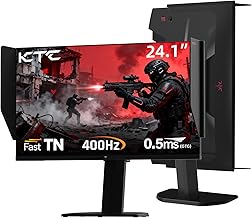
Best Budget: KTC 25M1 24.1 Inch 400Hz Fast TN Monitor
Offering 400Hz (and 240Hz support) with 0.5ms GTG, Adaptive Sync, and a built-in DAC plus shielding hood, the KTC 25M1 delivers flagship TN speed at a far more accessible price. Best for budget-conscious competitive gamers who want true TN latency and pro-style focus features without paying Zowie or ROG premiums.
Best Premium: BenQ Zowie XL2540X+ 24.1 Inch 280Hz Fast TN Monitor
Zowie’s XL2540X+ is tuned for tournament stability rather than spec-sheet extremes, with a 280Hz Fast TN, XL Setting to Share, Black eQualizer, Color Vibrance, and the S Switch for instant profile swaps. Best for serious esports players and LAN competitors who value proven color presets, shielding, and consistent low-lag performance over flashy extras.
Best for Competitive QHD: Samsung Odyssey G5 27″ G53F 200Hz QHD Monitor
While IPS rather than TN, the 27-inch G53F offers a compelling speed-for-resolution trade with 200Hz, 1ms-class tuning, HDR10, and FreeSync Premium plus Black Equalizer. Best for hybrid gamers who want sharper QHD visuals for streaming and single-player titles while retaining low input lag for competitive shooters.
Best for Large-Screen Speed: Samsung Odyssey G5 32″ G50F 180Hz QHD Monitor
The 32-inch G50F brings 180Hz QHD, Fast IPS with 1ms GtG, HDR10, and G-Sync Compatible support to a more immersive form factor with an adjustable stand. Best for players who prefer a bigger canvas for battle royale and racing games but still need responsive, low-lag performance for daily competitive play.
Frequently Asked Questions
Is TN still faster than IPS for input lag?
Yes, for absolute lowest input lag, modern Super TN and Fast TN panels still lead because their native pixel response and simpler driving electronics require less processing. High-end Fast IPS has narrowed the gap to within a few milliseconds, but TN remains the choice when every millisecond matters at 240Hz and above.
Does a higher refresh rate automatically mean lower input lag?
Higher refresh reduces scan-out and frame interval time, which directly lowers latency, but only if the monitor’s scaler is optimized for low lag. A well-tuned 280Hz TN can beat a poorly implemented 360Hz panel, so look at independent lag tests and low-latency modes rather than refresh alone.
Do I need 400Hz or 610Hz to benefit from these TN monitors?
You only benefit if your system can sustain frame rates close to the refresh rate in your main games. For esports titles like CS2 and Valorant, high-end GPUs can approach 400-600 fps at 1080p. If you play AAA games at 120-180 fps, a 280Hz TN like the Zowie will feel equally fast and may be more cost-effective.
What settings lower input lag the most?
Use DisplayPort when possible, enable Game Mode or Instant Mode, turn on FreeSync/G-Sync Compatible with VRR, disable extra image processing, and set overdrive to the manufacturer-recommended esports preset. Cap your in-game frame rate slightly below max refresh with VRR on to avoid V-Sync induced lag.
Final Thoughts
For the absolute lowest input lag, the ASUS ROG XG248QSG is in a class of its own, while the KTC 25M1 proves you can get 400Hz TN speed on a budget and the BenQ Zowie XL2540X+ remains the premium tournament standard. Choose the ASUS for record-chasing speed, the KTC for value-driven esports, or the Zowie for proven consistency.





