Key takeaways
- Resolution and size: 27 inches at 1440p is the value sweet spot — roughly 109 PPI, sharp without needing scaling, and far less GPU-hungry than 4K. Avoid 1080p at 27 inches unless you sit unusually far back; the pixel structure becomes visible.
- Refresh rate vs. your GPU: A 180Hz panel only pays off if your graphics card can push frames near that number in the games you actually play. Competitive shooters at 1440p on a mid-range card will get there; heavy single-player titles usually won’t, so don’t pay a premium for headroom you can’t use.
- Panel technology: Fast IPS delivers the best all-round balance of colour, viewing angles, and motion clarity at this price. VA offers deeper contrast and is common on curved models but can smear in dark transitions. QD-OLED gives genuinely elite contrast and response times, and now just fits under $500 — with the caveat of lower full-screen brightness and burn-in risk under static UI elements.
- Adaptive sync support: FreeSync Premium and G-SYNC Compatible certification eliminate tearing across a variable frame rate window. Check the sync range, not just the badge — a monitor that only syncs from 48Hz upward is less useful than one with Low Framerate Compensation.
- Connectivity and extras: DisplayPort 1.4 is essential for full refresh rate; HDMI 2.1 matters if you’re connecting a console. USB-C with power delivery is worth paying for if you dock a laptop, and built-in speakers are a convenience, not a substitute for headphones.
What's inside
Shopping for a gaming monitor under $500 has never been more confusing. Panel technology has fragmented into IPS, VA, and now affordable QD-OLED, refresh rates have climbed past 180Hz at mainstream prices, and marketing sheets are crowded with acronyms — ELMB, Adaptive-Sync, HDR400, DisplayHDR True Black — that rarely explain how a display actually feels in a firefight. The result is that plenty of buyers overspend on specs their GPU can’t feed, or underspend and end up with smeary motion and washed-out colour.
This guide cuts through that. We’ve focused on 27-inch 1440p displays, which remain the sweet spot for value in 2026: they’re sharp enough to justify a modern mid-range GPU, high-refresh enough for competitive play, and still comfortably within a $500 ceiling. Below you’ll find our current picks, the specs that genuinely matter when budget is tight, and short, honest reviews of each monitor — including where each one compromises, because at this price every monitor compromises somewhere.
As an Amazon Associate we earn from qualifying purchases.






⚡ Save on Your Next PC — Amazon Prime
Prime members get fast free shipping on the systems above, plus early access to Prime Day & Black Friday PC deals. New members get a 30-day free trial.
Watch: Best Gaming Monitor Under $500 — Video Review
How to Choose Gaming Monitor Under $500
- Resolution and size: 27 inches at 1440p is the value sweet spot — roughly 109 PPI, sharp without needing scaling, and far less GPU-hungry than 4K. Avoid 1080p at 27 inches unless you sit unusually far back; the pixel structure becomes visible.
- Refresh rate vs. your GPU: A 180Hz panel only pays off if your graphics card can push frames near that number in the games you actually play. Competitive shooters at 1440p on a mid-range card will get there; heavy single-player titles usually won’t, so don’t pay a premium for headroom you can’t use.
- Panel technology: Fast IPS delivers the best all-round balance of colour, viewing angles, and motion clarity at this price. VA offers deeper contrast and is common on curved models but can smear in dark transitions. QD-OLED gives genuinely elite contrast and response times, and now just fits under $500 — with the caveat of lower full-screen brightness and burn-in risk under static UI elements.
- Adaptive sync support: FreeSync Premium and G-SYNC Compatible certification eliminate tearing across a variable frame rate window. Check the sync range, not just the badge — a monitor that only syncs from 48Hz upward is less useful than one with Low Framerate Compensation.
- Connectivity and extras: DisplayPort 1.4 is essential for full refresh rate; HDMI 2.1 matters if you’re connecting a console. USB-C with power delivery is worth paying for if you dock a laptop, and built-in speakers are a convenience, not a substitute for headphones.
The Best Picks Reviewed
ASUS TUF Gaming VG27AQ3A
This is the most complete all-rounder under $500: a 180Hz Fast IPS panel with 130% sRGB coverage, ELMB Sync for backlight strobing without sacrificing adaptive sync, and both FreeSync Premium and G-SYNC Compatible certification. Colour accuracy out of the box is respectable, and while HDR is more a checkbox than a feature at this brightness level, the SDR performance is excellent for the money.
Samsung Odyssey OLED G6 (G61SH)
The QD-OLED panel here is a genuine step change — near-instant pixel response, effectively infinite contrast, and colour volume that no IPS monitor at this price can match, which makes dark, atmospheric games look transformed. It sits at the very top of the budget and demands sensible habits around static taskbars and HUDs, but if you want the best image quality under $500, this is it.
ASUS ROG XG27ACS
A 180Hz 1440p IPS panel with USB-C delivering power and video over a single cable, making it the smartest pick for anyone splitting time between a gaming PC and a work laptop. Motion handling and G-SYNC compatibility are on par with the TUF model, and the ROG build quality and stand adjustability are a step up.
Acer Nitro KG271U N3bmiipx
Acer’s Nitro strips things back to essentials and passes the savings on: 1440p, 180Hz, IPS, and adaptive sync, with none of the extras. Expect a basic tilt-only stand and unremarkable HDR, but for pure frames-per-dollar in competitive play it’s one of the strongest value propositions on this list.
Samsung Odyssey G5 (G51F)
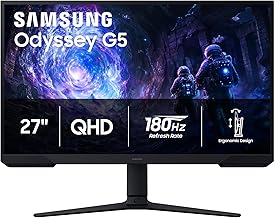
The G51F leans on Samsung’s VA heritage for contrast that IPS panels struggle to match, which suits single-player and cinematic games well. Dark-scene response times aren’t quite as clean as the Fast IPS competition, so twitch shooter players should weigh that trade-off, but it’s a strong pick if deep blacks matter more to you than absolute motion clarity.
Frequently Asked Questions
Is 1440p worth it over 1080p for gaming?
At 27 inches, yes. The jump in sharpness is immediately visible, and modern mid-range GPUs handle 1440p comfortably at high refresh rates. Only stay at 1080p if your graphics card is several generations old or you play exclusively competitive titles where maximum frame rate is the sole priority.
Do I need 180Hz, or is 144Hz enough?
144Hz already covers the vast majority of players, and the perceptual gain from 144Hz to 180Hz is far smaller than the jump from 60Hz to 144Hz. Treat 180Hz as a bonus when it costs little extra, not as a reason to compromise on panel quality.
Is OLED burn-in still a concern in 2026?
Modern QD-OLED monitors include pixel shifting, logo dimming, and automatic refresh cycles that substantially reduce risk, and warranties now typically cover burn-in for several years. Even so, if you leave static desktop elements on screen for many hours daily, an IPS panel remains the lower-risk choice.
Does FreeSync work with an NVIDIA graphics card?
In most cases, yes. Monitors carrying G-SYNC Compatible certification have been validated by NVIDIA to run variable refresh rate over DisplayPort, and many uncertified FreeSync displays work fine after enabling the option manually in the NVIDIA Control Panel.
Final Thoughts
For most buyers, the ASUS TUF Gaming VG27AQ3A is the pick we’d recommend without hesitation — it delivers the fewest compromises for the money and needs no caveats. If image quality is your priority and you can stretch to the top of the budget, the Samsung Odyssey OLED G6 offers a genuinely premium experience that would have cost twice as much a couple of years ago. And if you want one monitor that handles both work and play, the ASUS ROG XG27ACS and its single-cable USB-C setup is the smartest buy on the list.