Key takeaways
- 1080p: Comfortable on entry to mid-range cards; ideal if your GPU budget is tight or you prize triple-digit frame rates.
- 1440p: Wants a solid mid-to-upper-range GPU; the best all-around target for most single-player and competitive hybrids in 2026.
- 4K: Demands a flagship GPU and usually upscaling to stay smooth; reserve it for cinematic, visually driven titles.
Resolution is one of the first decisions you make when building or upgrading a gaming setup, and in 2026 the choice between 1080p, 1440p, and 4K matters more than ever. Higher resolutions pack in more pixels for a sharper, more immersive image, but they also demand far more from your graphics card. Picking the wrong target can leave you either staring at a soft, dated picture or wrestling with frame rates that never hit your monitor’s potential.
This guide breaks down what each resolution actually looks like in games, how much GPU horsepower each one needs, and which players are best served by each tier. By the end you will know whether to chase pixel density, raw frame rate, or a balance of both, and which recommended monitors below fit the resolution you land on.
Our top picks
 Samsung 27" Odyssey G5
- QHD Resolution (2560 x 1440) has 1.7 times…
- HDR10 provides brighter highlights and nuanced shadow for…
- The 180Hz refresh rate minimizes lag for gameplay…
 Acer Nitro 27in QHD 2560x1440 IPS 180Hz
- Quality Visuals: The KG271U 27" IPS monitor with…
- AMD FreeSync Technology: Say “goodbye” to stuttering and…
- Up to 180Hz: The 180Hz refresh rate speeds…
 ASUS TUF Gaming 27” 1440P HDR Monitor
- High-Resolution QHD Gaming Display: 27-inch QHD (2560 x…
- ASUS Extreme Low Motion Blur Sync Technology: ELMB…
- Advanced Synchronization Technologies: FreeSync Premium, G-Sync compatible and…
| Product | Key specs | |
|---|---|---|
| Samsung 27" Odyssey G5 | QHD Resolution (2560 x 1440) has 1.7 times… HDR10 provides brighter highlights and nuanced shadow for… The 180Hz refresh rate minimizes lag for gameplay… | Check price |
| Acer Nitro 27in QHD 2560x1440 IPS 180Hz | Quality Visuals: The KG271U 27" IPS monitor with… AMD FreeSync Technology: Say “goodbye” to stuttering and… Up to 180Hz: The 180Hz refresh rate speeds… | Check price |
| ASUS TUF Gaming 27” 1440P HDR Monitor | High-Resolution QHD Gaming Display: 27-inch QHD (2560 x… ASUS Extreme Low Motion Blur Sync Technology: ELMB… Advanced Synchronization Technologies: FreeSync Premium, G-Sync compatible and… | Check price |
 Samsung 27" Odyssey OLED G6 | Samsung’s 27” Odyssey OLED G6 Gaming Monitor is… OLED Safeguard technology supports performance by actively helping… Glare Free Technology keeps screen clear of reflection… | Check price |
 LG 27GS60QC-B Ultragear 27-inch Curved Gaming Monitor | Ascend your game with the speed of UltraGear… 180Hz Refresh Rate & 1ms GtG - Gear… 1000R Curved Screen - This UltraGear monitor's dramatic… | Check price |
 ASUS ROG XG27ACS 27 Inch 1440p 180Hz | 27-inch 2560 x 1440 HDR gaming monitor with… ASUS Fast IPS technology enables a 1ms response… ASUS Extreme Low Motion Blur Sync (ELMB SYNC)… | Check price |
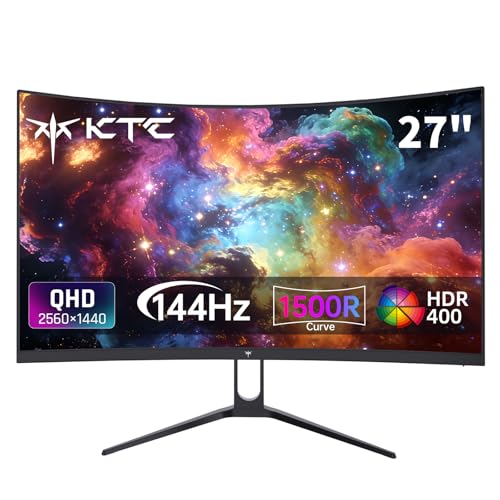 KTC H27S5C 27 Inch Curved Gaming Monitor | Immersive Curved Design: The KTC 27 inch curved… Stunning 2K QHD Resolution: Enjoy crisp, vivid images… Smooth 144Hz Refresh Rate: Experience seamless motion and… | Check price |
 Samsung 27” Odyssey G5 | Samsung’s 27” Odyssey G5 QHD Gaming Monitor delivers… QHD resolution (2560x1440) boasts incredibly detailed, pin-sharp images. With a wide 178° viewing angle, the IPS… | Check price |
As an Amazon Associate we earn from qualifying purchases at no extra cost to you.
⚡ Save on Your Next PC — Amazon Prime
Prime members get fast free shipping on the systems above, plus early access to Prime Day & Black Friday PC deals. New members get a 30-day free trial.
Watch: 1080p vs 1440p vs 4K for Gaming — Video Review
What Each Resolution Really Means
1080p (1920×1080) is roughly 2.1 million pixels, 1440p (2560×1440) is about 3.7 million, and 4K (3840×2160) is a little over 8.3 million. Those numbers translate directly into how crisp text, textures, and distant objects appear. Jumping from 1080p to 1440p is the single most noticeable upgrade most players will ever make, while 4K delivers a further leap in clarity that rewards larger screens and sharper eyes. A QHD panel like the Samsung 27″ Odyssey G5 (G51F) sits at the sweet spot many gamers gravitate toward.
Frame Rate Versus Fidelity
Every extra pixel your GPU has to render costs performance. At 1080p a mid-range card can push very high frame rates, which is why competitive players who want 144Hz or higher often stay there. At 1440p you generally trade some of those frames for a much cleaner image, and high-refresh QHD panels such as the ASUS TUF Gaming VG27AQ3A (180Hz) or the LG 27GS60QC-B keep motion smooth. At 4K, fidelity is king but sustaining high frame rates requires a top-tier GPU and often upscaling like DLSS or FSR.
Matching Resolution to GPU
- 1080p: Comfortable on entry to mid-range cards; ideal if your GPU budget is tight or you prize triple-digit frame rates.
- 1440p: Wants a solid mid-to-upper-range GPU; the best all-around target for most single-player and competitive hybrids in 2026.
- 4K: Demands a flagship GPU and usually upscaling to stay smooth; reserve it for cinematic, visually driven titles.
Screen Size and Viewing Distance
Resolution never lives in isolation from panel size. On a 24-inch screen, 1080p still looks reasonably sharp, but stretch that same resolution to 27 inches and pixels become visible. This is why 27-inch monitors like the Acer Nitro KG271U or the Samsung Odyssey OLED G6 pair so naturally with 1440p, the higher pixel count keeps the image dense. 4K only pays real dividends on 27 inches and above, or when you sit close to the display.
Panel Type and Extras
Do not fixate on resolution alone. A fast IPS panel gives you accurate color and wide viewing angles, OLED options like the Odyssey OLED G6 deliver perfect blacks and instant response, and curved designs such as the KTC H27S5C wrap the image around your field of view. Features like HDR, adaptive sync (G-SYNC or FreeSync), and refresh rate shape the experience just as much as the pixel count you choose.
Tips
- If you are unsure, choose 1440p at a high refresh rate; it is the best-balanced target for 2026 hardware.
- Buy the monitor around the GPU you own or plan to buy, not the other way around, so frames and pixels stay balanced.
- Turn on DLSS or FSR upscaling to unlock 1440p or 4K without buying a more expensive card.
- Prioritize refresh rate and response time for competitive shooters, and pixel density for slow, scenic games.
Frequently Asked Questions
Is 1440p worth it over 1080p in 2026?
For most players, yes. The clarity boost is dramatic, high-refresh QHD monitors are now affordable, and mid-range GPUs handle 1440p comfortably in the majority of games.
Do I need a 4K monitor for gaming?
Only if you own a flagship GPU and play visually rich, single-player titles on a large screen. Competitive players almost always prefer the higher frame rates of 1080p or 1440p.
Will a higher resolution lower my frame rate?
Yes. More pixels mean more work for your GPU, so frame rates drop as resolution rises unless you enable upscaling or lower in-game settings.
What resolution is best for competitive gaming?
1080p or 1440p at 144Hz or higher. These resolutions let capable GPUs sustain the high frame rates that give competitive players smoother aim and lower latency.
Conclusion
There is no single correct resolution, only the one that matches your GPU, screen size, and the way you play. In 2026, 1440p is the smart default for most gamers, 1080p remains ideal for frame-rate-focused competitors on a budget, and 4K is a luxury for flagship rigs chasing maximum fidelity. Match your resolution to your hardware and the games you love, and any of the recommended monitors above will serve you well.
FAQ
Is 1440p worth it over 1080p in 2026?
Do I need a 4K monitor for gaming?
Will a higher resolution lower my frame rate?
What resolution is best for competitive gaming?
More from Amazon
Programs that pair well with the guide above. Offers and eligibility are set by Amazon and may change.
Free shipping on eligible items, Prime Video and more. Eligible new members can start with a free trial.
Start a Prime free trialAd-free music streaming. Eligible new subscribers can start with a free trial.
Try Music Unlimited freeA Prime membership for ages 18-24 with a trial period. Eligibility is set by Amazon.
See Prime for Young AdultsAudiobooks and podcasts to listen to on the go. Eligible new members can start with a free trial.
Try Audible freeAs an Amazon Associate we earn from qualifying purchases.