
Key takeaways
- Refresh Rate vs. GPU Power: Match the monitor to what your GPU can sustain at 1440p. A 320Hz or 300Hz panel is wasted if you average 140 fps, while a 180Hz display is a sweet spot for mid-range GPUs and still feels dramatically smoother than 144Hz.
- Panel Type and Response Time: Fast IPS is now standard for 1440p high refresh, offering 0.3ms to 1ms response times with wide viewing angles. Look for ELMB Sync or similar blur reduction to keep motion crisp without sacrificing adaptive sync.
- Adaptive Sync Compatibility: AMD FreeSync Premium, FreeSync, and G-SYNC Compatible support prevents tearing at high frame rates. Ensure the monitor supports your graphics card ecosystem and that its sync range covers low and high fps.
- Color Gamut and HDR: For vibrant, accurate visuals look for 95%+ DCI-P3 or 99%+ sRGB coverage and at least VESA HDR400 or HDR10. Higher coverage benefits single-player and content creation, not just competitive play.
- Ergonomics and Connectivity: Height, tilt, and swivel adjustments, VESA mount support, and ports like DisplayPort 1.4, HDMI 2.0/2.1, and USB-C matter for long sessions and console compatibility with PS5 and Xbox.
What's inside
For most gamers seeking the ultimate 1440p high refresh rate experience, the ASUS ROG XG27ACMS 320Hz is our Best Overall pick, while the Acer Nitro XV272U W2 240Hz is our top runner-up for balanced performance and value. These two set the pace for QHD gaming in 2025, but the right choice depends on your GPU, competitive needs, and budget.
Choosing a 1440p high refresh rate monitor is tricky – push for the highest Hz and you may sacrifice color accuracy or pay for performance your GPU cannot drive, stick to 180Hz and you might leave competitive advantage on the table. This guide cuts through the specs to compare response times, adaptive sync, panel quality, and ergonomics across the best current options, so you can match refresh rate to your rig and playstyle with confidence.
As an Amazon Associate we earn from qualifying purchases.




🛒 Best Price Today on Amazon
Prime members get fast, free shipping on everything above, plus member-only deals. New members get a 30-day free trial — cancel anytime.
Quick Comparison
| Product | Best For | Standout Feature | Rating |
|---|---|---|---|
| ASUS ROG XG27ACMS 27″ 320Hz | Competitive & Enthusiast Gaming | 320Hz Fast IPS, 0.3ms, USB-C & ELMB Sync | 9.8/10 |
| ASUS TUF Gaming VG27AQ3A 27″ 180Hz | Budget-Conscious Gamers | 180Hz, 130% sRGB, FreeSync Premium & G-SYNC Compatible | 9.2/10 |
| Acer Nitro XV272U W2 27″ 240Hz | Premium All-Rounder | 240Hz, 0.5ms, 99% sRGB & VESA HDR400 | 9.6/10 |
| ASUS TUF Gaming VG27AQM5A 27″ 300Hz | Esports & Fast-Paced Shooters | 300Hz Fast IPS, 0.3ms, 95% DCI-P3 | 9.5/10 |
| Samsung Odyssey G5 (G51F) 27″ 180Hz | Immersive Everyday Gaming | 180Hz, HDR10, Height-Adjustable Stand | 9.3/10 |
How to Choose a/an 1440p Gaming Monitors for High Refresh Rate Performance
- Refresh Rate vs. GPU Power: Match the monitor to what your GPU can sustain at 1440p. A 320Hz or 300Hz panel is wasted if you average 140 fps, while a 180Hz display is a sweet spot for mid-range GPUs and still feels dramatically smoother than 144Hz.
- Panel Type and Response Time: Fast IPS is now standard for 1440p high refresh, offering 0.3ms to 1ms response times with wide viewing angles. Look for ELMB Sync or similar blur reduction to keep motion crisp without sacrificing adaptive sync.
- Adaptive Sync Compatibility: AMD FreeSync Premium, FreeSync, and G-SYNC Compatible support prevents tearing at high frame rates. Ensure the monitor supports your graphics card ecosystem and that its sync range covers low and high fps.
- Color Gamut and HDR: For vibrant, accurate visuals look for 95%+ DCI-P3 or 99%+ sRGB coverage and at least VESA HDR400 or HDR10. Higher coverage benefits single-player and content creation, not just competitive play.
- Ergonomics and Connectivity: Height, tilt, and swivel adjustments, VESA mount support, and ports like DisplayPort 1.4, HDMI 2.0/2.1, and USB-C matter for long sessions and console compatibility with PS5 and Xbox.
The Best 1440p Gaming Monitors for High Refresh Rate Performances Reviewed
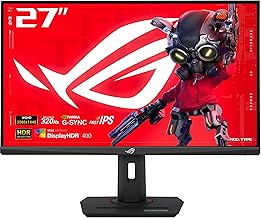
Best Overall: ASUS ROG XG27ACMS 27″ 320Hz USB-C Gaming Monitor
Ideal for enthusiasts who want the absolute fastest 1440p experience without compromise, the ROG XG27ACMS delivers an astonishing 320Hz Fast IPS panel with 0.3ms response, ELMB Sync, and G-SYNC compatibility. Its USB-C connectivity, tripod socket, and DisplayWidget Center make it a future-proof flagship for both PC and console gamers chasing every frame.
Best Budget: ASUS TUF Gaming VG27AQ3A 27″ 180Hz HDR Monitor
Perfect for value-focused gamers upgrading from 1080p, the TUF VG27AQ3A packs 180Hz, 1ms Fast IPS, and 130% sRGB coverage with FreeSync Premium and G-SYNC Compatible support at an accessible price. If you want reliable high refresh performance, built-in speakers, and great color without overspending, this is the smart entry point to 1440p.
Best Premium: Acer Nitro XV272U W2 27″ 240Hz Gaming Monitor
Built for gamers who want premium image quality alongside speed, the Acer Nitro XV272U W2 combines a 240Hz IPS panel with 0.5ms response, 99% sRGB, and VESA HDR400 certification. It is best for players who split time between competitive shooters and visually rich story-driven titles and want ergonomic flexibility with an adjustable stand and VESA mounting.
Best for Esports Speed: ASUS TUF Gaming VG27AQM5A 27″ 300Hz Monitor
Tailored for competitive FPS and esports athletes, the TUF VG27AQM5A hits 300Hz with Extreme Low Motion Blur Sync, 0.3ms response, and 95% DCI-P3 color for ultra-clear motion and shadow detail. If reaction time and clarity during chaotic firefights are your priority, this monitor gives you a tangible edge.
Best for Comfortable Daily Gaming: Samsung Odyssey G5 (G51F) 27″ QHD 180Hz Monitor
Best for gamers who want smooth performance with everyday comfort, the Samsung Odyssey G5 pairs a 180Hz, 1ms panel with HDR10, AMD FreeSync, Black Equalizer, and a height-adjustable stand. It is ideal for long sessions, mixed work and play setups, and users who value ergonomic tuning and auto source switching.
Frequently Asked Questions
Is 1440p worth it over 1080p for high refresh rate gaming?
Yes, for most modern GPUs. 1440p offers a sharp jump in clarity and desktop space over 1080p while remaining far easier to drive at 180Hz to 320Hz than 4K. At 27 inches, QHD provides ideal pixel density without requiring a flagship GPU to maintain high frame rates.
What refresh rate should I target at 1440p?
180Hz is excellent for mid-range GPUs and casual competitive play, 240Hz is the current sweet spot for serious gamers, and 300Hz to 320Hz is for high-end rigs and esports players who can consistently push 250+ fps in titles like Valorant, Fortnite, or Call of Duty.
Do I need HDMI 2.1 for a 1440p 240Hz+ monitor?
Not always. DisplayPort 1.4 handles 1440p at 240Hz, 300Hz, and even 320Hz on these monitors. HDMI 2.1 is mainly beneficial for 1440p 120Hz+ on PS5 and Xbox Series X, so check your console or GPU outputs before prioritizing it.
Will my graphics card handle 1440p at high refresh rates?
It depends on the game and settings. Mid-range cards like an RTX 4070 or RX 7800 XT can drive 1440p 180Hz well in most titles, while 240Hz+ at max settings in demanding games typically requires an RTX 4070 Ti, RTX 4080, RX 7900 XT or better. Lowering settings or using DLSS/FSR helps reach higher frame rates.
Final Thoughts
For peak speed and feature depth, the ASUS ROG XG27ACMS 320Hz stands out as the most capable 1440p high refresh monitor, with the Acer Nitro XV272U W2 240Hz as a superb premium all-rounder and the ASUS TUF Gaming VG27AQ3A as the best budget gateway to high refresh QHD gaming. Choose based on your GPU ceiling and competitive focus, and you will get a smooth, future-ready setup for years.





