Key takeaways
- Your Primary Console Platform: Xbox, PlayStation, and Nintendo Switch handle audio signals differently. Xbox consoles require proprietary security chips for wireless USB connections, whereas PlayStation is much more permissive with standard USB-A and USB-C audio dongles. If you buy a USB-wired or wireless headset, you must ensure it specifically states compatibility with your exact console. 3.5mm analog connections, however, are universally compatible across all controllers.
- Passive vs. Active (DSP) Microphone Cancellation: Passive microphone cancellation uses physical barriers—like acoustic chambers, foam windscreens, and directional polar patterns—to block sound. Active cancellation uses Digital Signal Processing (DSP) chips inside the headset to identify and subtract background frequencies. DSP is highly effective but usually requires a USB or wireless connection to draw power, whereas passive systems work on simple 3.5mm controller jacks.
- Your Ambient Noise Profile: Identify the specific sounds you need to block. If you are trying to eliminate sharp, high-frequency sounds like mechanical keyboard clicks or controller button-mashing, you need a highly directional physical microphone capsule. If you need to drown out continuous low-frequency hums like traffic, fans, or refrigerator motors, electronic DSP noise cancellation is your best bet.
When shopping for a console gaming or home-office headset, most buyers spend their time analyzing speaker driver sizes, spatial audio formats, and RGB lighting. They assume that if a headset sounds good to them, they will sound good to everyone else. This is the single biggest mistake buyers make.
The reality is that microphone quality—specifically, how well a microphone isolates your voice from the chaos of your household—is often treated as an afterthought by manufacturers. Many buyers bring home a premium headset only to discover that their teammates or colleagues can hear every click of their controller, the hum of the air conditioner, or a family member washing dishes in the next room. To get clear voice transmission, you need to understand exactly **what to look for in console headset microphone noise cancellation** so you do not waste money on marketing buzzwords that fail in real-world environments.
In this comprehensive buying guide, we will cut through the acoustic jargon and outline the physical, mechanical, and electronic specifications that determine whether a headset microphone will actually keep your communications crystal clear.
Decide These 3 Things First
Before looking at spec sheets, you must narrow down your search by answering three fundamental questions about your setup and environment.
- Your Primary Console Platform: Xbox, PlayStation, and Nintendo Switch handle audio signals differently. Xbox consoles require proprietary security chips for wireless USB connections, whereas PlayStation is much more permissive with standard USB-A and USB-C audio dongles. If you buy a USB-wired or wireless headset, you must ensure it specifically states compatibility with your exact console. 3.5mm analog connections, however, are universally compatible across all controllers.
- Passive vs. Active (DSP) Microphone Cancellation: Passive microphone cancellation uses physical barriers—like acoustic chambers, foam windscreens, and directional polar patterns—to block sound. Active cancellation uses Digital Signal Processing (DSP) chips inside the headset to identify and subtract background frequencies. DSP is highly effective but usually requires a USB or wireless connection to draw power, whereas passive systems work on simple 3.5mm controller jacks.
- Your Ambient Noise Profile: Identify the specific sounds you need to block. If you are trying to eliminate sharp, high-frequency sounds like mechanical keyboard clicks or controller button-mashing, you need a highly directional physical microphone capsule. If you need to drown out continuous low-frequency hums like traffic, fans, or refrigerator motors, electronic DSP noise cancellation is your best bet.
1. Microphone Polar Patterns and Capsule Design
The physical design of the microphone capsule is your first line of defense against unwanted noise. Most cheap headsets use omnidirectional microphones, which pick up sound in a 360-degree sphere. While this ensures your voice is always captured, it also captures every other sound in your room with equal volume.
For effective console communication, look for a cardioid or hypercardioid polar pattern. These patterns are shaped like a heart, focusing sound capture directly in front of the microphone capsule while rejecting sounds coming from the sides and rear by 15 dB to 20 dB. This physical rejection means your controller clicks (which occur behind the microphone) are naturally muffled before the signal even reaches your console.
Our top picks
 PrancyBt Wireless Headset with Noise Cancelling Microphone
- Premium Noise‑Cancelling for Flawless Voice Calls: This Bluetooth…
- Long‑Lasting Battery for Professional Work: Built with a…
- Immersive Stereo Audio for Work and Leisure: This…
 JIAMQISHI USB Headset with Microphone for PC
- ✅【Outstanding Noise cancelling Microphone】 The headphones with unidirectional…
- ✅【All-Day Comfort for All Head Shape】 Eaglend always…
- ✅【Enhanced sound performance & 40mm audio driver】:Corded phone…
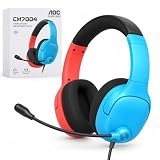
 AOC USB Headset with Microphone for PC
- Clear Calls with Mic 2.Comfortable and Lightweight
| Product | Key specs | |
|---|---|---|
| PrancyBt Wireless Headset with Noise Cancelling Microphone | Premium Noise‑Cancelling for Flawless Voice Calls: This Bluetooth… Long‑Lasting Battery for Professional Work: Built with a… Immersive Stereo Audio for Work and Leisure: This… | Check price |
| JIAMQISHI USB Headset with Microphone for PC | ✅【Outstanding Noise cancelling Microphone】 The headphones with unidirectional… ✅【All-Day Comfort for All Head Shape】 Eaglend always… ✅【Enhanced sound performance & 40mm audio driver】:Corded phone… | Check price |
| AOC USB Headset with Microphone for PC | Clear Calls with Mic 2.Comfortable and Lightweight | Check price |
 Blucalm Wired Headset with Noise Canceling Mic Blucalm Wired Headset with Noise Canceling Mic | Mic Noise Cancellation - Equipped with 3-microphone array,… Busylight - This wired headset features an innovative… Easy Connectivity- Plug and Play with the USB-A… | Check price |
As an Amazon Associate we earn from qualifying purchases at no extra cost to you.
The size of the capsule also matters. Standard headset mic capsules range from 4mm to 6mm in diameter. A larger 6mm capsule generally captures a wider frequency response (typically 100 Hz to 10 kHz), making your voice sound rich and natural rather than thin or walkie-talkie-like, while still allowing physical acoustic ports to cancel out off-axis sounds.
2. Boom Arm Construction and Adjustability
No matter how advanced a microphone’s noise cancellation is, it cannot perform properly if it is positioned incorrectly. The microphone capsule must sit approximately 1 to 2 inches (25mm to 50mm) from the corner of your mouth, just out of the direct path of your breath to avoid “popping” sounds.
To achieve this, look for a heavy-duty, flexible gooseneck boom arm. The arm should be constructed from a bendable metal core wrapped in a protective silicone or thermoplastic elastomer (TPE) sleeve. Avoid stiff plastic boom arms that only rotate up and down; they rarely allow you to position the capsule close enough to your mouth, forcing you to crank up the microphone gain, which in turn captures more background noise.
A high-quality boom arm should hold its shape perfectly without drooping, even after 5,000+ bends. Additionally, look for a microphone boom that is either fully detachable or features a reliable “flip-to-mute” mechanism. Detachable mics are ideal because if the microphone fails—which is the most common point of failure in headsets—you can replace just the mic boom rather than buying an entirely new headset.
3. Signal-to-Noise Ratio (SNR) and Decibel Attenuation
When comparing the technical specifications of headset microphones, look past the generic “noise-cancelling” label and search for the Signal-to-Noise Ratio (SNR) and the ambient noise attenuation rating, measured in decibels (dB).
The SNR indicates how much louder your voice is compared to the self-noise of the microphone’s internal electronics. A respectable headset microphone should have an SNR of at least 55 dB, while premium models will push past 65 dB. A higher SNR means your voice will sound clean and free of background hiss or static.
For environmental noise reduction, look for a specification indicating how many decibels of background noise the microphone can filter out. Entry-level headsets using passive acoustic chambers typically offer 10 dB to 15 dB of background noise reduction. Mid-range and premium headsets equipped with hardware-level DSP can suppress up to 25 dB to 30 dB of ambient noise, effectively turning a loud household vacuum cleaner in the next room into a faint, ignorable whisper.
4. Comfort, Clamping Force, and Weight
A headset with an incredible microphone is useless if it hurts your head after thirty minutes of use. Microphone performance is directly tied to how securely the headset sits on your head. If a headset slips or shifts when you move your jaw, the microphone capsule will constantly fall out of alignment.
The overall weight of the headset should ideally fall between 200 grams and 300 grams (7 to 10.5 ounces). Anything over 320 grams will cause neck fatigue during extended sessions. To distribute this weight evenly, look for a headband with a suspended ski-band design or thick memory foam padding wrapped in breathable mesh fabric.
Clamping force—the pressure the ear cups exert on the sides of your head—should sit in the sweet spot of 1.1 lbs to 1.4 lbs (approx. 500g to 630g) of pressure. This provides enough stability to keep the microphone positioned perfectly without causing headaches or pinching your ears against glasses frames. Ear cups made of high-density memory foam covered in cooling gel or breathable fabric are preferred over cheap pleather, which traps heat and sweat, causing you to constantly adjust the headset and create microphonic cable noise.
5. Price Tiers and What You Actually Get
As we look at the console landscape in 2026, the market has segmented into clear price brackets, each offering distinct levels of microphone noise-cancelling technology.
- Budget Tier ($25 to $45): In this range, you will find wired headsets (typically 3.5mm or basic USB-A) like the AOC or Blucalm models. Noise cancellation here is entirely passive, relying on directional cardioid capsules and foam windscreens. While they do not have smart chips to filter out sudden loud noises, they offer excellent vocal clarity and reliable plug-and-play performance without software dependencies.
- Mid-Range Tier ($50 to $100): This tier introduces wireless connectivity (typically via 2.4GHz USB dongles or Bluetooth, like the PrancyBt) and basic hardware-level DSP. These headsets can actively identify steady-state noises (like computer fans or air conditioners) and phase them out. Build quality improves with metal-reinforced headbands and more flexible boom arms.
- Premium Tier ($120 to $250+): At this level, you are paying for advanced dual-microphone arrays and AI-driven DSP chips. These headsets feature an external-facing mic that monitors room noise and an internal-facing mic that captures your voice, subtracting the room noise in real-time. They can isolate human speech from chaotic environments, such as crying babies or barking dogs, while maintaining high-fidelity vocal depth.
6. Connection Types and Cable Durability
The connection interface plays a major role in how microphone signals are processed and transmitted back to your console.
- 3.5mm Analog: Simple and universally compatible. The audio signal is processed by the console’s controller. While highly reliable and free of latency, 3.5mm connections are susceptible to port wear over time. If the controller jack gets loose, it can introduce a crackling hum to your microphone line. Look for a braided cable with a thickness of at least 3mm and strain-relief boots at the connectors.
- USB Wired: USB-A or USB-C wired connections allow the headset to use its own internal sound card. This bypasses the cheap digital-to-analog converters (DACs) inside your controller, providing cleaner power to the microphone and enabling built-in DSP noise cancellation. Cables should be detachable to prevent the entire headset from being ruined if the wire gets pinched or chewed by a pet.
- 2.4GHz Wireless: The gold standard for convenience. Using a dedicated USB dongle, 2.4GHz wireless provides ultra-low latency (under 20ms) and lossless audio transmission. However, make sure the battery life is rated for at least 20 to 30 hours of continuous use, and check that the microphone signal does not suffer from compression artifacts, which can make your voice sound metallic.
Spec Checklist
Use this quick-reference table to compare key specifications across the three main price tiers when shopping for your console headset.
| Specification | Budget ($25 – $45) | Mid-Range ($50 – $100) | Premium ($120 – $250+) |
|---|---|---|---|
| Mic Polar Pattern | Cardioid (Passive) | Cardioid / Hypercardioid | Dual-Mic Array (Hypercardioid + Omni) |
| Noise Cancellation Type | Acoustic Isolation & Foam | Hardware DSP (Steady-state) | AI-Driven Environmental DSP |
| Signal-to-Noise Ratio (SNR) | > 50 dB | > 58 dB | > 65 dB |
| Frequency Response | 100 Hz – 8 kHz | 80 Hz – 12 kHz | 50 Hz – 15 kHz |
| Connection Options | 3.5mm Analog / USB-A Wired | USB-C Wired / 2.4GHz Wireless | Dual-Wireless (2.4GHz + Bluetooth) |
| Headset Weight | 280g – 340g | 240g – 280g | 200g – 250g |
| Warranty Period | 1 Year | 1 to 2 Years | 2 to 3 Years |
Red Flags to Avoid
When browsing product descriptions, keep an eye out for these warning signs that indicate a headset’s microphone noise cancellation may not perform as advertised:
- “Omnidirectional Noise-Cancelling Mic”: This is an acoustic contradiction. An omnidirectional microphone, by definition, picks up sound from all directions. If a brand claims an omnidirectional mic has noise cancellation without mentioning a dedicated digital DSP chip, they are misleading you. It will pick up your entire room.
- Non-Adjustable, Rigid Plastic Mics: If the mic boom is a solid piece of plastic that only swivels up and down on a hinge, avoid it. You will not be able to position the capsule correctly, resulting in poor voice capture and increased background noise pickup.
- Thin, Non-Braided Cables: For wired models, a thin, rubbery cable (under 2mm in diameter) without reinforced strain relief will quickly develop internal wire breaks. This leads to intermittent microphone dropouts and a loud buzz or static hum in your party chat whenever the cable moves.
- Proprietary Microphone Connections: Some headsets feature detachable microphones that use custom, non-standard jacks instead of standard 3.5mm plugs. If the mic boom breaks, you will be forced to buy a costly proprietary replacement directly from the manufacturer—if they even sell them.
FAQ
Does PS5 or Xbox Series X support Bluetooth microphone noise cancellation natively?
No. Neither the PlayStation 5 nor the Xbox Series X supports native Bluetooth audio out of the box for gameplay and voice chat. To use a wireless headset with noise cancellation on these consoles, you must use a headset that includes a dedicated 2.4GHz USB wireless dongle, or connect the headset via a 3.5mm cable directly into the controller’s audio jack.
What is the difference between ANC and microphone noise cancellation?
Active Noise Cancellation (ANC) is designed to protect your ears from hearing outside noises by emitting anti-noise frequencies through the headset’s ear cups. Microphone noise cancellation is designed to protect the ears of the people listening to you by filtering out your background noise before sending your voice signal through the game chat.
Why does my voice sound muffled or robotic when noise cancellation is active?
This is usually caused by aggressive digital processing. When a headset’s DSP chip tries too hard to eliminate background noise, it can mistake the quiet parts of your voice (like the ends of words or soft consonants) for background noise and cut them off. Adjusting the microphone gate settings in your console’s audio menu or moving the microphone capsule slightly further from your mouth can help resolve this.
Can a simple foam windscreen replace electronic noise cancellation?
A foam windscreen (or “pop filter”) is excellent at dispersing sudden blasts of air from your mouth, which prevents harsh “P” and “B” plosive sounds from overloading the microphone capsule. However, foam windscreens are physically incapable of blocking ambient room noises like barking dogs, mechanical keyboards, or traffic. They should be used in tandem with a directional polar pattern, not as a replacement for it.