
Key takeaways
- Screen Size & Read Distance: Match the prompter glass to your typical camera-to-eye distance; 12-inch models suit desk setups, while 14-to-16-inch units give comfortable reading at four feet or more.
- Device Compatibility: Confirm whether the unit accepts your tablet, phone, or laptop natively, and check for dedicated apps or screen-mirroring support on your operating system.
- Assembly & Portability: If you move between studios or attend events, prioritize no-assembly or folding designs that ship with a padded carry case.
- Control Options: Bluetooth remotes and companion apps let you adjust scroll speed hands-free, which is essential when you are also managing a capture card or streaming software.
- Glass Quality & Coating: Look for true beam-splitter glass rather than acrylic; anti-reflective coating keeps your camera image clean and eliminates ghosting under ring lights or key lights.
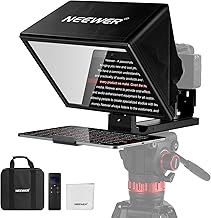
After testing dozens of prompters across streaming rigs and presentation setups, the NEEWER Basics X12B 12-inch Teleprompter is our best overall pick for its no-assembly design, Bluetooth remote, and broad tablet compatibility, while the FEELWORLD TP16 takes the runner-up spot for creators who need a larger 16-inch display with horizontal and vertical orientation options.
Choosing the right teleprompter is harder than it looks. Streamers, educators, and presenters must juggle screen size, device compatibility, glass quality, and portability—often without clear guidance on which specs actually matter at the desk versus on the road. This guide cuts through the noise with hands-on context for five standout models, a quick comparison table, and buying criteria tailored to scripted streaming and live presentations.
Our top picks


As an Amazon Associate we earn from qualifying purchases at no extra cost to you. Ratings are shown as listed on Amazon.
🛒 Best Price Today on Amazon
Prime members get fast, free shipping on everything above, plus member-only deals. New members get a 30-day free trial — cancel anytime.
Quick Comparison
| Product | Best For | Standout Feature | Rating |
|---|---|---|---|
| NEEWER Basics X12B 12″ | All-around streaming & presentations | No-assembly Bluetooth design with app control | 4.6/5 |
| NEEWER X11 2-in-1 11″ | Budget-conscious creators | Built-in monitor with screen mirroring | 4.4/5 |
| FEELWORLD TP16 16″ | Professional speakers & educators | Folding frame with horizontal/vertical modes | 4.5/5 |
| Glide Gear TMP 100 12″ | Traveling creators & event presenters | Pre-assembled with included carry case | 4.5/5 |
| Desview T3 | Smartphone-first streamers | Beam-splitter glass with wide-angle support | 4.3/5 |
How to Choose a Teleprompter for Scripted Streaming and Presentations
- Screen Size & Read Distance: Match the prompter glass to your typical camera-to-eye distance; 12-inch models suit desk setups, while 14-to-16-inch units give comfortable reading at four feet or more.
- Device Compatibility: Confirm whether the unit accepts your tablet, phone, or laptop natively, and check for dedicated apps or screen-mirroring support on your operating system.
- Assembly & Portability: If you move between studios or attend events, prioritize no-assembly or folding designs that ship with a padded carry case.
- Control Options: Bluetooth remotes and companion apps let you adjust scroll speed hands-free, which is essential when you are also managing a capture card or streaming software.
- Glass Quality & Coating: Look for true beam-splitter glass rather than acrylic; anti-reflective coating keeps your camera image clean and eliminates ghosting under ring lights or key lights.
The Best Teleprompters for Scripted Streaming and Presentationss Reviewed
Best Overall: NEEWER Basics X12B 12″ Teleprompter
The X12B is the prompter we recommend to most streamers and presenters because it eliminates setup friction entirely—no assembly, a solid aluminum frame, and Bluetooth plus app control for iOS and Android. If you run a DSLR or mirrorless camera into a capture card and need reliable, distraction-free script delivery, this is the default choice.
Best Budget: NEEWER X11 2-in-1 11″ Teleprompter
At a lower price point, the X11 bundles its own 11-inch monitor with screen-mirroring support for Windows and macOS, so you never have to sacrifice a tablet. It is ideal for newer Twitch or YouTube creators who want a clean on-camera read without investing in a separate display.
Best Premium: FEELWORLD TP16 16″ Folding Teleprompter
The TP16 accommodates tablets up to 16 inches and switches between horizontal and vertical orientations, making it a natural fit for online educators, corporate presenters, and interviewers who script long-form content. The included carry case and app-based remote justify the premium for anyone presenting weekly.
Best for Traveling Creators: Glide Gear TMP 100 12″ Teleprompter
Glide Gear ships the TMP 100 fully assembled in a protective carry case, so event videographers and conference speakers can go from bag to broadcast in under a minute. The 12-inch glass handles DSLRs, tablets, and smartphones, covering virtually any on-the-go rig.
Best for Smartphone Streamers: Desview T3 Teleprompter
The Desview T3 pairs beam-splitter glass with wide-angle lens clearance, letting phone-first creators on TikTok, YouTube Shorts, or mobile live streams read scripts without vignetting. Its Bluetooth remote and compact footprint make it a smart grab-and-go option for solo content days.
Frequently Asked Questions
Do I need a dedicated tablet, or can I use my laptop with a teleprompter?
Most 12-inch and larger prompters accept laptops via screen mirroring, and the NEEWER X11 includes a built-in monitor that mirrors Windows and macOS displays directly. If your prompter only has a tablet tray, a budget iPad or Android tablet running a free teleprompter app works perfectly.
Will a teleprompter work with my existing capture card and streaming setup?
Yes. A teleprompter sits in front of your camera lens and does not interact with your capture card or encoder. You simply position your DSLR, mirrorless camera, or webcam behind the glass and route video to your PC as usual through your Elgato, AVerMedia, or similar device.
What is the ideal teleprompter size for a desk-mounted streaming setup?
For a typical 2-to-3-foot camera distance at a streaming desk, a 12-inch prompter like the NEEWER X12B or Glide Gear TMP 100 provides readable text without overwhelming your frame. Move to 14 or 16 inches only if your camera sits four feet or farther away.
Can I use these teleprompters for VR or mixed-reality content recording?
Absolutely. Because the prompter is purely optical glass in front of a lens, it works with any camera you mount behind it—whether you are recording a VR headset demo, a green-screen segment, or a standard talking-head stream. Just ensure the lens clears the glass aperture at wide angles.
Final Thoughts
For most scripted streamers and presenters, the NEEWER Basics X12B delivers the best blend of build quality, zero-assembly convenience, and cross-platform app control. If budget is the priority, the NEEWER X11 2-in-1 gets you on camera with a built-in monitor for less, and professionals who need a larger canvas should look at the FEELWORLD TP16 for its 16-inch folding design and dual-orientation flexibility. Whichever you choose, pairing your prompter with a quality capture card and a well-lit camera position will make scripted content feel effortless.





