Key takeaways
- Rubber clip suits several cable sizes
- Simple design with no extras
- Recognized brand
The best mouse bungees under $30 are the SteelSeries Mouse Bungee for a simple rubber cable clip, the Sisyphy 360g version for a heavier base, and the HOTLINEGAMES 3.0 for an esports-focused cord holder. A mouse bungee only helps if you use a wired mouse.
Every pick is compared from listing specifications: weight, base, cable fit and any extra ports as stated by the maker. Where the listing is silent, the detail is marked as not listed, so check the maker page before you buy. A bungee is a small accessory, so the real differences are weight, how the cable is held, and whether you want lights or USB ports in the base. Spend on weight first and add extras only if your desk needs the ports.
Quick Comparison
| Model | Key specs per listing | Best for |
|---|---|---|
| SteelSeries Mouse Bungee | Rubber clip for holding different cable sizes | Simple and familiar design |
| Sisyphy Mouse Bungee (360g) | Premium version, 360g, black, cord holder and cable management | Heavier base that stays put |
| HOTLINEGAMES 3.0 | Cord clip and cord management system for esports FPS, white | Competitive FPS play |
| KIWIFOTOS RGB bungee | RGB LED lighting, 2 port USB hub and 1 Type-C | Lit desks with extra ports |
| Enhance Pro bungee | 4 port USB hub, 7 LED color modes, weighted design | USB hub and lighting in one |
SteelSeries Mouse Bungee: Rubber Clip for Many Cable Sizes
Specs from the listing: Mouse bungee with a rubber clip for holding different cable sizes.
As an Amazon Associate we earn from qualifying purchases at no extra cost to you.

The SteelSeries bungee is the plain, familiar choice. The listing is short and describes a rubber clip that holds different cable sizes, which is the whole job of the product: take the cable weight and drag off the mouse so the cord does not tug during flicks. It does not list the base weight, the arm material or the type of feet, so check the maker page if those matter to you. The rubber clip suits thicker braided cables and thinner standard ones, which is a plus if you change mice. It sits near the top of this budget because of the brand name, and it works as a no-fuss pick for anyone who has never used a bungee and wants a recognizable design for their first wired setup. If you only want the basic function without lights or extra ports, this is the straightforward option. If you use more than one wired mouse across work and play, the clip adapts without any swap of parts, and the lack of electronics means there is nothing to fail or to plug in. Pairing it with a wired mouse that has a flexible cable improves the effect, since stiff cables fight any bungee. It is also an easy gift for a friend who games on a wired mouse, because there are no sizes or models to match.
Pros
- Rubber clip suits several cable sizes
- Simple design with no extras
- Recognized brand
Cons
- Base weight and materials not listed
- Costs more than generic holders
Sisyphy Gaming Mouse Bungee: 360g Premium Version
Specs from the listing: Gaming mouse bungee, mouse cord holder and cable management device, premium version, 360g, black.

Sisyphy stands out on the one number that matters most for a bungee: weight. The listing calls out a 360g premium version, and a heavy base is what keeps the unit from sliding when the cable pulls on it. A light bungee can creep across a desk mat, so extra mass is a real benefit on smooth surfaces such as glass or hard pads. The listing describes it as a mouse cord holder and cable management device in black. It does not say what the arm is made of, how the cable clips in or what the base feet are, so check those on the maker page. In the middle of this price range, it is a sensible pick for players who have had a lighter bungee shift on them. In use, the setup is simple: place it behind the pad, thread the cable through the arm and adjust the height so the cord arcs above the desk instead of dragging across it. On hard pads the weight helps most, because glass and plastic surfaces give a light bungee less grip. Measure the free space behind your pad first, since a heavier base also takes a little more room than a light clip would.
Pros
- 360g weight stays put
- Priced mid-tier
- Black finish suits most desks
Cons
- Arm and clip details not listed
- Heavy base takes more desk space
HOTLINEGAMES Mouse Bungee 3.0: Esports FPS Focus
Specs from the listing: Mouse bungee, mouse cord clip, cord management system fixer holder for esports FPS games, version 3.0, white.
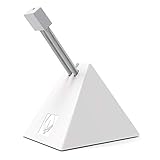
HOTLINEGAMES targets the competitive FPS crowd directly. Its listing calls the product a cord management system and a fixer holder, and this is the 3.0 version in white. The brand sells the same design in several colors, so you can match your desk. The listing does not state the weight, the arm design or the clip material, so those remain not listed, and it is worth reading the maker page before you buy if you swing a heavy mouse. It sits in the lower-middle of this budget, which makes it attractive if you want something designed for esports without paying for lights or hub ports. It is a clean pick for players who care more about cable drag than gadget features. Players who switch between mice often will appreciate a design made for general cord holding rather than one tied to a single mouse model. Match the color to the mouse so the cable stays visible against the desk during setup. Check the exact color on the listing, as the brand sells the same design in white, black, blue and pink variants.
Pros
- Made with FPS players in mind
- White version stands out on dark desks
- Mid-low cost
Cons
- Weight and materials not listed
- Several color variants can confuse buyers
KIWIFOTOS RGB Mouse Bungee: Lights and USB Ports
Specs from the listing: Mouse bungee with RGB LED lighting, mouse wire holder and cable management, 2 port USB hub and 1 Type-C.

KIWIFOTOS turns the bungee into a small hub. The listing mentions RGB LED lighting, a 2 port USB hub and one Type-C port, which means the bungee doubles as a place to plug in a USB drive or a wireless dongle. It also acts as a mouse wire holder. That makes it useful on a desk with limited ports, though it adds a second cable you must route to your PC. It is not the simplest option and the listing does not describe the base weight, the bungee arm or the data speeds of the USB ports, so those are not listed. This is the pick for people who like lit desks and want extra ports within easy reach, rather than for strict esports minimalists. If you dislike glowing desks, the lighting may be a drawback, so check whether the listing allows you to turn it off before relying on it at night. A hub bungee also works as a tidy home for a wireless mouse dongle on a wired-mouse desk. Keep the hub ports for low-power items such as dongles, and plug high-draw devices into the PC directly.
Pros
- 2 USB ports and 1 Type-C built in
- RGB lighting for lit desks
- Doubles as a wire holder
Cons
- USB port speeds not listed
- Needs its own cable to the PC
Enhance Pro Mouse Bungee: Weighted Hub With 7 LED Modes
Specs from the listing: Gaming mouse bungee and cable holder, 4 port USB hub, 7 LED color modes, weighted design, aimed at competitive esports.
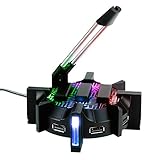
Enhance puts a 4 port USB hub and seven LED color modes into a weighted bungee. The listing calls out a weighted design for improved accuracy, which tells you the base is heavier than a basic clip. Four ports is more than the KIWIFOTOS bungee, so it suits a desk that needs several USB connections near the mouse. As with all hub bungees, one extra cable leads back to your PC. The listing does not give the actual weight, port speeds or arm material, so they are not listed. It is at the top of this budget along with the SteelSeries and is the better choice than the plain clip if you want ports and lighting without buying a separate hub for your desk. Because it combines weight and ports, it also removes the need for a stand-alone hub on the same desk, which can save a small amount of space. If you use a lot of USB accessories, the extra ports can replace a small desktop hub. Look at the maker page for the real weight and port speeds before you buy, since neither is given in the listing text.
Pros
- 4 USB ports in the base
- Weighted design listed
- 7 LED color modes
Cons
- Exact weight not listed
- Extra cable to the PC clutters the desk
How to Choose Under $30
Weight of the base
Light holders weigh well under 100g and can slide on smooth pads. Look for a stated weight near 300g or more, or a weighted design, if your mouse pad is glass or hard plastic.
Cable fit and clip type
Check what cable thickness the clip accepts. A rubber clip fits many cable sizes. A thin braided cable may slip out of a rigid clip, and a thick cable may not fit at all.
Extra ports and lights
A USB hub bungee adds a cable to the PC. If you want a tidy desk, skip hubs and pick a plain clip. If ports are scarce, a 2 or 4 port bungee saves a separate hub.
Mouse type and desk space
A bungee only helps a wired mouse. Wireless mice do not need one. Leave at least 8 to 10 inches of space behind the mouse zone so the bungee has room to hold the cable above the desk.
FAQ
Is a mouse bungee for home office use necessary?
Not usually. Office mice rarely drag the cable. A bungee helps if you use a wired mouse that snags on the desk edge or other items.
What is the best mouse bungee for small spaces?
A compact, light clip such as the SteelSeries Mouse Bungee. It needs little desk area and avoids the bulk of hub designs.
Are mouse bungees for gaming worth it?
If you use a wired mouse in fast shooters, yes. The bungee cuts cable drag and keeps the cord from catching. Wireless players can skip it.
Do mouse bungees work with wireless mice?
They do not add value. A wireless mouse has no cable to manage. A wireless dongle holder is a different accessory.
Where should I place a mouse bungee?
Put it behind the mouse, a few inches from the front of the pad, with the arm lifted slightly. Make sure it does not hit the keyboard.
Last updated: November 2026
FAQ
Is a mouse bungee for home office use necessary?
What is the best mouse bungee for small spaces?
Are mouse bungees for gaming worth it?
Do mouse bungees work with wireless mice?
Where should I place a mouse bungee?
More from Amazon
Programs that pair well with the guide above. Offers and eligibility are set by Amazon and may change.
Free shipping on eligible items, Prime Video and more. Eligible new members can start with a free trial.
Start a Prime free trialAd-free music streaming. Eligible new subscribers can start with a free trial.
Try Music Unlimited freeA Prime membership for ages 18-24 with a trial period. Eligibility is set by Amazon.
See Prime for Young AdultsAudiobooks and podcasts to listen to on the go. Eligible new members can start with a free trial.
Try Audible freeAs an Amazon Associate we earn from qualifying purchases.