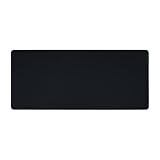
Key takeaways
- Very thin 1.5mm profile keeps the wrist low
- Square shape fits small desks
- Non-slip base listed
The best glass mousepads under $75 are the Redragon PG1ME for a slim 1.5mm profile, the llano MP001 for a larger tempered surface, and the WIYIXI XL for the most desk area. Pick glass if you want a fast, hard, easy-to-wipe surface and are ready to fit mouse skates.
Every pick below is compared from listing specifications: size, thickness, base and surface details as the maker states them. Anything the listing leaves out is marked as not listed, so check the maker page before you buy.
Quick Comparison
| Model | Key specs per listing | Best for |
|---|---|---|
| Redragon PG1ME | 11.8 x 11.8 in, 1.5mm ultra-thin, micro-etched, non-slip base | Low-profile desks and wrist comfort |
| SIROOLAC glass pad | 320mm x 360mm, 3.0mm thickness | Square footprint with a thicker slab |
| llano MP001 | 13.8 x 11.8 in (350 x 300mm), 3mm, 0.85 micron micro-etched, non-slip base | Viper or G502 style mice |
| WIYIXI XL (white) | 19.7 x 15.8 in, tempered glass, micro-etched | Wide sweeps and a full keyboard-side mat |
| GMKWTL XVX | 16.2 x 12.2 in, glass surface for precision and speed | Mid-size pad with printed designs |
| Konohan | 15.7 x 11.8 in, tempered glass, micro-etched surface | Plain white pad for office and play |
Redragon PG1ME: Slim Glass for Low-Profile Desks
Specs from the listing: 11.8 x 11.8 in, 1.5mm ultra-thin tempered glass, micro-etched surface, non-slip base, dirt and scratch resistant, low profile.
As an Amazon Associate we earn from qualifying purchases at no extra cost to you.
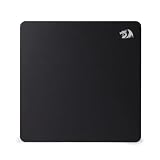
The PG1ME is the square, thin option in this group. At 1.5mm it sits flatter than the 3mm slabs below, which matters if your wrist already rests close to the desk edge. The 11.8 inch square footprint is compact, so it suits players who use short, quick flicks rather than long sweeps across the desk. The listing mentions a non-slip base and a dirt and scratch resistant surface, but it does not state the glass grade or the friction level, so check the maker page if that matters to you. Thin glass is the part to handle carefully: store it flat and keep it off the edge of a crowded desk. If you want a first glass pad from a known peripherals brand without paying the top of this tier, this is the cleanest starting point. Pair it with a compact keyboard and the setup stays tidy. Because the pad is square, left-handed and right-handed players get the same layout, and it travels in a bag more easily than a long mat.
Pros
- Very thin 1.5mm profile keeps the wrist low
- Square shape fits small desks
- Non-slip base listed
Cons
- Small area limits wide mouse swipes
- Thin glass needs careful storage
SIROOLAC Glass Gaming Mouse Pad: Thicker 3mm Slab
Specs from the listing: 320mm x 360mm, 3.0mm thickness, glass gaming pad aimed at FPS use.

SIROOLAC lists a 320 by 360mm footprint with a 3.0mm thickness, which makes it a slightly taller-than-wide pad with more heft than the slim options. The extra thickness is the main reason to choose it: it feels more like a solid plate under the mouse and is less likely to flex over an uneven desk surface. The listing is short on detail. It does not describe the etching, the base material or the glass type, so treat those as not listed. It is also a lesser-known brand, so you rely more on the dimensions and thickness than on a maker reputation. It is a sensible pick when you want a mid-priced glass pad that gives you more room than a 13 inch model without stepping up to a very large one. Because the listing names FPS play directly, it is clearly meant for aim practice rather than office browsing, so confirm the size fits your keyboard footprint before you order.
Pros
- 3.0mm thickness feels solid
- Roomy 320 x 360mm area
- Aimed squarely at FPS use
Cons
- Surface and base details not listed
- Brand has a thin listing to go on
llano MP001: Etched Glass for Popular Wireless Mice
Specs from the listing: 13.8 x 11.8 in (350 x 300mm), 3mm thick, 0.85 micron micro-etched surface, non-slip base, listed as compatible with Viper and G502 mice.

The llano MP001 puts a number on its surface, a 0.85 micron micro-etch, which is more than most glass listings offer. It is 3mm thick with a non-slip base, and the listing names the Viper and G502 as compatible mice. That does not mean other mice will fail, but it tells you what the pad is aimed at: lighter gaming mice that glide on PTFE feet. At 350 by 300mm it is a medium pad, wide enough for a keyboard-side arrangement on most desks. Glass of this kind is quick, so many people add or swap skates for control. If you want a measured surface spec and a mouse-matching note, this is the most informative listing in the group. Players with heavier office mice should still check feet condition, since glass shows up worn skates quickly. It is a good fit for a desk that already has a wrist rest or a compact keyboard beside it.
Pros
- Surface roughness is stated
- 3mm slab with non-slip base
- Medium 350 x 300mm area
Cons
- Mouse compatibility note is narrow
- Glass is fast and takes getting used to
WIYIXI XL White: Biggest Glass Surface Here
Specs from the listing: XL 19.7 x 15.8 in, tempered glass, micro-etched ultra-smooth surface, listed for esports use, white finish.

At 19.7 by 15.8 inches, this WIYIXI XL has the largest glass area in the set, and it is the one to look at if low-sensitivity players need room for full arm swings. The listing describes tempered glass with a micro-etched surface and a white finish, which shows dust and marks differently from black. It does not give the thickness or the base type, so those are not listed. Size is the trade-off: a pad this big takes most of the space in front of a keyboard on a narrow desk, and glass of that area is heavier than a small pad. For wide desks and arm-aim players it is the sensible glass pick below this budget ceiling. If you sit close to the monitor, remember that a pad nearly 20 inches wide can push your keyboard sideways, so plan your layout before you commit.
Pros
- Largest glass area in the group
- Micro-etched tempered glass
- White finish is easy to wipe
Cons
- Needs a wide desk
- Thickness and base not listed
GMKWTL XVX Glass Mouse Pad: Mid-Size With Designs
Specs from the listing: 16.2 x 12.2 in, special glass surface for improved precision and speed, black spider web design.
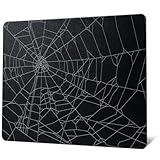
The XVX pad lists a 16.2 by 12.2 inch size, a good middle ground between compact squares and the XL slab above. Its selling point is the printed design, here a black spider web, with other patterns available from the same maker as separate listings. The listing claims improved precision and speed from a special glass surface, though it does not give the glass thickness, the etch figure or the base, so those stay not listed. Printed artwork is a style choice rather than a performance feature, and it is worth confirming how the print wears over time on the maker page. For a pad that doubles as desk decoration, and sits in the lower half of this budget, it is a reasonable choice. Check the colour and pattern on the exact listing, since the same maker sells several variants and the specs match across them. A mid-size glass pad also works as a stable base for a small desk mat setup.
Pros
- 16.2 x 12.2 in mid-size area
- Several designs from the same maker
- Priced well inside the tier
Cons
- Thickness and etch not listed
- Printed design wear is unknown
Konohan Gaming Glass Mouse Pad: Plain White for Office and Play
Specs from the listing: 15.7 x 11.8 in, white tempered glass, micro-etched surface, listed for gaming, office and laptop use.

Konohan keeps things plain: a 15.7 by 11.8 inch white tempered glass pad with a micro-etched surface, listed for gaming, office and laptop use. That mix of uses makes it the natural pick for a shared desk where the same pad serves a work mouse and a gaming mouse. The white finish looks clean next to light desks, but it also shows grime, so plan to wipe it with a microfiber cloth. The listing does not give the thickness, base material or surface figure, so those are not listed. It is the lowest cost entry here, so it makes sense as a trial pad if you have never used glass and want to find out whether the hard feel suits you before spending toward the ceiling. Because it is marketed for laptop use too, it also works on a side table or couch desk, where a plain hard surface is better than a soft fabric pad that can ripple.
Pros
- Simple white glass for mixed use
- 15.7 x 11.8 in fits most desks
- Low-cost way to try glass
Cons
- Thickness and base not listed
- White shows marks quickly
How to Choose Under $75
Pad size against your desk
Measure the space between your keyboard and the desk edge. Under about 12 inches of depth, pick a compact pad such as 11.8 x 11.8. At 16 inches or more, a 16 to 20 inch wide glass mat becomes comfortable for low-sensitivity play.
Thickness and weight
Listings that state thickness show 1.5mm to 3mm. Thin glass sits lower under the wrist but needs more care. Pick 3mm if the pad will stay in one spot and you want it to feel solid.
Surface and mouse feet
Glass is fast and hard. Soft, rounded PTFE skates glide best, and old worn feet can feel scratchy. Plan to fit fresh skates, and check that the pad listing says micro-etched so the sensor tracks reliably.
Base and desk safety
A non-slip base keeps the pad still on laminate or wood. Pads without a base listed should be checked on the maker page, because a sliding glass plate is more annoying than a sliding cloth pad.
FAQ
Are glass mousepads for home office use worth it?
Yes, if you want a hard, wipeable surface and a precise feel. They suit tidy desks. Expect a faster, harder glide than cloth, and keep a spare set of mouse feet.
What are the best glass mousepads for small spaces?
Compact squares such as the 11.8 x 11.8 in Redragon or the 13.8 x 11.8 in llano. They leave room for a keyboard and need little desk depth.
Are glass mousepads for gaming too fast for beginners?
They can feel fast at first. Most players adjust in a few days. If control suffers, try slower mouse feet or a lower sensitivity setting.
How do I clean a glass mousepad?
Wipe with a microfiber cloth and a little water or glass cleaner. Dry it fully and avoid sharp tools. Greasy fingerprints are the usual culprit for slow glide.
Do glass mousepads damage mouse feet?
They wear feet faster than cloth. Rounded PTFE skates handle glass well, and you should replace them when edges turn rough or the glide gets noisy.
Last updated: November 2026
FAQ
Are glass mousepads for home office use worth it?
What are the best glass mousepads for small spaces?
Are glass mousepads for gaming too fast for beginners?
How do I clean a glass mousepad?
Do glass mousepads damage mouse feet?
More from Amazon
Programs that pair well with the guide above. Offers and eligibility are set by Amazon and may change.
Free shipping on eligible items, Prime Video and more. Eligible new members can start with a free trial.
Start a Prime free trialAd-free music streaming. Eligible new subscribers can start with a free trial.
Try Music Unlimited freeA Prime membership for ages 18-24 with a trial period. Eligibility is set by Amazon.
See Prime for Young AdultsAudiobooks and podcasts to listen to on the go. Eligible new members can start with a free trial.
Try Audible freeAs an Amazon Associate we earn from qualifying purchases.