Our Short List of 3
- Link: https://www.amazon.com/dp/B07VMM5LKH

- Link: https://www.amazon.com/dp/B07YN82X3B

- Link: https://www.amazon.com/dp/B0CQPMCBDL
All 4 Picks at a Glance
| Product | Specs | Action |
|---|---|---|
| 2. Glorious Model O- (Minus) |
| Check price on Amazon |
| 3. Logitech G203 Lightsync |
| Check price on Amazon |
| 4. HyperX Pulsefire Haste 2 Mini |
| Check price on Amazon |
 5. Razer Cobra |
| Check price on Amazon |
Key takeaways
- Find the best mini gaming mouse for small hands: compact, lightweight picks with strong sensors, comfortable grips, and wired or wireless options.
Disclosure: As an Amazon Associate, we earn from qualifying purchases.
Finding the best mini gaming mouse is mostly about fit. A mouse that is too long, too wide, or too heavy can make aiming feel slow and tiring, especially during long sessions. A compact mouse can feel like an extension of the hand. It moves with less effort, it is easier to lift and reposition, and it leaves more room on the desk for wide movements.
The best mini gaming mouse is not simply the smallest mouse on the shelf. It also needs a sensor that tracks cleanly, buttons that feel consistent, a shape that suits the hand, and a weight that does not drag during fast flicks. Some players want a wired mouse with no battery to think about. Others want wireless freedom and a cable only for charging. Some want a symmetrical shape, while others prefer a right-handed shape with a gentle curve for the palm.
How to Choose the Best Mini Gaming Mouse
Size and dimensions
Most mini gaming mice measure between about 116 mm and 120 mm long. That is short enough for many small and medium hands to reach the scroll wheel and the main buttons without stretching, and it suits fingertip players who control the mouse with the fingertips alone. Width matters just as much. A width near 53 mm to 63 mm keeps the sides within easy reach of the thumb and the ring finger, which helps with lifting the mouse. A lower profile, around 36 mm to 38 mm, suits claw and fingertip grips, because the palm stays clear of the shell and the fingers do most of the work.
Weight
The mice in this guide weigh between 58 g and 85 g, excluding the cable on wired models. A lighter mouse is easier to start, stop, and lift, which helps in fast-paced games where the aim needs to change direction quickly. A mouse around 58 g to 61 g feels almost weightless and suits players who make large, fast swipes. A mouse around 85 g still feels light compared with many office mice, and the extra mass can feel more planted and steady for slower, controlled movements. Fast shooters reward low weight and quick lifts, while slower strategy games place less demand on weight, so comfort may matter more there.
Sensor and DPI
The sensor decides how accurately the mouse turns hand movement into cursor movement. DPI, also written as CPI, is the sensitivity setting. Most players use a setting far below the maximum, often between 400 and 3,200 DPI, so a very high ceiling is not a requirement for most people. What matters more is that the sensor tracks cleanly at the chosen setting, with no unwanted acceleration or jitter. Tracking speed, measured in IPS, and maximum acceleration, measured in G, describe how fast the mouse can move before tracking breaks down. Values such as 300 IPS and 35G are ample for most players, while 650 IPS and 50G give more headroom for very fast swipes. A polling rate of 1,000 Hz means the mouse reports its position to the computer 1,000 times per second, and that is the standard for the mice in this guide.
Grip styles for small hands
A palm grip places most of the palm on the shell, with the fingers resting flat on the buttons. It is the most relaxed grip for long sessions, but it needs a mouse long enough to support the palm. On a mini mouse, a palm grip works best for smaller hands, roughly under 17 cm.
A claw grip arches the fingers, with the palm resting lightly on the back of the mouse and the fingertips pressing the buttons. This grip gives a good mix of control and speed, and it suits many mini mice well. A fingertip grip touches the mouse only with the fingertips, with the palm held clear of the shell. It gives the most freedom of movement and the fastest flicks, and it suits the smallest mice best. Many players switch between grips during a session, and a symmetrical shape is a good choice for them, because it does not force the hand into one position.
Wired or wireless, buttons, and shell
Wired mini mice are simple, with no battery to charge and no wireless receiver to manage, and modern cables are light and flexible, so they drag far less than older braided cables. Wireless mini mice use a 2.4 GHz receiver for low-latency gaming, and many also support Bluetooth for a laptop or a second device. The main advantage is freedom of movement, with no cable pulling on the mouse during a flick. The wireless model in this guide still weighs only 59 g and is rated for up to 100 hours of battery life, and it can be used in wired mode while charging.
Most mice in this guide have six programmable buttons: left click, right click, middle click, two side buttons, and a DPI button. Optical switches actuate with light and a short travel, while mechanical switches have a more traditional click feel. A solid shell is easy to clean, while a honeycomb shell is lighter with more airflow. All of the mice in this guide use PTFE feet or a similar low-friction material.
Comparison Table
| Product | Key specs | Best for |
|---|---|---|
| Razer Viper Mini | 61 g, 118.3 x 53.5 x 38.3 mm, 8,500 DPI optical sensor, wired, 6 buttons | Fingertip and claw grips, fast shooters |
| Glorious Model O- (Minus) | 58 g, 120 x 63 x 36 mm, 12,000 DPI Pixart PMW3360 sensor, wired, 6 buttons | Lightest feel, honeycomb shell, claw grip |
| Logitech G203 Lightsync | 85 g, 116.6 x 62.15 x 38.2 mm, 8,000 DPI optical sensor, wired, 6 buttons | Simple setup, everyday gaming, solid shell |
| HyperX Pulsefire Haste 2 Mini | 59 g, 116.6 x 61.9 x 36.5 mm, 26,000 DPI HyperX 26K sensor, wireless, 6 buttons | Wireless play, small hands, long battery life |
| Razer Cobra | 58 g, 119.6 x 62.5 x 38.1 mm, 8,500 DPI optical sensor, wired, 6 buttons | Lightweight wired play, Gen-3 optical switches |
1. Razer Viper Mini
The Razer Viper Mini is a wired, ambidextrous mouse that weighs 61 g, excluding the cable, and measures 118.3 mm long, 53.5 mm wide, and 38.3 mm high. That short length and narrow width make it a natural fit for fingertip and claw grips, especially for hands that find wider mice hard to lift cleanly.
- Link: https://www.amazon.com/dp/B084W6W9WB
The sensor is a true 8,500 DPI optical sensor, based on the PixArt PAW3359, with tracking up to 300 IPS and 35G maximum acceleration. DPI presets of 400, 800, 1,600, 3,200, and 6,400 DPI are stored in the on-board memory, and the polling rate is 1,000 Hz. Those numbers are enough for competitive play at the sensitivity settings most players actually use.
The Viper Mini uses Razer Optical Mouse Switches, rated for 50 million clicks, with an actuation speed of 0.2 ms. The click feel is light and crisp, which suits rapid clicking in shooters. There are six programmable buttons, including two side buttons on the left side. The solid shell has no honeycomb cutouts, so the surface is smooth and easy to wipe clean. Chroma RGB lighting runs along the underside, and the 1.8 m Razer Speedflex cable is designed to flex easily and reduce drag. The mouse feet are PTFE, so it glides smoothly on a cloth mousepad.
2. Glorious Model O- (Minus)
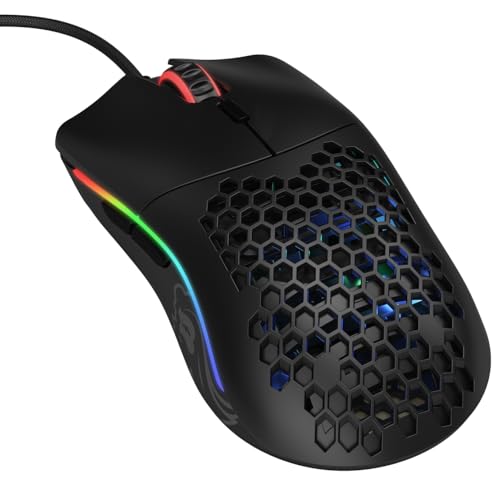
The Glorious Model O- (Minus), often written as Model O Minus, is the lightest wired mouse in this guide at 58 g in the matte black version. It measures 120 mm long, 63 mm wide, and 36 mm high. The honeycomb shell is the defining feature: the top and sides are covered in small hexagonal cutouts that reduce weight and let air reach the palm.
The sensor is the Pixart PMW3360 optical sensor, with sensitivity up to 12,000 DPI. Tracking speed is rated at 250 IPS and maximum acceleration at 50G, with a lift-off distance of less than 0.7 mm. That low lift-off distance means the sensor stops tracking quickly when the mouse is lifted, which helps when repositioning the mouse during a game. The polling rate is 1,000 Hz, and the DPI range runs from 400 to 12,000 DPI.
The Model O- (Minus) has six programmable buttons and uses Omron switches for the main clicks. The cable is a 2 m flexible cable with a USB Type-A connection, and the mouse uses Glorious Core software for button remapping, DPI settings, and RGB lighting control. RGB lighting runs along the sides of the shell, and the matte black finish gives the mouse a clean look when the lighting is off. The glossy version weighs 59 g, a single gram more. The matte version is the one listed here, with ASIN B07VMM5LKH.
3. Logitech G203 Lightsync
The Logitech G203 Lightsync is the most straightforward mouse in this guide. It is a wired, symmetrical mouse that weighs 85 g and measures 116.6 mm long, 62.15 mm wide, and 38.2 mm high. At 116.6 mm, it is the shortest mouse in this guide by length, which makes it easy to reach the buttons and the scroll wheel with smaller hands. The extra weight gives it a more planted feel, which some players prefer for slower, more deliberate aiming.
The sensor is a gaming-grade optical sensor with sensitivity from 200 to 8,000 DPI, and the polling rate is 1,000 Hz. That is the lowest maximum DPI in this guide, but it is still far above the sensitivity most players use in practice. A setting of 800, 1,600, or 3,200 DPI is common for desktop gaming, and the G203 covers all of those settings with room to spare.
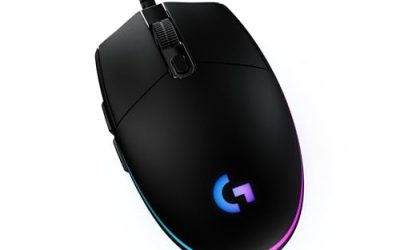
There are six programmable buttons, including two side buttons, and the buttons can be remapped through Logitech G Hub software. On-board memory stores one profile, so the button assignments and DPI settings travel with the mouse to another computer. The LIGHTSYNC RGB lighting runs along the side of the mouse and around the Logitech G logo. The cable is 2.1 m long, the longest in this guide, and the solid shell has no cutouts, so it is easy to clean and feels smooth under the palm.
4. HyperX Pulsefire Haste 2 Mini
The HyperX Pulsefire Haste 2 Mini is the only wireless mouse in this guide, and it is also the most advanced on sensor strength. It weighs 59 g and measures 116.6 mm long, 61.9 mm wide, and 36.5 mm high. HyperX describes it as 16 percent smaller than the full-size Pulsefire Haste 2 Wireless, and the compact shell is aimed squarely at gamers with smaller hands.
The sensor is the HyperX 26K Sensor, with native sensitivity up to 26,000 DPI, tracking speed up to 650 IPS, and acceleration up to 50G. DPI presets are 400, 800, 1,600, and 3,200 DPI, and up to five sensitivity settings can be saved and cycled with the DPI button. The polling rate is up to 1,000 Hz. Those are the strongest sensor numbers in this guide, giving the most headroom for very fast movements and high-sensitivity play.
Connectivity is dual wireless: 2.4 GHz wireless through a USB receiver for gaming, and Bluetooth 5.1 for use with a laptop or a second device. The mouse can also be used in wired mode while charging, using the included USB-C to USB-A cable. Battery life is rated for up to 100 hours on a full charge, from a 370 mAh lithium-ion polymer battery.
There are six programmable buttons, with HyperX Switches rated for up to 100 million clicks. The mouse has per-LED RGB lighting on the scroll wheel, and the lighting, button assignments, and DPI settings can be adjusted through HyperX NGENUITY software. The solid upper shell keeps the weight down to 59 g without honeycomb cutouts, and PTFE skates help the mouse glide smoothly. The box also includes HyperX Grips, the USB-C cable, the wireless dongle, and a USB extension adapter.
5. Razer Cobra
The Razer Cobra is a wired, right-handed symmetrical mouse that weighs 58 g and measures 119.6 mm long, 62.5 mm wide, and 38.1 mm high. It shares the same 58 g weight as the Glorious Model O- (Minus), making it one of the lightest mice in this guide, but it uses a solid shell rather than a honeycomb shell. That gives it a smooth, clean surface that is easy to keep clean while still feeling very light in the hand.
The sensor is the Razer 8,500 DPI Optical Sensor, with tracking up to 300 IPS and 35G maximum acceleration. DPI can be adjusted in 50 DPI increments, which makes it easy to fine-tune the sensitivity to an exact setting. The polling rate is 1,000 Hz, and the sensor tracks cleanly at the sensitivity settings most players use.
The Cobra uses Razer Optical Mouse Switches Gen-3, rated for 90 million clicks, with an actuation speed of 0.2 ms. That is a higher click rating than the Viper Mini, and the Gen-3 switches feel crisp and consistent. There are six programmable buttons, including two side buttons, and one on-board memory profile stores the settings. Chroma RGB lighting runs along the underside of the mouse, with an illuminated Razer logo on the palm rest. The cable is a 1.8 m Razer Speedflex cable, and the mouse feet are 100 percent PTFE, covering the front, the rear, and a ring around the sensor.
Which One to Pick
Choose the Razer Viper Mini if the hand is small and the grip is fingertip or claw. Its narrow 53.5 mm width and 61 g weight make it easy to lift and flick, and the solid shell is easy to keep clean. It is a focused wired mouse for fast shooters.
Choose the Glorious Model O- (Minus) if the lowest possible wired weight matters most. At 58 g with a honeycomb shell, it feels almost weightless, and the Pixart PMW3360 sensor with 12,000 DPI gives more sensitivity headroom than the Viper Mini. It suits claw and fingertip grips.
Choose the Logitech G203 Lightsync if simplicity matters most. It is the shortest mouse in this guide, it has a solid shell and a classic symmetrical shape, and it works well for gaming and everyday computer use. The 85 g weight feels more planted than the ultralight models, which some players prefer for controlled aiming.
Choose the HyperX Pulsefire Haste 2 Mini if wireless freedom matters most. It is the only wireless mouse in this guide, with 2.4 GHz and Bluetooth connectivity, up to 100 hours of battery life, and the strongest sensor in the group at 26,000 DPI. At 59 g, it is nearly as light as the lightest wired models, so there is little weight penalty for going wireless.
Choose the Razer Cobra if a very light wired mouse with a solid shell and newer switches matters most. At 58 g, it matches the Model O- (Minus) on weight, but the solid shell is easier to clean and the Gen-3 optical switches are rated for 90 million clicks. The 50 DPI adjustment steps make it easy to dial in an exact sensitivity setting.
Frequently Asked Questions
What size counts as a mini gaming mouse?
A mini gaming mouse is usually shorter than a full-size mouse, with a length around 116 mm to 120 mm, a width around 53 mm to 63 mm, and a weight under about 85 g.
Is a mini gaming mouse good for small hands?
Yes, a mini gaming mouse is often a good choice for small hands, because the shorter length and narrower width let the fingers reach the buttons and the scroll wheel without stretching. A palm grip works well for hands under about 17 cm, while a claw or fingertip grip works well for hands up to about 18.5 cm.
How much DPI do I need in a mini gaming mouse?
Most players use a DPI setting between 400 and 3,200, so a maximum DPI of 8,000 is already more than enough for everyday gaming. Higher maximum DPI, such as 12,000 or 26,000, gives more headroom for very high sensitivity settings, but it does not make the mouse more accurate at normal settings.
Should I choose a wired or wireless mini gaming mouse?
A wired mini gaming mouse is simple, with no battery to charge and no receiver to manage, and modern flexible cables drag far less than older cables. It is a good choice for a fixed desk setup. A wireless mini gaming mouse gives freedom of movement with no cable pulling on the mouse, and many models can also be used in wired mode while charging.
FAQ
What size counts as a mini gaming mouse?
Is a mini gaming mouse good for small hands?
How much DPI do I need in a mini gaming mouse?
Should I choose a wired or wireless mini gaming mouse?
More from Amazon
Programs that pair well with the guide above. Offers and eligibility are set by Amazon and may change.
Free shipping on eligible items, Prime Video and more. Eligible new members can start with a free trial.
Start a Prime free trialAd-free music streaming. Eligible new subscribers can start with a free trial.
Try Music Unlimited freeA Prime membership for ages 18-24 with a trial period. Eligibility is set by Amazon.
See Prime for Young AdultsAudiobooks and podcasts to listen to on the go. Eligible new members can start with a free trial.
Try Audible freeAs an Amazon Associate we earn from qualifying purchases.