Key takeaways
- A graphic drawing tablet buying decision comes down to one question that most listings blur: do you want to draw on a blank pad while watching your.
A graphic drawing tablet buying decision comes down to one question that most listings blur: do you want to draw on a blank pad while watching your monitor, or draw directly on a display under the pen? The first style is cheaper and tougher, but it asks your hand and eye to learn a new coordination habit that usually takes a week or two to settle. The second feels natural from the first stroke, yet it costs more and ties up a good chunk of desk.
This guide is for beginners, students, teachers who annotate lessons, rhythm-game players who want a pen for aiming, and hobbyists stepping up from a mouse. Every pick below was sorted by the active area, pen technology, shortcut keys, and operating system support stated in its listing title, so you can match the hardware to your desk and your software before spending anything. Seven models made the cut, from a palm-sized pad to a laminated pen display.
Quick Picks
Our top picks






As an Amazon Associate we earn from qualifying purchases at no extra cost to you.
| Product | Best for | Key spec from the listing |
|---|---|---|
| Wacom Intuos Small | Brand-name entry pad | Battery-free pen, 4 ExpressKeys, Mac, Windows and Chrome |
| HUION Inspiroy H1060P | Large workspace on a budget | 10 x 6.25 in, 12+16 hot keys, 8192 levels |
| GAOMON M10K | Students and teachers | 10×6 area, touch ring, 10 keys |
| XPPen Deco 01 V3 | Cross-platform artists | 10×6, 16K battery-free stylus, 8 keys |
| XPPen Artist 13.3 Pro V2 | Drawing directly on a screen | Full-laminated, 123% sRGB, anti-glare |
| HUION H420X | Rhythm games and tiny desks | 4.17×2.6 in, 8192 levels |
| GAOMON S620 | Travel and light sketching | 6.5×4 in, ultra-slim, 4 hot keys |
How to Choose
Active area versus desk space
Active area is the part of the surface that maps to your screen. A 10×6 inch pad gives full arm movement for illustration and suits a 24 inch monitor. An 8×5 inch pad is a fair midpoint, while pads near 6×4 inches work for signatures, photo retouching, and gaming. Measure your keyboard tray first, because a large pad needs about 14 inches of width once the bezel is included. Remember that the pad scales to your whole screen, so a small surface on a big monitor makes every hand movement jumpy. If you plan to upgrade your display later, favor a larger area now so the pad does not become the weak link. Wide pads also make left-handed setups easier, since you can rotate the layout.
Pressure levels and pen type
Nearly every listing here advertises 8192 pressure levels, and some mention a 16K pen. Beyond 4096 levels, the difference is hard to feel, so do not pay extra for the larger number alone. What matters more is a battery-free stylus, which never needs charging and weighs less in the hand. Tilt support is worth seeking if you shade with the side of the pen, and a pen that holds a clean line at low pressure helps with light sketching. Replacement nibs should be included or easy to find, because the tip wears down with regular drawing and a worn tip scratches the surface.
Shortcut keys and software support
Express keys replace trips to the keyboard for undo, brush size, and eraser. Four keys cover basics, eight suit daily illustration, and a touch ring adds quick zoom or scroll. Check the operating system line carefully: Windows and Mac are standard, while Android and Chrome support appear only on certain models and matter if you draw on a phone or Chromebook. Ignore bundled software lists unless you lack a drawing program, since free options already cover most beginner needs. Also confirm whether the driver lets you map keys per application, which saves a lot of time when you switch between a paint program and a photo editor.
Pen pad or pen display
Screen models cost noticeably more, and budget versions cut corners on color coverage, glare, and stand quality. Look for full lamination, which reduces the gap between pen tip and image, and a stated sRGB coverage figure. If you only sketch or edit photos, a screenless pad gives you more drawing area per unit of spending, and it also avoids the cable tangle that many displays need. A pad can be stored in a drawer in seconds, while a display often becomes a permanent fixture on the desk.
The 7 Best Options
Wacom Intuos Small
Wacom’s small Intuos is the familiar name for a first tablet. The listing mentions a wired connection, a bundled pen, included software, and support for Mac, Windows, and Chrome, which makes it a straightforward pick for students on school-issued laptops or anyone who wants a recognized brand without a steep learning curve.
- Strength: Battery-free pen means no charging and a light grip.
- Strength: Works with Chrome, helpful for classroom devices.
- Trade-off: Small area, with only 4 ExpressKeys, leaves little room for large strokes.
Skip it if you paint full-page illustrations or want a wide, desk-sized surface for long sessions.
HUION Inspiroy H1060P
This model gives a 10 x 6.25 inch surface with 12 keys on the tablet and 16 more virtual ones, according to the title. With 8192 levels and a battery-free stylus, it addresses digital painting, comics, and photo editing at a budget-friendly tier, and the generous area lets you draw with the whole forearm instead of the wrist alone.
- Strength: Large area suits broad arm movement and big canvases.
- Strength: Many hot keys can be assigned to common shortcuts.
- Trade-off: The big pad needs real desk space beside the keyboard.
Skip it if you travel with your tablet or use a cramped desk.
GAOMON M10K
The listing aims it at beginners, students, and teachers, with a 10×6 inch area, 10 keys, a touch ring, and 8192 pressure levels. The ring is the standout feature, handing you scroll or zoom without reaching for the mouse, which matters when you flip through documents or enlarge a drawing to fix small details.
- Strength: Touch ring speeds up zooming and brush resizing.
- Strength: Battery-free stylus keeps the pen light.
- Trade-off: The title does not mention Android or Chrome, so confirm compatibility first.
Skip it if you need to draw on a phone or tablet running a mobile system.
XPPen Deco 01 V3
XPPen lists a 10×6 inch tablet with a 16K battery-free stylus and 8 keys, supporting Mac, PC, and Android. The mention of teaching and osu! hints at its dual role for lessons and rhythm gaming, so one pad can serve a classroom in the morning and a game session at night. Its key count is modest, which keeps the layout easy to learn for a first-time user.
- Strength: Android support extends it beyond desktop use.
- Strength: Eight keys cover most shortcut needs.
- Trade-off: The 16K figure is a marketing spec; the feel differs little from 8192 levels.
Skip it if you want a touch ring or dial for scrolling.
XPPen Artist 13.3 Pro V2
This is the only screen model on the list, with a full-laminated, anti-glare panel quoted at 123% sRGB, 8 keys, and Mac, PC, and Android support. Drawing directly on the image removes the hand-eye adjustment, and the color figure points toward illustration and animation work where hue accuracy matters.
- Strength: Laminated display places the pen tip close to the line.
- Strength: Wide color coverage helps with illustration and animation.
- Trade-off: Sits in a higher cost tier than screenless pads and needs cables and a stand.
Skip it if you want the cheapest entry point or a minimal desk footprint.
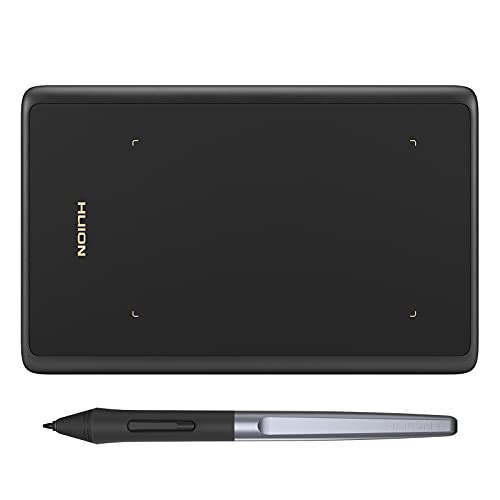
HUION H420X
A palm-sized pad measuring 4.17×2.6 inches, with 8192 levels and a battery-free stylus. The title points to osu! and design work, and its footprint is small enough to sit beside a mouse pad or slip into a laptop bag, making it the least demanding model on this list.
- Strength: Tiny size fits crowded desks and rhythm-game setups.
- Strength: Entry-level cost tier lowers the barrier to trying a pen.
- Trade-off: The surface is too small for detailed art.
Skip it if you plan to draw anything larger than signatures, quick notes, or game input.
GAOMON S620
Measuring 6.5×4 inches and billed as ultra-slim and portable, this pad carries 4 hot keys and 8192 levels with a battery-free stylus. The listing targets beginners, students, and creators, and the middle-ground size gives enough room for sketching and photo masks without taking over the desk.
- Strength: Thin body slides into a backpack.
- Strength: Moderate area supports sketching and photo edits.
- Trade-off: Four keys limit shortcut customization.
Skip it if you work on a large monitor and need sweeping strokes.
Which One Fits Your Situation
You teach online and annotate slides
The GAOMON M10K suits this, since the listing names teachers and the touch ring makes scrolling documents quick during a lesson. The 10×6 inch area also leaves plenty of room to write out equations by hand, and ten keys can be mapped to pen, highlighter, and page-turn actions.
You want to draw on the image itself
Go with the XPPen Artist 13.3 Pro V2. It is the only option here with a display, so there is no coordination learning period, and the laminated panel is made for illustration work. Keep in mind that it needs more desk room and cabling than any pad on this list.
Your desk is small and you play rhythm games
The HUION H420X fits beside a keyboard, and its 4.17×2.6 inch surface keeps wrist travel short, which is what many osu! players look for. If you also want to sketch occasionally, the GAOMON S620 offers a bit more area while staying portable.
You need a first pad for school work on a Chromebook
Choose the Wacom Intuos Small, since Chrome support is stated in the listing and the setup is simple enough for a class device. Teachers who share a computer between several people will appreciate the wired connection, which avoids pairing steps.
Common Mistakes
- Buying a screenless pad without expecting a short adjustment period for hand-eye coordination.
- Paying for a higher pressure number when 8192 levels already exceed what most hands can distinguish.
- Ignoring the operating system line and finding out later that the driver does not support your device.
- Choosing a tiny pad for illustration, then fighting to fit a full canvas into a few inches.
- Skipping a measurement of desk space, especially for the large 10×6 inch models.
Related guides
- Logitech G Pro X Superlight 2 Vs Razer Viper V3 Pro
- Motherboard Io Panel And Back Connectors Explained
- How To Record Your Computer Screen With Audio
Frequently Asked Questions
Do I need a computer for these tablets?
Yes, every model in this list connects to a computer or, where the listing says so, to an Android device. None of them are standalone. Confirm the connection type and operating system before ordering.
Is a battery-free pen better?
For most buyers, yes. It never needs charging, stays lighter, and removes one source of mid-session interruptions. All seven picks here list a battery-free stylus or pen.
What size should a beginner pick?
Around 10×6 inches is a comfortable starting size for a standard desk. If space is tight, 6.5×4 inches still works for sketching and photo retouching, though large illustrations will feel cramped.
Are pen displays worth the extra cost in 2026?
If you draw mainly illustration or animation and dislike looking at a separate monitor, a laminated display shortens the learning curve. For notes, signatures, or editing, a pad provides more area for the same budget tier.
FAQ
Do I need a computer for these tablets?
Is a battery-free pen better?
What size should a beginner pick?
Are pen displays worth the extra cost in 2026?
More from Amazon
Programs that pair well with the guide above. Offers and eligibility are set by Amazon and may change.
Free shipping on eligible items, Prime Video and more. Eligible new members can start with a free trial.
Start a Prime free trialAd-free music streaming. Eligible new subscribers can start with a free trial.
Try Music Unlimited freeA Prime membership for ages 18-24 with a trial period. Eligibility is set by Amazon.
See Prime for Young AdultsAudiobooks and podcasts to listen to on the go. Eligible new members can start with a free trial.
Try Audible freeAs an Amazon Associate we earn from qualifying purchases.