Our Short List of 3
All 4 Picks at a Glance
| Product | Specs | Action |
|---|---|---|
 1. Logitech G203 LIGHTSYNC | Check price on Amazon | |
 2. Razer DeathAdder Essential | Check price on Amazon | |
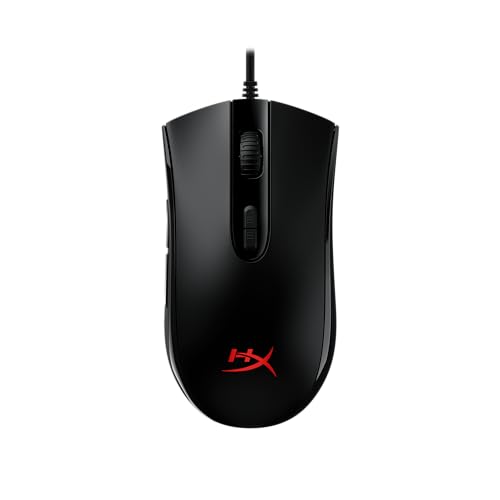 4. HyperX Pulsefire Core | Check price on Amazon | |
 5. Redragon M808 Storm | Check price on Amazon |
Our Top Picks
- Razer DeathAdder Essential Ergonomic Wired Gaming Mouse5.01 x 2.86 x 1.69 inches0.3 poundsCheck on Amazon
Disclosure: As an Amazon Associate, we earn from qualifying purchases.
Finding the best lightweight gaming mouse under 30 is one of the smartest upgrades a PC gamer on a tight budget can make. A lighter mouse moves faster across the pad, puts less strain on the wrist during long sessions, and makes small aiming corrections feel more natural. The good news is that the entry-level budget class is no longer filled with slow, clumsy office mice dressed up with a gaming label. Several well-known peripheral brands now sell genuinely capable gaming mice in this class, with optical sensors, adjustable sensitivity, programmable buttons, and polling rates that were once reserved for far more expensive hardware.
The challenge is knowing which one fits your hand, your grip, and the games you play. A mouse that feels perfect for a palm-grip player with large hands can feel awkward for a fingertip-grip player with small hands, and a featherweight shell means little if the sensor cannot keep up with fast flicks.
Every mouse in this guide is a wired gaming mouse from a recognised gaming brand. Wired models dominate this budget class for a simple reason: a cable costs less to build than a wireless receiver and a battery, so more of the manufacturing budget goes into the sensor, the switches, and the shell. A wired connection also removes battery anxiety entirely, and the cables on the models below are light and flexible enough that they rarely drag or snag during play.
How to Choose a Lightweight Gaming Mouse
Before comparing individual models, it helps to understand the handful of specifications that separate a good budget gaming mouse from a mediocre one. Manufacturers publish these numbers on every product page, and they are worth reading before you buy.
Weight in Grams
Weight is the headline specification for this guide, and it is measured in grams. Most gaming mice in the entry-level budget class weigh between 77 and 96 grams. At the light end, a 77-gram mouse feels almost effortless to lift and reposition, which suits fast-paced shooters where you lift the mouse often. At the heavier end, a 96-gram mouse still feels light compared with older gaming mice that weighed well over 100 grams, and some players prefer the extra substance because it feels more planted and controlled.
There is no single correct weight. Players who favour low sensitivity settings and large sweeping arm movements often prefer the lightest mouse they can find, because every gram adds up over hundreds of movements. Players who favour high sensitivity settings and small wrist movements may barely notice a difference of ten grams. As a rough guide, anything under 90 grams counts as light in this class, and anything under 80 grams counts as genuinely ultralight for the money.
Sensor and DPI
The sensor is the optical eye underneath the mouse, and it determines how accurately your physical movement becomes cursor movement on screen. Every mouse in this guide uses an optical sensor, which is the standard for gaming because it tracks reliably on most mouse pads.
DPI, or dots per inch, describes how far the cursor moves for each inch you move the mouse. A higher maximum DPI means the sensor can be set to a more sensitive level, but the maximum number is not a quality score on its own. Most players use somewhere between 400 and 3,200 DPI, depending on their game and sensitivity preferences, so a mouse with a maximum of 6,200 DPI is already far beyond what most people will ever set. What matters more is that the sensor tracks accurately at the DPI you actually use, without smoothing, acceleration, or angle snapping that changes your aim in ways you did not ask for.
The mice in this guide use sensors rated from 6,200 DPI up to 12,400 DPI at the top end, which gives you plenty of headroom to find a comfortable setting. Each mouse also lets you switch between several DPI levels, either with a dedicated button or through the brand’s software, so you can use a lower setting for precise aiming and a higher setting for fast menu navigation.
Polling Rate
Polling rate measures how often the mouse reports its position to your computer, expressed in hertz. A polling rate of 1,000 Hz means the mouse reports its position one thousand times per second, which translates to a one-millisecond response time. Most gaming mice in this class run at a 1,000 Hz polling rate, and that is the figure to look for.
Shape and Grip Style
Shape is the most personal specification of all, and it is the one that causes the most returns. Gaming mice generally fall into two broad shape families. Symmetrical, or ambidextrous, mice have a neutral shape that suits claw and fingertip grips. Ergonomic right-handed mice have a sculpted curve that fills the palm and supports the thumb, which suits palm-grip players and anyone with larger hands.
Your grip style matters as much as your hand size. Palm-grip players rest their whole hand on the mouse and need a longer, taller body. Claw-grip players arch their fingers and need a mouse that supports the fingertips without forcing the palm down. Fingertip-grip players touch the mouse only with their fingertips and need a short, light body that can be moved with small finger movements. If you know your grip style, start with the mice below whose shape matches it.
Cable and Build
Build quality matters too. Look for mechanical switches under the main buttons, which give a crisp, consistent click and are usually rated for millions of clicks. The mice below carry switch ratings from 10 million clicks up to 60 million clicks. Rubberised side grips, textured scroll wheels, and low-friction feet on the underside are also worth noting, because they affect how the mouse feels and glides during long sessions.
Buttons and Software
Extra buttons are useful, but only if they are placed where your thumb and fingers can reach them without stretching. The mice in this guide have between five and seven programmable buttons, which is enough for the essentials: left and right click, a clickable scroll wheel, two thumb buttons, and a DPI switch.
Each brand also offers free software for customising the mouse. The software lets you remap buttons, adjust DPI levels, set the polling rate, and customise the lighting. Some mice store your settings in on-board memory, which means your configuration travels with the mouse when you plug it into a different computer.
Comparison Table
| Product | Key specs | Best for |
|---|---|---|
| Logitech G203 LIGHTSYNC | 85 g, up to 8,000 DPI, 6 programmable buttons, LIGHTSYNC RGB | All-round play and RGB lighting |
| Razer DeathAdder Essential | 96 g, up to 6,400 DPI, 5 programmable buttons, ergonomic right-handed shape | Palm grip and larger hands |
| SteelSeries Rival 3 | 77 g, up to 8,500 DPI, 6 programmable buttons, TrueMove Core sensor | Competitive shooters and fast flicks |
| HyperX Pulsefire Core | 87 g, up to 6,200 DPI, 7 programmable buttons, Pixart 3327 sensor | Extra buttons and symmetrical comfort |
| Redragon M808 Storm | 85 g, up to 12,400 DPI, 7 programmable buttons, honeycomb shell | Maximum DPI range and airflow |
1. Logitech G203 LIGHTSYNC
Link: https://www.amazon.com/dp/B07YN82X3B
The Logitech G203 LIGHTSYNC is the most balanced mouse in this guide, and it is an easy first recommendation for anyone who is unsure where to start. It weighs 85 grams, which sits right in the middle of the lightweight range, and its symmetrical shape works for claw and fingertip grips as well as for palm-grip players with small to medium hands.
The sensor is a Logitech optical sensor rated up to 8,000 DPI, which is more than enough for any common sensitivity setting. Logitech pairs it with a 1,000 Hz polling rate, so the cursor updates quickly and consistently during fast movement. The main buttons use mechanical switches with a crisp, tactile click, and the scroll wheel has a light, notched feel that makes weapon switching easy to control.
LIGHTSYNC RGB is the feature that gives this mouse its name. A light strip runs along the side of the mouse and the Logitech G logo on the palm glows in step with it, and both can be customised through the Logitech G HUB software. The software also lets you remap the six programmable buttons, set up to five DPI levels, and store your settings in the on-board memory. The lighting can be set to a single steady colour if you prefer a quieter look, or turned off entirely.
2. Razer DeathAdder Essential
Link: https://www.amazon.com/dp/B094PS5RZQ
The Razer DeathAdder Essential is the heaviest mouse in this guide at 96 grams, and it is included because weight is not the only thing that matters. What this mouse offers in return is one of the most comfortable ergonomic shapes ever made for gaming. The right-handed sculpted body fills the palm, supports the thumb on a rubberised side grip, and gives large-handed players a mouse that finally feels like it was designed for them.
The optical sensor is rated up to 6,400 DPI, with a maximum tracking speed of 220 inches per second and acceleration handling up to 30 G, according to the manufacturer specification. Those figures are more than enough for the vast majority of players, and the sensor tracks cleanly at the DPI levels most people actually use. The polling rate reaches 1,000 Hz, so responsiveness is on par with the lighter mice in this guide.
Razer fits the DeathAdder Essential with five programmable buttons, including two thumb buttons that sit exactly where a resting thumb expects them. The mechanical switches under the main buttons are rated for up to 10 million clicks, and the scroll wheel is rubberised and textured for a secure grip. Lighting is limited to a single-colour green glow on the scroll wheel and the Razer logo, which keeps the look simple and understated.
This is the mouse to choose if you play with a palm grip, have medium to large hands, or find symmetrical mice uncomfortable after an hour of play. The extra weight is the trade-off, but for players who value comfort above all else, the ergonomic shape is worth it.
3. SteelSeries Rival 3
Link: https://www.amazon.com/dp/B08176SM7C
The SteelSeries Rival 3 is the lightest wired mouse in this guide at 77 grams, and it is the strongest pick for competitive shooters. The symmetrical shape is compact and low, which suits claw and fingertip grips, and the light shell makes fast flicks and quick repositioning feel almost effortless.
The TrueMove Core optical sensor is rated up to 8,500 DPI, with true one-to-one tracking and a maximum speed of 300 inches per second. One-to-one tracking means the cursor moves exactly in step with your hand, without prediction or smoothing that could interfere with muscle memory. The polling rate reaches 1,000 Hz, and the sensor is paired with a dedicated DPI switch behind the scroll wheel so you can change sensitivity mid-game without opening software.
SteelSeries fits the Rival 3 with six programmable buttons, including two side buttons and the DPI switch, and the split-trigger design on the main buttons separates the left and right clicks so each one actuates cleanly and consistently. The mechanical switches are rated for up to 60 million clicks, which is the highest durability rating in this guide. Three-zone RGB lighting runs through the mouse and can be customised through the SteelSeries Engine software, which also handles button remapping, DPI levels, and on-board memory.
4. HyperX Pulsefire Core
Link: https://www.amazon.com/dp/B07H3GFJJ2
The HyperX Pulsefire Core is the button-rich option in this guide, with seven programmable buttons in a symmetrical body that weighs 87 grams. The extra buttons make it a good choice for players who like to bind actions such as melee attacks, ability casts, or push-to-talk to the mouse itself, and for anyone who plays a mix of shooters and multiplayer games where extra inputs are genuinely useful.
The Pixart 3327 optical sensor is rated up to 6,200 DPI, which covers every sensitivity setting most players will use, and the polling rate reaches 1,000 Hz. The sensor tracks reliably on cloth pads, and the DPI can be adjusted through the HyperX NGENUITY software or cycled with the DPI button on top of the mouse. The main switches are rated for up to 20 million clicks, which is a solid durability figure for this class.
Comfort is a quiet strength of the Pulsefire Core. The symmetrical shape suits palm, claw, and fingertip grips for small to medium hands, and the side grips are textured to keep the mouse secure during fast movements. The braided cable is light and flexible, and the large skates on the underside give the mouse a smooth, controlled glide. RGB lighting runs along the side of the mouse and can be customised through the NGENUITY software, alongside button assignments and DPI levels.
5. Redragon M808 Storm
Link: https://www.amazon.com/dp/B089Q7KX8F
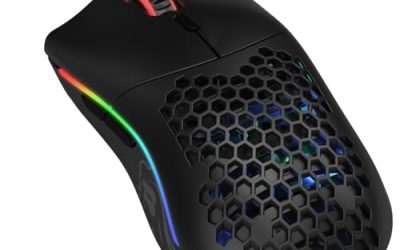
The Redragon M808 Storm is the most distinctive mouse in this guide, and the easiest to recognise at a glance. Its honeycomb shell is drilled with a pattern of holes that reduces weight and lets air flow through the body, which helps keep the palm cooler during long sessions. Despite the open shell, the M808 Storm weighs 85 grams, putting it in the same lightweight band as the Logitech G203.
The optical sensor is rated up to 12,400 DPI, which is the highest maximum DPI in this guide. As with the other mice here, the maximum figure matters less than the fact that it gives you a wide range of sensitivity settings to choose from, and the sensor tracks cleanly across that range. The polling rate reaches 1,000 Hz, and the mouse offers seven programmable buttons, including two side buttons and a DPI switch.
The honeycomb design also gives the M808 Storm a distinctive look, especially with the RGB lighting glowing through the shell and along the sides. The lighting can be customised through the Redragon software, which also handles button remapping and DPI settings. The cable is a super-light braided cord that is designed to flex easily and stay out of the way, which matters more than usual on a mouse this light, because a stiff cable would be noticeable.
Which One to Pick
The right choice depends on your hand, your grip, and the games you play most, so here is a short decision guide.
If you want the safest all-round choice, pick the Logitech G203 LIGHTSYNC. Its 85-gram weight, symmetrical shape, and 8,000 DPI sensor suit the widest range of players, and the RGB lighting and on-board memory make it easy to live with.
If you have large hands or play with a palm grip, pick the Razer DeathAdder Essential. It is the heaviest mouse here at 96 grams, but its ergonomic shape is the most comfortable in the guide for long sessions, and the rubberised side grips keep it secure.
If you play competitive shooters and want the lightest mouse possible, pick the SteelSeries Rival 3. At 77 grams it is the lightest model here, its TrueMove Core sensor offers true one-to-one tracking up to 8,500 DPI, and its switches are rated for up to 60 million clicks.
If you want the most programmable buttons, pick the HyperX Pulsefire Core. Its seven buttons, symmetrical shape, and Pixart 3327 sensor make it a flexible choice for players who bind several actions to the mouse.
If you want the widest DPI range and a shell that breathes, pick the Redragon M808 Storm. Its honeycomb body, 12,400 DPI sensor, and seven programmable buttons give you the most distinctive package in this guide.
Frequently Asked Questions
What weight counts as lightweight for a gaming mouse?
In the entry-level budget class, most gaming mice weigh between 77 and 96 grams. Anything under 90 grams is generally considered light, and anything under 80 grams is considered genuinely ultralight for the money. The lightest mouse in this guide is the SteelSeries Rival 3 at 77 grams, while the heaviest is the Razer DeathAdder Essential at 96 grams.
Is a wired mouse better than a wireless mouse in this budget class?
Wired mice dominate the entry-level budget class because a cable costs less to build than a wireless receiver and a battery, so more of the manufacturing budget goes into the sensor, the switches, and the shell. A wired connection also removes battery anxiety entirely. The cables on the mice in this guide are light and flexible, so they rarely drag or snag during play.
How much DPI do I actually need?
Most players use between 400 and 3,200 DPI, depending on their game and sensitivity preferences. A mouse rated up to 6,200 DPI already offers far more headroom than most people will use, and the mice in this guide range from 6,200 DPI up to 12,400 DPI. The maximum DPI figure is not a quality score on its own. What matters more is that the sensor tracks accurately at the DPI you actually use, without smoothing or acceleration that changes your aim.
FAQ
What weight counts as lightweight for a gaming mouse?
Is a wired mouse better than a wireless mouse in this budget class?
How much DPI do I actually need?
More from Amazon
Programs that pair well with the guide above. Offers and eligibility are set by Amazon and may change.
Free shipping on eligible items, Prime Video and more. Eligible new members can start with a free trial.
Start a Prime free trialAd-free music streaming. Eligible new subscribers can start with a free trial.
Try Music Unlimited freeA Prime membership for ages 18-24 with a trial period. Eligibility is set by Amazon.
See Prime for Young AdultsAudiobooks and podcasts to listen to on the go. Eligible new members can start with a free trial.
Try Audible freeAs an Amazon Associate we earn from qualifying purchases.