Key takeaways
- Lead with the GPU: Your graphics card determines your resolution and frame rate more than anything else. At this budget, an RTX 5070 is the sweet spot for 1440p gaming, while an RTX 5060 Ti or 5060 is better suited to high-refresh 1080p.
- Avoid CPU bottlenecks: Pairing a current-gen GPU with an aging processor wastes money. A Ryzen 7 8700F, 9700X, or Intel Core Ultra 7 will comfortably feed anything in this price range; older chips like the Ryzen 7 5700X are fine for entry-level cards but will limit stronger GPUs.
- Insist on 32GB DDR5: 16GB is still playable, but modern titles, background apps, and streaming push past it regularly. DDR5 at 32GB is the new baseline for a system you want to keep for four or five years.
- Check storage capacity, not just speed: Every PC here uses NVMe SSDs, so speed is a given. Capacity is the real variable — 1TB fills up after five or six modern installs, so 2TB is worth paying for if the price gap is small.
- Factor in upgradeability and support: Look for a standard ATX case, a quality power supply with headroom, and accessible drive bays. Boutique builders often offer better internal layouts, while major brands like Alienware provide stronger warranty and service coverage.
What's inside
Shopping for a gaming desktop under $2,000 in 2026 is genuinely confusing. Spec sheets are packed with acronyms, prebuilt vendors love to pair a strong GPU with a weak CPU (or the reverse), and the same nominal budget can buy you anything from a solid 1080p machine to a legitimate 1440p high-refresh rig. The difference usually comes down to which single component the builder chose to prioritize — and whether the rest of the system can keep up with it.
This guide cuts through that. We’ve picked six prebuilt gaming PCs that land comfortably under the $2,000 ceiling, explained what each one is actually good at, and laid out the buying criteria that matter most at this price. Whether you’re targeting maxed-out 1080p at 240Hz, a smooth 1440p experience, or your first serious upgrade from a laptop, there’s a sensible option here — and we’ll tell you which ones offer the best value per dollar.
As an Amazon Associate we earn from qualifying purchases.




⚡ Save on Your Next PC — Amazon Prime
Prime members get fast free shipping on the systems above, plus early access to Prime Day & Black Friday PC deals. New members get a 30-day free trial.
Watch: Best Gaming PC Under $2000 — Video Review
How to Choose Gaming PC Under $2000
- Lead with the GPU: Your graphics card determines your resolution and frame rate more than anything else. At this budget, an RTX 5070 is the sweet spot for 1440p gaming, while an RTX 5060 Ti or 5060 is better suited to high-refresh 1080p.
- Avoid CPU bottlenecks: Pairing a current-gen GPU with an aging processor wastes money. A Ryzen 7 8700F, 9700X, or Intel Core Ultra 7 will comfortably feed anything in this price range; older chips like the Ryzen 7 5700X are fine for entry-level cards but will limit stronger GPUs.
- Insist on 32GB DDR5: 16GB is still playable, but modern titles, background apps, and streaming push past it regularly. DDR5 at 32GB is the new baseline for a system you want to keep for four or five years.
- Check storage capacity, not just speed: Every PC here uses NVMe SSDs, so speed is a given. Capacity is the real variable — 1TB fills up after five or six modern installs, so 2TB is worth paying for if the price gap is small.
- Factor in upgradeability and support: Look for a standard ATX case, a quality power supply with headroom, and accessible drive bays. Boutique builders often offer better internal layouts, while major brands like Alienware provide stronger warranty and service coverage.
The Best Picks Reviewed
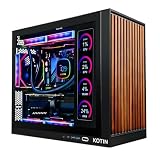
KOTIN Prebuilt Gaming PC – RTX 5070, Ryzen 7 9700X
This is the most balanced configuration on the list: a Ryzen 7 9700X paired with an RTX 5070 12GB, backed by 32GB of DDR5 and a 1TB NVMe SSD. Nothing here holds anything else back, making it our top all-around pick for 1440p gaming under $2,000.
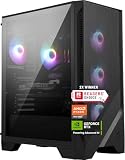
MSI Codex Z2 – R7-8700F, RTX 5070
MSI’s Codex Z2 matches the RTX 5070 and 32GB DDR5 of our top pick but doubles the storage to 2TB and includes front USB Type-C, VR readiness, and Windows 11 Home preinstalled. It’s the more polished, better-supported option if you’d rather buy from an established brand than a boutique builder.
Alienware Aurora – RTX 5070, Core Ultra 7 265F
The Aurora brings Dell’s build quality, thermal engineering, and warranty coverage to an RTX 5070 and Intel Core Ultra 7 265F pairing that handles 1440p with ease. You pay a premium for the badge and the support network, but the chassis and cooling are noticeably better than budget prebuilts.
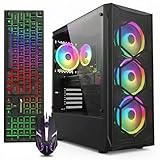
KOTIN Gaming PC – Ryzen 7 8700F, RTX 5060 Ti
Stepping down to an RTX 5060 Ti 8GB and 16GB DDR5 saves a meaningful chunk of the budget while keeping a capable Ryzen 7 8700F at the helm. This is the value play for high-refresh 1080p gamers who want room to add RAM later.
YAWYORE Gaming PC – Ryzen 7 5700X, RTX 5060
A current-generation RTX 5060 paired with the older but still competent Ryzen 7 5700X makes this a genuinely affordable entry point into modern gaming. Expect excellent 1080p performance in esports titles and solid results in AAA games with settings tuned.
Frequently Asked Questions
Is $2,000 enough for 1440p gaming in 2026?
Yes, comfortably. Any of the RTX 5070 systems here will deliver high frame rates at 1440p in most titles, often with upscaling enabled to push into high-refresh territory.
Should I buy a prebuilt or build my own?
Prebuilts have become genuinely competitive on price, and they arrive tested with a single warranty covering everything. Building your own still offers more control over parts selection, but the savings are smaller than they used to be.
Is 16GB of RAM still enough?
It’s playable today but increasingly tight. If you buy a 16GB system, budget for an additional kit within the first year — DDR5 upgrades are straightforward and inexpensive.
Do these PCs come with a monitor, keyboard, or mouse?
Generally not. Prebuilt desktops in this range almost always ship as the tower alone, so set aside additional budget for peripherals if you’re starting from scratch.
Final Thoughts
For most buyers, the KOTIN RTX 5070 / Ryzen 7 9700X offers the strongest raw value under $2,000, with no meaningful bottlenecks anywhere in the build. If brand support and extra storage matter more to you, the MSI Codex Z2 is the better-rounded package, while the Alienware Aurora is worth the premium for anyone who values warranty coverage and refined thermals over pure specs per dollar.