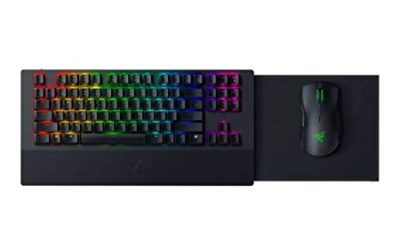
Key takeaways
- Find the best gaming mouse pad RGB for a brighter desk. Compare five light-up mats on surface, size, lighting zones, and USB features before you buy.
A gaming mouse pad with RGB lighting does two jobs at once. It gives your mouse a smooth, consistent surface to track on, and it adds a ring of color that ties a whole desk setup together. The best RGB mouse pads do both jobs well, with even lighting, a surface that suits your aim style, and a base that stays put during long sessions. The weakest ones look bright in photos but slide around, fray at the edges, or need software you will never open. This guide compares five light-up pads covering hard and cloth surfaces, compact and desk-covering sizes, and simple plug-in lighting alongside deeper software control.

As an Amazon Associate, we earn from qualifying purchases.
Quick Answer
For most desks, the Corsair MM700 RGB Extended is the best gaming mouse pad RGB, with a huge cloth surface, three-zone lighting, and two USB ports. The Razer Firefly Hard V2 suits fast aim on a hard surface, while the SteelSeries QcK Prism Cloth XL is the calm cloth pick. The HyperX Pulsefire Mat RGB XL adds touch controls, and the Razer Goliathus Chroma 3XL covers the whole desk.
How to Choose
Start with the surface, because it changes how your mouse feels every minute you play. Hard pads have a firm, micro-textured top that lets a mouse glide with very little resistance. They suit fast flicks and low-friction aiming, and they wipe clean when dust or a spill lands on them. Cloth pads have a woven top with more grip, which gives steadier control for tracking and small adjustments. They feel softer under the wrist and suit players who value stopping power over raw speed. Match the surface to the games you play most and to how much resistance you like under your hand.
Size comes next. A standard pad covers the mouse area only, which is fine if your keyboard sits directly on the desk. An extended pad slides under the keyboard as well, so the whole setup shares one level surface and the keyboard cannot snag on a pad edge. Desk-covering mats go further and hold a keyboard, a mouse, and often a headset stand or a drink. Measure your desk before ordering, and leave room for the cable that powers the lighting.
Lighting is the reason you are shopping for an RGB pad, so look at how the light is arranged. Edge lighting runs a glowing strip around the rim, which frames the desk and stays visible even when a keyboard covers the middle. Fully lit mats glow across the whole surface, which looks striking but can distract some players in a dark room. Count the lighting zones as well. A single zone shows one color at a time, two or three zones can show a gradient, and more zones allow waves that move across the pad. Check whether the lighting can be set from a button on the pad itself or only through software, because onboard controls are easier to adjust mid-game.
Power and ports are easy to overlook. Every RGB pad needs a USB connection for its lighting, and some also feed a built-in hub. A pad with a USB passthrough port lets you plug a mouse or headset receiver into the pad instead of reaching behind your computer, which keeps cables short and tidy. A detachable cable is a plus, because it makes the pad easier to roll up, store, or move between desks. Thickness and base grip decide whether the pad feels stable. A thicker pad, around four millimeters, cushions the wrist and hides small bumps in the desk underneath.
Software is the last factor. Brand software lets you sync the pad with a keyboard, mouse, and headset so the whole desk changes color together, and it can link lighting to in-game events. That is appealing if you already own matching gear from the same brand. If you do not, a pad with onboard memory and a touch control or button is the simpler choice, because it keeps its lighting pattern without any software running.
Razer Firefly Hard V2
The Razer Firefly Hard V2 is the pick for players who want a fast, hard surface with bright edge lighting. Its micro-textured top is built for speed, so the mouse glides with very little drag, and the hard base keeps the surface flat and even. The lighting runs around the edge in nineteen zones, which allows smooth gradients and waves that move around the rim. A built-in cable catch at the top holds the mouse cable out of the way, keeping it from dragging across the pad during wide movements. The non-slip rubber base grips the desk, and the hard surface wipes clean with a damp cloth.
This pad suits fast-paced shooters and players who like a slick, low-resistance feel. The hard top gives quick, confident flicks, and the edge lighting is bright enough to stand out without washing out the desk. The compact footprint fits smaller desks, and Chroma software lets the lighting sync with other Razer gear. The trade-offs are a cold, firm feel under a bare wrist, less cushioning than a thick cloth pad, and a keyboard that sits beside the pad rather than on it. Players who like a soft, controlled glide may find the surface too slick. Even so, for pure speed and a clean, bright frame of light, this is a strong choice.
Specs
| Feature | Detail |
|---|---|
| Surface | Micro-textured hard surface |
| Lighting | 19-zone Chroma RGB edge lighting |
| Cable management | Built-in cable catch |
| Base | Non-slip rubber base |
| Model number | RZ02-03020100-R3U1 |
| Software | Razer Chroma RGB |
Corsair MM700 RGB Extended
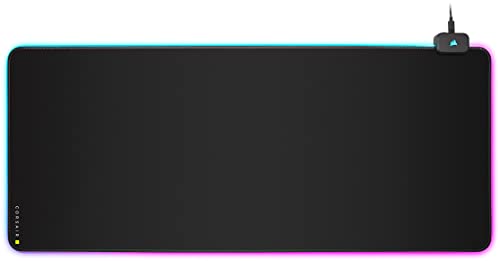
The Corsair MM700 RGB Extended is the desk-covering pick, with a cloth surface large enough to hold a full keyboard and a mouse with room to spare. Its woven top is tuned for a balance of glide and control, so the mouse moves freely without feeling loose. The lighting runs around the whole perimeter in three zones, giving a 360-degree glow that frames the entire setup. Twelve onboard lighting profiles can be switched from the pad itself, so the lighting works without software running in the background. Two USB ports sit on the pad, turning it into a small hub for a mouse receiver or a headset dongle.
At 930 by 400 millimeters, it covers a wide stretch of desk, and the four-millimeter thickness cushions the wrist and smooths over small imperfections in the desk surface. The rubber base is thick and textured, so the pad stays in place even during aggressive mouse movements. The stitched edges resist fraying, which matters on a pad this large. This pad fits players who want one surface for everything and dislike a keyboard sitting half on and half off a small mat. It also suits streamers who want a tidy, unified desk. For a big, comfortable, well-lit workspace, the MM700 RGB Extended is hard to beat.
Specs
| Feature | Detail |
|---|---|
| Surface | Glide-enhanced woven cloth |
| Size | 930 by 400 millimeters |
| Thickness | 4 millimeters |
| Lighting | 360-degree three-zone RGB |
| Lighting profiles | 12 onboard profiles |
| USB ports | Two-port USB hub |
| Base | Textured rubber base |
| Model number | CH-9417070-WW |
SteelSeries QcK Prism Cloth XL
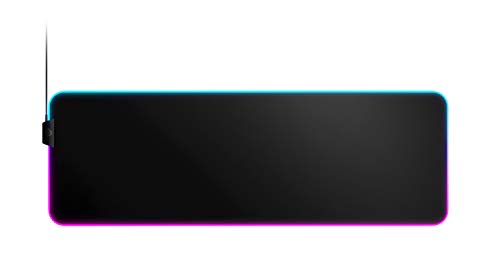
The SteelSeries QcK Prism Cloth XL is the calm, reliable cloth pick in this list. It uses the micro-woven cloth surface that made the QcK line a long-running favorite, with a fine weave that gives smooth tracking and steady control. The RGB lighting is split into two zones, one on each side, which keeps the look simple and avoids the busy rainbow effect that some pads produce. The lighting can react to in-game events and chat notifications through SteelSeries software, so the pad can flash or change color when something happens in a match. The XL size covers a wide area, so a full-size keyboard and a mouse fit comfortably on one surface.
At 900 by 300 millimeters and four millimeters thick, this pad has a generous footprint without taking over the whole desk. The thickness gives the wrist a soft landing, and the non-slip rubber base keeps the pad anchored during play. The cloth surface is consistent from edge to edge, which helps aim feel the same wherever the mouse sits. The pad rolls up for transport, which makes it easy to take to a friend’s house or a local event. This pad suits players who already like the QcK feel and want lighting added without changing the surface they trust. Players who want many lighting zones or a built-in USB hub should look elsewhere, since this pad keeps its feature list short.
Specs
| Feature | Detail |
|---|---|
| Surface | Micro-woven cloth |
| Size | 900 by 300 millimeters |
| Thickness | 4 millimeters |
| Lighting | Two-zone RGB illumination |
| Event lighting | Real-time event lighting |
| Base | Non-slip rubber base |
| Model number | 63826 |
HyperX Pulsefire Mat RGB XL

The HyperX Pulsefire Mat RGB XL stands out for its touch controls and onboard memory, which make it easy to change the lighting without opening any software. A touch sensor on the pad switches between three saved lighting profiles, so the look can be changed with a tap. The two RGB zones run along the edges, and the lighting can be tuned through HyperX software for players who want deeper control. The rollable cloth surface is smooth and precise, with anti-fray stitching around the edge to keep the border tidy over time. The anti-slip rubber base holds the pad in place, and the XL size gives plenty of room for low-sensitivity aiming.
At 900 by 420 millimeters, this is one of the widest cloth pads in the list, which suits players who use large mouse movements and need space for both the keyboard and the mouse. The three-millimeter thickness keeps the pad close to the desk while still giving a little cushion under the wrist. The onboard memory is the key feature for players who move between computers, since the saved lighting profiles travel with the pad and do not depend on software being installed. The touch sensor is simple to use once its position is learned. Buyers who want a hard surface or a built-in USB hub will not find those features here, and the touch sensor can be triggered by accident until its location becomes familiar.
Specs
| Feature | Detail |
|---|---|
| Surface | Rollable cloth surface |
| Size | 900 by 420 millimeters |
| Thickness | 3 millimeters |
| Lighting | Two RGB lighting zones |
| Profiles | Three onboard lighting profiles |
| Controls | Touch sensor profile switching |
| Base | Anti-slip rubber base |
| Model number | 4S7T2AA |
Razer Goliathus Chroma 3XL

The Razer Goliathus Chroma 3XL is the largest pad in this guide, built to cover an entire desk with one glowing cloth surface. At 1200 by 550 millimeters, it holds a keyboard, a mouse, and still leaves room for a headset stand, a notebook, or a drink. The micro-textured cloth surface balances control and speed, so the mouse tracks smoothly without sliding too freely. Chroma RGB lighting runs around the edge and can show a huge range of colors and patterns, with dynamic in-game effects that react to play. The non-slip rubber base keeps the big sheet of cloth anchored, and the pad sits flat under a keyboard without raising it awkwardly.
A pad this size changes how a desk feels. There are no edges under the keyboard or the wrist, so the whole workspace becomes one continuous surface. That suits players with low mouse sensitivity who need long, sweeping movements, and it suits creators who want a clean, unified desk for work and play. The lighting frames the entire desk, which looks striking in a dark room and ties the setup together. The cloth surface is soft under the wrist and quiet during fast movements, which makes it comfortable for long sessions. The main trade-off is the footprint: this pad needs a deep, wide desk, and it is best left in place rather than moved often.
Specs
| Feature | Detail |
|---|---|
| Surface | Micro-textured cloth surface |
| Size | 1200 by 550 millimeters |
| Thickness | 4 millimeters |
| Lighting | Chroma RGB edge lighting |
| Colors | 16.8 million colors |
| Base | Non-slip rubber base |
| Model number | RZ02-02500700-R3U1 |
Who Should Skip It
An RGB mouse pad is not the right buy for every desk. If you play only on a laptop in different places, the extra USB cable and the need for a flat surface make a light-up pad more hassle than it is worth, and a plain travel pad will serve you better. If your desk is already crowded, a large RGB pad may not fit, and a standard pad will leave more room for the gear you already own. Players who game in a bright room may also find the lighting hard to see during the day, so the glow adds little.
Budget is another reason to skip. A good RGB pad costs more than a plain pad of the same size, and the extra money buys lighting rather than a better tracking surface. If your current pad still tracks well, the upgrade is mostly cosmetic, and the money may be better spent on a mouse or a headset. Finally, skip an RGB pad if you are sensitive to light while playing. Bright edge lighting in a dark room can pull the eye away from the screen, and if you share a room with someone who sleeps nearby, the glow may bother them too. In those cases, a non-lit pad is the kinder and more practical choice.
FAQ
Do RGB mouse pads need software to light up?
No. Most RGB pads light up as soon as they are plugged into a USB port, and many have a button or touch sensor for changing colors without software. Software adds extra effects, syncing with other gear, and in-game lighting, but the basic glow works on its own. Pads with onboard memory keep their saved lighting even when moved to another computer.
Does RGB lighting affect mouse tracking?
No. The lighting sits around the edge of the pad, while the tracking surface stays flat and even. A good RGB pad tracks just as well as a plain pad of the same surface type. If tracking feels off, the cause is usually dust, a worn surface, or a sensor setting, not the lighting.
How do I clean an RGB mouse pad?
Unplug the pad first, then wipe the surface with a slightly damp cloth and a small amount of mild soap. Hard pads wipe clean easily, while cloth pads may need a gentle scrub and time to air dry flat. Never soak a pad with lighting, and never put it in a washing machine, since water can damage the electronics and the USB connection.
What size RGB mouse pad should I buy?
Choose a size that fits your desk and your aiming style. A standard pad suits small desks and high-sensitivity players. An extended pad fits a keyboard and mouse on one surface, which suits most setups. A desk-covering mat suits low-sensitivity players and big desks, but measure first, since a pad that hangs over the edge will curl and wear quickly.
Final Verdict
The best gaming mouse pad RGB for most buyers is the Corsair MM700 RGB Extended, because it covers the keyboard and mouse on one comfortable cloth surface, offers three-zone lighting with onboard profiles, and adds two USB ports for a tidy desk. Players who want speed above all should choose the Razer Firefly Hard V2, with its fast hard surface and nineteen-zone edge lighting, while the SteelSeries QcK Prism Cloth XL is the best simple cloth option with calm two-zone lighting. The HyperX Pulsefire Mat RGB XL suits buyers who want touch controls and saved profiles without software, and the Razer Goliathus Chroma 3XL is the pick for the biggest desks, where full coverage and a bright Chroma frame matter most. Measure your desk, pick the surface that matches your aim, and choose the lighting style you will still enjoy months from now.
Product and ASIN Reference
| Product | ASIN |
|---|---|
| Razer Firefly Hard V2 | B07ZDWHL4M |
| Corsair MM700 RGB Extended | B08QSNNV5H |
| SteelSeries QcK Prism Cloth XL | B07HYXKWS9 |
| HyperX Pulsefire Mat RGB XL | B09DFBG9C1 |
| Razer Goliathus Chroma 3XL | B0B7L3V3NT |
FAQ
Do RGB mouse pads need software to light up?
Does RGB lighting affect mouse tracking?
How do I clean an RGB mouse pad?
What size RGB mouse pad should I buy?
More from Amazon
Programs that pair well with the guide above. Offers and eligibility are set by Amazon and may change.
Free shipping on eligible items, Prime Video and more. Eligible new members can start with a free trial.
Start a Prime free trialAd-free music streaming. Eligible new subscribers can start with a free trial.
Try Music Unlimited freeA Prime membership for ages 18-24 with a trial period. Eligibility is set by Amazon.
See Prime for Young AdultsAudiobooks and podcasts to listen to on the go. Eligible new members can start with a free trial.
Try Audible freeAs an Amazon Associate we earn from qualifying purchases.