Our Top Picks
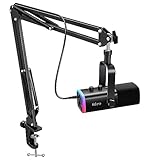
 TONOR Dynamic Gaming Microphone XLR/USB Mic with AI16.7''L x 5.4''W x 4.5''H1.9 poundsCheck on Amazon


The best USB microphones under $50 are plug-in condenser and dynamic mics that skip the audio interface, and the FIFINE AmpliGame A6V is the top pick here for its quick mute, gain control and RGB lighting on a tripod stand. The other five picks cover boom arms, podcast stands and simple desk mics.
This guide is compared from listing specifications, so every spec below comes from the listing text and anything missing is marked “not listed”. Check the maker page before you buy if a detail matters to you, such as cable length or compatibility with your console.
What to Expect From a Budget USB Mic
A USB microphone at this budget replaces a laptop or headset mic with something that sits closer to your mouth and has a proper capsule. The main gains are a clearer voice, less tinny sound and controls you can reach without opening a settings menu. What you should not expect is the detail of a studio setup. At this level, the differences between models come down to pickup pattern, on-body controls, what is in the box and how much room noise gets through. The comparison table below lines those up, and each pick after it explains the trade-offs in plain terms. Where a listing does not state a spec, this page says so rather than guessing.
Quick Comparison
| Model | Key specs per listing | Best for |
|---|---|---|
| FIFINE AmpliGame A6V | USB condenser, RGB, quick mute, gain control, tripod stand | Gaming and streaming desks |
| TONOR Dynamic Gaming Mic | XLR/USB dynamic, AI noise cancellation, boom arm set, tap mute, 3.5mm jack | Noisy rooms and arm-mounted setups |
| ZealSound Podcast Mic | USB, noise cancellation, gain and volume dials, mute, monitoring | Podcasts and voice-overs |
| FIFINE K669B | USB condenser, metal body, cardioid, Mac and Windows | Meetings and home office calls |
| COCONISE Gaming Mic | USB condenser, quick mute, pop filter, RGB | Small desks and first mics |
| TONOR Podcast Mic | USB cardioid condenser, tripod stand, pop filter | Simple voice recording |
FIFINE AmpliGame A6V: Best Overall
Spec line: USB gaming microphone, condenser capsule, RGB lighting, quick mute, gain control, tripod stand (per listing).
As an Amazon Associate we earn from qualifying purchases at no extra cost to you.

The A6V puts the controls most people reach for in the middle of a call or stream right on the mic: a quick mute and a gain control. That matters because a mic that is too hot is the most common reason a budget USB mic sounds harsh. The tripod stand keeps it on the desk, though the listing does not say whether it can be moved to a boom arm, so check the mount thread on the maker page if you plan to. As a condenser it will pick up keyboard clatter and fan noise more readily than a dynamic mic, so it suits a reasonably quiet room. The RGB lighting is cosmetic and will not matter for voice quality, but it fits a gaming desk with matching lighting.
- Pros: quick mute, gain control, includes a stand
- Pros: RGB styling suits gaming desks
- Pros: plug-and-play USB design
- Cons: condenser pickup can catch room noise
- Cons: polar pattern is not listed in the title text
TONOR Dynamic Gaming Microphone: Best for Noisy Rooms
Spec line: XLR/USB dynamic microphone, AI noise cancellation, boom arm set, RGB, tap mute, 3.5mm jack, gain control (per listing).

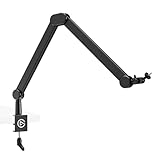
Dynamic microphones tend to reject background sound better than condensers, which is why this one is the pick for a shared room or a desk next to a loud PC. The listing mentions both XLR and USB outputs, so you can start on USB and move to an audio interface later without replacing the mic. The boom arm set lifts the mic off the desk, which reduces keyboard thump through the stand. The 3.5mm jack is listed for monitoring, but check the maker page for exactly how it works. “AI noise cancellation” is a listing claim, and results will vary, so treat it as an extra rather than a substitute for good placement close to your mouth.
- Pros: dynamic design suits noisy rooms
- Pros: boom arm set is included
- Pros: USB now, XLR option later
- Cons: dynamic mics need to be close to your mouth
- Cons: noise cancellation behavior is not detailed in the listing
ZealSound Podcast Microphone: Best for Podcasts and Voice-Overs
Spec line: USB podcast microphone for PC, noise cancellation, gain and volume adjustment, mute button, monitoring (per listing).

This listing leans on practical controls: gain, volume, mute and monitoring, which are the four things a podcaster adjusts while recording. Having them on the mic means you do not dig through system settings mid-session. Real-time monitoring is useful because you hear yourself without latency from the computer, though the exact output type is not listed in the visible text. The listing calls out noise cancellation, but as with any budget mic, a quiet room does more than a feature name. It is a good fit if you record voice-overs or interviews more than you stream games, and you want a no-fuss desk mic.
- Pros: gain, volume and mute controls on the mic
- Pros: monitoring for hearing yourself live
- Pros: aimed at podcast and voice work
- Cons: stand and cable details are not listed in the visible text
- Cons: no boom arm mentioned
FIFINE K669B: Best for Meetings and Home Office Calls
Spec line: USB condenser microphone, metal body, cardioid pattern, works with Mac OS and Windows (per listing).

The K669B is the plainest mic here, and that is its appeal. A cardioid pattern means it favors sound from the front, which suits one person talking to a laptop on a call. The metal build is listed, so it should feel more solid than a plastic mic. The listing names vocals, meetings and laptop use, and it is stated to work with both Mac OS and Windows, which makes it a safe choice for a mixed household. It has no listed RGB or boom arm, so it works best as a quiet desk mic. If you want gain control on the body, look at the A6V instead.
- Pros: cardioid pattern for single-voice calls
- Pros: metal construction per the listing
- Pros: Mac and Windows support is stated
- Cons: no RGB or boom arm listed
- Cons: controls on the body are not listed
COCONISE Gaming Microphone: Best for Small Desks
Spec line: USB condenser microphone, quick mute, pop filter, RGB lighting, for podcasts, videos and streaming (per listing).
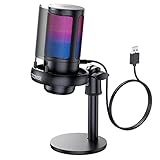
COCONISE sits at the low end of this price range and bundles a pop filter and quick mute, which are the two extras that make the biggest difference on a first mic. The pop filter softens plosives, the harsh “p” and “b” bursts that make a budget mic sound amateur. The mute button is useful when you join a team call from a crowded desk. It is the one to consider if your desk is small, since the listing describes a compact condenser with a stand, but dimensions are not listed, so check the maker page if space is tight. Brand recognition is lower than FIFINE or TONOR, so read the return terms.
- Pros: pop filter included
- Pros: quick mute for calls
- Pros: RGB fits gaming setups
- Cons: dimensions are not listed
- Cons: less established brand than FIFINE or TONOR
TONOR Podcast Microphone: Best Simple Voice Recorder
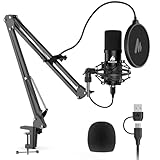
Spec line: USB computer mic, cardioid condenser, tripod stand, pop filter, for podcasts (per listing).

This is a straightforward desk setup: a cardioid condenser mic, a tripod stand and a pop filter. It lacks the gain dial and mute button of other picks here, so you will manage levels in your operating system. That is fine for recording a voice track or taking occasional calls, but less convenient for live streaming where you need a quick mute. It is a sensible choice when you want the lowest cost in this list and mainly need a clearer voice than a laptop microphone gives. The cardioid pattern helps with focus, but it will still pick up a noisy room.
- Pros: cardioid pickup with pop filter
- Pros: tripod stand included
- Pros: simple, low-cost option
- Cons: no gain or mute controls listed
- Cons: not ideal for live streaming
How to Choose Under $50
Match the mic type to your room
Condenser mics capture detail but also room noise. Dynamic mics reject noise better but need a close mouth distance of a few inches. If your room is quiet, a condenser under $50 is fine. If you share a space or run loud fans, choose the dynamic TONOR set.
Look for on-body controls
A mute button and gain control save time on calls and streams. For gaming or streaming, treat a quick mute as a must. For recording alone, you can live without it and manage levels in software.
Check what ships in the box
A pop filter and stand are worth having. A boom arm is a bonus, since it removes desk vibration. If you have a small desk, confirm the size on the maker page, because dimensions are rarely in the listing title.
Position the mic correctly
Placement changes the result more than the model. Keep a condenser about a hand-width from your mouth, slightly off-axis to reduce plosives. Keep a dynamic mic closer, around two to four fingers. Put the mic on a stand or arm that is not touching the desk if your keyboard is loud.
USB, XLR or both
USB is the simplest. A USB/XLR mic gives you a path to an audio interface later. Under $50, most buyers are better off with USB unless they already plan to upgrade.
USB Microphones for Home Office, Small Spaces and Gaming
For a home office, the FIFINE K669B and ZealSound mic are the easiest to use with video calls. For small spaces, the COCONISE and the TONOR podcast mic keep the setup compact, though sizes are not listed. For gaming, the A6V and the dynamic TONOR set add quick mute and RGB styling, and the dynamic set is better when a mechanical keyboard sits nearby.
FAQ
Is a budget USB microphone good enough for streaming?
Yes, for most solo streamers. A quick mute, gain control and a pop filter matter more than price. Expect clear voice but not studio-grade detail.
Do I need a pop filter?
It helps with plosives, which are the harsh bursts on “p” and “b” sounds. Several picks here include one. If yours does not, you can add one later.
Condenser or dynamic for a noisy room?
Dynamic is usually better for noisy rooms because it picks up less background sound, but you must speak close to it. A condenser suits quiet rooms.
Will these work on a console?
Compatibility is not stated for consoles in the listing text. Check the maker page for PlayStation or Xbox support before buying, as many USB mics are PC and Mac only.
Can I use a USB mic with a boom arm?
Only if the mic has the right mount thread. The TONOR dynamic set lists a boom arm. For the others, check the maker page for mount compatibility.
Last updated: November 2026
FAQ
Is a budget USB microphone good enough for streaming?
Do I need a pop filter?
Condenser or dynamic for a noisy room?
Will these work on a console?
Can I use a USB mic with a boom arm?
More from Amazon
Programs that pair well with the guide above. Offers and eligibility are set by Amazon and may change.
Free shipping on eligible items, Prime Video and more. Eligible new members can start with a free trial.
Start a Prime free trialAd-free music streaming. Eligible new subscribers can start with a free trial.
Try Music Unlimited freeA Prime membership for ages 18-24 with a trial period. Eligibility is set by Amazon.
See Prime for Young AdultsAudiobooks and podcasts to listen to on the go. Eligible new members can start with a free trial.
Try Audible freeAs an Amazon Associate we earn from qualifying purchases.