Key takeaways
- Silent operation listed
- Works above or below the monitor line
- Padded clamp suits tight desk edges
The best microphone arms under $100 are the Elgato Wave Mic Arm MK.2 for a slim all-metal arm that can rise above monitors, the NEEWER MS002 for pneumatic damping, and the FIFINE BM88 for a low-profile clamp at a lower cost. Check the weight rating against your mic first.
Every pick is compared from listing specifications: reach, weight capacity, cable handling and mount details as stated by the maker. Where a figure is missing from the listing, it is marked as not listed, so check the maker page before you buy. Most of the arms here are low-profile designs, which keep the mic near your mouth while leaving the desk and the monitor view clear, and that is the main reason to buy an arm at all.
Quick Comparison
| Model | Key specs per listing | Best for |
|---|---|---|
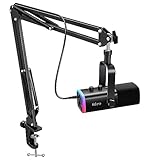
| Elgato Wave Mic Arm MK.2 | Rises above monitors or stays low profile, silent operation, slim all-metal, padded clamp for tight spaces | Silent moves and tight desks |
| Elgato Wave Mic Arm (low profile) | Sits below shoulder line, 360 degree rotation, magnetic cable channels, all-metal | Clean look in the camera frame |
| NEEWER MS002 | Low profile, pneumatic damping, 360 degrees, cable management | Heavier mics like the SM7B |
| FIFINE BM88 | Low profile, desk mount clamp, cable management, screw adapter | Streaming at lower cost |
| InnoGear boom arm | Horizontal reach 32.3 in, 3.5 lb capacity, cable management, heavy-duty | Long reach for a Blue Yeti style mic |
| Frgyee overhead arm | Adjustable height with extension riser, for SM7B, Blue Yeti, QuadCast S | Tall overhead position |
Elgato Wave Mic Arm MK.2: Silent, Slim and Flexible
Specs from the listing: Studio boom arm, rises above monitors or stays low profile, silent operation, slim all-metal design, padded clamp fits tight spaces.
As an Amazon Associate we earn from qualifying purchases at no extra cost to you.
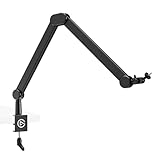
The MK.2 is the premium choice in this tier and sits close to the budget ceiling. The listing highlights silent operation, a slim all-metal design and a padded clamp that fits tight spaces, which together make it a strong pick for streamers who talk while they move the arm, and for desks where the clamp needs to squeeze beside a monitor. It can rise above monitors or sit low profile, so the same arm works for a hidden camera-friendly look or a traditional overhead position. The weight capacity and the arm length are not given in the listing text, so check the maker page against your microphone before you commit. It is the one to pick if you hate noise from a squeaky joint and want a compact, finished-looking arm. A note for small rooms: because the arm can stay low, it also keeps clear of shelves or wall decor behind the desk.
Pros
- Silent operation listed
- Works above or below the monitor line
- Padded clamp suits tight desk edges
Cons
- Weight capacity not listed in the text
- Costs the most of the six picks
Elgato Wave Mic Arm Low Profile: Stays Below the Frame
Specs from the listing: Low-profile boom arm, sits below the shoulder line, 360 degree rotation, magnetic cable channels, all-metal build, fully adjustable mount.

The original Wave Mic Arm takes a different route from the MK.2: it sits below your shoulder line and stays out of the camera frame. The listing mentions 360 degree rotation, magnetic cable channels and an all-metal build with a fully adjustable mount. Magnetic cable channels are a neat touch because they keep the mic cable from dangling and are easy to open when you swap cables. It is listed at the very top of this budget, so you pay a premium for the name and the finish. The reach and weight rating are not given in the text we have, so match them to your microphone on the maker page. This is the pick for players who value a clean on-camera look and a tidy desk above all else. If your desk has a monitor arm already, check clearance for the clamp before ordering.
Pros
- Stays below the shoulder line
- Magnetic cable channels
- All-metal build
Cons
- Sits at the budget ceiling
- Reach and weight capacity not listed
NEEWER MS002: Pneumatic Damping for Heavy Mics
Specs from the listing: Low-profile mic arm desk mount, pneumatic damping, 360 degree rotation, cable management, listed as compatible with Shure MV7, SM7B and Blue Yeti.

NEEWER lists the MS002 with pneumatic damping, which is the gas-spring style support that lets an arm hold position without drooping. That is the feature to look for if your microphone is heavy, and the listing names the Shure MV7, SM7B and Blue Yeti as compatible. The arm offers 360 degree rotation and cable management, and it carries the low-profile label, so it suits desks where the arm needs to stay compact. It does not state a weight rating in the text here, so confirm that before mounting a heavy dynamic microphone. It sits in the upper middle of this tier, costs less than the Elgato models, and gives you a more spring-style feel. It is a good fit for broadcasters with heavier gear. It makes sense for people who move the arm often, since spring-style arms tend to hold position better than friction joints.
Pros
- Pneumatic damping holds heavy mics
- Named compatibility with SM7B and MV7
- Cable management included
Cons
- Weight rating not stated in the text
- Less compact than a simple scissor arm
FIFINE BM88: Low-Profile Clamp for Streaming
Specs from the listing: Low-profile microphone boom arm stand for gaming and streaming, desk mount clamp, cable management, screw adapter, adjustable stick stand.

FIFINE sells the BM88 as a low-profile boom arm for gaming, streaming and podcasting, with a desk mount clamp, cable management and a screw adapter. It is a sensible choice if you already use a FIFINE microphone and want to stay with one brand, though the arm is not limited to FIFINE gear. Check the thread size on your mic mount against the adapter listed. The listing calls it an adjustable stick stand, so expect a simple, rigid arm rather than a spring-damped one. The weight capacity is not stated, and the overall reach is not given in the text. For lighter USB microphones on a desk with a monitor, it keeps the mic near your mouth and out of the way. It is a clear value pick at a lower cost than the NEEWER and Elgato arms. It is also a straightforward arm for a home office, where the aim is video calls rather than studio-grade recordings.
Pros
- Low profile keeps the desk clear
- Screw adapter included
- Lower cost than the premium arms
Cons
- Weight capacity not listed
- Simpler build with no damping listed
InnoGear Mic Arm: Long Horizontal Reach
Specs from the listing: Boom arm with cable management for Blue Yeti, desk mount, horizontal reach 32.3 in, 3.5 lb weight capacity, heavy-duty, extendable.

This InnoGear arm is the one with clear numbers: a 32.3 inch horizontal reach and a 3.5 pound weight capacity. That reach is generous, so you can park the clamp at the back corner of a deep desk and still pull the mic in front of you. The listing mentions cable management, a desk mount, and a heavy-duty build, with Blue Yeti and Shure microphones named as compatible. A 3.5 lb limit suits most USB condenser mics, and it is easy to compare with your microphone’s listed weight. It is not a pneumatic arm, so heavier dynamic mics are a poor match. For USB microphone users who want a straightforward arm with stated limits and mid-range cost, this is a good option. The long reach means you can keep your mic close to your mouth without crowding the keyboard.
Pros
- 32.3 in reach is stated
- 3.5 lb capacity is stated
- Cable management included
Cons
- Not a pneumatic damped arm
- Not suited to the heaviest broadcast mics
Frgyee Overhead Boom Arm: Tall Position With a Riser
Specs from the listing: Mic boom arm, adjustable height overhead microphone stand with heightened extension riser, listed for Shure SM7B, Blue Yeti, HyperX QuadCast S and other mics.

Frgyee positions this arm as an overhead stand with a heightened extension riser, so the mic can sit higher over the desk than a low-profile arm allows. That matters if you want the mic above keyboard height and out of your line of sight. The listing names the Shure SM7B, Blue Yeti and HyperX QuadCast S as compatible, which suggests it is built to handle larger microphones, though a weight rating is not given in the text. It does not claim noise-free joints or damping. The tradeoff with a tall riser is stability, so check how the clamp holds on a thin desktop. It is the right pick when height is the priority and the budget stays under the ceiling. Fit it on a thick desk edge and keep cables looped so the arm does not tug.
Pros
- Raised riser sets the mic higher
- Named for several popular mics
- Lower cost than the premium models
Cons
- Weight capacity not listed in the text
- Tall setups can wobble on thin desks
How to Choose Under $100
Weight capacity against your mic
Check your microphone weight. Light USB mics under about 1 lb suit simple arms. Mics between 1 and 3.5 lb suit arms with a stated 3.5 lb limit. A heavy dynamic mic needs a damped or spring-style arm.
Reach and desk depth
On a desk 24 inches deep or more, a 30 inch reach arm lets you clamp at the back. On a shallow desk under 20 inches, choose a compact low-profile arm to avoid hitting the monitor.
Clamp fit and desk thickness
Clamp limits differ by model, so check the listing for the allowed desk thickness and measure your desk edge, including any lip or shelf underneath that could block the clamp. Use a padded clamp on a glass or veneer surface to protect the finish.
Cable management and noise
Built-in cable channels keep cords from tapping the desk. If you speak while adjusting the arm, silent joints matter more than raw reach.
FAQ
Are microphone arms for home office worth it?
Yes. They free desk space, bring the mic near your mouth, and cut the thumps from typing. Choose a low-profile arm and keep an eye on weight capacity.
What are the best microphone arms for small spaces?
Low-profile arms with a compact clamp, such as the FIFINE BM88 or Elgato MK.2. They need little desk depth and stay under the monitor line.
Are microphone arms for gaming different from studio arms?
Mostly not. Gaming setups prefer compact low-profile designs and cable channels. Studio arms add damping for heavier mics.
How much weight can a mic arm hold?
It varies. The InnoGear listing states 3.5 lb. Where no figure is listed, check the maker page before mounting a heavier microphone.
Do I need a shock mount with a mic arm?
Not always. Many USB mics include their own. If vibration from the desk reaches the mic, add a shock mount.
Last updated: November 2026
FAQ
Are microphone arms for home office worth it?
What are the best microphone arms for small spaces?
Are microphone arms for gaming different from studio arms?
How much weight can a mic arm hold?
Do I need a shock mount with a mic arm?
More from Amazon
Programs that pair well with the guide above. Offers and eligibility are set by Amazon and may change.
Free shipping on eligible items, Prime Video and more. Eligible new members can start with a free trial.
Start a Prime free trialAd-free music streaming. Eligible new subscribers can start with a free trial.
Try Music Unlimited freeA Prime membership for ages 18-24 with a trial period. Eligibility is set by Amazon.
See Prime for Young AdultsAudiobooks and podcasts to listen to on the go. Eligible new members can start with a free trial.
Try Audible freeAs an Amazon Associate we earn from qualifying purchases.