Our Top Picks
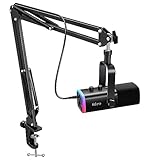
 TONOR Gaming Microphone Set with Boom Arm518.4 cubic inches16 x 6 x 5.4 inches1 poundsCheck on Amazon


The best gaming microphones under $30 are the TONOR TC310+ for a boom-arm kit with tap-mute, the MRSDY AI noise reduction mic for a feature-rich USB condenser, and the FDUCE M160 for the simplest desk-stand setup. Picks are compared from listing specifications: mute controls, gain, accessories, monitoring jacks and console support.
Every mic here is a USB condenser, so it plugs straight into a PC or console without an interface. Condensers capture detail and also room noise, so placement and gain settings matter more than any spec. Home office, small-space and gaming use are covered in the buying section and the FAQ below.
Quick Comparison
| Model | Key specs per listing | Best for |
|---|---|---|
| TONOR TC310+ | Boom arm, stand, RGB, tap mute, gain control, USB condenser | Streaming desks |
| TONOR TC310 | Desktop stand set, RGB, quick mute, volume control, 200 cm cable | Twitch and Discord chat |
| MRSDY USB Gaming Mic | AI noise reduction, mute, gain, headphone jack, RGB, pop filter, shock mount, for PS4, PS5, Mac, PC | Console and PC players |
| COCONISE Gaming Mic | USB condenser, quick mute, pop filter, RGB, for PS4, PS5, PC, laptop | Basic entry setup |
| ONIKUMA Gaming Mic | Noise cancellation, mute, boom arm, reverb adjustment, monitoring, for PC, PS4, PS5, Mac | Monitoring and effects |
| FDUCE M160 | RGB condenser, tripod stand, quick mute, gain, headphone jack, for PS5, Twitch, YouTube | Compact desk stand |
The table is quoted from the listings, and anything a listing leaves out is flagged in the pick below. At this ceiling, the difference between mics is mostly accessories and controls, not raw sound spec. Sample rate and bit depth are not given in several listings, so judge the extras: a boom arm, a pop filter, a shock mount, a mute button and a headphone jack.
TONOR TC310+
As an Amazon Associate we earn from qualifying purchases at no extra cost to you.

Spec line: USB gaming microphone set with boom arm and stand, vocal condenser, RGB, tap mute, gain control, for PC, Twitch and streaming.
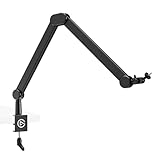
The TC310+ is the most complete kit in the group because the listing includes a boom arm and a stand, so you can mount the mic close to your mouth and keep your desk clear. Tap mute is a practical control for a match, and gain control lets you tame a loud keyboard. RGB lighting adds a gaming look. The catch is that the listing does not give sample rate or a headphone jack, so you cannot monitor your own voice from the mic body. It is a good pick if you want an arm included and care about desk space.
- Pro: boom arm and stand in the listing
- Pro: tap mute and gain control
- Pro: RGB lighting
- Con: no headphone jack listed
- Con: sample rate not listed
TONOR TC310

Spec line: TONOR TC310 gaming microphone set, PC condenser mic with RGB, desktop stand set, quick mute, volume control, 200 cm cable, for Twitch and Discord.
The TC310 is the desk-stand version of the same family. It trades the arm for a desktop stand, which is simpler to set up but puts the mic farther from your mouth, so you will need to turn the gain up and expect more room noise. Quick mute and volume control are listed, and the 200 cm cable gives a little reach for a desk with the PC on the floor. For Discord chat and casual play it is a fair choice. If you want the arm, choose the TC310+ instead, since the two come from the same family and share the RGB and mute features. The practical question is whether you would rather have a clear desk or a simple stand that sits wherever you put it.
- Pro: quick mute and volume control
- Pro: 200 cm cable length
- Pro: simple desktop stand
- Con: no arm in this version
- Con: no monitoring jack listed
MRSDY USB Gaming Microphone

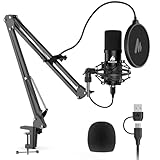
Spec line: USB condenser mic with AI noise reduction, mute, gain, headphone jack, RGB, pop filter, shock mount, for PC, PS4, PS5, Mac and podcasting.
The MRSDY has the longest feature list. It combines AI noise reduction, a headphone jack for self-monitoring, a pop filter and a shock mount, all listed in the title. The listing names PS4, PS5, Mac and PC, so it covers consoles and computers. That is a lot for the ceiling, and it makes the MRSDY a strong pick for players who play in a noisy room. The usual caveat applies to noise reduction: it is software processing, so results vary, and the listing does not describe how it works. Check the maker page for settings details before you rely on it, and keep your mouth a few centimetres from the capsule so the processing has less noise to remove in the first place.
- Pro: AI noise reduction listed
- Pro: headphone jack for monitoring
- Pro: pop filter and shock mount included
- Con: noise reduction details not given
- Con: accessory dimensions not listed
COCONISE Gaming Microphone
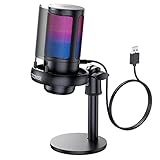
Spec line: USB condenser gaming microphone with quick mute and pop filter, RGB, for podcasts, videos and streaming, compatible with PS4, PS5, computer and laptop.
The COCONISE is a basic entry mic. The listing includes quick mute, a pop filter and RGB lighting, and it names PS4, PS5, PC and laptop compatibility. That covers the essentials for voice chat. It does not list a boom arm, a headphone jack or a gain knob, so you will adjust gain in your operating system’s sound settings. The simple design is easy to place on a desk, but you cannot monitor yourself from the mic. It suits a first mic for a console player who wants mute and a pop filter without more controls to learn.
- Pro: quick mute and pop filter
- Pro: PS4, PS5 and PC compatible
- Pro: RGB lighting
- Con: no gain knob listed
- Con: no headphone jack listed
ONIKUMA Gaming Microphone

Spec line: USB condenser mic with noise cancellation, mute, boom arm, reverb adjustment and monitoring, for streaming, podcasting, Discord, YouTube, PC, PS4, PS5 and Mac.
The ONIKUMA lists a boom arm, a mute button, noise cancellation, monitoring and a reverb adjustment. The reverb control suits streamers who like a lively voice, though most players leave it off for team chat. Monitoring lets you hear yourself, and the boom arm keeps the mic close. The downsides are that the listing does not give sample rate or build details, and effects like reverb can add latency or an artificial sound if you push them. It is a good option for a creator who wants an arm and some voice effects on a small desk.
- Pro: boom arm listed
- Pro: monitoring and mute
- Pro: reverb adjustment
- Con: effects can sound artificial
- Con: sample rate not listed
FDUCE M160

Spec line: USB gaming microphone, RGB condenser, desktop mic with tripod stand, quick mute, gain, headphone jack, for streaming, podcasting, Twitch, YouTube and PS5.
The M160 is the most compact desk-stand option. It packs a tripod stand, quick mute, gain control and a headphone jack into a small body. The listing names PS5 alongside PC streaming platforms. A tripod stand stays on the desk, so you must keep the mic close and speak across the capsule. It does not include a boom arm or a pop filter in the listing, so buy a filter if you notice breath pops. It is a tidy choice for a small desk or a console setup.
- Pro: gain, mute and headphone jack
- Pro: compact tripod stand
- Pro: PS5 named in the listing
- Con: no arm or filter listed
- Con: stand keeps mic on the desk
How to Choose Under $30
Look for mute, gain and a pop filter
Quick mute is the control you will use most. Gain control lets you set levels without software, and a pop filter reduces breath noise. The MRSDY lists all three, and the TONOR kits list mute and gain.
Gaming microphones for home office
A gaming mic works well for work calls because the mute button and gain control are quicker than digging through menus. For calls, mute and a quiet gain setting matter more than lighting. Any USB condenser with a mute button works, and noise reduction helps if your room is not quiet. Turn the RGB off if it distracts on camera.
Gaming microphones for small spaces
Choose a tripod stand model like the FDUCE M160 if desk space is tight, or a boom arm kit if you want the mic off the desk. A boom arm folds away, but check clamp thickness against your desk edge.
Gaming microphones for gaming
Console players should look for PS4 or PS5 in the listing, as the MRSDY, COCONISE and FDUCE state. A headphone jack gives zero-delay monitoring, so you hear your voice and do not shout. Keep gain low enough that a mouse click does not spike: say a normal sentence, watch the level meter in your voice app, and lower the gain until the loudest word sits just below the top of the meter. Then ask a teammate to confirm they can hear you clearly without the keyboard coming through.
A quick decision matrix
Arm included: TONOR TC310+ or ONIKUMA. Noise reduction and monitoring: MRSDY. Console starter: COCONISE. Compact tripod: FDUCE M160. Desk stand with a long cable: TONOR TC310. Match your platform first, then the extras. If two mics tie, choose the one that lists a headphone jack and a pop filter, because those are the hardest extras to add later. A worked example: a console player on a small desk who wants to hear themselves would shortlist the MRSDY and FDUCE M160, since both list a headphone jack and name PS5, then choose between noise reduction and a compact stand.
FAQ
Do these mics work on PS5?
The MRSDY, COCONISE, ONIKUMA and FDUCE listings name PS5. Confirm console steps on the maker page, since some features, like RGB or software noise reduction, may be PC-only.
What does tap mute do?
It silences the mic with a touch or button press, usually with a light showing that you are muted. It is handy for coughing or for when someone speaks to you mid-match, and it stops accidental noise from reaching your team.
Which is best for a home office?
The MRSDY, thanks to noise reduction and a headphone jack. For simple calls, any USB mic with a mute button works.
Which suits a small desk?
The FDUCE M160 uses a compact tripod stand and keeps everything in one small body. Boom arm kits like the TONOR TC310+ clear the desk entirely, but need an edge to clamp onto.
Do I need a pop filter?
It helps. A pop filter reduces the sharp bursts of air from p and b sounds. The MRSDY and COCONISE list one; for the others, a pop filter is a small, easy add that fits most desktop condenser mics and noticeably cleans up speech.
Last updated: November 2026
FAQ
Do these mics work on PS5?
What does tap mute do?
Which is best for a home office?
Which suits a small desk?
Do I need a pop filter?
More from Amazon
Programs that pair well with the guide above. Offers and eligibility are set by Amazon and may change.
Free shipping on eligible items, Prime Video and more. Eligible new members can start with a free trial.
Start a Prime free trialAd-free music streaming. Eligible new subscribers can start with a free trial.
Try Music Unlimited freeA Prime membership for ages 18-24 with a trial period. Eligibility is set by Amazon.
See Prime for Young AdultsAudiobooks and podcasts to listen to on the go. Eligible new members can start with a free trial.
Try Audible freeAs an Amazon Associate we earn from qualifying purchases.