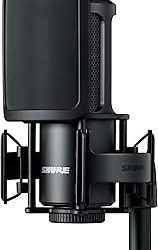
Our Top Picks


The best condenser microphones under $75 start with the MAONO A04 for a plug-and-play USB kit, the HyperX SoloCast 2 for a compact USB-C mic, and the Mackie EM-91C when you already own an XLR interface. Picks are compared from listing specifications: connection type, pickup pattern, sample rate and what comes in the box.
The first decision is USB versus XLR. A USB condenser mic plugs straight into a PC or console and needs nothing else. An XLR condenser mic sounds the same class of clear and detailed, but it needs an audio interface that supplies phantom power. Home office, small-space and gaming use are covered in the buying section and the FAQ.
Quick Comparison
| Model | Key specs per listing | Best for |
|---|---|---|
| MAONO A04 | USB, 192kHz/24-bit, cardioid, metal body, kit with accessories | All-round streaming and podcasts |
| HyperX SoloCast 2 | USB-C, 24-bit/96kHz, cardioid, tap-to-mute | Gaming desks, console and PC |
| FIFINE K669B | USB, metal cardioid, for vocals, meetings and voice-overs | Home office calls |
| MAONO PM320S | XLR cable, boom arm and pop filter included, for interface or mixer | Boom-arm setups with an interface |
| Mackie EM-91C | Large-diaphragm condenser, XLR | Vocals through an interface |
| Tascam TM-80 | Large-diaphragm condenser, XLR | Home recording on a limit |
Specs in the table are quoted from each listing, and anything a listing leaves out is marked as not listed in the pick below. The first three are USB and work on their own. The last three are XLR and need an interface with 48V phantom power, which is an extra purchase if you do not own one. That split matters more than any sample-rate number.
MAONO A04
As an Amazon Associate we earn from qualifying purchases at no extra cost to you.
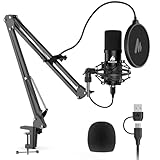
Spec line: USB condenser mic kit, 192kHz/24-bit, plug and play, cardioid, metal body, pro sound chipset, for recording, gaming, content creation and streaming.
The A04 is the most complete USB pick here because the listing describes a full kit rather than a bare mic. A cardioid pattern favors sound from the front, which helps a desk setup where the keyboard and fans sit to the sides. The 192kHz/24-bit figure is more than streaming platforms need, but it gives headroom for recording. The trade-off is that the listing does not give a headphone jack or mute button, so monitoring yourself or muting mid-stream means using software or another device. Check the maker page for the exact kit contents before you order a separate arm.
- Pro: USB plug and play
- Pro: cardioid pattern with metal body
- Pro: 192kHz/24-bit listed
- Con: mute and monitoring controls not listed
- Con: kit contents need a check on the maker page
HyperX SoloCast 2

Spec line: USB condenser gaming microphone, 24-bit/96kHz, cardioid, USB-C, tap-to-mute, PC compatible.
The SoloCast 2 is the gaming-first choice. The USB-C connector suits modern PCs and laptops, and tap-to-mute is useful when a teammate talks over you or the doorbell rings. A 96kHz rate is plenty for voice chat and streaming. It has a smaller feature list than the MAONO kit, so the listing does not mention a boom arm or a pop filter. If you stream often, plan a separate arm to keep the capsule close to your mouth. The listing says PC compatible, so confirm console support on the maker page if you play on a PlayStation or Xbox.
- Pro: USB-C connection
- Pro: tap-to-mute listed
- Pro: cardioid pickup
- Con: no arm or pop filter in the listing
- Con: console support not stated
FIFINE K669B

Spec line: USB condenser mic, metal cardioid body, for vocals, meetings, voice-overs, streaming and online meetings, Mac and Windows.
The K669B is aimed at everyday voice work rather than gaming, and that shows in the listing: meetings, voice-overs and YouTube are named alongside streaming. It works with Mac and Windows, which makes it a safe pick for a home office that mixes both. The metal body and cardioid pattern are standard for the class. The downside is the thin spec sheet: sample rate, bit depth and any mute control are not given. It also arrives without lighting or a monitoring jack in the listing, so it is a plain mic. For calls and basic recording that simplicity is a plus.
- Pro: Mac and Windows compatible
- Pro: metal cardioid build
- Pro: named for meetings and voice-overs
- Con: sample rate not listed
- Con: no mute control listed
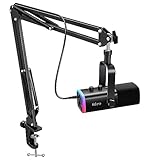
MAONO PM320S

Spec line: Condenser PC microphone with XLR cable, boom arm and pop filter; compatible with audio interface and mixer, for podcast, streaming, music and vocals.
The PM320S is a ready-to-mount XLR kit, which is handy because the listing includes the cable, a boom arm and a pop filter. That saves buying accessories one by one and gets the capsule off your desk. The catch is that it is not USB: the listing says it is compatible with an audio interface and mixer, so you must supply one that provides phantom power. Add that cost to your plan before choosing it over a USB mic. For buyers who already own an interface, it is the tidiest way to get a boom-mounted condenser.
- Pro: cable, arm and pop filter in the listing
- Pro: works with interfaces and mixers
- Pro: frees up desk space
- Con: needs a separate interface
- Con: no direct USB connection
Mackie EM-91C

Spec line: Mackie EM-Series large-diaphragm condenser microphone (EM-91C).
The EM-91C is the pick for readers who want a classic large-diaphragm condenser and already have an XLR path. The listing is brief, naming only the large diaphragm and the EM-Series family, so polar pattern, frequency range and included mount are all details to confirm on the maker page. A large diaphragm suits vocals and voice-over work in a quiet room. It will also pick up more room noise than a dynamic mic, so a treated corner or a rug and curtains help. Treat it as a mic for a home studio, not a plug-in streaming solution.
- Pro: large-diaphragm condenser capsule
- Pro: from a known pro-audio maker
- Pro: suits vocals and voice-over
- Con: needs interface and phantom power
- Con: pattern and accessories not listed
Tascam TM-80

Spec line: Tascam TM-80 large-diaphragm condenser microphone, silver.
The TM-80 is another large-diaphragm XLR option, this time from Tascam. The listing names only the capsule type and the silver finish, so cable, stand and frequency details are not given. Like the Mackie, it assumes you own an interface with phantom power. Its appeal is a simple home-recording microphone that stays under the ceiling and leaves room in the budget for the interface. The practical risk is the lack of accessories: plan for a stand or arm, a pop filter and an XLR cable, because the listing does not say they are included.
- Pro: large-diaphragm capsule
- Pro: simple XLR design
- Pro: leaves room for an interface purchase
- Con: accessories not listed
- Con: needs phantom power
How to Choose Under $75
USB or XLR
Choose USB if you want to plug in and record. Choose XLR only when you already own, or plan to buy, an interface with 48V phantom power. Condenser mics are sensitive, so both types benefit from a pop filter and a close position about a hand-width from your mouth. Distance is the easiest upgrade you have, and it needs no extra gear: halving the distance to the capsule raises your voice relative to the room, so you can turn the gain down and let background hum fall away. Set the gain so normal speech peaks around the upper-middle of the meter, then leave headroom for a laugh or a shout.
Condenser microphones for home office
For calls and recordings, a USB cardioid mic such as the FIFINE K669B or MAONO A04 is enough. Cardioid pickup reduces sound from behind the mic, which helps in a room with a laptop fan or a window. Mute control is a bonus, and only the HyperX SoloCast 2 lists it, so on the others use the mute option in your calling app. Test your levels in a recorded voice memo before the first live meeting.
Condenser microphones for small spaces
Condensers capture room echo. In a small room, hard walls and a bare desk make it worse, so soft furnishings help. A boom arm like the one in the PM320S kit keeps the mic off the desk and away from keyboard thumps.
Condenser microphones for gaming
For gaming, tap-to-mute and USB-C make the HyperX SoloCast 2 convenient. A condenser picks up a keyboard and mouse clicks easily, so speak close to the mic and lower the gain until the clicks fade behind your voice. If your game audio plays through speakers, the mic will hear it too, so wear headphones or aim the cardioid pattern away from the speakers. That one habit stops your teammates from hearing the game echoed back at them.
A quick decision matrix
No interface and a console or PC: HyperX SoloCast 2 or MAONO A04. Mac and Windows calls: FIFINE K669B. Already own an interface and want an arm: MAONO PM320S. Already own an interface and want a vocal capsule: Mackie EM-91C or Tascam TM-80. Add up the interface if you choose XLR, because the total setup, not the mic alone, decides whether it fits your plan. A simple worked check: list the mic, the interface (if XLR), a cable, an arm and a pop filter, then see which of those the listing already includes. The MAONO PM320S bundles the cable, arm and filter, the MAONO A04 and HyperX SoloCast 2 need nothing beyond a USB port, and the Mackie and Tascam mics need the most extras. Counting extras this way keeps the real total close to your limit rather than far above it.
FAQ
Is a condenser microphone better than a dynamic mic?
Not always. A condenser captures more detail but also more room noise and keyboard clatter. In a quiet room it sounds clear and open; in a noisy or echoey room a dynamic mic is often the better choice.
Do USB condenser mics need phantom power?
No. USB condenser mics are powered by the USB connection. Only XLR condenser mics, such as the Mackie EM-91C and Tascam TM-80, need 48V phantom power from an interface.
Which is best for a home office?
The FIFINE K669B is named for meetings and voice-overs on Mac and Windows. The MAONO A04 is a kit option if you also want to record content.
Which suits a small room?
A cardioid USB mic on a boom arm is the usual answer. The cardioid pattern favors the front, and the arm keeps the capsule close to your mouth and away from the desk, which cuts echo from nearby walls.
Can I use these for gaming?
Yes. The HyperX SoloCast 2 lists tap-to-mute and USB-C, and the MAONO A04 names gaming among its uses. Check console support on the maker page.
Last updated: November 2026
FAQ
Is a condenser microphone better than a dynamic mic?
Do USB condenser mics need phantom power?
Which is best for a home office?
Which suits a small room?
Can I use these for gaming?
More from Amazon
Programs that pair well with the guide above. Offers and eligibility are set by Amazon and may change.
Free shipping on eligible items, Prime Video and more. Eligible new members can start with a free trial.
Start a Prime free trialAd-free music streaming. Eligible new subscribers can start with a free trial.
Try Music Unlimited freeA Prime membership for ages 18-24 with a trial period. Eligibility is set by Amazon.
See Prime for Young AdultsAudiobooks and podcasts to listen to on the go. Eligible new members can start with a free trial.
Try Audible freeAs an Amazon Associate we earn from qualifying purchases.