Key takeaways
- Compare the best PS5 external storage drives by capacity and interface, with clear notes on what a USB drive can and cannot do on the console.
The best overall pick for most PlayStation 5 owners is the 2TB Seagate Game Drive for PlayStation: it is an officially licensed portable drive with a USB 3.0 interface, enough room for a respectable library of archived PS5 games and playable PS4 titles, and none of the setup guesswork of a general-purpose drive. The key fact behind every drive on this list is that a USB drive on the PS5 stores PS5 games but cannot run them, while PS4 games can be played straight from it. If your library is large, the 5TB Game Drive is the one to look at.
Quick List
- Seagate Game Drive 2TB – best for a balanced, licensed drive that suits most libraries
- Seagate Game Drive 5TB (STLV5000100) – best for archiving a very large PS5 library
- Seagate Portable 2TB (STGX2000400) – best as a runner-up everyday drive that is not marketed for PlayStation
- Seagate Game Drive 5TB for PS4/PS5 – best for the same large-capacity job under a different listing
- Avolusion T1 1TB (Renewed) – best for a small, pre-formatted drive in a refurbished package
- Ezekers Portable 500GB – best for a compact drive that also works with phones and other devices
Which One Is Right for You?
| If you… | Choose |
|---|---|
| want one drive for PS4 games and PS5 archives with minimal fuss | Seagate Game Drive 2TB |
| keep dozens of large PS5 downloads and hate deleting them | Seagate Game Drive 5TB (STLV5000100) or the other 5TB listing |
| need a drive for the PC or laptop first and the console second | Seagate Portable 2TB (STGX2000400) |
| want a smaller, pre-formatted drive for PS4 titles | Avolusion T1 1TB (Renewed) |
| also want to move files from a phone or tablet | Ezekers Portable 500GB |
| want to double-check the exact model before buying a 5TB drive | Seagate Game Drive 5TB for PS4/PS5 |
The first question is not which drive but whether an external drive is the right tool. External storage is ideal for archiving PS5 games you are not playing and for running PS4 games. It is not a replacement for the console’s internal storage or an internal M.2 SSD when you want to play PS5 games directly. With that in mind, choose capacity based on how many games you want to keep, then pick between licensed drives and general-purpose ones.
All 6 Picks in Detail
1. Seagate Game Drive 2TB – Best Balanced Pick for Most Libraries
As an Amazon Associate we earn from qualifying purchases at no extra cost to you.

This is the drive to start with if you have never used external storage on a console. The listing is for the Seagate Game Drive for PS4 and PS5 at 2TB, USB 3.0, in a 2.5-inch form factor with blue LED lighting, model STLV2000202. One wrinkle: the listing text is partly in Dutch and describes it as an external SSD, while the licensed Game Drive in this family is sold as a hard drive, so read the product page carefully and confirm the drive type before buying.
It suits players who want plug-and-play storage for PS4 games and an archive for PS5 titles they will return to. As a portable 2.5-inch drive it is bus-powered over USB, which means a single cable from the console to the drive and no power brick. Expect hard-drive behavior if it is a mechanical model: fine for PS4 games, with longer loads than the console’s internal SSD.
Setup is straightforward in principle: plug the drive into a port on the console, open the storage settings and choose to format it as USB extended storage. After that, you can move PS5 games over to free internal space and copy them back when you want to play. Because the process wipes the drive, it is worth doing on day one before any files are stored on it.
- Capacity: 2TB
- Interface: USB 3.0
- Form factor: 2.5-inch portable
- Blue LED lighting
- Drive type (HDD or SSD): confirm on listing
Pros
- Licensed for PlayStation use, so compatibility is the expected case
- Enough capacity for many archived games
Cons
- Cannot run PS5 games directly
- Listing wording on drive type is inconsistent
Next to the 5TB models, it is the more sensible choice if your library is moderate.
2. Seagate Game Drive 5TB (STLV5000100) – Best for a Very Large Archive
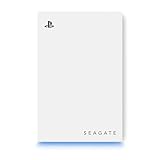
The 5TB Game Drive is described as an officially licensed HDD for PlayStation, built to archive PS5 games and to play PS4 games, with a USB 3.0 interface and model number STLV5000100. Five terabytes is a lot of room: if you buy digital games at launch and hate redownloading, this is the style of capacity that keeps the entire back catalog available. PS5 titles can be very large, so a drive like this saves repeated multi-hour downloads.
It suits collectors and families who share one console with several accounts, each with a library of their own. The trade-off is physical: high-capacity portable hard drives are thicker and often slower to wake than smaller ones, and a hard drive does not enjoy being dropped while spinning, so place it where it cannot be knocked off a shelf.
A practical tip for big archives is to keep the favorites you play weekly on internal storage and move everything else to the drive. Copying a game back takes far less time than downloading it again, so the drive works like a shelf of boxed games that you can pull down whenever you want them. Label the drive’s role in your head: archive first, PS4 library second.
- Capacity: 5TB
- Interface: USB 3.0
- Officially licensed hard drive for PlayStation, per the listing name
- Purpose stated: archive PS5 games and play PS4 games
- Size, weight and power draw: confirm on listing
Pros
- Huge capacity for archives
- Licensed and designed with PlayStation in mind
Cons
- Mechanical drive speeds on PS4 titles
- Larger and heavier than a 1TB or 2TB drive
Versus the 2TB Game Drive, it is the answer to a library problem rather than a performance one.
3. Seagate Portable 2TB (STGX2000400) – Runner-Up for Everyday Storage

This one deserves a plain label: it is not a PlayStation-branded drive. The listing describes an everyday portable hard drive for plug-and-play backup on Windows and macOS, with a USB 3.0 interface, an 18-inch cable and an Adobe trial mention. A general USB drive may work as PS5 extended storage if it meets Sony’s requirements, which are a SuperSpeed USB port at 5 Gbps or faster and a capacity between 250GB and 8TB, but the listing does not promise PlayStation compatibility, so treat it as a runner-up.
It suits someone who needs a computer backup drive first and is willing to experiment with the console second. Formatting the drive for the PS5 erases everything on it, so do not use a drive that holds important documents unless you plan to dedicate it to the console.
If you go this route, check the console’s response when the drive is connected: the PS5 will tell you whether it meets the requirements for extended storage. If it does not, you can still use the drive for backups on a computer, which is the job it was designed for. That fallback is the main reason this pick suits people who already need a general-purpose drive.
- Capacity: 2TB
- Interface: USB 3.0
- Windows and macOS backup drive, per the listing name
- Included cable: about 18 inches
- PlayStation compatibility: confirm on listing
Pros
- Flexible use across computers
- Same capacity as the 2TB Game Drive
Cons
- No licensed PlayStation branding
- Reformatting for the console wipes it
Compared with the 2TB Game Drive, you give up the console-specific assurance for general flexibility.
4. Seagate Game Drive 5TB for PS4/PS5 – Best for Double-Checking a Big Drive

This second 5TB listing reads almost the same as the earlier one: an external hard drive with USB 3.0, officially licensed for PlayStation, intended to archive PS5 games and play PS4 games. The title in the catalog is cut off and lacks the model number, so it may be a variant or a different listing of the same product line. Before ordering, compare the model number and the contents of the box against the other 5TB entry.
It suits shoppers who want the 5TB capacity and prefer to buy through a particular listing. Since there is no significant difference visible in the name, the choice comes down to what the product page says about the exact model, color, included cable and warranty. Take a moment to compare those fields.
When two listings look alike, the practical tie-breakers are the stated warranty period, the cable included and whether the product page shows a model number that matches the licensed 5TB drive. If the pages are identical in every respect you can verify, buy the one with the clearer description of what is in the box and how returns work.
- Capacity: 5TB
- Interface: USB 3.0
- External hard drive, per the listing name
- Officially licensed for PlayStation, per the listing name
- Model number and warranty length: confirm on listing
Pros
- Large capacity with licensing
- Same stated purpose as the other 5TB drive
Cons
- Almost indistinguishable from the other 5TB listing
- Mechanical drive limitations apply
Treat it as interchangeable with the 5TB pick above unless the product pages show a difference.
5. Avolusion T1 1TB (Renewed) – Best for a Small, Pre-Formatted Drive

The Avolusion T1 is a 1TB portable gaming hard drive with USB 3.0, in white, described as pre-formatted for PS4 and PS5 with a two-year warranty. The word renewed matters: it means the unit is refurbished rather than new, so quality and wear depend on the seller’s process. The pre-formatted claim is convenient, but the PS5 will still ask you to format a drive as extended storage, so do not assume it is ready to use out of the box.
It suits a buyer who wants a smaller drive for a handful of PS4 games and does not mind refurbished hardware. One terabyte holds a modest number of modern PS5 downloads, so it is better as a PS4 library drive or as a short-term archive than as a long-term store for large games.
With any refurbished storage, ask how the seller checks and resets drives, and check the warranty terms in the listing. A mechanical drive has moving parts, so its remaining lifespan is less predictable than a new unit’s. Keep game data on it that you can redownload, not irreplaceable files, and the risk stays small.
- Capacity: 1TB
- Interface: USB 3.0
- Renewed (refurbished) condition, per the listing name
- Two-year warranty, per the listing name
- Pre-formatted for PS4 and PS5 per the listing: confirm on listing
Pros
- Compact capacity for light use
- Warranty stated in the listing
Cons
- Refurbished condition adds uncertainty
- Capacity fills quickly with PS5 games
Compared with the 2TB Game Drive, it is smaller and less certain, so pick it only if you want that size or condition.
6. Ezekers Portable 500GB – Best for a Compact Multi-Device Drive

This drive is the smallest on the list, at 500GB, with both USB 3.0 and USB-C connectivity and a compatibility list that covers PCs, Macs, phones, Xbox and PlayStation. The phrase “PS5 (Storage Only)” in the listing is an honest signal that it is for storing PS5 games rather than running them, which is true of every drive here. The USB-C option makes it handy for phones and newer laptops.
It suits a buyer who wants a small portable drive across several devices and only a handful of console games. At 500GB, you can store a few large PS5 titles at best, so it fits a light library or a specific purpose, such as holding one or two games you rotate.
Because it works with phones and Xbox as well, it is the one drive here you might share with other family members. If you do, remember that formatting for the PS5 wipes it, and a drive formatted for extended storage may no longer be readable on other devices until it is reformatted.
- Capacity: 500GB
- Interface: USB 3.0 and USB-C
- PS5 listed as storage only, per the listing name
- Works with PC, Mac, phones and other consoles, per the listing name
- Drive type and cable length: confirm on listing
Pros
- Works across many devices
- Small and portable
Cons
- Limited capacity for modern games
- Not a licensed PlayStation drive
Next to the Avolusion, it offers less capacity but wider device compatibility through USB-C.
Specs Compared
| Product | Capacity | Interface | Drive type | PlayStation status | Condition or note |
|---|---|---|---|---|---|
| Seagate Game Drive 2TB | 2TB | USB 3.0 | Confirm on listing (listing text conflicts) | Made for PS4/PS5 | 2.5-inch, blue LED |
| Seagate Game Drive 5TB (STLV5000100) | 5TB | USB 3.0 | HDD | Officially licensed | Archive PS5, play PS4 |
| Seagate Portable 2TB (STGX2000400) | 2TB | USB 3.0 | HDD | Not PlayStation-branded; confirm on listing | Windows and macOS backup drive |
| Seagate Game Drive 5TB for PS4/PS5 | 5TB | USB 3.0 | HDD | Officially licensed | Model number: confirm on listing |
| Avolusion T1 1TB (Renewed) | 1TB | USB 3.0 | Confirm on listing | Pre-formatted for PS4/PS5 per listing | Renewed, 2-year warranty |
| Ezekers Portable 500GB | 500GB | USB 3.0 and USB-C | Confirm on listing | PS5 storage only | Also for PC, Mac, phones |
How We Chose These
This guide is based on catalog research and manufacturer documentation rather than physical use of the drives. We read each listing name for capacity, interface and any PlayStation licensing, and we checked those details against Sony’s published requirements for USB extended storage and Seagate’s support guidance. Where a listing is cut off, partly translated or inconsistent about whether a drive is a hard drive or an SSD, we flag it for confirmation. We did not rank by popularity or by any claim we could not read in the listing or manufacturer documents. Drives are ordered by how clearly they are intended for PlayStation use and how well their capacity matches common libraries, with general-purpose and refurbished options placed after the licensed ones.
What to Look For
What external storage can and cannot do
Sony’s published rules for USB extended storage are specific: the drive needs a SuperSpeed USB connection at 5 Gbps or faster, a capacity between 250GB and 8TB, and a direct connection to the console without a hub. Only one extended drive can be connected at a time. PS4 games can run directly from the drive, while PS5 games must be moved back to internal storage to be played. If you want to play PS5 games from expanded storage, the correct tool is an internal M.2 SSD rather than a USB drive.
Capacity planning
Capacity is where most buyers should spend their thinking. A drive’s usable space is smaller than its label because of formatting and how capacity is counted, so a 2TB drive shows roughly 1.8TB of usable space. Modern PS5 games range widely, but many fall between 50GB and 150GB. As a rule of thumb, divide usable space by 80GB: a 2TB drive stores about 20 to 25 average PS5 titles, a 5TB drive about 55, and a 500GB drive only about five. PS4 games are generally smaller, so they stretch further.
Hard drive or SSD
Hard drives offer the most capacity per unit of cost and are fine for archives and PS4 games. Portable SSDs load faster and tolerate movement better, but they cost more per terabyte. For PS4 titles, an SSD can shorten load times; for archiving PS5 games, the speed gain is small because games are copied back before playing. Hard drives are sensitive to drops while running, so keep them on a stable surface.
Ports, cables and power
Plug the drive directly into the console, using a rear port if a front Type-A port is not supported for extended storage. Drives that include their own USB hub are not supported. Most portable drives are bus-powered, so the cable matters: a short, good-quality cable is more reliable than a long one. USB-C drives need the right cable end for the PS5 ports, so check whether an adapter is included.
Reliability, heat and everyday handling
Portable hard drives are sensitive to knocks while spinning, so set the drive on a flat surface away from the edge of a shelf and never move it while a game is running. Give it airflow rather than stacking it under other devices, and unplug it properly or power down the console before moving it. If a drive ever clicks, disconnects or reports errors, copy off what you can and replace it rather than trusting it with a library you care about. A short cable reduces accidental disconnects.
Format and backup habits
Formatting a drive as extended storage erases it, so move anything important elsewhere first. Think of the external drive as a convenience layer rather than a backup: games can be redownloaded, but save data deserves its own backup through the console’s cloud or manual options.
Questions
Can I play PS5 games from an external drive?
No, a USB drive can store PS5 games, but they must be moved back to internal storage to be played. PS4 games can be played straight from the external drive.
How much external storage do I need?
For a light library, 1TB to 2TB is plenty. If you keep dozens of large downloads, 5TB gives more breathing room, since the console’s limit is 8TB.
Do I need a drive marketed for PlayStation?
Not strictly, because Sony’s requirements are about speed and capacity rather than branding. A licensed drive is the safer choice because compatibility is the stated purpose.
Will formatting erase my drive?
Yes, setting a drive up as extended storage wipes its contents. Back up any files before you format it.
Can I connect two drives at the same time?
No, Sony allows only one USB extended storage drive to be connected at a time. You can swap drives, but not use two together.
Is an external SSD worth it over a hard drive?
For PS4 games, an SSD can load faster and is less sensitive to bumps, so it is nicer to use. For archiving PS5 games, the gain is smaller, because you copy the games back to internal storage before playing, so a larger hard drive is often the better fit.
Update History
- October 20, 2026 – Initial publication; product set drawn from current catalog listings.
- Check the product page for current specifications and availability before buying.
Sources
- Sony PlayStation support documentation on USB extended storage requirements
- Manufacturer product and support pages for Seagate Game Drive models
- Retailer listing titles and specification fields for each product named above