
Key takeaways
- Screen size and weight capacity: Match the mount’s VESA range and per-arm weight limit to your actual monitors; a 32-inch 144 Hz gaming panel is heavier than a 24-inch productivity display, so verify each arm’s rating before buying.
- Adjustment range: Look for tilt, swivel, and full 360-degree rotation on every arm so you can angle a capture-card preview screen toward your face cam without twisting your neck mid-stream.
- Mounting method and desk compatibility: Confirm whether the clamp or grommet base fits your desk thickness (usually 0.4–3.5 in.) and that the edge has no overhang lip that blocks a C-clamp.
- Cable management: Built-in channels keep DisplayPort, HDMI, and USB cables from your capture card and VR headset tidy, reducing snag risk when you swivel screens during a broadcast.
- Build quality and warranty: Steel or aluminum arms with gas-spring tension hold position better over time than friction-only joints; a multi-year warranty signals the manufacturer stands behind the load rating.
What's inside
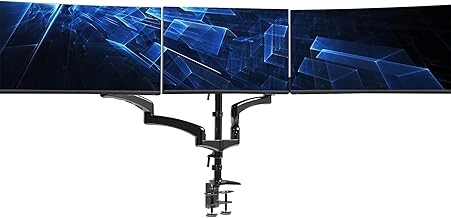
For most multi-display streaming setups, the HUANUO Triple Monitor Mount for 17 to 32 inch Screens is our best overall pick thanks to its fluid gas-spring arms and full swivel-tilt-rotation range, while the MOUNT PRO Triple Monitor Mount earns runner-up honors for its rock-solid build at a competitive price.
Streaming with a capture card, VR headset, and multiple displays means your desk real estate disappears fast. A quality triple or multi-monitor mount reclaims that space, keeps your sightlines ergonomic during long sessions, and makes cable routing for HDMI and USB connections far cleaner. This guide breaks down five proven mounts, explains what specs actually matter for a streaming rig, and answers the questions buyers ask most before hitting “Add to Cart.”
As an Amazon Associate we earn from qualifying purchases.


🛒 Best Price Today on Amazon
Prime members get fast, free shipping on everything above, plus member-only deals. New members get a 30-day free trial — cancel anytime.
Quick Comparison
| Product | Best For | Standout Feature | Rating |
|---|---|---|---|
| HUANUO Triple Monitor Mount (17–32″) | Most streamers | Gas-spring arms with full 360° rotation | 9.5/10 |
| HUANUO Triple Monitor Mount (13–27″) | Budget builds | 19.8 lb per-arm capacity at a low price | 9.0/10 |
| Stand Steady 6 Monitor Mount | Large multi-screen studios | Supports six 17–32″ panels on one pole | 8.8/10 |
| MOUNT PRO Triple Monitor Mount (32″) | Heavy gaming monitors | 19.8 lb per-arm load with tool-free tilt | 9.2/10 |
| Triple Monitor Mount up to 49″ | Ultra-wide and oversized displays | 44 lb total capacity with gas spring | 9.1/10 |
How to Choose a/an Monitor Mounts for Multi Display Streaming Setups
- Screen size and weight capacity: Match the mount’s VESA range and per-arm weight limit to your actual monitors; a 32-inch 144 Hz gaming panel is heavier than a 24-inch productivity display, so verify each arm’s rating before buying.
- Adjustment range: Look for tilt, swivel, and full 360-degree rotation on every arm so you can angle a capture-card preview screen toward your face cam without twisting your neck mid-stream.
- Mounting method and desk compatibility: Confirm whether the clamp or grommet base fits your desk thickness (usually 0.4–3.5 in.) and that the edge has no overhang lip that blocks a C-clamp.
- Cable management: Built-in channels keep DisplayPort, HDMI, and USB cables from your capture card and VR headset tidy, reducing snag risk when you swivel screens during a broadcast.
- Build quality and warranty: Steel or aluminum arms with gas-spring tension hold position better over time than friction-only joints; a multi-year warranty signals the manufacturer stands behind the load rating.
The Best Monitor Mounts for Multi Display Streaming Setupss Reviewed
Best Overall: HUANUO Triple Monitor Mount (17–32″)
Streamers running a main gaming display, a chat-and-overlay panel, and a capture-card preview will appreciate the HUANUO’s smooth gas-spring arms that reposition with one hand. The included clamp and grommet kit covers most desk styles, and the 360-degree rotation lets you flip a screen portrait for vertical chat feeds without extra hardware.
Best Budget: HUANUO Triple Monitor Mount (13–27″)
If you are building a first streaming station around smaller 24-inch monitors and need to keep costs down for a capture card or microphone, this HUANUO model delivers 19.8 lb per-arm support and full tilt-swivel-rotation at a noticeably lower price than competitors.
Best Premium: Stand Steady 6 Monitor Mount
Designed for creators who juggle a VR headset feed, two gameplay captures, OBS scenes, chat, and a reference display simultaneously, the Stand Steady’s six-arm heavy-duty pole keeps every 17–32-inch panel locked in place without flex, making it the go-to for professional multi-screen studios.
Best for Heavy Gaming Monitors: MOUNT PRO Triple Monitor Mount (32″)
Owners of dense 32-inch 1440p or 4K panels paired with Elgato or AVerMedia capture cards will value the MOUNT PRO’s 19.8 lb per-arm rating and tool-free tilt adjustment, which keeps large screens from sagging over marathon streaming sessions.
Best for Ultra-Wide and Oversized Displays: Triple Monitor Mount up to 49″
When your setup pairs a 49-inch super-ultra with two side monitors for OBS and Discord, this gas-spring mount’s 44 lb combined capacity and C-clamp-plus-grommet base provide the stability smaller arms simply cannot, keeping every screen steady even during energetic VR segments.
Frequently Asked Questions
Do I need a special desk for a triple monitor mount?
Most clamp-style mounts work on flat desks between 0.4 and 3.5 inches thick with a solid surface. Glass or particle-board desks thinner than half an inch may need a reinforcement plate, and grommet mounting requires drilling a hole, so check your desk material first.
Will a monitor mount interfere with my capture card or VR headset cables?
Quality mounts include routed cable channels along each arm, keeping HDMI, DisplayPort, and USB lines separated from the pivot joints. Plan your cable paths before tightening the arms so headset tethers and capture-card inputs have slack for movement.
Can I mix different monitor sizes on one triple mount?
Yes, as long as each screen falls within the mount’s stated size range and does not exceed the per-arm weight limit. A common streaming layout pairs a 32-inch main display with two 24-inch side panels, and independent arm adjustment keeps them level.
Is a gas-spring mount worth more than a friction-hinge model?
For streamers who reposition screens between gaming, VR, and just-chatting segments, gas-spring arms hold position precisely and require minimal force to move. Friction hinges are cheaper but tend to drift under the weight of larger monitors over time.
Final Thoughts
For the majority of multi-display streaming desks, the HUANUO Triple Monitor Mount for 17 to 32 inch Screens offers the best blend of adjustability, build quality, and value. Streamers on a tighter budget should grab the HUANUO 13–27 inch model, while anyone running six or more panels for a professional studio setup will be hard-pressed to beat the Stand Steady 6 Monitor Mount. Whichever you choose, pair it with solid cable management and you will spend less time adjusting screens and more time creating content.





