
Key takeaways
- Panel and Refresh Rate: Prioritize IPS for accurate colors and wide viewing angles, and aim for at least 120Hz for smooth gaming and scrolling; 144Hz or 165Hz is ideal for competitive titles without sacrificing visual clarity.
- Design and Bezels: Look for a true matte white chassis, slim bezels on all four sides, and a clean stand design. VESA mount compatibility is essential if you want a floating, ultra-minimalist look.
- Curvature and Size: Choose 24.5-inch for compact desks and esports, 27-inch for the most versatile all-around setup, or 34-inch ultrawide 21:9 for immersive racing, editing, and multitasking.
- Connectivity and Ergonomics: Ensure HDMI, DisplayPort, and tilt adjustment are included. Built-in speakers, HDR support, and Adaptive-Sync or FreeSync add convenience and tear-free gameplay.
- Lighting and Eye Comfort: Complete the aesthetic with bias lighting like a monitor light bar. Features like low blue light, flicker-free panels, and auto-dimming reduce eye strain during long gaming or streaming sessions.
What's inside
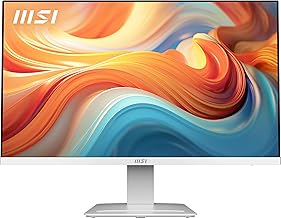
The MSI PRO MP273W E14A 27-inch is our Best Overall pick for white aesthetic setups, with the CRUA 34-inch UWQHD Curved Gaming Monitor as the runner-up for premium ultrawide immersion. It delivers the ideal balance of clean minimalist design, 144Hz IPS performance, and versatile connectivity that most gamers and streamers need without compromising on style.
Finding a white gaming monitor that actually looks good and performs well is harder than it should be — many models are either glossy white gimmicks with poor panels, or great gaming specs hidden in a standard black chassis. This guide cuts through the clutter by focusing on truly white, aesthetic-friendly monitors that also deliver on refresh rate, color accuracy, and eye comfort, plus the finishing accessories that complete the look.
As an Amazon Associate we earn from qualifying purchases.




🛒 Best Price Today on Amazon
Prime members get fast, free shipping on everything above, plus member-only deals. New members get a 30-day free trial — cancel anytime.
Quick Comparison
| Product | Best For | Standout Feature | Rating |
|---|---|---|---|
| MSI PRO MP273W E14A 27-inch | Overall Aesthetic Setup | 144Hz IPS, 4-Side Slim Bezel | 4.8/5 |
| MSI PRO MP251W E2 24.5-inch | Budget Minimalist Builds | 120Hz IPS, HDR Ready | 4.6/5 |
| CRUA 34-inch UWQHD Curved | Premium Ultrawide Gaming | 165Hz 3440×1440 1500R VA | 4.7/5 |
| Gawfolk 24.5-inch Curved Gaming Monitor | Compact Curved Setups | 3000R Curve, Built-in Speakers | 4.5/5 |
| Quntis Monitor Light Bar Pro White | Eye-Care & Desk Aesthetics | Auto-Dimming, No Glare, Dual Control | 4.9/5 |
How to Choose a/an White Gaming Monitors for Aesthetic Setups
- Panel and Refresh Rate: Prioritize IPS for accurate colors and wide viewing angles, and aim for at least 120Hz for smooth gaming and scrolling; 144Hz or 165Hz is ideal for competitive titles without sacrificing visual clarity.
- Design and Bezels: Look for a true matte white chassis, slim bezels on all four sides, and a clean stand design. VESA mount compatibility is essential if you want a floating, ultra-minimalist look.
- Curvature and Size: Choose 24.5-inch for compact desks and esports, 27-inch for the most versatile all-around setup, or 34-inch ultrawide 21:9 for immersive racing, editing, and multitasking.
- Connectivity and Ergonomics: Ensure HDMI, DisplayPort, and tilt adjustment are included. Built-in speakers, HDR support, and Adaptive-Sync or FreeSync add convenience and tear-free gameplay.
- Lighting and Eye Comfort: Complete the aesthetic with bias lighting like a monitor light bar. Features like low blue light, flicker-free panels, and auto-dimming reduce eye strain during long gaming or streaming sessions.
The Best White Gaming Monitors for Aesthetic Setupss Reviewed
Best Overall: MSI PRO MP273W E14A 27-inch IPS Monitor
Best for most gamers, streamers, and hybrid work setups who want a flawless white aesthetic without compromise. The 27-inch FHD IPS panel with 144Hz, 1ms response, and FreeSync delivers sharp color and fluid motion, while its 4-side slim bezel and VESA-ready white chassis blend perfectly into minimalist battlestations.
Best Budget: MSI PRO MP251W E2 24.5-inch IPS Monitor
Best for budget-conscious builders and smaller desks who still want a premium look. This 24.5-inch FHD monitor offers 120Hz, Adaptive-Sync, HDR Ready, and a clean white design with tilt and speakers, making it an affordable entry point to aesthetic gaming without cutting core performance.
Best Premium: CRUA 34-inch UWQHD Curved Gaming Monitor
Best for immersive gamers, video editors, and multitaskers who want a statement piece. The 34-inch 3440×1440 1500R VA ultrawide with 165Hz, 120% sRGB, PIP/PBP, and FreeSync wraps your field of view while the all-white curved design elevates any setup from ordinary to high-end.
Best for Compact Curved Gaming: Gawfolk 24.5-inch Curved Gaming Monitor
Best for users who want curvature on a compact footprint and built-in convenience. With a 3000R curve, 120Hz refresh rate, FHD clarity, HDMI 2.0, and integrated speakers, this white curved monitor delivers cozy immersion for smaller rooms and wall-mounted aesthetic rigs.
Best for Eye-Care Aesthetic Lighting: Quntis Monitor Light Bar Pro White
Best for streamers, students, and anyone completing a white setup who needs functional style. This no-glare USB light bar provides stepless and auto-dimming, dual control, and asymmetric optics to light your desk evenly while reducing eye strain and keeping your aesthetic clean and cable-free.
Frequently Asked Questions
Are white gaming monitors more expensive than black ones?
Not necessarily. Models like the MSI PRO MP251W E2 and Gawfolk 24.5-inch are competitively priced with their black counterparts. Premium ultrawide options like the CRUA 34-inch cost more due to resolution and refresh rate, not just color.
Do white monitors show yellowing or get dirty faster?
Modern matte white coatings are resistant to yellowing and easy to wipe clean. Keeping the monitor out of direct sunlight and dusting regularly will maintain its bright finish for years, especially on MSI and Quntis-grade materials.
Is 120Hz enough for aesthetic gaming setups or should I get 144Hz/165Hz?
120Hz is excellent for casual gaming, streaming, and daily use with a noticeable jump over 60Hz. For competitive FPS or fast-paced titles, 144Hz on the MSI 27-inch or 165Hz on the CRUA ultrawide provides extra smoothness and future-proofing.
Can I mount these white monitors for a cleaner look?
Yes. All the monitors featured — including the MSI 24.5-inch and 27-inch, Gawfolk, and CRUA — support 75x75mm VESA mounting. Pairing them with a white monitor arm creates a floating, minimalist aesthetic and frees up desk space.
Final Thoughts
For a timeless, photo-ready setup, the MSI PRO MP273W E14A 27-inch remains the smartest all-around choice, while the CRUA 34-inch UWQHD Curved is the ultimate upgrade for ultrawide immersion. On a tighter budget or smaller desk, the MSI PRO MP251W E2 delivers clean white style and solid gaming performance to complete your aesthetic without overspending.





