Key takeaways
- Portability: A 14-inch laptop under about 3.5 lbs is easy to carry all day across campus. Weigh screen size against how much you value a lighter bag.
- Battery life: Aim for a machine that lasts a full day of classes on one charge so you are not hunting for outlets between lectures.
- RAM and storage: 8GB of RAM is the practical minimum for smooth multitasking, with 16GB better for heavier work. Prioritize an SSD of at least 256GB, or lean on cloud storage with a Chromebook.
- Operating system: Windows suits most degree programs and desktop software, while a Chromebook is a cheaper, secure option for web-based work and Google tools. Confirm your courses’ required apps first.
- Build and keyboard: A sturdy chassis and comfortable keyboard survive daily backpack life and long typing sessions. These everyday details matter more than flashy specs.
What's inside
The right laptop can carry a student through years of lectures, essays, group projects, and late-night study sessions, and in 2026 you no longer need to spend a fortune to get one that holds up. Affordable machines have grown genuinely capable, with efficient processors, all-day battery life, and enough storage for coursework, cloud apps, and streaming between classes. The goal is a laptop that is light to carry, quick for everyday tasks, and dependable when a deadline looms.
Because “student laptop” covers everyone from a high-schooler on Chromebooks to a college engineer running heavier software, the best choice depends on your workload and budget. This guide lays out the features that matter most for study, then highlights five well-rounded laptops that deliver strong value for students this year.
As an Amazon Associate we earn from qualifying purchases.


⚡ Save on Your Next PC — Amazon Prime
Prime members get fast free shipping on the systems above, plus early access to Prime Day & Black Friday PC deals. New members get a 30-day free trial.
Watch: Best Laptop For Students 2026 — Video Review
How to Choose a Laptop for Students
- Portability: A 14-inch laptop under about 3.5 lbs is easy to carry all day across campus. Weigh screen size against how much you value a lighter bag.
- Battery life: Aim for a machine that lasts a full day of classes on one charge so you are not hunting for outlets between lectures.
- RAM and storage: 8GB of RAM is the practical minimum for smooth multitasking, with 16GB better for heavier work. Prioritize an SSD of at least 256GB, or lean on cloud storage with a Chromebook.
- Operating system: Windows suits most degree programs and desktop software, while a Chromebook is a cheaper, secure option for web-based work and Google tools. Confirm your courses’ required apps first.
- Build and keyboard: A sturdy chassis and comfortable keyboard survive daily backpack life and long typing sessions. These everyday details matter more than flashy specs.
The Best Laptops for Students Reviewed
HP 14″ 2026 Edition
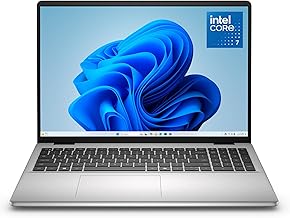
The refreshed HP 14 is a superb everyday pick, pairing a modern Intel processor with 8GB of RAM and a 256GB SSD, plus Copilot AI features and long battery life. It is light, quick for writing and browsing, and priced to be an easy recommendation for most students.
HP Pavilion 2026 (Intel N100)
Stepping up on memory, this Pavilion pairs an efficient Intel N100 with a generous 16GB of RAM and a 256GB SSD. The extra headroom keeps dozens of browser tabs and study apps running smoothly, making it a smart choice for multitaskers who want longevity.
HP 14″ Ultralight
Built for students who move all day, the Ultralight combines an Intel quad-core chip with 8GB of RAM in an especially portable chassis. It focuses on carry-anywhere convenience and dependable performance for notes, documents, and research without weighing down your bag.
HP Chromebook 14
For the tightest budgets and web-first workflows, the Chromebook 14 delivers fast boot times, strong battery life, and hassle-free security on ChromeOS. With an Intel Celeron N4120 and a clean 14-inch HD display, it is ideal for Google Docs, research, and streaming.
Samsung Galaxy Chromebook Go
Samsung’s Galaxy Chromebook Go is a light, affordable companion for cloud-based study, running ChromeOS on an Intel Celeron N4500. Its portability and simple, secure software make it a dependable second machine or a primary pick for students living in the browser.
Frequently Asked Questions
How much RAM does a student laptop need?
8GB is the comfortable minimum for smooth browsing, documents, and video calls. Step up to 16GB if you run heavier software or keep many apps and tabs open at once.
Is a Chromebook good enough for college?
For web-based coursework, Google tools, and streaming, yes, and they are cheaper and very secure. Confirm any required desktop software runs on ChromeOS before committing, since some programs are Windows-only.
What screen size is best for students?
A 14-inch laptop balances a readable screen with easy portability, making it the popular choice for campus life. Larger 15-inch or 17-inch models suit those who prefer more screen and stay mostly at a desk.
How important is battery life?
Very. A laptop that lasts a full day of classes frees you from chasing outlets between lectures and keeps you productive in libraries and cafes. Prioritize all-day endurance over raw speed for study.
Final Thoughts
A great student laptop blends portability, battery life, and just enough performance to handle everything a course throws at it. The HP 14 2026 Edition is the best all-round pick, the 16GB Pavilion suits heavier multitaskers, and the Chromebooks cover budget, web-first study. Match the OS and specs to your program, and you will have a reliable partner for the whole school year.