Key takeaways
- Bands: Tri-band routers with the 6GHz band unlock WiFi 7’s full potential, while dual-band models are a cheaper entry point. If you own many newer devices, prioritize tri-band.
- Wired ports: Look for 2.5G LAN as a minimum and a 10G port if you have multi-gig internet or a NAS. Fast wired backhaul is what keeps a mesh system quick.
- Coverage: A single powerful router suits apartments and mid-size homes; a mesh system is the answer for large or multi-floor houses where one unit cannot reach every room.
- Internet plan match: Buy for the speed you actually have. A BE3600-class router is plenty for gigabit plans, while 5Gbps-plus service justifies a higher-tier BE9000 or 10G model.
- Software and security: Check for a clean app, easy guest networks, and ongoing security updates. Gaming-focused firmware can add QoS prioritization if low latency is your goal.
What's inside
WiFi 7 has moved from cutting-edge to genuinely worthwhile in 2026. The newest standard adds wider 320MHz channels, 4K-QAM data density, and Multi-Link Operation that lets devices talk across bands simultaneously, and the practical result is lower latency, steadier connections in busy homes, and headroom for multi-gig internet plans. If your router is more than a couple of years old, a WiFi 7 upgrade is one of the clearest ways to future-proof your network.
The challenge is that WiFi 7 routers range from focused dual-band boxes to sprawling tri-band and mesh systems with 10G ports, and the differences directly affect what you should pay. Below we explain the features that actually matter, then round up five of the best WiFi 7 routers on the market this year, from value picks to no-compromise flagships.
As an Amazon Associate we earn from qualifying purchases.



⚡ Save on Your Next PC — Amazon Prime
Prime members get fast free shipping on the systems above, plus early access to Prime Day & Black Friday PC deals. New members get a 30-day free trial.
Watch: Best WIFI 7 Router 2026 — Video Review
How to Choose a WiFi 7 Router
- Bands: Tri-band routers with the 6GHz band unlock WiFi 7’s full potential, while dual-band models are a cheaper entry point. If you own many newer devices, prioritize tri-band.
- Wired ports: Look for 2.5G LAN as a minimum and a 10G port if you have multi-gig internet or a NAS. Fast wired backhaul is what keeps a mesh system quick.
- Coverage: A single powerful router suits apartments and mid-size homes; a mesh system is the answer for large or multi-floor houses where one unit cannot reach every room.
- Internet plan match: Buy for the speed you actually have. A BE3600-class router is plenty for gigabit plans, while 5Gbps-plus service justifies a higher-tier BE9000 or 10G model.
- Software and security: Check for a clean app, easy guest networks, and ongoing security updates. Gaming-focused firmware can add QoS prioritization if low latency is your goal.
The Best WiFi 7 Routers Reviewed
TP-Link Archer BE550
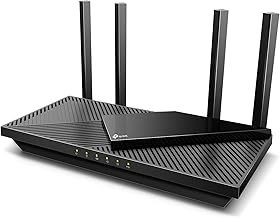
The tri-band BE550 is the sweet-spot pick for most homes, delivering BE9300 speeds, six spatial streams, and full 2.5G ports across the board. It has the muscle to handle a house full of devices and multi-gig internet without stepping up to flagship pricing, making it our overall recommendation.
TP-Link Archer BE600
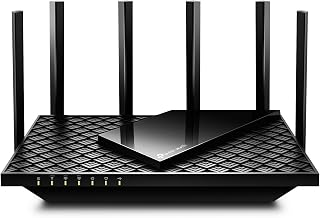
For enthusiasts who want more headroom, the BE600 adds a 10G port alongside a 2.5G WAN and triple 2.5G LAN in a tri-band BE9700 design. It is built for fast fiber plans and wired setups that need serious throughput, giving power users room to grow.
Amazon eero Pro 7
The eero Pro 7 is the easiest whole-home answer for people who value simplicity. This tri-band mesh system supports plans up to 5 Gbps, blankets large spaces in reliable coverage, and sets up in minutes through eero’s famously friendly app. It is the pick for hands-off households.
TP-Link Deco BE63
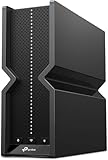
The Deco BE63 brings tri-band BE10000 mesh performance with six streams and 10 Gbps capability to bigger homes. It combines strong whole-house coverage with fast wired options, making it a great choice when you need both range and raw speed across multiple floors.
ASUS ROG Rapture GT-BE98 Pro
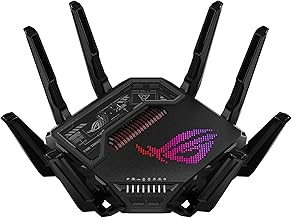
Gamers chasing the absolute best will find it in the GT-BE98 Pro, a quad-band beast with up to 30Gbps of aggregate throughput and mesh support. Its advanced QoS, prioritization, and abundant fast ports make it the flagship for low-latency gaming and demanding smart homes.
Frequently Asked Questions
Do I need WiFi 7 devices to benefit from a WiFi 7 router?
You get the biggest gains with WiFi 7 clients, but a new router still improves range, capacity, and stability for older devices. It also future-proofs your network as you add WiFi 7 phones and laptops.
Is dual-band or tri-band WiFi 7 better?
Tri-band adds the 6GHz band that unlocks WiFi 7’s fastest speeds and cleanest airspace, which matters in device-heavy homes. Dual-band models are cheaper and fine for smaller setups with fewer new devices.
Should I buy a single router or a mesh system?
A single powerful router covers apartments and mid-size homes well. Choose a mesh system for large or multi-story houses where one unit cannot reach every corner reliably.
Do I need multi-gig ports?
If your internet plan or local network exceeds a gigabit, yes. A 2.5G or 10G port lets you actually use that speed over a wired connection instead of bottlenecking at 1G.
Final Thoughts
WiFi 7 delivers real, measurable improvements for modern homes, and 2026’s routers cover every need and budget. The TP-Link Archer BE550 is the smart all-round buy, the eero Pro 7 is the simplest mesh option, and the ASUS GT-BE98 Pro is the flagship for gamers. Match bands, ports, and coverage to your home and internet plan, and your whole network will feel faster and more reliable.