Key takeaways
- 5Gbps USB 3.0 speed on the data-focused models
- Powered option for charging and demanding devices
- Individual switches for easy power management
- Sizes for every need, from travel to desktop
What's inside
Modern laptops keep getting thinner, and the first casualty is almost always the humble USB port. That is why USB hub reviews matter so much: the right hub turns a single crowded port into a proper connection center for your mouse, keyboard, flash drives, and printer. This roundup-style review compares the standouts, from slim four-port splitters to a powered eight-port desktop unit.
I evaluated build quality, data speed, cable length, and whether each hub supports charging or individual switches, so you can pick the one that matches your setup. Whether you want a tiny travel adapter or a permanent docking solution, there is a hub here worth adding to your desk.
As an Amazon Associate we earn from qualifying purchases.

 | Multiport adapter with 5Gbps Data Transfer for USB-A Port Laptop, PC, Desktop and More (Charging Not Supported)(USB-A, 2ft)](https://m.media-amazon.com/images/I/51+U60trRlL._AC_UY218_.jpg)


🎮 Get More From Your Setup — Free
Prime Gaming gives you free PC games every month, in-game loot, and a free Twitch channel sub — plus fast free shipping on all the gear above. New members get a 30-day free trial.
Watch: Usb Port Hub Reviews: Review & Buyer’s Guide — Video Review
Design & Build
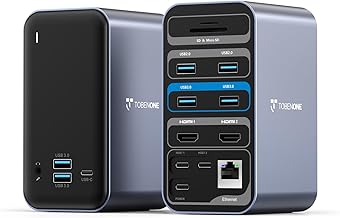
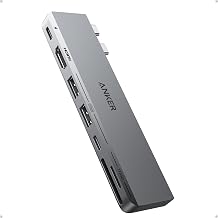
Form factor is the first decision. The UGREEN USB 3.0 hub is ultra-slim with a short half-foot cable, ideal for slipping into a bag or keeping a clean laptop desk. The Acer 4-port hub adds a two-foot cable and a Type-C power input for extra stability, while the Anker 4-port keeps things minimal with a compact aluminum-style body. Step up to the 7-port hub with individual switches and you get a longer 3.3-foot cable plus toggle controls and status lights for each port. The 7-in-1 aluminum USB-C hub and the Atolla powered 8-port are the heavy hitters, built for desktops where you never want to run out of connections.
Performance
For data, the USB 3.0 models are the ones to want, delivering up to 5Gbps transfer that makes moving files off an external drive quick rather than agonizing. The UGREEN and Anker hubs are dependable plug-and-play choices for adding keyboard, mouse, and flash storage, though note that some slim hubs, including the Anker unit, do not pass through charging power. That is where the Atolla powered 8-port pulls ahead: its 5V/4A adapter and dedicated smart charging port mean bus-powered devices and even phone charging work reliably, and the per-port switches let you cut power to idle devices. The 7-in-1 USB-C hub is the pick for MacBook, iPad, and console owners who need a mix of USB-A, USB-C, and 5Gbps throughput from one adapter.
Pros & Cons
- 5Gbps USB 3.0 speed on the data-focused models
- Powered option for charging and demanding devices
- Individual switches for easy power management
- Sizes for every need, from travel to desktop
- Some hubs do not support device charging
- Slim models have very short cables
- Powered hubs need an extra outlet
Alternatives to Consider
If you travel light, the slim UGREEN or Anker four-port hubs are the easy grab-and-go choice. Need to run many peripherals plus charging at a fixed desk? The Atolla powered eight-port is built for that. And if your machine is USB-C only, such as a MacBook or iPad, the 7-in-1 aluminum hub gives you the port variety those devices are missing without cluttering your bag.
Frequently Asked Questions
What is the difference between USB 2.0 and 3.0 hubs?
USB 3.0 hubs transfer data far faster, up to 5Gbps, which matters for external drives. USB 2.0 is fine only for mice, keyboards, and low-speed accessories.
Do I need a powered USB hub?
Only if you run power-hungry devices or want to charge through the hub. For a mouse, keyboard, and flash drive, an unpowered hub like the UGREEN is enough.
Will these hubs charge my phone?
Most data hubs will not. Choose a powered model such as the Atolla, which includes a smart charging port designed for that.
Are USB-C hubs compatible with older laptops?
A USB-C hub needs a USB-C port. For older USB-A laptops, pick a USB-A hub like the Acer, Anker, or UGREEN options instead.
Verdict
The best USB hub depends entirely on your desk. For travel and simple expansion, the slim UGREEN or Anker hubs deliver fast data in a tiny package; for a busy permanent workstation, the Atolla powered eight-port is the workhorse; and for USB-C machines, the 7-in-1 aluminum hub restores the ports manufacturers left out. Match the port count and power needs to your gear and you will wonder how you managed without one.