Key takeaways
- Easy upgrade: Adds or improves Wi-Fi via a simple USB port, no internal install needed.
- Strong antennas: High-gain designs boost range and signal stability.
- Range of standards: Options from affordable dual-band to fast Wi-Fi 7.
What's inside
A USB Wi-Fi adapter is the simplest fix for a desktop PC stuck with weak or no wireless connectivity, turning any free USB port into a fast, modern network connection. Whether your motherboard lacks built-in Wi-Fi or you want to upgrade to a newer standard, these plug-in adapters are an affordable, effective solution. This review examines the best USB Wi-Fi adapters available now, from budget dual-band options to cutting-edge Wi-Fi 7 models.
Below I evaluate how these adapters perform in real use, weigh their strengths and trade-offs, and help you pick the right one for your PC and internet plan. From simple browsing boosts to high-speed gaming connections, there’s an adapter here to match your needs.
As an Amazon Associate we earn from qualifying purchases.


🎮 Get More From Your Setup — Free
Prime Gaming gives you free PC games every month, in-game loot, and a free Twitch channel sub — plus fast free shipping on all the gear above. New members get a 30-day free trial.
Watch: Usb Wifi For Pc: Review & Buyer’s Guide — Video Review
Design & Build
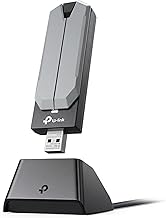
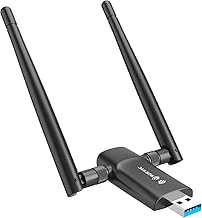
USB Wi-Fi adapters come in two main styles: compact nano dongles and larger units with external antennas. The models here mostly favor performance, with high-gain external antennas that improve range and signal strength. The TP-Link Archer T2U Plus and TX20U Plus, along with the UGREEN and Tenda adapters, use 5dBi or 6dBi antennas for a stronger, more stable connection. The WAVLINK Wi-Fi 7 adapter goes further with four antennas and a USB 3.0 connector for maximum throughput. These designs prioritize reliable coverage over the ultra-minimal footprint of tiny dongles.
Performance
Performance scales with the Wi-Fi standard and antenna design. Entry options like the TP-Link Archer T2U Plus (AC600) and Nineplus adapter deliver solid dual-band speeds for browsing, streaming, and everyday use. Wi-Fi 6 models such as the TP-Link TX20U Plus, Tenda AX900, and UGREEN AX900 add faster speeds, lower latency, and WPA3 security, making them great for gaming and heavy downloads. The WAVLINK Wi-Fi 7 adapter tops the range with tri-band BE6500 speeds and features like MLO and OFDMA for the fastest, most future-proof connection. Match the standard to your router and internet plan for the best results.
Pros & Cons
- Easy upgrade: Adds or improves Wi-Fi via a simple USB port, no internal install needed.
- Strong antennas: High-gain designs boost range and signal stability.
- Range of standards: Options from affordable dual-band to fast Wi-Fi 7.
- Needs matching router: Wi-Fi 6 or 7 speeds require a compatible router.
- Antennas add bulk: High-gain models are larger than nano dongles.
- USB 3.0 recommended: Fast adapters need a USB 3.0 port to hit full speed.
Alternatives to Consider
Your ideal adapter depends on your setup. If you just need reliable everyday Wi-Fi, the affordable TP-Link Archer T2U Plus or Nineplus adapter does the job well. For gaming and faster speeds, a Wi-Fi 6 model like the TP-Link TX20U Plus, UGREEN AX900, or Tenda AX900 offers a great balance of performance and price. If you have a Wi-Fi 7 router and want the fastest possible connection, the WAVLINK BE6500 is the standout. Confirm your router’s standard and use a USB 3.0 port for top speeds.
Frequently Asked Questions
Will a USB Wi-Fi adapter work with my PC?
Yes, as long as you have a free USB port and a supported operating system. Most work with Windows, and setup is typically plug-and-play or driver-assisted.
Do I need Wi-Fi 6 or 7?
Only if your router supports it. Wi-Fi 6 and 7 adapters deliver faster speeds and lower latency, but you’ll need a matching router to see the full benefit.
Why use external antennas?
High-gain antennas improve range and signal strength, especially if your PC is far from the router or separated by walls. They boost stability over tiny dongles.
Does the USB port version matter?
Yes. Fast Wi-Fi 6 and 7 adapters need a USB 3.0 port to reach their full speed. Plugging into an older USB 2.0 port can bottleneck performance.
Verdict
A USB Wi-Fi adapter is an easy, affordable way to give your desktop fast, reliable wireless. For everyday use, the budget TP-Link Archer T2U Plus works well, while Wi-Fi 6 models like the TX20U Plus and UGREEN AX900 suit gaming and streaming. If you have a Wi-Fi 7 router, the WAVLINK BE6500 future-proofs your connection. Match the adapter to your router and plug it into a USB 3.0 port for the best experience.