Key takeaways
- Pro: Installs in seconds, no case-opening or cabling required.
- Pro: External-antenna models meaningfully extend range and stability.
- Pro: WiFi 6 options like the TX20U Plus cut latency on busy networks.
- Pro: Affordable across the range, with capable options at every price.
What's inside
If your desktop sits far from the router or you’re stuck with flaky onboard networking, a USB WiFi adapter is the quickest fix there is. Plug one into a spare port and you skip running Ethernet cable or cracking open the case to install a PCIe card. The right adapter can be the difference between constant buffering and a rock-solid connection.
This review looks at the leading USB WiFi adapters for desktop PCs, spanning affordable AC dongles to modern WiFi 6 models. I’ll cover build, real-world performance, and where each one fits, so you can match an adapter to your network and budget.
As an Amazon Associate we earn from qualifying purchases.


🎮 Get More From Your Setup — Free
Prime Gaming gives you free PC games every month, in-game loot, and a free Twitch channel sub — plus fast free shipping on all the gear above. New members get a 30-day free trial.
Watch: Pc Wifi Usb: Review & Buyer’s Guide — Video Review
Design & Build
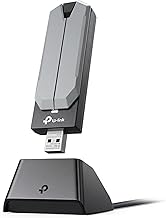
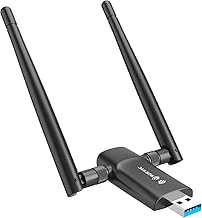
USB WiFi adapters come in two broad shapes: compact nano dongles and larger units with external antennas. The antenna models, like the TP-Link Archer T2U Plus and Archer T3U, trade portability for noticeably better range and signal stability thanks to their high-gain 5dBi antennas. WiFi 6 adapters such as the TP-Link Archer TX20U Plus and TX30U Plus, plus the UGREEN AX900, tend to use USB 3.0 connectors to unlock their full bandwidth. Build quality across the TP-Link range is consistently solid, with sturdy hinged antennas and reliable seating in the port.
Performance
Performance scales clearly with standard and antenna design. For basic browsing and streaming, an AC600-class adapter like the Archer T2U Plus is perfectly adequate and cheap. Step up to the AC1300 Archer T3U and you get smoother dual-band 5GHz throughput for HD streaming and video calls. The real gains come from WiFi 6: the Archer TX20U Plus (AX1800) and the higher-throughput TX30U Plus deliver lower latency and better performance on congested networks, which matters if you game or move large files. The UGREEN AX900 splits the difference with a driver-free setup on Windows 10 and 11. Across the board, positioning the antenna with line of sight to the router makes a bigger difference than most people expect.
Pros & Cons
- Pro: Installs in seconds, no case-opening or cabling required.
- Pro: External-antenna models meaningfully extend range and stability.
- Pro: WiFi 6 options like the TX20U Plus cut latency on busy networks.
- Pro: Affordable across the range, with capable options at every price.
- Con: USB adapters generally trail a good PCIe card or Ethernet for peak speed.
- Con: Some models need a driver install, and a few are Windows-only.
- Con: Larger antenna units block adjacent USB ports.
Alternatives to Consider
If you want maximum speed and don’t mind opening your case, a PCIe WiFi card usually outperforms any USB dongle and adds Bluetooth. For the most stable connection of all, a powerline adapter or a run of Ethernet cable beats wireless entirely. Among USB options, the Nineplus 1300Mbps dual-antenna adapter is a budget-friendly alternative if you want strong range without paying for WiFi 6.
Frequently Asked Questions
WiFi 5 or WiFi 6, which do I need?
If your router supports WiFi 6 and you game or transfer big files, a WiFi 6 adapter like the Archer TX20U Plus is worth it. For basic browsing and streaming, a WiFi 5 (AC) adapter is plenty.
Do I need USB 3.0?
For high-throughput WiFi 6 adapters, yes, USB 3.0 provides the bandwidth they need. Slower AC dongles work fine on USB 2.0.
Will external antennas really help?
Yes. High-gain antennas improve both range and signal stability, especially if your PC is several rooms from the router.
Are these Mac compatible?
Some are, but many TP-Link WiFi 6 models list Windows-only support. Check the compatibility notes carefully before buying if you run macOS.
Verdict
For most desktops, the TP-Link Archer TX20U Plus is the best balance of modern WiFi 6 speed, range, and value. If you only browse and stream, the Archer T3U (AC1300) is a cheaper, dependable choice, while the UGREEN AX900 appeals to anyone who wants a driver-free, plug-and-play setup.