Key takeaways
- Pros:
- Exceptional tactile and auditory feedback from Green mechanical switches.
- Premium build quality with double-shot PBT keycaps.
- Comfortable and detachable magnetic wrist rest.
- Extensive RGB customization via Razer Synapse.
- Flawless anti-ghosting and N-key rollover.
- Onboard memory for saved profiles.
What's inside
The mechanical keyboard market is a crowded one, but Razer has consistently found ways to stand out, and their latest iteration, the Razer BlackWidow V4 Mechanical Gaming Keyboard, Green Switches, continues that trend. We’ve spent the past few weeks putting this flagship through its paces, analyzing everything from its tactile feedback to its robust feature set. In 2026, with the gaming landscape evolving rapidly, does the BlackWidow V4 still hold its ground as a top-tier choice?
This review focuses on the classic clicky feel that Razer’s Green Switches are known for, a beloved choice for many gamers who appreciate auditory and tactile confirmation with every keystroke. We’ll dive deep into what makes this keyboard tick, its strengths, its weaknesses, and whether it’s the right investment for your setup.
As an Amazon Associate we earn from qualifying purchases.




⚡ Save on Your Next PC — Amazon Prime
Prime members get fast free shipping on the systems above, plus early access to Prime Day & Black Friday PC deals. New members get a 30-day free trial.
Watch: Razer BlackWidow V4 Review — Video Review
Design & Build
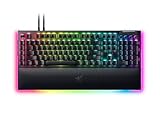
The Razer BlackWidow V4 retains the signature aggressive aesthetic that Razer is known for, but with a refined touch. The chassis is constructed from a sturdy, matte-finish ABS plastic that feels premium and resistant to fingerprints. The inclusion of a plush, magnetic wrist rest, upholstered in faux leather, is a welcome addition for extended gaming sessions, significantly improving comfort. The per-key RGB lighting is as vibrant and customizable as ever, offering millions of color combinations and a host of dynamic effects via Razer Synapse software. Cable management is also well-thought-out, with a braided USB-C cable that feels durable and a channel on the underside of the keyboard for routing. The keycaps are double-shot PBT, which are highly durable and resist shine over time, a crucial factor for longevity in a gaming peripheral. While the overall footprint is standard for a full-sized board, the design feels intentional and robust, built to withstand the rigors of intense gaming.
Performance
At the heart of the Razer BlackWidow V4 Mechanical Gaming Keyboard, Green Switches, are the aforementioned Green mechanical switches. These offer a tactile bump and an audible click at the actuation point, which registers at 50g of force with an actuation distance of 1.9mm. For typing, this provides satisfying feedback, making each keystroke feel deliberate. In gaming, this translates to rapid and precise inputs, especially in genres where quick reactions are paramount. The anti-ghosting and N-key rollover capabilities are flawless, ensuring that even the most complex key combinations are registered accurately. Razer Synapse software offers deep customization, allowing for macro recording, remapping keys, and intricate RGB lighting profiles. The onboard memory is also a plus, letting you save your preferred settings directly to the keyboard, eliminating the need for the software to be running constantly.
Pros & Cons
- Pros:
- Exceptional tactile and auditory feedback from Green mechanical switches.
- Premium build quality with double-shot PBT keycaps.
- Comfortable and detachable magnetic wrist rest.
- Extensive RGB customization via Razer Synapse.
- Flawless anti-ghosting and N-key rollover.
- Onboard memory for saved profiles.
- Cons:
- Green switches may be too loud for some environments.
- ABS plastic chassis, while sturdy, might not appeal to those seeking metal construction.
- Razer Synapse software can be resource-intensive.
- Full-size layout takes up considerable desk space.
Alternatives to Consider
For those who prefer a quieter, linear typing experience, the Razer BlackWidow V4 X Mechanical Gaming Keyboard, Yellow Switches, Black, offers a compelling alternative with its smooth actuation. If a more compact form factor is desired, the Razer BlackWidow V4 75% Mechanical Gaming Keyboard, Orange Switches, Black, provides a balanced layout that saves desk space without sacrificing too many dedicated keys. For a wireless option with a similar feature set, the Razer BlackWidow V4 TKL Wireless Gaming Keyboard, Orange Switches, is a strong contender.
Frequently Asked Questions
What is the main difference between Razer Green and Yellow switches?
Razer Green switches are tactile and clicky, providing audible feedback and a noticeable bump. Razer Yellow switches are linear and silent, offering a smooth, consistent press without any tactile or auditory cues.
Is the Razer BlackWidow V4 worth it for non-gamers?
Absolutely. The high-quality build, comfortable wrist rest, and satisfying typing experience make it an excellent choice for productivity and general computer use, even if gaming isn’t your primary focus.
How durable are the PBT keycaps?
PBT keycaps are significantly more durable than ABS keycaps. They are resistant to wear, shine, and discoloration, ensuring that the legends on your keys remain clear and the overall look of the keyboard stays fresh for years.
Can I customize the RGB lighting without installing Razer Synapse?
While basic lighting effects can often be cycled through onboard controls, extensive customization of per-key RGB lighting, macros, and advanced profiles requires the installation and use of Razer Synapse software.
Verdict
The Razer BlackWidow V4 Mechanical Gaming Keyboard, Green Switches, stands as a formidable contender in the premium gaming keyboard segment. Its blend of robust build quality, satisfying tactile feedback, and extensive customization options makes it a joy to use for both gaming and typing. While the clicky nature of the Green switches might not be for everyone, and the software can be demanding, its strengths far outweigh its minor drawbacks for those seeking a high-performance, feature-rich mechanical keyboard. In 2026, it remains a solid investment for any gamer looking for a reliable and immersive input device.