Key takeaways
- A gaming build with a graphics card already chosen or purchased.
- A budget build where every saving can go toward the GPU or storage.
- A system where the processor will not do video encoding that benefits from Quick Sync.
The Core i5-14400 and Core i5-14400F are the same processor for gaming; the only real difference is that the 14400 includes Intel UHD Graphics 730 and the 14400F has the integrated graphics disabled. Buy the F version if a graphics card is definitely going in and it is cheaper; buy the non-F version if the iGPU, Quick Sync video, or a display fallback matter to you.
Our top picks
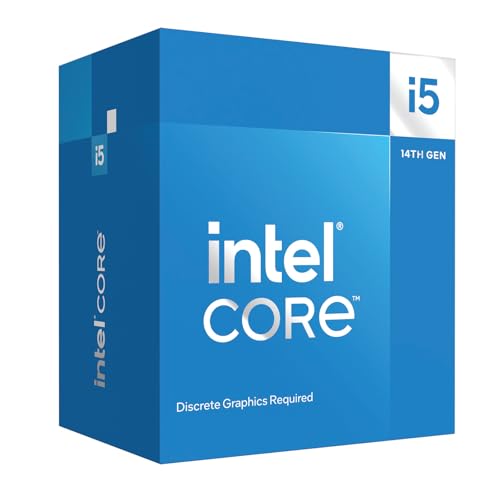
 Intel Core i5-14400F Desktop Processor 10 cores
- 10 cores (6 P-cores plus 4 E-cores) and…
- Performance hybrid architecture integrates two core microarchitectures, prioritizing…
- Up to 4.7 GHz unlocked
As an Amazon Associate we earn from qualifying purchases at no extra cost to you.
What Is Actually Different
Intel sells the 14400 and 14400F as a pair built on the same silicon. Both are 10-core, 16-thread chips with six performance cores and four efficient cores. Reviewers and spec sites that compare them, including CPU-Monkey and Tom’s Hardware coverage, describe CPU performance as identical, with the F version possibly drawing slightly less power with the iGPU off, a difference that is generally negligible.
| Item | Core i5-14400 | Core i5-14400F |
|---|---|---|
| Cores | 10 (6 P + 4 E) | 10 (6 P + 4 E) |
| Threads | 16 | 16 |
| P-core max turbo | Up to 4.7 GHz | Up to 4.7 GHz |
| L3 cache | 20 MB | 20 MB |
| Base power | 65 W | 65 W |
| Integrated graphics | UHD Graphics 730 | None |
| Quick Sync Video | Yes | No |
| Socket | LGA1700 | LGA1700 |
| Unlocked multiplier | No | No |
Who Should Pick the 14400F
The F model is the practical choice for a gaming PC with a dedicated graphics card from day one. In that setup the iGPU sits unused, so paying for it brings no benefit. Games run on the discrete card, and the CPU cores handle the rest. If the listed price of the F version is lower, there is no performance reason to avoid it.
- A gaming build with a graphics card already chosen or purchased.
- A budget build where every saving can go toward the GPU or storage.
- A system where the processor will not do video encoding that benefits from Quick Sync.
Who Should Pick the 14400
The non-F version earns its place in several situations that are easy to overlook.
- Diagnosis. If the graphics card fails or a new build shows a black screen, plugging the monitor into the motherboard output lets you tell whether the CPU, memory and board are working. The F model cannot do this.
- Staged builds. A buyer who plans to add a graphics card later can use the PC for office work and video in the meantime.
- Video work. Quick Sync handles hardware encoding and decoding in many editors and streaming tools, and it is only available with the iGPU.
- Multi-monitor office use. The iGPU can drive extra displays alongside a discrete card on boards that allow it.
- Resale. Systems with a working iGPU are easier to test and sell.
Gaming Class and What to Pair It With
Intel does not publish game frame rates for these chips, so no figures are given here. Reviewers place the 14400 family in the value tier, strong for 1080p and 1440p gaming with a mid-range graphics card, but one that trails the better AMD value chips in some reviews. Tom’s Hardware’s review, as summarized by iTechGuides, framed the 14400 as a value gaming chip that falls behind AMD. That is useful context: it is a solid, affordable processor, not a leader.
| Resolution / goal | Fit with 14400 / 14400F |
|---|---|
| 1080p, high settings | Good match with mid-range graphics cards |
| 1440p | Fine with mid-range cards; the GPU is the limit |
| 4K | Workable, but a stronger CPU gives headroom with top-end cards |
| Esports at very high refresh rates | Capable, but faster chips suit extreme frame rate targets |
Pairing a very expensive graphics card with this processor can waste some of the card, particularly at 1080p, since fewer cores and lower clocks than the Core i5-14600K or the i7 tier can hold the card back in CPU-heavy games. A balanced build usually pairs it with a card in the mid-range tier.
Motherboard, Memory and Cooler
Both chips fit LGA1700 boards. Because neither is unlocked, a B760 or similar board is sufficient and a Z790 board adds cost without unlocking the CPU multiplier. Memory depends on the board: DDR4-3200 on DDR4 boards or DDR5-4800 on DDR5 boards are the official speeds the maker lists. Faster kits generally run via memory profiles on supported boards.
The 65 W base power makes the chip easy to cool. The box version has historically shipped with a basic cooler, and many buyers use that or step up to an inexpensive tower cooler for lower noise. Follow the mounting instructions carefully for LGA1700 to ensure even contact.
Common Mistakes
- Buying the F model and then discovering the system will not display anything without a graphics card.
- Paying extra for a Z-series board expecting overclocking on a locked chip.
- Assuming the iGPU in the 14400 will play modern games well. It is meant for desktop use and light work, not for current demanding titles.
- Mixing up the 14400 with the older 12400 or 13400, which are similar-looking but different generations with different core configurations.
- Ignoring BIOS support. Some older 600-series boards need an update for 14th Gen processors.
Upgrade Logic
Since the 14400 and 14400F sit on LGA1700, a future swap to a Core i5-14600 or i7 chip is possible on the same board, as long as its power delivery and BIOS support the chip. This is the last generation for the socket, so treat this as a final upgrade step rather than a long road. Someone choosing between the two today should weigh the diagnostic value of an iGPU against the small saving of the F model, rather than any speed difference.
Reading the Price Gap Sensibly
Retail pricing moves around, so the saving from the F model changes from week to week and from store to store. A useful rule is to treat the iGPU as a small insurance policy. If the gap between the two is only a token amount, the non-F version removes a possible headache for almost nothing. If the gap is large enough to fund a better SSD, extra memory or a step up in graphics card tier, the F version is the rational choice for anyone confident in their ability to troubleshoot with a spare card or a second machine. Whichever you buy, keep the original box and receipt in case the CPU has to go back to the maker for warranty service.
Alternatives
Within Intel, the Core i5-14500 and i5-14600 add more efficient cores for multitasking. On the AMD side, the Ryzen 5 7600 and the Ryzen 5 9600X are often compared against this tier by reviewers, and they use the AM5 platform with DDR5 only.
Frequently Asked Questions
Is the i5-14400F slower than the i5-14400?
No. Both have the same cores, cache and clocks, and reviews report identical CPU performance. The F version simply lacks integrated graphics.
Can I game on the i5-14400 without a graphics card?
You can run light and older games, but the UHD Graphics 730 iGPU is not designed for demanding modern titles. Most gamers will pair either chip with a discrete card.
What happens if I put the 14400F in a system with no GPU?
The system will not give a video signal because the integrated graphics are disabled. Install a discrete graphics card and connect the monitor to it.
Does the iGPU help when I have a graphics card?
Sometimes. Quick Sync can speed up certain video encoding and decoding tasks, and the iGPU can provide backup video output. For pure gaming it adds nothing.
Do both chips use the same cooler and motherboard?
Yes. They share the LGA1700 socket, the same power class, and the same board and cooler requirements.
Should I choose the F version just to save money?
Only if you are sure you will always use a discrete card. If the saving is small, many buyers prefer the non-F version for the diagnostic and encoding benefits.
FAQ
Is the i5-14400F slower than the i5-14400?
Can I game on the i5-14400 without a graphics card?
What happens if I put the 14400F in a system with no GPU?
Does the iGPU help when I have a graphics card?
Do both chips use the same cooler and motherboard?
Should I choose the F version just to save money?
More from Amazon
Programs that pair well with the guide above. Offers and eligibility are set by Amazon and may change.
Free shipping on eligible items, Prime Video and more. Eligible new members can start with a free trial.
Start a Prime free trialAd-free music streaming. Eligible new subscribers can start with a free trial.
Try Music Unlimited freeA Prime membership for ages 18-24 with a trial period. Eligibility is set by Amazon.
See Prime for Young AdultsAudiobooks and podcasts to listen to on the go. Eligible new members can start with a free trial.
Try Audible freeAs an Amazon Associate we earn from qualifying purchases.