Our Top Picks
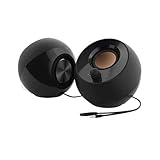
 Creative Sound Blaster GS3 Compact RGB Gaming Soundbar3.64 x 16.14 x 2.9 inches2.33 poundsCheck on Amazon

The best pc soundbars under $100 are the Razer Leviathan V2 X for full-range drivers and USB-C, the Edifier QS30 for Bluetooth 5.4 with a built-in mic, and the Creative Sound Blaster GS3 for a compact under-monitor design. Measure the gap under your monitor before you order.
Every pick is compared from listing specifications: connections, drivers, power source and extras as stated by the maker. Where a detail such as wattage or frequency range is missing, it is marked as not listed, so check the maker page before you buy. Soundbars here are short desktop bars that sit below a monitor, not living room models.
Quick Comparison
| Model | Key specs per listing | Best for |
|---|---|---|
| Razer Leviathan V2 X | Full-range drivers, compact, Chroma RGB, USB-C, Bluetooth 5.0 | Gaming desks with RGB |
| Edifier QS30 | Bluetooth 5.4, enhanced bass, integrated mic, dynamic lighting, USB powered | Calls plus music and play |
| Creative Sound Blaster GS3 | Compact RGB gaming soundbar, Superwide, Bluetooth, USB-C, under monitor | PC and console under a monitor |
| Bluedee PC soundbar | HiFi stereo, Bluetooth and AUX, USB or USB-C powered | Simple desk audio |
| Nylavee PC soundbar | 4-driver Hi-Fi stereo, Bluetooth and AUX, USB A or C power, built-in mic, headphone jack | Mic and headphone jack on the bar |
| Edifier MG300 | Deep bass, switchable RGB, built-in mic, Bluetooth 5.3 and USB adapter | Bass and RGB at a lower cost |
Razer Leviathan V2 X: Compact Gaming Bar With USB-C
Specs from the listing: PC soundbar with full-range drivers, compact design, Chroma RGB, USB-C, Bluetooth 5.0, for PC, laptop, smartphones, tablets and Nintendo Switch.
As an Amazon Associate we earn from qualifying purchases at no extra cost to you.
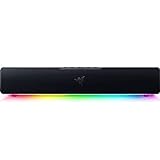
The Leviathan V2 X is the top-cost option in this tier and sits right at the budget ceiling. It is a compact bar with full-range drivers, Chroma RGB lighting, USB-C and Bluetooth 5.0, and the listing says it works with PCs, laptops, phones, tablets and a Nintendo Switch. That mix of connections makes it a flexible desk bar. The listing does not give wattage, frequency response or subwoofer details, so check the maker page if you want numbers for bass depth. It is a pick for people who want gaming-brand looks and software lighting from a small bar, and who are prepared to spend the full budget on a desktop bar from a well-known name. It is a sensible fit for a gaming desk that also needs a bar for a handheld console or a phone, thanks to the listed Bluetooth. If your desk is wide, the bar’s compact size also leaves room for a keyboard and wrist rest in front.
Pros
- USB-C and Bluetooth 5.0 connections
- Works with PC and Switch
- Chroma RGB lighting
Cons
- Sits at the top of the budget
- Wattage and frequency range not listed
Edifier QS30: Bluetooth 5.4 With a Built-In Mic
Specs from the listing: Multimedia soundbar, Bluetooth V5.4, enhanced bass, integrated mic, dynamic lighting, multiple sound effects, USB powered, for desktop PC, laptop and tablets.

The QS30 is the most feature-rich bar here after the Razer. The listing highlights Bluetooth V5.4, enhanced bass, an integrated mic, dynamic lighting and several sound effects, and the bar is USB powered. The integrated mic is the standout, since you can take calls or chat in a game without a separate headset or mic. It targets desktop PCs, laptops and tablets. Output wattage and the exact driver arrangement are not listed, so check the maker page if you are comparing loudness. It sits in the upper middle of this tier, costs less than the Razer, and gives you more connection flexibility. It is a good fit for people who split their day between work calls and music. The sound effect modes are worth trying in a game and a film before you choose a favorite, since each changes the balance of bass and treble. Keep the bar centered under the monitor for the most even stereo image.
Pros
- Bluetooth 5.4 and an integrated mic
- Several sound effects and lighting
- USB powered
Cons
- Wattage not listed
- Lighting and effects add menu complexity
Creative Sound Blaster GS3: Compact Under-Monitor Bar
Specs from the listing: Compact RGB gaming soundbar, Superwide, Bluetooth, USB-C, under monitor, for PC and console, black.

Creative aims the GS3 at tight desks. The listing calls it a compact RGB gaming soundbar with Superwide audio, Bluetooth and USB-C, and it names an under-monitor position and both PC and console use. That helps if you have a console on the same desk as a PC. The compact size is a plus under a monitor, but it also limits bass depth in general terms, and the listing does not provide wattage or driver size. The Superwide label suggests a widened sound field, though the listing does not explain how it is achieved. It sits in the middle of this budget and is a good match for players who want a recognized audio brand and a compact bar for a small desk. Because it lists console support, it is the better pick if a game console shares the same monitor input and you switch often. Check the monitor stand height, because a very low stand can block the bar and muffle the sound.
Pros
- Compact size fits under monitors
- Works with PC and console
- Bluetooth and USB-C
Cons
- Driver size and wattage not listed
- Small bars have limited bass depth
Bluedee PC Soundbar: Simple Hi-Fi Stereo Desk Bar
Specs from the listing: Computer sound bar, Bluetooth and AUX, HiFi stereo, USB or USB-C powered, gaming speakers for monitor, PC and laptop.

Bluedee keeps it simple. The listing gives you Bluetooth and a 3.5mm AUX input, Hi-Fi stereo sound and power by USB or USB-C. It targets monitors, PCs and laptops, with no mention of a microphone or an app. That makes it an easy pick for someone who wants a plug-and-play desk bar. The listing does not state wattage, the driver count or any lighting, so those are not listed. The simple feature set is the point: there are fewer things to configure, and fewer things to fail. It is in the middle of the range, comparable to the Nylavee, and a sensible pick for general desktop audio and background music. For a bedroom or dorm desk where fewer features is a benefit, this is a calm choice. It is easy to power from a monitor USB port or a wall charger, which keeps the desk tidy.
Pros
- Bluetooth and AUX both included
- USB and USB-C power options
- Straightforward plug-and-play design
Cons
- No microphone listed
- Driver and wattage details not listed
Nylavee PC Soundbar: Four Drivers, Mic and Headphone Jack
Specs from the listing: Computer speakers soundbar, 4-driver Hi-Fi stereo sound, Bluetooth and AUX, USB A or C power, built-in mic and headphone jack, for desktop, laptop and monitor.

Nylavee is the only bar here that lists four drivers. The listing also mentions Bluetooth and AUX inputs, USB A or C power, a built-in mic and a headphone jack. A headphone jack on the bar is handy when you want private listening without reaching behind the PC, and the built-in mic means calls work on the bar as well. The driver count is a positive sign for stereo spread, but the listing does not give wattage or driver size. It costs about the same as the Bluedee and is the better pick if you want a bar with a mic and headphone jack on the same unit. It suits home office desks where calls and music share one setup. On a work desk, the mic and speaker in one unit also reduces the number of cables running to the PC. The headphone jack makes it easy to switch between speakers and a headset during late sessions.
Pros
- Four drivers listed
- Built-in mic and headphone jack
- Bluetooth plus AUX input
Cons
- Wattage and driver size not listed
- Width and wattage not given in the text
Edifier MG300: Deep Bass and RGB at a Lower Cost
Specs from the listing: Computer sound bar, deep bass, switchable RGB, built-in microphone, Bluetooth 5.3 and USB adapter, for gaming and desktop.

Edifier’s MG300 is the lowest cost of the branded bars here. The listing promises deep bass and switchable RGB, with a built-in microphone, Bluetooth 5.3 and a USB adapter. The USB adapter is useful for PCs without Bluetooth, and the mic lets the bar handle calls and in-game chat. It sits below the QS30 in price and fills the same role, with fewer connection extras. The listing does not give wattage or frequency range. If you want an Edifier at a lower cost than the QS30, this is the straightforward choice, but expect fewer sound options than the more advanced model. The switchable lighting means you can turn it off in a work setting. Use the USB adapter if your PC has no Bluetooth, and keep it in a rear port to avoid cable clutter.
Pros
- Switchable RGB lighting
- Built-in microphone
- Bluetooth 5.3 and USB adapter
Cons
- Wattage not listed
- Fewer features than the QS30
How to Choose Under $100
Width and fit under the monitor
Measure the gap under your monitor and the stand height. Widths are not given in most listings here, so check the maker page. Make sure the bar clears the stand legs and does not touch the screen bezel.
Connections and power
USB or USB-C power keeps cables tidy. Bluetooth is handy for phones, while AUX or USB covers PCs. If your PC lacks Bluetooth, choose a bar with an adapter or a wired input.
Microphone and headphone jack
A built-in mic means calls and chats work from the bar. A headphone jack gives private listening. If you already own a headset, you may not need either feature.
Lighting and sound modes
RGB lighting and sound effects add style but not always sound quality. Prioritize driver count and listed bass features first, then pick lighting you can turn off.
FAQ
Are pc soundbars for home office use better than laptop speakers?
Usually yes. A desktop bar offers wider stereo and more volume. A built-in mic helps with calls, and USB power keeps desk wiring simple.
What are the best pc soundbars for small spaces?
Compact bars such as the Creative Sound Blaster GS3 or the Razer Leviathan V2 X. They fit under monitors and leave room for a keyboard.
Are pc soundbars for gaming good enough without a subwoofer?
For a desk, yes. Small bars give clear dialog and effects. They offer limited deep bass, so expect less rumble than a bar with a separate sub.
Do I need Bluetooth on a PC soundbar?
Not for a desktop PC if the bar has USB or AUX. Bluetooth helps when you want to play audio from a phone.
Can I use a soundbar and headphones together?
Yes. Many bars have a headphone jack or you can switch outputs on the PC. Mute the bar when you wear headphones.
Last updated: November 2026
FAQ
Are pc soundbars for home office use better than laptop speakers?
What are the best pc soundbars for small spaces?
Are pc soundbars for gaming good enough without a subwoofer?
Do I need Bluetooth on a PC soundbar?
Can I use a soundbar and headphones together?
More from Amazon
Programs that pair well with the guide above. Offers and eligibility are set by Amazon and may change.
Free shipping on eligible items, Prime Video and more. Eligible new members can start with a free trial.
Start a Prime free trialAd-free music streaming. Eligible new subscribers can start with a free trial.
Try Music Unlimited freeA Prime membership for ages 18-24 with a trial period. Eligibility is set by Amazon.
See Prime for Young AdultsAudiobooks and podcasts to listen to on the go. Eligible new members can start with a free trial.
Try Audible freeAs an Amazon Associate we earn from qualifying purchases.