Our Top Picks
The best audio interfaces under $75 for a streaming or home-recording desk are the M-Audio M-Track Duo for two XLR inputs, the M-Audio M-Track Solo for a single-mic setup, and the Mackie Onyx Artist 1X2 as a compact alternative. Everything here is compared from listing specifications: input count, phantom power, sample rate and bundled software.
An audio interface sits between an XLR microphone or instrument and your computer. It supplies the preamp, phantom power and digital conversion that a plain USB mic builds in. At this price ceiling the trade-offs are input count, USB connector type and how much the listing tells you. Home office, small-space and gaming use are covered in the buying section and the FAQ below.
Quick Comparison
| Model | Key specs per listing | Best for |
|---|---|---|
| M-Audio M-Track Duo | Dual XLR, line and DI inputs; software suite for recording, streaming and podcasting | Two-person podcasts, mic plus guitar |
| M-Audio M-Track Solo | XLR, line and DI inputs; software suite | One-mic streamers |
| Mackie Onyx Artist 1X2 | 1-in, 2-out USB interface | Small desks, simple vocal setups |
| Behringer UMC22 | 2×2, 48 kHz, Midas mic preamp | First home studio |
| Synido USB-C Interface (Purple) | Dual XLR, line/Hi-Z switching, 3 monitoring modes, 24-bit/48 kHz, 48V phantom power | USB-C laptops, two mics |
| BOMGE Mini 2 Channel | 2 channels, XLR with 48V phantom power | Tightest desks |
Specs in the table are quoted from each listing, and anything a listing leaves out is marked as not listed in the pick below. Two units state their sample rate, two state phantom power, and three leave most converter details to the maker page. That gap is why the verification step in each section matters more than any single number. Sort by inputs first, connector second and brand third, and the shortlist usually narrows to two models.
M-Audio M-Track Duo
As an Amazon Associate we earn from qualifying purchases at no extra cost to you.

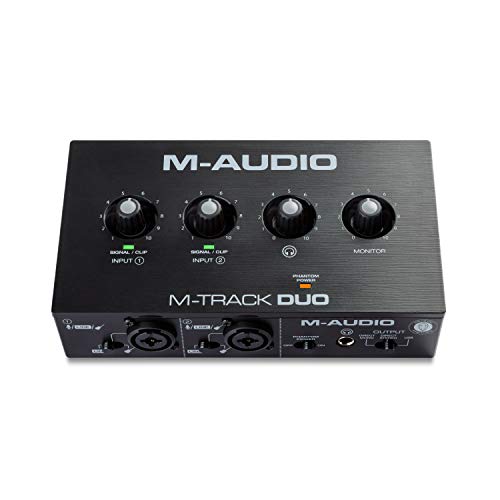
Spec line: USB interface with dual XLR, line and DI inputs and a recording software suite.
The Duo is the most flexible pick at this ceiling because two inputs let you run a host and a guest, or a vocal mic and an instrument, without swapping cables. The listing names recording, streaming and podcasting as target uses, so it fits creators who want one box for several jobs, and the included software means you can start recording without hunting for a separate program. The trade-off is physical size: two inputs and the controls around them take more desk space than the single-input models below. Sample rate, bit depth and phantom power details are not in the listing text, so check the maker page before pairing it with a condenser mic that needs 48V.
- Pro: two XLR-capable inputs
- Pro: line and DI inputs for instruments
- Pro: bundled software suite
- Con: larger footprint than one-input units
- Con: power and phantom specs not listed
M-Audio M-Track Solo
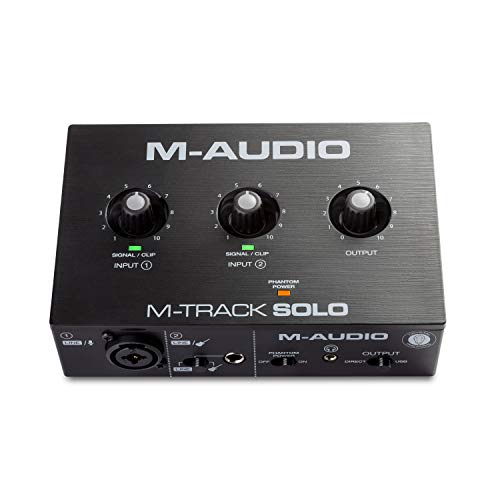
Spec line: USB interface with XLR, line and DI inputs and a software suite for recording, streaming and podcasting.
The Solo trims the Duo down to a single mic input, which is exactly what most solo streamers need. It keeps the same input types, so you can plug in an XLR mic or a guitar, but only one source at a time. That makes it a sensible way to move up from a USB mic while keeping the setup small, and it leaves money in the budget for a boom arm or a pop filter. The limitation is obvious: no second mic means co-hosted shows need a different unit. As with the Duo, detailed converter specs are not in the listing, so verify them on the maker page if you plan to record at a particular sample rate.
- Pro: lower entry point in the M-Track range
- Pro: XLR, line and DI inputs
- Pro: software suite included
- Con: one input only
- Con: converter specs not listed
Mackie Onyx Artist 1X2

Spec line: Mackie Onyx Artist 1X2 USB audio interface (1 input, 2 outputs).
The listing text is short, giving the model name and its 1×2 layout, so the main selling point here is the Mackie brand and a compact one-in, two-out design. One input suits a single vocal or instrument; two outputs cover headphones and monitors or a pair of speakers. Because the listing does not state preamp gain, phantom power or sample rate, treat this as a pick for buyers who will read the maker page first and confirm those details. If you want the specs spelled out in the product title, the M-Audio and Synido units are easier to compare on paper, but the Mackie is a reasonable choice for a plain, no-fuss vocal setup.
- Pro: compact 1-in, 2-out layout
- Pro: two outputs for headphones or monitors
- Pro: simple to set up on a small desk
- Con: only one input
- Con: very few specs in the listing
Behringer UMC22

Spec line: Audiophile 2×2 USB interface, 48 kHz, Midas mic preamplifier, for recording microphones and instruments.
The UMC22 is a straightforward 2×2 interface built around a Midas mic preamp, and the listing states a 48 kHz sample rate. That rate is enough for streaming, voice chat and most podcast work, though it is lower than the 192 kHz figures advertised on some rivals. It is the kind of unit that suits a first home studio: a mic preamp, instrument capability and stereo outputs in one box. The compromise is that the listing mentions only one preamp, so two-mic recording is not the use case. The listing also does not mention USB-C, which matters if your laptop has only USB-C ports and you would need an adapter.
- Pro: Midas preamp named in the listing
- Pro: 2×2 input and output layout
- Pro: works for mics and instruments
- Con: 48 kHz maximum listed
- Con: single mic preamp
Synido USB-C Audio Interface (Purple)

Spec line: USB-C, dual XLR, line/Hi-Z switching, 3 monitoring modes, 24-bit/48 kHz, 48V phantom power, 2-channel, 3-color gain lights.
This is the most detailed listing in the group, and it reads well on paper: two channels with phantom power, a switch between line and Hi-Z for instruments, and three monitoring modes. The USB-C connection means a direct plug into current laptops without an adapter. The 24-bit/48 kHz rating is fine for voice and streaming. The downside is brand familiarity; Synido is a newer name than Mackie, Behringer or M-Audio, so driver support and long-term software updates are worth a look on the maker page. The gain lights are a practical touch because they warn you before a loud shout clips the signal.
- Pro: two XLR inputs with 48V phantom power
- Pro: USB-C connection
- Pro: line and Hi-Z switching
- Con: 48 kHz ceiling
- Con: less established brand
BOMGE Mini 2 Channel USB Audio Interface

Spec line: Mini 2-channel USB interface with XLR and 48V phantom power for recording, streaming and podcasting.
The BOMGE is the lowest-priced pick and the one aimed hardest at small spaces. The listing describes a mini two-channel unit with XLR and phantom power, which is the minimum a condenser mic needs. It suits a laptop desk, a dorm or a shared room where every inch counts, and its target uses match the streaming and podcasting crowd. The cost of that size is fewer controls and less detail: the listing does not give sample rate, gain range or output type, so you are relying on the maker page. Treat it as a useful starter for a first XLR mic, not a long-term studio hub.
- Pro: smallest footprint listed
- Pro: XLR with 48V phantom power
- Pro: two channels in a mini body
- Con: sample rate and gain not listed
- Con: fewer controls for monitoring
How to Choose Under $75
Count the inputs you need
One mic means a single-input interface is enough, and it keeps the desk tidy. Two voices, or a mic plus a guitar, need two inputs. At a $75 ceiling, the M-Audio Duo, Synido and BOMGE list two channels, while the Solo and Mackie lean on one. Decide this first, because an interface cannot add inputs later.
Check phantom power before buying a condenser mic
Condenser microphones need 48V phantom power, while dynamic mics do not. Only pair a condenser mic with an interface whose listing states 48V, as the Synido and BOMGE do. For the M-Audio, Mackie and Behringer models, confirm it on the maker page so you do not end up with a silent mic.
Audio interfaces for home office
For video calls and voiceovers, a one-input unit with headphone monitoring is plenty. Look for a USB-C connector if your laptop has dropped USB-A, and make sure the box has a headphone output so you can hear yourself without delay. The M-Audio Solo and Mackie 1X2 fit this job well.
Audio interfaces for small spaces and gaming
Small desks favor mini units like the BOMGE or the one-input M-Audio and Mackie models. For gaming, an interface mainly improves your microphone path; game sound still comes from headphones or speakers on your PC, so check the outputs. A 24-bit/48 kHz rating matches voice chat and streaming, so higher sample rates are optional.
A quick decision matrix
Match your situation to a pick. One streamer with one XLR mic and a tight desk: M-Audio M-Track Solo or Mackie Onyx Artist 1X2. Two hosts, or a mic plus an instrument: M-Audio M-Track Duo or Synido. A laptop with only USB-C ports: Synido, whose listing names USB-C. Smallest possible body for a dorm or shared room: BOMGE Mini. First home studio with a recognised preamp name: Behringer UMC22. If a condenser mic is already in your cart, shortlist only the units whose listings state 48V phantom power, then compare input count. This order of questions removes most of the guesswork before you read a single review.
FAQ
Do I need an audio interface for a USB microphone?
No. A USB microphone has its own converter and preamp built in. An interface is for XLR microphones and instruments, which connect through a separate preamp and send digital audio to your computer over USB.
Is 48 kHz enough for streaming?
Yes. Streaming platforms and voice chat commonly run at 48 kHz, so a 24-bit/48 kHz interface such as the Synido or Behringer covers streaming, podcasting and game chat without any practical limit.
Which interface suits a home office?
A single-input model such as the M-Audio M-Track Solo handles calls and voiceovers. Add an XLR mic and use the headphone output for monitoring while you talk, keeping the desk clear for work.
Can I use a condenser mic with these units?
Only with phantom power. The Synido and BOMGE listings state 48V. For the others, confirm phantom power on the maker page first, since a condenser mic stays silent without it.
Which is best for small spaces?
The BOMGE Mini is the smallest listed. The M-Audio Solo and Mackie 1X2 are also compact because they offer one input, which suits a laptop desk or shared room.
Last updated: November 2026
FAQ
Do I need an audio interface for a USB microphone?
Is 48 kHz enough for streaming?
Which interface suits a home office?
Can I use a condenser mic with these units?
Which is best for small spaces?
More from Amazon
Programs that pair well with the guide above. Offers and eligibility are set by Amazon and may change.
Free shipping on eligible items, Prime Video and more. Eligible new members can start with a free trial.
Start a Prime free trialAd-free music streaming. Eligible new subscribers can start with a free trial.
Try Music Unlimited freeA Prime membership for ages 18-24 with a trial period. Eligibility is set by Amazon.
See Prime for Young AdultsAudiobooks and podcasts to listen to on the go. Eligible new members can start with a free trial.
Try Audible freeAs an Amazon Associate we earn from qualifying purchases.