Our Top Picks


The best desktop speakers under $30 are the Creative Pebble 2.0 for a compact USB-powered pair, the FUNLOGY 14W for a tilted desk-friendly design, and the Logitech Z150 for a familiar brand with multi-device input. Picks are compared from listing specifications: power source, connection, stated wattage and size.
At this ceiling you are choosing a simple 2.0 stereo pair, which means two small speakers and no subwoofer. Expect clear voices and everyday music rather than deep bass. The useful questions are how the speakers get power, how they connect, and whether they fit the space beside your monitor. Home office, small-space and gaming use are covered below.
Quick Comparison
| Model | Key specs per listing | Best for |
|---|---|---|
| Creative Pebble 2.0 | USB-powered, 2.0 stereo, compact, minimal design | Small desks, laptops |
| FUNLOGY 14W | 14W stereo, USB powered, 30 degree tilt, volume dial, for desktop, laptop, monitor and consoles | Gaming desks, consoles |
| Logitech Z150 | Stereo sound for multiple devices | Phone, laptop and PC sharing |
| Logitech S150 | USB speakers with digital sound | Basic office use |
| LENRUE G11 | Touch lights, USB-C or USB powered, AUX audio | Lit setups, USB-C laptops |
| ABRRU USB-C/A Speakers | Max 14W, 2 EQ modes (bass, vocal), clamp, touch control, Mac, Windows and PS5 | Monitor-mounted clamp setups |
Everything in the table comes from the listing text. Where a listing does not give a power rating or driver size, the pick says so. Because watt figures on small speakers are often peak numbers, treat them as a rough size indicator rather than a loudness promise. Fit, connection and controls matter more at this level.
Creative Pebble 2.0
As an Amazon Associate we earn from qualifying purchases at no extra cost to you.
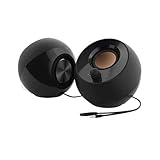
Spec line: USB desktop stereo speakers, 2.0, USB-powered, compact, minimal design, for PC and laptop.
The Pebble 2.0 is the easiest speaker pair to recommend for a small desk. The listing describes a compact, minimal design with USB power, so there is no bulky adapter or second cable. It suits a laptop or a PC where a USB port is free. The limit is power: the listing gives no wattage, and a USB-powered pair at this size will not fill a large room. It is a better fit for near-field listening, meaning one person sitting a metre or less away. If you want louder output, look at the powered options, but for calls, video and background music it is a good fit.
- Pro: USB power with a single cable
- Pro: compact, minimal design
- Pro: 2.0 stereo for PC and laptop
- Con: wattage not listed
- Con: not meant for large rooms
FUNLOGY 14W Stereo PC Speakers

Spec line: 14W stereo PC speakers, USB powered, compact size, 30 degree tilt design, volume dial control, for desktop, laptop, monitor and gaming consoles.
The FUNLOGY listing offers more detail than most at this ceiling. A 14W stereo rating, a volume dial and a 30 degree tilt are all stated, and the tilt aims sound upward toward your ears when the speakers sit low on the desk. The console mention suggests it is meant for more than a PC, though you should check which connection a console needs on the maker page. The dial is a practical touch because you can change volume without opening a menu. As with other USB-powered units, the stated wattage is a maximum, so do not expect it to behave like a mains-powered system.
- Pro: 14W stereo rating listed
- Pro: tilt angle aims sound at you
- Pro: physical volume dial
- Con: console connection details not listed
- Con: wattage is a stated maximum
Logitech Z150 Multimedia Speakers
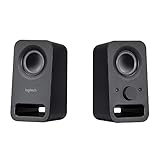
Spec line: Logitech Multimedia Speakers Z150 with stereo sound for multiple devices, black.
The Z150 is the pick for shared use. The listing says stereo sound for multiple devices, so you can move a phone, tablet or laptop onto the same pair without buying a second set. It comes from a long-established speaker maker, which helps if you want a name you recognise. The listing is short, however: power source, wattage and input types are not stated, so confirm the plug type and cable on the maker page before assuming it will fit your desk or outlet. It is a sensible, plain choice for a home office that values simple setup over lighting or extra features.
- Pro: stereo sound for multiple devices
- Pro: familiar speaker brand
- Pro: simple, plain design
- Con: power and inputs not listed
- Con: no lighting or controls described
Logitech S150 USB Speakers
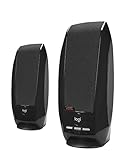
Spec line: Logitech S150 USB speakers with digital sound.
The S150 is the most basic pair in this group and the simplest to set up. The listing mentions USB speakers with digital sound, which points to a USB connection for both audio and power. That means one cable and no sound-card setting changes on most PCs. For a work desk where speakers handle video calls and the odd video, that is enough. What the listing does not give is wattage, size or a headphone jack, so check the maker page if those matter. It is a fair choice for a second PC or an office desk, but not for gaming sessions where positional audio and punch matter.
- Pro: USB connection for audio and power
- Pro: very simple setup
- Pro: minimal, no-frills design
- Con: wattage and size not listed
- Con: basic for gaming
LENRUE G11 Computer Speakers

Spec line: Computer speakers with touch lights, USB-C or USB powered, AUX audio input, for desktop PC and laptop.
The G11 adds lighting and a choice of connectors. USB-C or USB power means it can run from a modern laptop port or a standard USB-A socket, and the AUX audio input handles the sound signal. Touch lights give the desk a gaming look without a software app. The compromise is that wattage and driver details are not in the listing, and a lit speaker can distract in a dark room. It is a good fit for a gamer on a small desk who wants a little style, as long as you accept the modest output expected from a speaker at this size.
- Pro: USB-C or USB-A power
- Pro: touch lights for a gaming look
- Pro: AUX audio input
- Con: wattage not listed
- Con: lighting can distract
ABRRU USB-C/A Computer Speakers

Spec line: USB-C/A monitor speakers, max 14W, 2 EQ modes (bass and vocal), 1.38 inch wide clamp, touch control, for Mac, Windows and PS5.
The ABRRU is the most feature-rich pick, and the clamp is its standout detail. A wide clamp attaches the speakers to a monitor edge or desk, which frees desk space and aims the sound at your ears. Two EQ modes, one for bass and one for vocals, give a quick way to match music, chat or film without software. The listing names PS5 alongside Mac and Windows. As with all USB-powered speakers, 14W is a maximum figure, and the clamp width means you should measure your monitor edge or desk thickness before ordering.
- Pro: clamp mount saves desk space
- Pro: bass and vocal EQ modes
- Pro: USB-C and USB-A support
- Con: clamp width limits where it fits
- Con: 14W is a maximum figure
How to Choose Under $30
Check the power and the connection
USB-powered speakers run from a computer port and need no wall plug, which keeps cables tidy. Check the connector: USB-C suits newer laptops, and USB-A suits most desktops. A 3.5mm AUX input handles the sound, but you still need power from a USB port or an adapter. Count your free ports before you buy: a laptop with two ports may already be using one for a mouse dongle and another for a charger, and a USB-C-only laptop may need a hub to run a USB-A pair. Also check the cable length, because a short lead can force you to place the speakers farther apart than you want.
Desktop speakers for home office
For calls and background music, any 2.0 USB pair works. The Creative Pebble 2.0 and Logitech S150 are easy, quiet choices. Pay attention to a front volume control or dial, because it lets you adjust sound without opening a window.
Desktop speakers for small spaces
Measure the free desk width first. Compact pairs like the Pebble 2.0 sit beside a laptop, while the ABRRU clamp mounts speakers to the monitor edge and gives you the desk back. Tilted designs such as the FUNLOGY aim sound upward, which helps when the speakers sit low.
Desktop speakers for gaming
Under $30 you will not get a subwoofer or surround, so aim for clear stereo and quick volume control. FUNLOGY and ABRRU mention consoles, and the LENRUE adds lighting. For competitive play, a headset still gives better positional detail than any small speaker pair.
Placement matters more than watts
A simple rule gives better sound than a higher wattage number: place the two speakers about as far apart as you sit from them, and angle them slightly inward toward your head. Keep the drivers at ear height or aim them there with a tilt, and leave a few centimetres between the cabinet and the wall or monitor. Small speakers lose bass quickly when boxed in, so open space around them helps clarity more than any equaliser setting.
A quick decision matrix
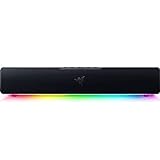
Smallest footprint: Creative Pebble 2.0. Monitor clamp: ABRRU. Tilted, with a volume dial: FUNLOGY. Shared across devices: Logitech Z150. Plain office duty with no frills: Logitech S150. Lit gaming desk: LENRUE G11. Choose by space and connector first, and treat brand and watt figures as tie-breakers. If two models tie, pick the one whose listing gives more detail about power and connection, because it leaves fewer surprises when the box arrives.
FAQ
Do USB speakers need a wall adapter?
Not if the listing says USB-powered. The speakers draw power from a USB port, so a single cable usually handles power and sometimes sound, depending on the model.
Are 14W desktop speakers loud?
For a desk, yes, they are loud enough. The 14W figure is a maximum, so treat it as an upper limit rather than steady output. Near-field listening, where you sit within about an arm’s length of the pair, needs far less power than filling a room, so a small stated wattage is usually enough for a desk.
Which are best for a home office?
The Creative Pebble 2.0 and Logitech S150 are simple USB options. Both handle calls and videos without extra setup.
Which suit a small desk?
The Pebble 2.0 for compact size, or the ABRRU if you want a clamp to free desk space. Measure your monitor edge or desk thickness first, and check that the cable reaches your computer without stretching across the desk.
Are they good for gaming?
For casual play, yes. FUNLOGY and ABRRU list console use, and LENRUE adds lights. For competitive games, a headset gives more precise direction cues, so many players keep speakers for relaxed sessions and music only.
Last updated: November 2026
FAQ
Do USB speakers need a wall adapter?
Are 14W desktop speakers loud?
Which are best for a home office?
Which suit a small desk?
Are they good for gaming?
More from Amazon
Programs that pair well with the guide above. Offers and eligibility are set by Amazon and may change.
Free shipping on eligible items, Prime Video and more. Eligible new members can start with a free trial.
Start a Prime free trialAd-free music streaming. Eligible new subscribers can start with a free trial.
Try Music Unlimited freeA Prime membership for ages 18-24 with a trial period. Eligibility is set by Amazon.
See Prime for Young AdultsAudiobooks and podcasts to listen to on the go. Eligible new members can start with a free trial.
Try Audible freeAs an Amazon Associate we earn from qualifying purchases.