
Key takeaways
- Latency and Passthrough: Prioritize true or ultra-low latency with near-zero added delay to HDMI passthrough. Look for dedicated passthrough that preserves your monitor’s refresh rate and HDR so your gameplay feels instant while the capture feed stays synced for commentary.
- Resolution, Refresh Rate, and HDR: Match passthrough and capture specs to your platform. For PS5, Xbox Series X, or high-refresh PC, choose HDMI 2.1 with 4K60/4K120 or 4K144 and VRR support; for Switch or 1080p streaming, 1080p60 capture with 4K passthrough is often enough.
- Connectivity and Compatibility: Check USB interface and host requirements. USB 3.2 Gen 2 offers higher bandwidth for 4K high-frame capture, while USB 3.0 cards offer broader plug-and-play compatibility. Confirm support for Windows 11, macOS, OBS, and your console.
- Software and Audio Sync: Look for stable OBS integration, driverless UVC support where possible, and reliable audio handling. Low-latency audio capture with mic mixing or audio embedding helps you commentate live without manual sync correction.
- Form Factor and Workflow: Consider desk space and portability. Internal and full-size external cards suit fixed streaming rigs, while compact dongle-style cards are ideal for portable commentary, secondary PCs, or quick camera-to-laptop setups.
What's inside
The Elgato 4K X is our Best Overall pick for low-latency live commentary, with the AVerMedia Live Gamer Ultra 2.1 GC553G2 as the runner-up for equally impressive HDMI 2.1 performance. Both deliver the ultra-low latency and reliable passthrough needed to keep your voice perfectly synced with gameplay when milliseconds matter.
Live commentary fails when your capture card adds delay between what you play and what your audience hears, forcing you to guess timing or fix sync in post. Many cards also confuse buyers with passthrough limits, resolution trade-offs, and spotty OBS compatibility. This guide cuts through the noise to compare real-world latency, passthrough, connectivity, and software support so you can choose a card that keeps your commentary immediate, natural, and in sync.
As an Amazon Associate we earn from qualifying purchases.




🛒 Best Price Today on Amazon
Prime members get fast, free shipping on everything above, plus member-only deals. New members get a 30-day free trial — cancel anytime.
Quick Comparison
| Product | Best For | Standout Feature | Rating |
|---|---|---|---|
| Elgato 4K X | Overall Live Commentary | Ultra-low latency HDMI 2.1, 4K144 and VRR passthrough, 1080p240 capture | 4.9/5 |
| acer USB 3.0 HDMI Capture Card | Budget Commentary | 4K HDMI loop-out, 1080p60 capture, USB Type-A and Type-C | 4.6/5 |
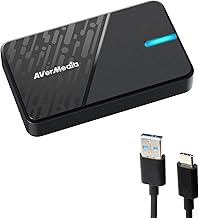
| AVerMedia Live Gamer Ultra 2.1 GC553G2 | Premium High Refresh Capture | HDMI 2.1, 4K144 / 4K120 passthrough, low latency for PS5 Pro and Xbox | 4.8/5 |
| AVerMedia Live Gamer Ultra S GC553Pro | Console Commentary | True low latency on PS5/Pro, Xbox, Switch 2 with 4K HDR passthrough | 4.7/5 |
| AVerMedia StreamLine MINI+ GC311G2 | Beginners and Compact Setups | 4K60 HDR passthrough with 1080p60 recording in ultra-compact form | 4.5/5 |
How to Choose a/an Low Latency Capture Cards for Live Commentary
- Latency and Passthrough: Prioritize true or ultra-low latency with near-zero added delay to HDMI passthrough. Look for dedicated passthrough that preserves your monitor’s refresh rate and HDR so your gameplay feels instant while the capture feed stays synced for commentary.
- Resolution, Refresh Rate, and HDR: Match passthrough and capture specs to your platform. For PS5, Xbox Series X, or high-refresh PC, choose HDMI 2.1 with 4K60/4K120 or 4K144 and VRR support; for Switch or 1080p streaming, 1080p60 capture with 4K passthrough is often enough.
- Connectivity and Compatibility: Check USB interface and host requirements. USB 3.2 Gen 2 offers higher bandwidth for 4K high-frame capture, while USB 3.0 cards offer broader plug-and-play compatibility. Confirm support for Windows 11, macOS, OBS, and your console.
- Software and Audio Sync: Look for stable OBS integration, driverless UVC support where possible, and reliable audio handling. Low-latency audio capture with mic mixing or audio embedding helps you commentate live without manual sync correction.
- Form Factor and Workflow: Consider desk space and portability. Internal and full-size external cards suit fixed streaming rigs, while compact dongle-style cards are ideal for portable commentary, secondary PCs, or quick camera-to-laptop setups.
The Best Low Latency Capture Cards for Live Commentarys Reviewed
Best Overall: Elgato 4K X
Best for dedicated streamers and live commentators who need flawless sync on PS5, Xbox, and PC, the Elgato 4K X combines ultra-low latency with HDMI 2.1, VRR, and HDR10 passthrough up to 4K144 while capturing up to 1080p240. It is the most reliable choice if you commentate fast-paced competitive games and need gameplay and mic to stay perfectly aligned.
Best Budget: acer USB 3.0 HDMI Capture Card
Best for new commentators and budget-conscious streamers, this acer card delivers dependable 1080p60 capture with 4K HDMI loop-out and dual USB Type-A and Type-C connections. It is ideal if you want simple plug-and-play performance for Nintendo Switch 2, PS5, Xbox, or camera sources without investing in a premium HDMI 2.1 device.
Best Premium: AVerMedia Live Gamer Ultra 2.1 GC553G2
Best for enthusiasts who demand maximum fidelity, the GC553G2 offers HDMI 2.1 with 4K144 and 4K120 passthrough and low-latency capture in a robust external design. Choose it if you stream high-refresh or 4K HDR console and PC gameplay and need no-compromise passthrough for your gaming monitor.
Best for Console Commentary: AVerMedia Live Gamer Ultra S GC553Pro
Best for PS5, PS5 Pro, Xbox, and Switch 2 commentators, the GC553Pro focuses on true low latency with 4K HDR support and wide OBS and platform compatibility for Windows 11 and Mac. It is a strong pick if your channel centers on console titles and you need consistent lip-sync accuracy across different consoles.
Best for Compact and Beginner Setups: AVerMedia StreamLine MINI+ GC311G2
Best for beginners, travelers, and minimal desks, the StreamLine MINI+ GC311G2 packs 4K60 HDR passthrough and 1080p60 recording into an ultra-compact body with ultra-low latency. It is perfect if you want an affordable, portable card for Switch 2, Xbox, PS5, or PC that still delivers clean, sync-ready commentary.
Frequently Asked Questions
How much latency is acceptable for live commentary?
For natural live commentary you want less than about 50ms of added capture delay, ideally much lower. Premium HDMI 2.1 cards like the Elgato 4K X and AVerMedia GC553G2 advertise ultra-low latency and near-instant passthrough so your reactions match gameplay without software delay compensation, which is critical when you narrate fast decisions.
Do I need 4K144 or 4K120 passthrough if I only stream at 1080p60?
You do not need to capture at 4K144, but high-refresh passthrough matters if your monitor can display it. A card that passes through 4K120, 4K144, and VRR lets you play at full smoothness while simultaneously capturing a clean 1080p60 feed for Twitch, YouTube, or OBS, preventing your card from limiting your gaming experience.
Will a capture card delay my microphone or game audio?
A low-latency card minimizes audio drift, but you should still verify audio embedding and OBS sync settings. The best cards in this roundup maintain tight audio-video alignment over HDMI, so commentary from a USB mic or headset mixed in OBS stays in sync. If you hear echo or lip-sync issues, adjust OBS audio sync offset by a few milliseconds rather than adding large delays.
Is USB 3.0 enough or do I need USB 3.2 Gen 2?
USB 3.0 is sufficient for 1080p60 capture and is widely compatible with laptops and consoles, which makes cards like the acer model very convenient. USB 3.2 Gen 2 provides higher bandwidth for higher resolutions and frame rates such as 4K60 or 1080p240 with lower compression, so choose it if you plan to capture high-frame 4K or HDR content and your PC supports the faster port.
Final Thoughts
For most live commentators, the Elgato 4K X remains the safest all-around investment for ultra-low latency and future-proof HDMI 2.1 support, while the AVerMedia Live Gamer Ultra 2.1 GC553G2 is an equally premium alternative for high-refresh workflows. If you are starting out or need a portable option, the acer USB 3.0 HDMI Capture Card and AVerMedia StreamLine MINI+ GC311G2 provide reliable low-latency 1080p60 performance without the premium cost.





