
Key takeaways
- Audio quality first: Viewers forgive mediocre video far sooner than muffled or clipping audio, so prioritize kits that include a dedicated interface or mixer rather than a simple USB mic.
- Platform compatibility: Confirm the bundle works with your primary device—PC, Mac, smartphone, or console—before purchasing, since some kits require a capture card for PS5 or Xbox input.
- Bundled extras vs. hidden costs: Check whether stands, pop filters, cables, and headphones are included; a slightly pricier all-in-one kit often beats a cheap mic that forces you to buy three accessories separately.
- Scalability: Choose a kit whose mixer or interface has spare inputs so you can add a second mic, a guest channel, or a soundboard later without replacing the entire setup.
- Lighting and framing: If your kit lacks an LED panel or adjustable tripod, budget an extra twenty to thirty dollars for a ring light; proper illumination elevates even a 1080P webcam to broadcast quality.
The Movo Portable Podcast Equipment Bundle is our top pick for most new streamers, delivering a complete two-mic setup with audio interface, desk stands, and headphones in one box; the Webcam Streaming Kit for Gaming Setup is the best runner-up if you need video-first gear on a tighter budget.
Walking into streaming for the first time means confronting a wall of jargon—capture cards, condenser mics, audio interfaces, RGB lighting—and figuring out which pieces you actually need before spending hundreds on mismatched gear. This guide cuts through that noise by reviewing five all-in-one streaming starter kits that bundle audio, video, and lighting essentials so you can go live on Twitch, YouTube, or TikTok without a trip to four separate product pages.
Our top picks



As an Amazon Associate we earn from qualifying purchases at no extra cost to you. Ratings are shown as listed on Amazon.
🛒 Best Price Today on Amazon
Prime members get fast, free shipping on everything above, plus member-only deals. New members get a 30-day free trial — cancel anytime.
Quick Comparison
| Product | Best For | Standout Feature | Rating |
|---|---|---|---|
| Movo Portable Podcast Equipment Bundle | Beginners wanting a full audio workstation | Two dynamic mics + audio interface + headphones | 4.6/5 |
| Webcam Streaming Kit for Gaming Setup | Budget-conscious video-first streamers | 1080P camera, RGB mic, and LED light in one bundle | 4.4/5 |
| TENLAMP G10 Creator Audio Mixer Bundle | Streamers prioritizing studio-grade sound | Built-in noise reduction, auto-tune, and Bluetooth | 4.5/5 |
| Brvomussy Podcast Equipment Bundle for 2 | Co-streaming and interview setups | Dual condenser mics with integrated voice changer | 4.3/5 |
| Vlogging Kit for iPhone/Android | Mobile-first creators on TikTok and Shorts | Wireless mic, dual tripods, and RGB fill light | 4.4/5 |
How to Choose a/an Complete Streaming Starter Kits for New Streamers
- Audio quality first: Viewers forgive mediocre video far sooner than muffled or clipping audio, so prioritize kits that include a dedicated interface or mixer rather than a simple USB mic.
- Platform compatibility: Confirm the bundle works with your primary device—PC, Mac, smartphone, or console—before purchasing, since some kits require a capture card for PS5 or Xbox input.
- Bundled extras vs. hidden costs: Check whether stands, pop filters, cables, and headphones are included; a slightly pricier all-in-one kit often beats a cheap mic that forces you to buy three accessories separately.
- Scalability: Choose a kit whose mixer or interface has spare inputs so you can add a second mic, a guest channel, or a soundboard later without replacing the entire setup.
- Lighting and framing: If your kit lacks an LED panel or adjustable tripod, budget an extra twenty to thirty dollars for a ring light; proper illumination elevates even a 1080P webcam to broadcast quality.
The Best Complete Streaming Starter Kits for New Streamerss Reviewed
Best Overall: Movo Portable Podcast Equipment Bundle
With two CastMic dynamic microphones, a dedicated audio interface, desk stands, and included headphones, this kit gives solo and duo streamers broadcast-ready audio out of the box. It is the right choice if you want a single purchase that covers recording, monitoring, and phone or computer connectivity without extra adapters.
Best Budget: Webcam Streaming Kit for Gaming Setup
Packing a 1080P HD camera, RGB USB microphone, and LED light into one affordable package, this bundle suits Twitch and YouTube beginners who need solid video and passable audio without breaking past the fifty-dollar mark. Note that console streamers will still need a separate capture card for PS5 or Xbox.
Best Premium: TENLAMP G10 Creator Audio Mixer Bundle
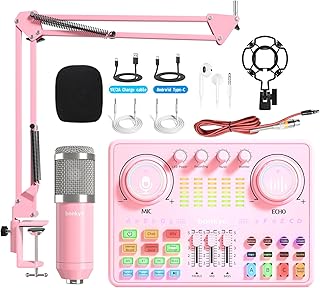
The G10 mixer’s onboard noise reduction, voice effects, auto-tune, and Bluetooth connectivity make it ideal for streamers who treat audio production as seriously as gameplay. If you sing, podcast, or layer backing tracks during live sessions, this is the kit that grows with your content.
Best for Co-Streaming and Interviews: Brvomussy Podcast Equipment Bundle for 2
Two condenser microphones, a shared audio interface, and a built-in voice changer make this the natural pick for partners, podcast duos, or interview-style channels. The all-in-one mixer keeps cable clutter minimal while giving each host an independent gain channel.
Best for Mobile Content Creators: Vlogging Kit for iPhone/Android
A wireless microphone, camera tripod, flexible mini tripod, and RGB fill light cover every angle a TikTok or YouTube Shorts creator needs while filming on the go. This kit is purpose-built for smartphone shooters who want stable, well-lit vertical video without hauling a full desk setup.
Frequently Asked Questions
Do I need a capture card with these kits?
Only if you stream console gameplay. PC and mobile streaming kits connect directly via USB or wireless receivers; PS5 and Xbox output requires an HDMI capture card, which some bundles note as a separate purchase.
Can I use these bundles for podcasting as well as streaming?
Yes. Every kit reviewed here includes an audio interface or mixer compatible with recording software such as Audacity, OBS, and GarageBand, making them equally suited for podcast episodes and live broadcasts.
Are condenser or dynamic microphones better for beginners?
Dynamic mics, like those in the Movo bundle, are more forgiving in untreated rooms because they reject background noise. Condenser mics capture richer detail but benefit from a quieter space or a mixer with noise reduction, like the TENLAMP G10.
What additional accessories should I budget for?
Most streamers eventually add a boom arm for mic positioning, a pop filter to tame plosives, and acoustic foam panels. Expect to spend roughly thirty to fifty dollars on these upgrades once your channel gains traction.
Final Thoughts
For a single, confidence-inspiring purchase, the Movo Portable Podcast Equipment Bundle remains our top recommendation, followed closely by the TENLAMP G10 Creator Audio Mixer Bundle for those who want studio-grade effects and Bluetooth flexibility. Mobile-first creators should grab the Vlogging Kit for iPhone/Android to cover wireless audio, stabilization, and lighting in one lightweight package—any of these three will have you live and sounding professional within an afternoon.





