Our Short List of 3

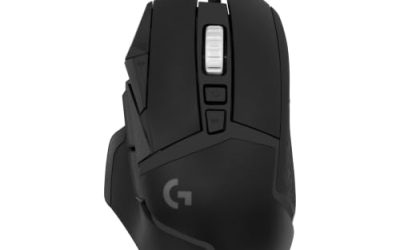
- Best for: MMO, strategy, and productivity players who want many programmable buttons and a tunable weight.
- HERO 25K sensor with up to 25,600 DPI
- 11 programmable buttons
- Adjustable weight system with five 3.6-gram weights
- Dual-mode hyper-fast scroll wheel

- Best for: Players buying their first gaming mouse who want a comfortable, familiar ergonomic shape.
- 6400 DPI optical sensor
- 5 programmable buttons
- Mechanical switches
- Rubber side grips

- Best for: Wireless players who want a light mouse with long battery life and no charging cable to manage.
- HERO 12K sensor with up to 12,000 DPI
- 6 programmable buttons
- LIGHTSPEED wireless connection
- Up to 250 hours of battery life on one AA battery
All 3 Picks at a Glance
| Product | Specs | Action |
|---|---|---|
| Logitech G502 HERO |
| Check price on Amazon |
| Razer DeathAdder Essential |
| Check price on Amazon |
| Logitech G305 LIGHTSPEED |
| Check price on Amazon |
Our Top Picks
- Razer DeathAdder Essential Ergonomic Wired Gaming Mouse5.01 x 2.86 x 1.69 inches0.3 poundsCheck on Amazon

A black gaming mouse sounds like a simple purchase until the choices pile up. A heavy wired mouse with eleven buttons suits a player who juggles abilities and inventory shortcuts, while a light wireless mouse suits a player who flicks across a wide pad and hates cable drag. Colour is the easy part. The real decision is how the mouse fits your hand, how many buttons you actually use, and whether you want a cable, a battery, or both.
This guide is for competitive shooter players, MMO and strategy players, and anyone building a tidy black desk setup who wants one mouse for games and everyday work. The five mice below were chosen from their Amazon listings, using the names and specifications stated there: sensor resolution, button count, connection type, weight, and battery life where the listing states it. Every mouse here is the black version of its model.
Quick Picks
As an Amazon Associate we earn from qualifying purchases
| Product | Best for | Key spec from title |
|---|---|---|
| Logitech G502 HERO | Button-heavy games and a palm grip | HERO 25K sensor, 25,600 DPI, 11 buttons |
| Razer DeathAdder Essential | A first gaming mouse with a classic shape | 6400 DPI optical sensor, 5 programmable buttons |
| Logitech G305 LIGHTSPEED | Wireless play on a single AA battery | HERO 12K sensor, 12,000 DPI, 250-hour battery |
| SteelSeries Rival 3 | A light wired mouse with RGB lighting | 8,500 CPI TrueMove Core sensor, 6 programmable buttons |
| SteelSeries Rival 3 Wireless | Long wireless sessions without charging | 18,000 CPI TrueMove Air sensor, 400-plus-hour battery |
How to Choose
Match the shape to your grip first
A mouse that fights your hand will annoy you long after the sensor impresses you. Palm grip players rest the whole hand on the mouse and usually suit taller, fuller shapes such as the Logitech G502 HERO or the Razer DeathAdder Essential. Claw grip players arch their fingers and often prefer a mid-sized body with a defined hump, while fingertip players hold the mouse with fingertips only and need a shorter, lighter shell. If you can, compare the length and width in the listing against a mouse you already own. A shape that matches your grip matters more than a higher sensor number, because comfort decides how long you can play without strain.
Decide how many buttons you will really use
Extra buttons help only when they sit where your thumb and fingers can reach them without shifting your grip. MMO and strategy players who map abilities, push-to-talk, and inventory commands benefit from the eleven programmable buttons on the G502 HERO. Shooter players usually need fewer: two side buttons for melee and reload, plus a DPI button for scoped aiming, cover most situations. A mouse with six buttons, such as the SteelSeries Rival 3, keeps the layout simple and avoids accidental presses. Count the commands you use in a typical match before choosing, and skip buttons you would never press.
Pick wired, wireless, or both on purpose
A wired mouse never needs charging and never runs out of power mid-match, which is why many competitive players still choose a cable. The trade-off is cable drag, so check whether the cable is braided and flexible, and whether your desk layout lets it move freely. A wireless mouse removes the cable entirely, but it adds a battery or a charging routine to your setup. The Logitech G305 runs on a single AA battery for a listed 250 hours, while the Rival 3 Wireless lists more than 400 hours across its two wireless modes. If you switch between a desktop and a laptop, a mouse with both 2.4 GHz wireless and Bluetooth saves you from carrying a receiver everywhere.
Read the sensor number in context
Sensor resolution is listed in DPI or CPI, and the headline number is almost never the setting you will play at. Most players settle somewhere between 400 and 3,200 DPI, so the difference between a 12,000 DPI sensor and a 25,600 DPI sensor rarely changes a match. What matters more is consistent tracking at your chosen sensitivity, a polling rate that keeps up with fast movement, and a sensor that does not spin out during quick flicks. A mouse with an 8,500 CPI sensor, such as the Rival 3, already covers the sensitivity range most players use. Spend your attention on shape, weight, and buttons, and treat the top sensor number as headroom rather than a deciding factor.
The 5 Best Options
Logitech G502 HERO
- Best for: MMO, strategy, and productivity players who want many programmable buttons and a tunable weight.
- HERO 25K sensor with up to 25,600 DPI
- 11 programmable buttons
- Adjustable weight system with five 3.6-gram weights
- Dual-mode hyper-fast scroll wheel
MMO, strategy, and productivity players who want many programmable buttons and a tunable weight.
the 121-gram starting weight is heavy for low-sensitivity flick shots, and the right-handed shape does not suit left-handed players.
The G502 HERO is the button-heavy pick in this group, built for players who want a full set of controls under one hand. Its right-handed ergonomic shape suits palm grip players, and the dual-mode scroll wheel switches between precise clicks and free spinning, which helps when scrolling long inventories or web pages. Five small tuning weights let you add heft in small steps until the balance feels right, and the onboard memory stores up to five profiles so your bindings travel with the mouse.
Watch out for: the 121-gram starting weight is heavy for low-sensitivity flick shots, and the right-handed shape does not suit left-handed players.
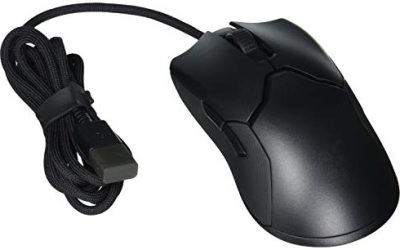
Razer DeathAdder Essential
- Best for: Players buying their first gaming mouse who want a comfortable, familiar ergonomic shape.
- 6400 DPI optical sensor
- 5 programmable buttons
- Mechanical switches
- Rubber side grips
Players buying their first gaming mouse who want a comfortable, familiar ergonomic shape.
the 6400 DPI ceiling and five-button layout offer less headroom than newer mice if you later want more controls or a higher sensitivity range.
The DeathAdder Essential is the straightforward choice for players who want a proven ergonomic shape without a long feature list. Its right-handed curve has been a familiar fit for palm and claw grips for years, and the rubber side grips help the mouse stay put during fast movements. Five programmable buttons cover the essentials, and the mechanical switches are rated in the listing context for long use. This is the mouse to pick when you want to stop comparing specifications and start playing.
Watch out for: the 6400 DPI ceiling and five-button layout offer less headroom than newer mice if you later want more controls or a higher sensitivity range.
Logitech G305 LIGHTSPEED
- Best for: Wireless players who want a light mouse with long battery life and no charging cable to manage.
- HERO 12K sensor with up to 12,000 DPI
- 6 programmable buttons
- LIGHTSPEED wireless connection
- Up to 250 hours of battery life on one AA battery
Wireless players who want a light mouse with long battery life and no charging cable to manage.
it uses a disposable AA battery rather than a rechargeable one, so keep a spare battery nearby if you play long sessions.
The G305 LIGHTSPEED is the wireless pick for players who want freedom from a cable without a charging dock or a built-in battery routine. It runs on a single AA battery, and the listing states up to 250 hours of battery life, so a single battery lasts through weeks of regular play. At 99 grams it is light enough for quick flicks, and its six programmable buttons keep the layout simple. The onboard memory stores your settings, so the mouse behaves the same way on any computer you plug the receiver into.
Watch out for: it uses a disposable AA battery rather than a rechargeable one, so keep a spare battery nearby if you play long sessions.
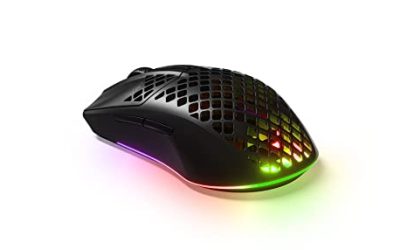
SteelSeries Rival 3
The Rival 3 is the lightest wired option here, and it suits players who want a simple mouse with a bit of colour. Its ergonomic shape fits right-handed players, and the split trigger buttons are designed to give the main clicks a crisp, consistent feel. The TrueMove Core sensor covers up to 8,500 CPI, which is more than enough for the sensitivity settings most players use. Prism RGB lighting runs through the scroll wheel and logo, so the mouse adds a small glow to a black desk setup without looking busy.
Specs
- 8,500 CPI TrueMove Core optical sensor
- 6 programmable buttons
- Split trigger buttons
- Brilliant Prism RGB lighting
- Ergonomic shape
- Wired connection
- Colour: Black
- Model number: 62513
Best for: Players who want a light, simple wired mouse with RGB lighting and a comfortable ergonomic shape.
Watch out for: the 8,500 CPI ceiling and six-button layout are modest next to the higher-spec mice in this guide, so check that they cover your sensitivity and binding needs.
SteelSeries Rival 3 Wireless
The Rival 3 Wireless takes the same idea as the wired Rival 3 and removes the cable, adding a much stronger sensor and a battery life figure that stands out in this group. The listing states more than 400 hours of battery life, and the mouse connects over 2.4 GHz wireless or Bluetooth 5.0, so it works with a desktop, a laptop, or a living-room setup without swapping hardware. Its 18,000 CPI TrueMove Air sensor gives plenty of headroom, and the switches are listed with a 60-million-click durability figure.
Specs
- 18,000 CPI TrueMove Air optical sensor
- 400-plus-hour battery life
- Dual wireless: 2.4 GHz and Bluetooth 5.0
- 60-million-click switch durability
- 6 programmable buttons
- Colour: Black
- Model number: 62521
Best for: Players who want one wireless mouse for a desktop and a laptop, with very long battery life between changes.
Watch out for: check which wireless mode your device supports before buying, since Bluetooth and the 2.4 GHz receiver behave differently for latency-sensitive games.
Which One Fits Your Situation
You play MMO or strategy games with many abilities
Choose the Logitech G502 HERO. Its eleven programmable buttons give you room for abilities, push-to-talk, and inventory shortcuts without reaching for the keyboard, and the tunable weights let you balance the mouse for long sessions. The wired connection means no battery worries during raids or long matches, and the onboard memory keeps your profiles with the mouse.
You want your first gaming mouse and a safe, comfortable shape
Choose the Razer DeathAdder Essential. Its ergonomic shape is a familiar fit for most right-handed players, the five-button layout is easy to learn, and the rubber side grips keep it steady during fast movements. You get a real gaming sensor and programmable buttons without paying for features you may never use, and the wired connection means there is nothing to charge.
You hate cables and do not want to charge a mouse
Choose the Logitech G305 LIGHTSPEED if you want a light wireless mouse, or the SteelSeries Rival 3 Wireless if you want the longest battery life in this guide. The G305 runs on a single AA battery for a listed 250 hours, while the Rival 3 Wireless lists more than 400 hours and adds Bluetooth for laptops. Both free your desk from cable drag.
You want a light wired mouse with RGB on a black desk
Choose the SteelSeries Rival 3. It is the simplest wired pick here, with a comfortable ergonomic shape, six programmable buttons, and Prism RGB lighting that suits a black setup. Its sensor covers the sensitivity range most players use, and the wired connection keeps the setup simple with nothing to charge.
Common Mistakes
- Buying the highest DPI number instead of the shape that fits your grip, then wondering why your hand aches after an hour.
- Choosing a mouse with eleven buttons when you only use two side buttons, and pressing the extras by accident mid-match.
- Picking a wireless mouse without checking how it is powered, then discovering it needs a battery or a charge at the wrong moment.
- Ignoring the cable on a wired mouse, and letting a stiff cable drag against the desk edge during fast flicks.
- Ordering a colour variant by mistake: confirm the listing states Black before checkout, since many of these models also come in white and other colours.
Frequently Asked Questions
Is a black gaming mouse better for gaming than other colours?
No, colour does not change how a mouse performs. A black finish hides dust, fingerprints, and wear better than a white shell, and it matches most desks and keyboards, which is why it is popular. Sensor, shape, weight, and buttons decide how a mouse plays, so choose those first and treat black as a finish preference.
Do I need a wireless gaming mouse for competitive play?
Not necessarily. Modern wireless mice perform well for competitive games, and the wireless picks in this guide use low-latency connections. A wired mouse still has the advantage of never needing a battery, while a wireless mouse removes cable drag. Choose based on your desk setup and whether you mind charging or changing batteries.
What DPI should I use on a black gaming mouse?
Most players settle between 400 and 3,200 DPI, depending on their game and how far they move the mouse. Start at 800 DPI with a medium in-game sensitivity, then adjust in small steps until aiming feels natural. The headline DPI number on the box is a maximum, not a recommended setting, so a lower number can still be the right one for you.
Can I use a gaming mouse for everyday work as well?
Yes, and many players do. The extra side buttons can be mapped to forward, back, copy, or paste, and the onboard memory on some models carries those bindings between computers. A comfortable ergonomic shape matters even more for long workdays than for short gaming sessions, so pick a shape you can live with for hours.
FAQ
Is a black gaming mouse better for gaming than other colours?
Do I need a wireless gaming mouse for competitive play?
What DPI should I use on a black gaming mouse?
Can I use a gaming mouse for everyday work as well?
More from Amazon
Programs that pair well with the guide above. Offers and eligibility are set by Amazon and may change.
Free shipping on eligible items, Prime Video and more. Eligible new members can start with a free trial.
Start a Prime free trialAd-free music streaming. Eligible new subscribers can start with a free trial.
Try Music Unlimited freeA Prime membership for ages 18-24 with a trial period. Eligibility is set by Amazon.
See Prime for Young AdultsAudiobooks and podcasts to listen to on the go. Eligible new members can start with a free trial.
Try Audible freeAs an Amazon Associate we earn from qualifying purchases.