Our Short List of 3

- Best for: A new 1080p build that should stay current for several years.
- Graphics coprocessor: GeForce RTX 5060
- Graphics card RAM: 8 GB GDDR7
- Memory interface: 128-bit
- Bus: PCIe 5.0

- Best for: Compact builds and upgrades where case space and power headroom are limited.
- Graphics coprocessor: GeForce RTX 4060
- Graphics card RAM: 8 GB GDDR6
- Memory interface: 128-bit
- Cooling: WINDFORCE cooling system, 2X WINDFORCE fans
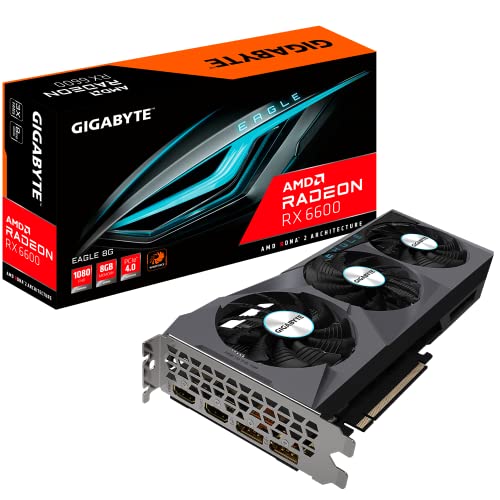
- Best for: A first 1080p gaming PC where the budget stays lean.
- Graphics coprocessor: AMD Radeon RX 6600
- Graphics card RAM: 8 GB GDDR6
- Memory interface: 128-bit
- Cooling: WINDFORCE 3X cooling system
All 3 Picks at a Glance
| Product | Specs | Action |
|---|---|---|
| GIGABYTE GeForce RTX 5060 Gaming OC 8G |
| Check price on Amazon |
| GIGABYTE GeForce RTX 4060 WINDFORCE OC 8G |
| Check price on Amazon |
| GIGABYTE Radeon RX 6600 Eagle 8G |
| Check price on Amazon |
Key takeaways
- Gigabyte GPU software is Gigabyte Control Center, one free app for fan curves, clock speeds, RGB lighting and updates. See the 4 best cards it runs on.
Gigabyte GPU software is Gigabyte Control Center, one free app that handles fan curves, clock speeds, RGB lighting, and driver updates for a Gigabyte graphics card. Older tools such as AORUS Engine and RGB Fusion now live inside Control Center, so a single download covers tuning, monitoring, and lighting. Install it from Gigabyte support, let it detect the card, and every control below sits in one window.
This guide fits buyers who already own a Gigabyte card or plan to buy one and want the software to work without extra tools. It also fits builders choosing between Gigabyte models by resolution, case size, and power supply. Every card below was chosen from its name and specs on the Amazon product page, and each one pairs with Control Center out of the box.
Quick Picks
As an Amazon Associate we earn from qualifying purchases
| Product | Best for | Key spec from title |
|---|---|---|
| GIGABYTE GeForce RTX 5060 Gaming OC 8G | Newest 1080p builds with DLSS 4 | 8GB GDDR7, PCIe 5.0, 2595 MHz core clock |
| GIGABYTE GeForce RTX 4070 WINDFORCE OC 12G | 1440p gaming with room to grow | 12GB GDDR6X, 192-bit, 3X WINDFORCE fans |
| GIGABYTE GeForce RTX 4060 WINDFORCE OC 8G | Compact cases and modest power supplies | 8GB GDDR6, 128-bit, 2X WINDFORCE fans |
| GIGABYTE Radeon RX 6600 Eagle 8G | Budget 1080p gaming on AMD | 8GB GDDR6, 128-bit, WINDFORCE 3X cooling |
How to Choose
Match the card to your monitor first
Start with resolution and refresh rate, not with a model name. A 1080p monitor at 60 Hz runs well on an 8 GB card, while a 1440p monitor at 144 Hz asks for more memory and a wider bus. A card that is too strong for the monitor wastes money, and a card that is too weak leaves the monitor half used. Check the monitor spec sheet, write down the resolution and refresh rate, then pick the card that covers both with headroom. The RTX 4070 below suits 1440p, the RTX 5060 and RTX 4060 suit 1080p, and the RX 6600 suits 1080p on a tighter budget.
Check the software before you buy the hardware
Gigabyte Control Center is free, and it only unlocks its full feature set on Gigabyte hardware. Fan curve editing, RGB Fusion lighting, and one-click overclock profiles appear when the app detects a Gigabyte card. A card from another brand will still run games, but its lighting and fan controls will need that brand own tool instead. If the goal is one app for the whole build, pair a Gigabyte card with a Gigabyte motherboard and the same app covers both. Download Control Center from Gigabyte support and confirm the model list includes the card you plan to buy.
Measure the case and the power supply
Length and slot thickness decide whether a card fits at all, so measure the space from the rear bracket to the nearest drive cage or front fan. Triple-fan cards run longer than dual-fan cards, and the RTX 5060 Gaming OC below measures 281 mm from end to end. A 2.5-slot card can also block the slot beneath it, which matters on small boards with a capture card or Wi-Fi card installed. Then check the power supply wattage and the 8-pin connector count, since every card here needs a single 8-pin plug and a supply sized for the whole system.
Decide how much VRAM the games need
Video memory holds textures, and 8 GB covers most 1080p games at high settings today. Newer titles with ultra texture packs push past that limit at 1440p, which is where a 12 GB card earns its place. A card with more memory also ages better, since texture sizes grow with each generation of games. Look at the games already installed and the ones planned for next year, then choose memory to match. The 12 GB RTX 4070 is the safe pick for 1440p, while the 8 GB cards below stay comfortable at 1080p.
The 4 Best Options
GIGABYTE GeForce RTX 5060 Gaming OC 8G
- Best for: A new 1080p build that should stay current for several years.
- Graphics coprocessor: GeForce RTX 5060
- Graphics card RAM: 8 GB GDDR7
- Memory interface: 128-bit
- Bus: PCIe 5.0
A new 1080p build that should stay current for several years.
Confirm the case has 281 mm of clearance and a free 8-pin power connector before ordering.
The RTX 5060 Gaming OC is the newest card in this lineup, and it suits a fresh 1080p build where DLSS 4 and frame generation matter. Its triple-fan WINDFORCE cooler keeps the card quiet under load, and Control Center handles the fan curve and the factory overclock profile. A builder who wants current-generation features without stepping up to a 12 GB card will find this the most forward-looking option here. It also fits standard mid-tower cases, though the 281 mm length needs a quick case measurement first.
Watch out for: Confirm the case has 281 mm of clearance and a free 8-pin power connector before ordering.
GIGABYTE GeForce RTX 4070 WINDFORCE OC 12G
The RTX 4070 WINDFORCE OC is the strongest card here, and it suits a 1440p monitor with high refresh rates. Twelve gigabytes of GDDR6X memory give texture-heavy games room to breathe, and the triple-fan cooler pairs with Control Center fan profiles for quiet sessions. DLSS 3 frame generation helps demanding titles hold smooth frame rates at 1440p. A buyer moving from 1080p to 1440p will feel the step up most clearly with this card, and the metal back plate adds rigidity to a long, heavy board.
Specs
- Graphics coprocessor: NVIDIA GeForce RTX 4070
- Graphics card RAM: 12 GB GDDR6X
- Memory interface: 192-bit
- Boost clock: 2490 MHz
- Cooling: WINDFORCE cooling system, 3X WINDFORCE fans
- Features: NVIDIA DLSS 3, full ray tracing, Dual BIOS, protection metal back plate, anti-sag bracket
- Model: GV-N4070WF3OC-12GD
Best for: 1440p gaming at high settings with headroom for newer titles.
Watch out for: Check the power supply rating, since this card draws more power than the 8 GB models below.
GIGABYTE GeForce RTX 4060 WINDFORCE OC 8G
- Best for: Compact builds and upgrades where case space and power headroom are limited.
- Graphics coprocessor: GeForce RTX 4060
- Graphics card RAM: 8 GB GDDR6
- Memory interface: 128-bit
- Cooling: WINDFORCE cooling system, 2X WINDFORCE fans
Compact builds and upgrades where case space and power headroom are limited.
Measure the case length first, since even a 192 mm card can clash with a front-mounted radiator.
The RTX 4060 WINDFORCE OC is the compact pick, and it suits small cases and modest power supplies. Two fans and a 192 mm length fit builds where triple-fan cards cannot, and the 8 GB of GDDR6 memory covers 1080p gaming at high settings. DLSS 3 support keeps demanding titles playable, and Control Center manages the fan curve so the card stays quiet during lighter loads. A buyer upgrading an older office-sized PC will find this the easiest card to drop in without changing the case or the power supply.
Watch out for: Measure the case length first, since even a 192 mm card can clash with a front-mounted radiator.
GIGABYTE Radeon RX 6600 Eagle 8G
- Best for: A first 1080p gaming PC where the budget stays lean.
- Graphics coprocessor: AMD Radeon RX 6600
- Graphics card RAM: 8 GB GDDR6
- Memory interface: 128-bit
- Cooling: WINDFORCE 3X cooling system
A first 1080p gaming PC where the budget stays lean.
Confirm the motherboard has a PCIe x16 slot and the case fits a triple-fan card.
The RX 6600 Eagle is the budget AMD pick, and it suits 1080p gaming where value matters more than ray tracing. Its triple-fan WINDFORCE 3X cooler runs cool at modest power draw, and Control Center still covers fan control and monitoring for this card. Eight gigabytes of GDDR6 memory handle esports titles and older AAA games at high settings without strain. A buyer building a first gaming PC on a tight budget gets a full-featured card here, and the low power draw keeps the power supply choice simple.
Watch out for: Confirm the motherboard has a PCIe x16 slot and the case fits a triple-fan card.
Which One Fits Your Situation
Building a brand-new 1080p PC
Pick the RTX 5060 Gaming OC. Its GDDR7 memory and PCIe 5.0 bus give the newest platform a longer useful life, and Control Center unlocks the factory overclock profile with one click. The triple-fan cooler stays quiet in a mid-tower case, and DLSS 4 support covers newer titles. Measure the case for the 281 mm length, then pair it with a modern power supply and a single 8-pin connector.
Moving up to a 1440p monitor
Pick the RTX 4070 WINDFORCE OC. Twelve gigabytes of GDDR6X memory and a 192-bit bus handle 1440p textures that 8 GB cards struggle with, and DLSS 3 keeps frame rates smooth at high settings. The triple-fan cooler and Dual BIOS give quiet and performance modes through Control Center. Check the power supply wattage first, since this card asks for more headroom than the others here.
Upgrading a small or older PC
Pick the RTX 4060 WINDFORCE OC. At 192 mm long with two fans, it fits cases that reject longer cards, and the 450W supply recommendation suits many existing builds. Control Center manages the fan curve, and DLSS 3 support stretches the card through demanding titles. Verify the case length and the 8-pin connector, then the swap is a simple drop-in upgrade.
Keeping the budget low on a first build
Pick the RX 6600 Eagle. It covers 1080p esports and older AAA titles at high settings, and its modest power draw keeps the power supply cheap. The triple-fan cooler runs cool without extra case fans, and Control Center still handles monitoring and fan control. Skip ray tracing heavy titles, and this card delivers strong value for a first gaming PC.
Common Mistakes
- Buying a card before measuring the case, then finding the triple-fan cooler hits a drive cage or front fan.
- Choosing 8 GB of memory for a 1440p monitor, then hitting texture limits in newer games.
- Installing a second tuning app alongside Control Center, which can fight over the same fan and clock controls.
- Ignoring the power supply wattage and connector count, then discovering the 8-pin plug is already in use.
- Skipping the driver install after fitting the card, so Control Center cannot detect the hardware at all.
Frequently Asked Questions
What is Gigabyte GPU software called?
Gigabyte GPU software is called Gigabyte Control Center. It replaced AORUS Engine as the main tuning app, and RGB Fusion lighting controls now live inside it. One download covers fan curves, clock speeds, lighting, monitoring, and driver updates for Gigabyte graphics cards. Install it from Gigabyte support after fitting the card, and it detects the hardware on its own.
Does Gigabyte Control Center work with non-Gigabyte cards?
Control Center runs on other cards for basic monitoring, but its full tuning and lighting controls unlock only on Gigabyte hardware. Fan curve editing, RGB Fusion, and one-click overclock profiles need a Gigabyte card to appear in the app. A card from another brand needs that brand own tuning tool for the same controls, so match the card brand to the software you want.
Do I need a Gigabyte motherboard to use Control Center?
No, Control Center works with a Gigabyte graphics card on any compatible motherboard. A Gigabyte motherboard adds extra controls for board lighting and fan headers inside the same app, which keeps the whole build under one tool. The graphics card controls work on their own, so the motherboard brand does not block GPU tuning or monitoring.
Which Gigabyte card should I pick for 1080p gaming?
The RTX 5060 Gaming OC suits a new 1080p build with the newest features, while the RTX 4060 WINDFORCE OC suits compact cases and smaller power supplies. The RX 6600 Eagle covers 1080p on the leanest budget. All three handle 1080p at high settings, so the choice comes down to case size, power supply, and how long the build should stay current.
FAQ
What is Gigabyte GPU software called?
Does Gigabyte Control Center work with non-Gigabyte cards?
Do I need a Gigabyte motherboard to use Control Center?
Which Gigabyte card should I pick for 1080p gaming?
More from Amazon
Programs that pair well with the guide above. Offers and eligibility are set by Amazon and may change.
Free shipping on eligible items, Prime Video and more. Eligible new members can start with a free trial.
Start a Prime free trialAd-free music streaming. Eligible new subscribers can start with a free trial.
Try Music Unlimited freeA Prime membership for ages 18-24 with a trial period. Eligibility is set by Amazon.
See Prime for Young AdultsAudiobooks and podcasts to listen to on the go. Eligible new members can start with a free trial.
Try Audible freeAs an Amazon Associate we earn from qualifying purchases.