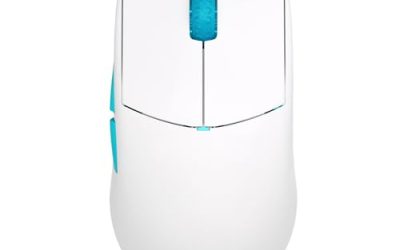
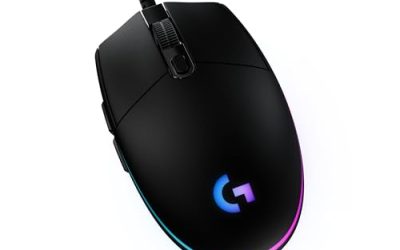
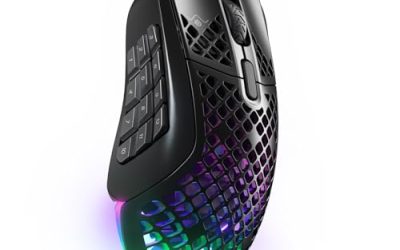
Our Short List of 3
All 4 Picks at a Glance
| Product | Specs | Action |
|---|---|---|
 1. Logitech G PRO X Superlight 2 | Check price on Amazon | |
 2. Razer DeathAdder V3 Pro | Check price on Amazon | |
 3. Logitech G502 X LIGHTSPEED | Check price on Amazon | |
 5. Logitech G Pro Wireless | Check price on Amazon |
Our Top Picks
- Logitech G Pro X Superlight 2 Lightspeed WirelessClassic1.57 x 2.5 x 4.92 inches0.1 poundsCheck on Amazon
- Razer DeathAdder V3 Pro Wireless Gaming Mouse1000 Hz5.01 x 2.65 x 1.69 inches0.1 poundsCheck on Amazon
Valorant rewards clean aim, calm crosshair placement, and fast flicks, and the mouse in your hand shapes all three. A mouse with adjustable DPI lets you tune sensitivity to your grip, your desk space, and the way you hold angles, so small wrist movements translate into steady, predictable aim instead of overshooting every target. The right DPI setting is personal, but the right mouse makes finding it simple, with on-the-fly controls and a sensor that tracks every movement without jitter or lag.
This guide looks at five gaming mice with adjustable DPI that suit Valorant, from ultralight esports models built for flick shots to versatile all-rounders that also handle everyday work. Each pick below is listed on Amazon US with a verified ASIN, and every model offers a wide DPI range, a precise optical sensor, and the kind of build quality that holds up through long ranked sessions.
As an Amazon Associate, we earn from qualifying purchases.
How to Choose a Gaming Mouse DPI for Valorant
DPI, or dots per inch, sets how far your crosshair moves for each inch you move the mouse. A low DPI setting means you move the mouse further for the same on-screen distance, which many tactical shooter players prefer because it gives finer control for small adjustments. A high DPI setting means the crosshair covers more ground with less hand movement, which suits players with limited desk space or a fast, wrist-driven style. There is no single correct number, and the best setting is the one that lets you hit flicks and hold angles without fighting your own hand.
Look for a mouse that lets you change DPI in small steps, either through dedicated DPI buttons on the shell or through the companion software. On-the-fly DPI buttons are useful in Valorant because you can drop to a lower setting when holding a long angle and switch back for fast rotations. A high maximum DPI matters less than a clean, adjustable range, since most Valorant players settle somewhere in the low to mid range and rarely push the sensor to its limit.
Sensor quality matters more than the headline DPI number. A modern optical sensor with no smoothing, no acceleration, and no angle snapping keeps your aim honest, so the crosshair goes exactly where your hand tells it to. Weight matters too. Lighter mice make flicks and fast resets easier, while a slightly heavier mouse can feel steadier for players who anchor their wrist. Shape is just as personal as DPI, so a mouse that fits your grip style will always beat a lighter or faster one that forces your hand into an awkward position.
Battery life and connection quality round out the picture for wireless models. A stable wireless link with a high polling rate keeps input delay low, and a long battery life means the mouse survives a full evening of ranked matches without a charging break. Wired models remove the battery question entirely. Whichever route you take, choose a mouse with a sensor, a shape, and a DPI range that fit your hand first, then tune the DPI setting in small steps until your aim feels natural.
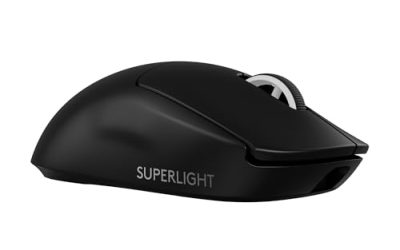
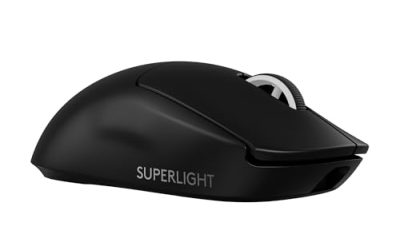
1. Logitech G PRO X Superlight 2
The Logitech G PRO X Superlight 2 is built for competitive shooters, and it shows in every detail. At 60 grams, it is one of the lightest wireless gaming mice Logitech has made, and the low weight makes fast flicks and quick resets feel almost effortless. The HERO 2 sensor tracks up to 44,000 DPI with sub-micron accuracy, so the mouse follows even tiny adjustments without jitter, and the LIGHTSPEED wireless link keeps the connection stable through long matches. For Valorant players who want a no-compromise esports mouse, this is a strong starting point.
DPI control is straightforward. The sensor adjusts in fine steps through Logitech G HUB software, and the two side buttons can be set to shift DPI on the fly. The mouse also supports up to 8 kHz polling, which shortens the time between the mouse reporting movement and the game reacting to it. The shell is a simple, ambidextrous-inspired shape that suits claw and fingertip grips well, and the zero-additive PTFE feet glide smoothly across most mouse pads.
Battery life runs up to 95 hours on a single charge, so a full week of evening ranked sessions is realistic before the mouse needs a cable. Charging uses USB-C, and the mouse also works with Logitech POWERPLAY charging mats for players who want to skip cables entirely. The hybrid optical-mechanical LIGHTFORCE switches give a crisp, consistent click that holds up over millions of presses.
Who It Suits
This mouse suits Valorant players who want a featherweight wireless mouse with a top-tier sensor and a clean, simple shape. It fits claw and fingertip grips best, and it works well for players who flick fast and reset often. Players who want many side buttons or a sculpted right-handed shape may prefer a different pick on this list.
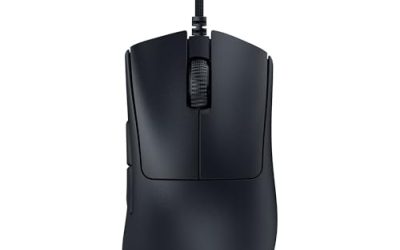
2. Razer DeathAdder V3 Pro
The Razer DeathAdder V3 Pro keeps the ergonomic shape that made the DeathAdder line famous, but in a much lighter body. At 63 grams, it is far lighter than earlier DeathAdder models, and the right-handed ergonomic curve supports the palm through long sessions. The Focus Pro 30K optical sensor tracks up to 30,000 DPI with high precision, and the HyperSpeed wireless link keeps input delay low, which matters when a single duel decides a round.
DPI adjustment is flexible. The sensor changes in fine steps through Razer Synapse software, and the mouse includes a DPI button that cycles through your saved settings. The Gen-3 optical switches actuate quickly and avoid the double-click issues that can plague mechanical switches over time. The mouse also supports up to 8 kHz polling with the HyperPolling wireless dongle, which sharpens responsiveness for players who notice the difference.
Battery life runs up to 90 hours, which covers many evenings of play before a recharge is needed. The mouse charges over USB-C, and the cable is long enough to keep playing while plugged in. The textured grip tape in the box adds extra control for players who want a firmer hold during tense rounds.
Who It Suits
This mouse suits Valorant players who like a comfortable, ergonomic right-handed shape and want a proven esports sensor. It fits palm and claw grips well, and the light weight keeps flicks quick. Players who prefer a symmetrical shell or a smaller mouse may find the DeathAdder shape a little large.
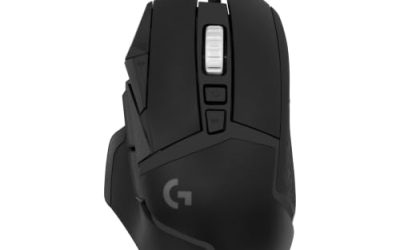
3. Logitech G502 X LIGHTSPEED
The Logitech G502 X LIGHTSPEED is the most versatile mouse on this list, and it suits Valorant players who want more buttons without giving up sensor quality. The HERO 25K sensor tracks up to 25,600 DPI with precise, consistent tracking, and the LIGHTSPEED wireless link keeps the connection stable. The mouse carries 13 buttons, including a DPI shift button that temporarily drops sensitivity while held, which is handy for holding a tight angle or lining up a long shot.
The G502 X shape is sculpted for right-handed players, with a thumb rest and textured side grips that keep the hand steady during long sessions. The dual-mode scroll wheel switches between a notched mode for weapon selection and a free-spin mode for fast scrolling, and the wheel tilt adds two more inputs. LIGHTFORCE hybrid optical-mechanical switches deliver a crisp click with a long lifespan, and the adjustable DPI steps can be tuned in fine increments through Logitech G HUB software.
Battery life runs up to 140 hours, which is the longest on this list, so the mouse can go a long time between charges. It charges over USB-C and also works with Logitech POWERPLAY wireless charging mats. The mouse weighs more than the ultralight picks here, but the extra weight gives it a planted, steady feel that many players prefer for precise aiming.
Who It Suits
This mouse suits Valorant players who want many programmable buttons, a comfortable right-handed shape, and very long battery life. It fits palm and claw grips well, and the DPI shift button is a genuine help for precise aiming. Players who want the lightest possible mouse may prefer an ultralight pick instead.
4. Razer Viper V3 Pro
The Razer Viper V3 Pro is a symmetrical esports mouse built for speed. At 54 grams, it is the lightest mouse on this list, and the low weight makes fast flicks and rapid direction changes feel natural. The Focus Pro 35K optical sensor tracks up to 35,000 DPI with excellent precision, and the HyperPolling wireless dongle supports up to 8 kHz polling, which keeps the mouse reporting movement to the game as fast as possible.
DPI control is handled through Razer Synapse software, where the sensor adjusts in fine steps and DPI stages can be saved to the mouse. The shell is symmetrical, so it works for left-handed and right-handed players, and the shape suits claw and fingertip grips. The Gen-3 optical switches give a fast, consistent click, and the smooth PTFE feet glide cleanly across cloth and hard pads alike.
Battery life runs up to 95 hours, which is generous for a mouse this light. Charging is over USB-C, and the mouse keeps working while plugged in. The Viper V3 Pro is a focused tool, with no extra weight and no unnecessary features, which is exactly what many competitive players want.
Specs
| Feature | Detail |
|---|---|
| Brand | Razer |
| Model | Viper V3 Pro |
| Sensor | Focus Pro 35K optical |
| Maximum DPI | 35,000 |
| Weight | 54 grams |
| Connection | HyperSpeed wireless, USB-C |
| Polling rate | Up to 8 kHz |
| Programmable buttons | 8 |
| Battery life | Up to 95 hours |
| ASIN | B0CW25XR5R |
Who It Suits
This mouse suits Valorant players who want the lightest possible wireless mouse with a symmetrical shape and a fast sensor. It fits claw and fingertip grips best, and it works well for players who flick fast and play with a low sensitivity. Players who want an ergonomic right-handed shape or many side buttons may prefer another pick.
5. Logitech G Pro Wireless
The Logitech G Pro Wireless is a long-standing favorite among professional players, and it remains a solid choice for Valorant. The HERO 25K sensor tracks up to 25,600 DPI with accurate, consistent tracking, and the LIGHTSPEED wireless link delivers a fast, stable connection. The ambidextrous shape works for left-handed and right-handed players, and the removable side buttons let you configure the mouse for your grip.
DPI adjustment is simple. The sensor changes in fine steps through Logitech G HUB software, and the DPI button on the underside cycles through your saved settings. The mouse weighs 80 grams, which sits between the ultralight picks and the heavier G502 X, giving it a balanced feel that works for a wide range of grips. The mechanical switches give a firm, consistent click, and the shell has a clean, understated look.
Battery life runs up to 60 hours with lighting off, which covers many sessions before a recharge is needed. The mouse charges over a micro-USB cable, and it also works with Logitech POWERPLAY wireless charging mats. While newer models have surpassed it in weight and polling rate, the G Pro Wireless still delivers the sensor quality and reliability that made it a tournament staple.
Who It Suits
This mouse suits Valorant players who want a proven, ambidextrous wireless mouse with a balanced weight and a reliable sensor. It fits claw and palm grips well, and it works for both left-handed and right-handed players. Players who want the lightest shell or the highest polling rate may prefer a newer model on this list.
FAQ
What DPI should I use for Valorant?
There is no single correct DPI for Valorant, because the best setting depends on your grip, your desk space, and your in-game sensitivity. Many tactical shooter players use a low to mid DPI setting paired with a low in-game sensitivity, since that combination gives finer control for small adjustments. Start in the low to mid range, then change the setting in small steps until flicks and tracking feel natural. A mouse with on-the-fly DPI buttons makes this tuning process much easier.
Does a higher maximum DPI make a mouse better for Valorant?
Not on its own. A high maximum DPI shows the sensor has headroom, but most Valorant players settle well below the maximum and never use the top of the range. Sensor accuracy, tracking consistency, and the ability to adjust DPI in fine steps matter more than the headline number. A mouse with a clean sensor and a comfortable shape will serve you better than a mouse with a huge DPI figure and a poor fit.
Should I choose a wired or wireless mouse for Valorant?
Both work well for Valorant. Modern wireless gaming mice use fast, stable links with low input delay, and the freedom from a cable helps with fast flicks. Wired mice remove battery concerns entirely and cost less in many cases. If you choose wireless, look for a model with a high polling rate and a battery life that covers your longest sessions. If you choose wired, look for a light, flexible cable that does not drag across the desk.
How do I change DPI on the fly during a match?
Most gaming mice let you switch DPI with a dedicated button on the shell or through the companion software. Set two or three DPI stages before you play, such as a low stage for holding angles, a middle stage for general play, and a higher stage for fast rotations. Some mice also have a DPI shift button that temporarily lowers sensitivity while held, which is useful for lining up a precise shot and then returning to your normal setting when you release it.
Final Verdict
The best gaming mouse DPI for Valorant comes down to a mouse that tracks cleanly, adjusts in fine steps, and fits your hand. The Logitech G PRO X Superlight 2 is the top pick for most players, with a featherweight body, a superb HERO 2 sensor, and up to 8 kHz polling. The Razer Viper V3 Pro is the lightest option here and suits fast flick players, while the Razer DeathAdder V3 Pro offers the most comfortable ergonomic shape. The Logitech G502 X LIGHTSPEED is the best choice for players who want many buttons and the longest battery life, and the Logitech G Pro Wireless remains a reliable, ambidextrous option with a proven sensor. Pick the shape and weight that suit your grip first, then tune the DPI in small steps until your aim feels natural.
Product and ASIN Reference
| Product | ASIN |
|---|---|
| Logitech G PRO X Superlight 2 | B09NBWL8J5 |
| Razer DeathAdder V3 Pro | B0B6XZLNHQ |
| Logitech G502 X LIGHTSPEED | B092CRH1RX |
| Razer Viper V3 Pro | B0CW25XR5R |
| Logitech G Pro Wireless | B07P6DMQK3 |
FAQ
What DPI should I use for Valorant?
Does a higher maximum DPI make a mouse better for Valorant?
Should I choose a wired or wireless mouse for Valorant?
How do I change DPI on the fly during a match?
More from Amazon
Programs that pair well with the guide above. Offers and eligibility are set by Amazon and may change.
Free shipping on eligible items, Prime Video and more. Eligible new members can start with a free trial.
Start a Prime free trialAd-free music streaming. Eligible new subscribers can start with a free trial.
Try Music Unlimited freeA Prime membership for ages 18-24 with a trial period. Eligibility is set by Amazon.
See Prime for Young AdultsAudiobooks and podcasts to listen to on the go. Eligible new members can start with a free trial.
Try Audible freeAs an Amazon Associate we earn from qualifying purchases.