Key takeaways
- Four large gaming mouse pads for low DPI play compared on listed size, control cloth texture, stitched edges, pad thickness, and rubber bases.
Low DPI aim turns every turn into a long arm movement, so the pad stops being an accessory and becomes the limit on your aim. Run out of surface mid-swipe and you lift, recenter, and lose the shot; stay on cloth and the motion stays one clean arc. The real decision is how much uninterrupted width and depth your swipes need, and whether the surface gives you enough friction to stop exactly where the swing ends.


This guide is for tactical shooter players on low sensitivity, arm aimers who reset their mouse often, and anyone whose current pad forces constant recentering. The four pads below were chosen from their Amazon listing names and stated specifications, and every one is a large gaming mouse pad with the listed dimensions, surface weave, and thickness compared side by side.
Quick Picks
As an Amazon Associate we earn from qualifying purchases.
| Product | Best for | Key spec from title |
|---|---|---|
| Logitech G840 XL Cloth Gaming Mouse Pad | Low DPI play named in the listing itself | 900 x 400 mm, 3 mm, moderate surface friction |
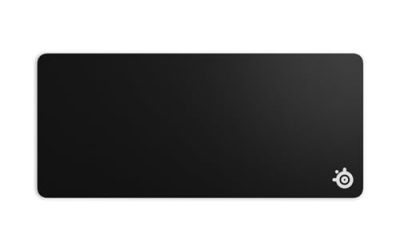
| SteelSeries QcK XXL Gaming Mouse Pad | A proven micro-woven control cloth | 900 x 400 mm, model 67500 |
| Razer Gigantus V2 XXL Cloth Gaming Mouse Pad | The widest and deepest surface here | 940 x 410 mm, 4 mm thick |
| Corsair MM300 PRO Extended Cloth Gaming Mouse Pad | Stitched edges and a spill-proof surface | 930 x 300 mm, 3 mm, anti-fray stitching |
How to Choose
Measure your swipe, then buy width and depth to cover it
Start with your longest in-game turn and measure how far the mouse actually travels. At low sensitivity a full turn can eat most of a standard pad, so look for extended footprints around 900 millimeters wide and close to 400 millimeters deep. Width covers horizontal swings, while depth decides whether vertical flicks stay on cloth. Check the listed dimensions against your desk, including keyboard space, before anything else, because a pad that overhangs the desk edge curls and ruins the flat surface you paid for.
Pick a control cloth texture, not the slickest glide
Low DPI aim needs two opposite things: easy movement across long distances and a firm stop at the end of the swing. Tightly woven cloth with moderate friction gives that braking feel, while very slick surfaces can feel loose when you try to park the crosshair on a small target. Read the listing wording closely, since makers describe their weaves as performance-tuned, micro-woven, or textured. A consistent texture across the whole pad also matters, because your muscle memory assumes every centimeter behaves the same.
Decide how much thickness your wrist and desk want
Thickness changes how the pad handles desk flaws and how your wrist sits during long sessions. Listings here run from 3 to 4 millimeters. A thicker foam pad flattens over seams, cable bumps, and slightly uneven desks, and it cushions the heel of your hand during repeated swipes. A thinner pad keeps the mouse closer to desk height and feels firmer under quick stops. Neither is automatically better; match the listed thickness to your desk surface and to how much cushion your forearm already gets from your chair height.
Check edges and the base, because swipes end there
At low sensitivity your mouse regularly reaches the border of the pad, so edge construction is a working feature, not decoration. Stitched anti-fray edges resist peeling where your wrist and mouse feet cross them hundreds of times a day, while unstitched cloth edges can lift sooner. The base matters just as much: a rubber base with real grip keeps the pad from creeping forward during hard swings. Confirm both details in the listing, and note the base material and any anti-skid texture the maker states.
The 4 Best Options
Logitech G840 XL Cloth Gaming Mouse Pad
The G840 XL is the rare pad whose own listing names low-DPI gaming, describing moderate surface friction and a consistent texture tuned for gaming sensors. Its 900 by 400 millimeter footprint gives arm aimers a full keyboard-plus-mouse surface with genuine depth for vertical movement, and the 3 millimeter profile keeps the whole setup low and stable. For players who want the control surface Logitech itself positions for this exact play style, this is the most direct match in the group.
Specs
- Listed size: 900 x 400 mm (35.43 x 15.75 in), XL
- Thickness: 3 mm (0.12 in) as listed
- Surface: performance-tuned cloth with moderate surface friction
- Base: stable rubber base, non-slip
- Model number: 943-000776
- Color: Black
Best for: Low DPI players who want the pad Logitech lists for low-DPI gaming
Watch out for: The listing does not describe stitched edges, so check the edge finish on the page if fraying is a concern for you
ASIN: B0BHMN52LY
SteelSeries QcK XXL Gaming Mouse Pad
The QcK line built its name on micro-woven cloth, and the XXL stretches that surface to 900 by 400 millimeters so low sensitivity players get the familiar control texture without running out of room. The listing describes a high thread count cloth optimized for optical and laser sensors, over a non-slip rubber base. Players who already trust the standard QcK feel and simply need far more of it will find this the least risky change in the roundup.
Specs
- Listed size: 900 x 400 mm, XXL
- Surface: exclusive QcK micro-woven cloth, high thread count
- Base: durable non-slip rubber base
- Sensor fit: optimized for optical and laser gaming sensors as listed
- Model number: 67500
- Color: Black
Best for: Players who want a long-established control cloth in an extended size
Watch out for: Sources differ on this model thickness, so confirm the current listing figure on the page before ordering if thickness matters to you
ASIN: B00WAA2704
Razer Gigantus V2 XXL Cloth Gaming Mouse Pad
The Gigantus V2 XXL is the biggest surface in this group at 940 by 410 millimeters, which suits players whose turns are wide enough to challenge even extended pads. Razer lists a textured micro-weave cloth surface over thick, high-density rubber foam, and at 4 millimeters it is also the cushioned option here, staying flat over imperfect desks. If your current pad still feels cramped during full arm swings, this is the one built to end recentering altogether.
Specs
- Listed size: 940 x 410 mm (37 x 16.14 in), XXL
- Thickness: 4 mm as listed
- Surface: textured micro-weave cloth
- Base: thick high-density rubber foam with anti-slip base
- Model number: RZ02-03330400-R3U1
- Color: Classic Black
Best for: Arm aimers who need the maximum listed width and depth
Watch out for: At 940 millimeters wide it demands a large desk, so measure your surface and keyboard placement first
ASIN: B0885FJ8CB
Corsair MM300 PRO Extended Cloth Gaming Mouse Pad

The MM300 PRO Extended trades some depth for the toughest edge and surface treatment in this group. Its 930 millimeter width still covers long horizontal swipes, and the listing adds a spill-proof, stain-resistant coating over micro-weave fabric, stitched anti-fray edges all the way around, and an anti-skid textured rubber base. For players whose pad border takes constant wrist traffic, or whose desk sees drinks during long sessions, those construction details are the reason to pick it.
Specs
- Listed size: 930 x 300 mm (36.6 x 11.8 in), Extended
- Thickness: 3 mm plush rubber construction
- Surface: micro-weave fabric with spill-proof, stain-resistant coating
- Edges: durable stitched anti-fray edges, listed as 360 degrees of stitching
- Base: anti-skid textured rubber base
- Part number: CH-9413641-WW
Best for: Players who want stitched edges and an easy-clean surface
Watch out for: The 300 millimeter depth is shallower than the other pads here, so vertical swipe room is smaller despite the long width
ASIN: B08JH7H1NG
Which One Fits Your Situation
You play tactical shooters with full arm swings
Choose the Razer Gigantus V2 XXL. Its 940 by 410 millimeter surface is the largest listed here, so wide turns and big vertical corrections stay on cloth without a lift. The 4 millimeter foam also keeps the pad flat when your swings get forceful late in a match. The textured micro-weave cloth gives those long movements a controlled stop, so the extra room does not come at the cost of the braking feel your sensitivity depends on.
You want the surface positioned for low DPI by its maker
Choose the Logitech G840 XL. Logitech lists moderate surface friction and a consistent texture for low-DPI gaming, which is exactly the braking control this sensitivity range needs. The 900 by 400 millimeter size still covers a keyboard and full mouse travel. Its 3 millimeter profile also keeps keyboard and mouse level on one shared surface.
You keep wearing out pad edges
Choose the Corsair MM300 PRO Extended. Its stitched anti-fray edges are built for borders that see constant crossings, and the spill-proof coating wipes clean after accidents. Accept the shallower 300 millimeter depth as the trade for that construction. The anti-skid textured rubber base also stays planted when your wrist drags across that border during long sessions.
You want a familiar control cloth, only bigger
Choose the SteelSeries QcK XXL. The micro-woven surface is the same family of cloth many players learned on, stretched to 900 by 400 millimeters. It suits anyone upgrading size without relearning how their mouse stops and starts. The non-slip rubber base and high thread count cloth keep tracking consistent from the center of the pad to the far corners your swings reach.
Common Mistakes
- Buying by headline size words like XL or XXL without reading the listed dimensions. Those labels mean different footprints at different brands, and one extended pad here is 300 millimeters deep while another is 410. Compare the actual width and depth figures, then measure your desk and your longest swipe before choosing.
- Choosing the slickest surface for a low sensitivity setup. Fast glide feels exciting for small wrist movements, but long arm swings need friction to stop precisely. A pad that will not brake turns every flick into an overshoot you must correct, which quietly costs accuracy in every gunfight.
- Ignoring depth because width looks generous. Low DPI players move diagonally and vertically as well as sideways, and a shallow pad pushes the mouse off the top or bottom edge during ordinary play. Depth near 400 millimeters is what keeps the whole swing on one surface.
- Letting the keyboard steal the mouse area. On a shared extended pad, a wide keyboard placement can leave less mouse room than a smaller dedicated pad would. Position the keyboard first, then check the remaining width against your measured swipe before you commit.
- Skipping the base and edge details. A pad that creeps forward a few millimeters each round changes your effective space and your aim reference points. Grippy rubber bases and stitched edges look minor in a listing and decide how the pad behaves after months of hard swipes.
Frequently Asked Questions
How large should a mouse pad be for low DPI play?
Look for extended listings around 900 millimeters wide and close to 400 millimeters deep, like three of the pads in this guide. That footprint covers a full arm swing plus keyboard space. Measure your longest turn first, then leave margin on every side so hard flicks never reach the border.
Is a cloth pad better than a hard pad at low sensitivity?
For most low DPI players, yes, because cloth adds the friction that stops a long swing precisely. The listings here describe moderate friction, micro-woven, and textured cloth surfaces built for control. Hard pads glide faster, which suits some wrist aimers, but they give arm aimers less help braking at the target.
Does pad thickness change how aim feels?
Thickness changes cushion and how the pad handles desk flaws more than it changes glide. A 4 millimeter foam pad flattens over seams and softens wrist contact, while a 3 millimeter pad sits lower and feels firmer. Pick from the listed thickness that matches your desk surface and session length.
How do I keep a large cloth pad performing well?
Keep the surface clean, since dust and skin oils change friction across a woven cloth, and follow the care wording on your product listing. Keep the pad fully flat, avoid folding it, and replace it when the weave or edges wear enough that tracking or stopping feels uneven from one area to another.
FAQ
How large should a mouse pad be for low DPI play?
Is a cloth pad better than a hard pad at low sensitivity?
Does pad thickness change how aim feels?
How do I keep a large cloth pad performing well?
More from Amazon
Programs that pair well with the guide above. Offers and eligibility are set by Amazon and may change.
Free shipping on eligible items, Prime Video and more. Eligible new members can start with a free trial.
Start a Prime free trialAd-free music streaming. Eligible new subscribers can start with a free trial.
Try Music Unlimited freeA Prime membership for ages 18-24 with a trial period. Eligibility is set by Amazon.
See Prime for Young AdultsAudiobooks and podcasts to listen to on the go. Eligible new members can start with a free trial.
Try Audible freeAs an Amazon Associate we earn from qualifying purchases.