Key takeaways
- Pick an ultrawide if you play single-player, racing, flight, simulation or city-builder games, if you multitask with side-by-side windows, or if you want one screen instead of two.
- Pick a standard 16:9 monitor if you mostly play esports titles, want the widest game compatibility, or need a lower-cost panel that is easy to drive at high refresh rates.
- Pick a 32:9 super ultrawide only if you have a strong graphics card and a deep desk, because it behaves like two monitors in one and is demanding.
An ultrawide monitor suits players who want an immersive wide view in racing, simulation, open-world and strategy games and who also use the screen for work, while a standard 16:9 monitor suits competitive shooter players, anyone on a tight graphics-card budget and desks that are short on width. Neither is better in every case. The right pick depends on the games you play, how much GPU power you have and how much desk you can give up.
Our top picks
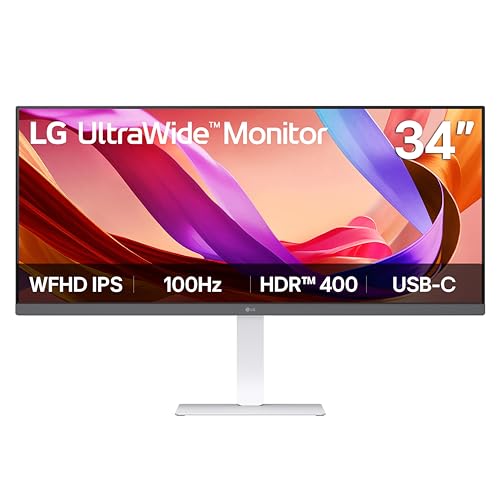
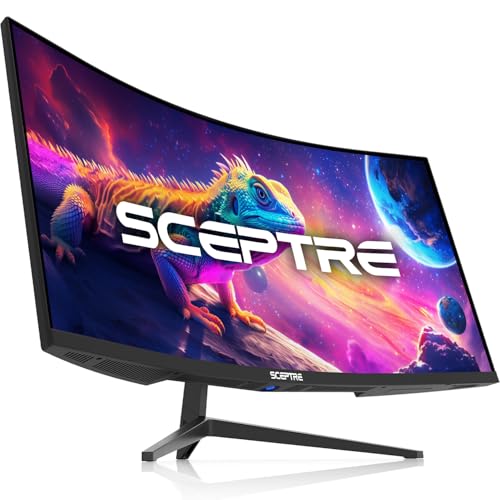
 Sceptre 34-inch Curved ultrawide WQHD Monitor
- 1ms MPRT: Colors fade and illuminate instantly with…
- Luminous Backcover Lights: A colorful LED light illuminates…
- WQHD Resolution: At 5 million pixels, Wide Quad…

As an Amazon Associate we earn from qualifying purchases at no extra cost to you.
Short Answer: Who Should Pick Which
- Pick an ultrawide if you play single-player, racing, flight, simulation or city-builder games, if you multitask with side-by-side windows, or if you want one screen instead of two.
- Pick a standard 16:9 monitor if you mostly play esports titles, want the widest game compatibility, or need a lower-cost panel that is easy to drive at high refresh rates.
- Pick a 32:9 super ultrawide only if you have a strong graphics card and a deep desk, because it behaves like two monitors in one and is demanding.
What the Two Formats Actually Are
A standard gaming monitor uses a 16:9 shape. Common resolutions are 1920×1080, 2560×1440 and 3840×2160. An ultrawide uses a wider shape marketed as 21:9 (the true ratio is closer to 64:27), with typical resolutions of 2560×1080, 3440×1440 and 3840×1600. Super ultrawide panels use 32:9, such as 5120×1440, which is roughly the width of two 16:9 screens side by side. Reference material on the format notes that 32:9 was introduced around 2017 by Samsung and Philips and is often positioned as an alternative to a dual-monitor setup.
Comparison Table
| Factor | Standard 16:9 | Ultrawide 21:9 | Super ultrawide 32:9 |
|---|---|---|---|
| Typical gaming resolution | 1920×1080, 2560×1440, 3840×2160 | 2560×1080, 3440×1440 | 5120×1440 |
| Pixels at the common 1440-line size | 3,686,400 (2560×1440) | 4,953,600 (3440×1440) | 7,372,800 (5120×1440) |
| GPU load | Baseline | About one third more pixels than 2560×1440 | Twice the pixels of 2560×1440 |
| Immersion | Good | Strong | Very strong |
| Game support | Universal | Wide, but some titles stretch, crop or add bars | Narrower; more titles need workarounds |
| Desk width needed | Modest | Larger | Largest |
| Multitasking | One main window plus alt-tab | Two windows side by side | Three windows comfortably |
| Competitive fit | Best | Mixed | Often not allowed or not suited |
The pixel counts in the table are simple arithmetic from the resolutions, so they hold regardless of brand. They are the clearest way to see why a wider screen costs more graphics-card power.
Field of View and Immersion
The main appeal of an ultrawide is a wider horizontal view. In games that support the format properly, the extra width appears at the sides of the image instead of the picture being stretched. That adds to the sense of speed in racing titles, makes cockpits feel larger in flight and space games, and lets you see more of the map in strategy games.
The effect depends on the game. Many modern titles handle ultrawide natively, but support varies by title: some cut scenes are boxed with black bars, some interface elements sit far from the center, and a few older or console-focused games lock to 16:9. A standard monitor avoids all of that because every game is designed for it first.
Performance: What Wider Costs You
Your graphics card must draw every pixel. A 3440×1440 ultrawide has about 34 percent more pixels than a 2560×1440 monitor, and a 5120×1440 super ultrawide has twice as many. Expect lower frame rates than on the matching 16:9 panel at the same settings, and more pressure on video memory. If you already struggle to hold your target frame rate at 1440p, an ultrawide of the same height will make it harder.
A practical approach is to match the monitor to the graphics card tier. Mid-range cards generally suit 2560×1080 ultrawide or 1440p standard monitors. Higher-end cards are the realistic choice for 3440×1440 at high refresh rates. Super ultrawide at high refresh rates is mainly for the top tier. Use the game’s own upscaling options, such as DLSS, FSR or XeSS where the title offers them, if you want a wider screen without giving up smoothness.
Competitive Gaming
For fast shooters, a standard 16:9 monitor is the usual choice. Many esports titles are tuned for 16:9, and some limit the horizontal view on wider screens or stretch the image, which can remove any advantage. A smaller panel also lets your eyes take in the whole screen without head movement. Ultrawides are better treated as immersion screens than as competitive screens.
Work, Streaming and Everyday Use
This is where ultrawides pull ahead. A wide screen can hold a game guide, chat window or spreadsheet next to your main window without a second monitor, and it removes the bezel gap between two screens. Video editors get a longer timeline. The tradeoffs: full-screen 16:9 video shows black bars at the sides, and screen-sharing a very wide display can look awkward on a call unless you share a single window.
Curve, Size and Panel Type
Most ultrawides are curved, which helps the edges stay within view at normal desk distance. Curvature is listed by makers as a radius figure, and a smaller number means a tighter curve. Panel type affects the feel as much as the shape. IPS panels are known for color and viewing angles, VA panels for contrast, and OLED panels for fast response and deep blacks. Pick on refresh rate, response and panel type first and treat the aspect ratio as one more factor in the choice.
Decision Table
| If this describes you | Better fit |
|---|---|
| Mostly fast online shooters | Standard 16:9, high refresh rate |
| Racing, flight or story games | Ultrawide 21:9 |
| Mid-range graphics card | Standard 1440p or 2560×1080 ultrawide |
| Want to replace two monitors | Ultrawide or super ultrawide |
| Small desk, under about a metre of width | Standard 16:9 |
| Console player | Standard 16:9 (many console games do not output ultrawide) |
| Productivity plus gaming, strong GPU | 3440×1440 ultrawide |
Common Mistakes
- Ignoring the GPU. Buying a 3440×1440 panel with a card built for 1080p leaves the screen underused.
- Assuming every game supports it. Check the game’s display options or community notes for ultrawide before you buy if one title matters most.
- Counting inches instead of shape. A 34-inch ultrawide is not as tall as a 34-inch standard screen; it is wide but similar in height to a 27-inch 16:9 panel.
- Forgetting cable and port limits. High resolution at high refresh rates needs an adequate DisplayPort or HDMI version and a good cable.
- Buying 32:9 for competitive play. It is better for immersion and desktop space.
- Skipping desk depth. Wide, curved screens need some distance to look comfortable.
Alternatives
- Two standard monitors. Cheaper per pixel and flexible, but with a bezel gap in the middle and one screen at an angle.
- A large 16:9 4K screen. Sharp and universally supported, though it is taller instead of wider.
- A 27-inch 1440p high-refresh monitor. The common sweet spot for balanced performance and game support.
Frequently Asked Questions
Is ultrawide better than a standard monitor for gaming?
It is better for immersion in games that support the wider view, and a standard monitor is better for compatibility and competitive play. Neither wins outright. Game type and graphics card power decide it.
Does an ultrawide give an advantage in shooters?
Not reliably. Some titles stretch or limit the horizontal view, and a smaller 16:9 screen is easier to scan at a glance. Most competitive players still pick standard monitors with high refresh rates.
Will an ultrawide lower my frame rate?
Usually yes compared with a 16:9 screen of the same height, because more pixels have to be drawn. A 3440×1440 screen has roughly a third more pixels than 2560×1440, so the graphics card works harder at the same settings.
Can I use an ultrawide on a console?
Many consoles output standard 16:9 resolutions, and support for wider output varies, so an ultrawide will often show black bars at the sides. Check the console maker’s display settings and the individual game before choosing one for console use.
Is 21:9 or 32:9 better?
21:9 is the easier choice for most people because it needs less GPU power and fits more desks. 32:9 behaves like two monitors in one and suits multitaskers with strong hardware and a deep desk.
Is an ultrawide worth it for work as well as games?
Many users find it useful because two or three windows fit side by side without a bezel gap. If you rarely use windows next to each other, the benefit is mostly immersion in games.
FAQ
Is ultrawide better than a standard monitor for gaming?
Does an ultrawide give an advantage in shooters?
Will an ultrawide lower my frame rate?
Can I use an ultrawide on a console?
Is 21:9 or 32:9 better?
Is an ultrawide worth it for work as well as games?
More from Amazon
Programs that pair well with the guide above. Offers and eligibility are set by Amazon and may change.
Free shipping on eligible items, Prime Video and more. Eligible new members can start with a free trial.
Start a Prime free trialAd-free music streaming. Eligible new subscribers can start with a free trial.
Try Music Unlimited freeA Prime membership for ages 18-24 with a trial period. Eligibility is set by Amazon.
See Prime for Young AdultsAudiobooks and podcasts to listen to on the go. Eligible new members can start with a free trial.
Try Audible freeAs an Amazon Associate we earn from qualifying purchases.