Key takeaways
- Overclocks and undervolts. Return GPU clocks, memory and voltage to default. Unstable overclocks are a frequent cause of TDR events. Also check motherboard memory profiles and CPU tuning, since BIOS changes can cause instability and may affect your warranty.
- Overlays and capture software. Discord, the in-game GPU overlay and recording tools hook into games and have been reported to cause driver resets. Turn them off one at a time to see if the problem stops.
- Background monitoring tools. Tools that poll the GPU can occasionally conflict. Close them for a test.
- Hardware acceleration in browsers or apps. If the black screen happens outside games, try turning it off in the affected program.
A black screen during games or after a driver update usually means Windows reset the graphics driver after the GPU stopped responding, a process called Timeout Detection and Recovery (TDR), and the most common fix is a clean reinstall of a stable driver version. If that does not help, the causes to check next are a bad driver release, overlays, an overclock, a loose cable or power connection, and failing hardware.
What a driver-related black screen is
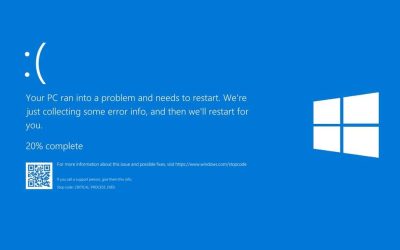
Windows watches the graphics driver. If the GPU does not respond for about two seconds, Windows resets the driver instead of freezing the whole system. On screen that looks like a black flash or a short blackout, sometimes with a message that the display driver stopped responding and recovered. If recovery fails, the result can be a blue screen such as VIDEO_TDR_FAILURE, often naming nvlddmkm.sys on NVIDIA systems. Event Viewer entries such as LiveKernelEvent 141 or Event ID 153 from nvlddmkm are also reported by troubleshooting guides for NVIDIA cards.
The cause is not always the driver. A TDR event is a symptom, and the real cause can be software, settings or hardware.
| Symptom | Likely cause | First fix |
|---|---|---|
| Black screen right after a driver update | Bad install or a faulty driver release | Clean reinstall or roll back to the previous version |
| Black flash during games, then recovers | TDR reset from driver or instability | Remove overclocks, disable overlays, clean driver install |
| Black screen, PC keeps running, image returns later | Possible signal loss over the cable or monitor | Reseat or swap the display cable, try another port |
| Black screen with fans at full speed | Power or hardware fault | Check PCIe power connectors, test another PSU or card if possible |
| Black screen during video playback only | Release-specific driver bug | Check the maker release notes and roll back if needed |
Step 1: do a clean driver installation
A common sequence, described by multiple troubleshooting sources, is:
- Download the latest stable driver for your card from the GPU maker website and save it. Also download Display Driver Uninstaller (DDU) from its maker, Wagnardsoft.
- Disconnect from the internet or pause Windows Update so Windows does not install a different driver automatically.
- Boot into Safe Mode, run DDU, choose GPU and your vendor, then select the option to clean and restart.
- Run the downloaded installer. On NVIDIA, choose Custom (Advanced) and tick the clean installation option.
Some forum users argue a standard reinstall is enough and DDU is not necessary. Either route is reasonable; DDU is a third-party tool, so download it only from its maker, and create a restore point first.
Step 2: try a different driver version
New driver releases occasionally introduce bugs. Reports in 2026 mention a NVIDIA Game Ready release, 621.01, with a confirmed issue causing freezes or black screens during video playback, with a workaround of going back to an earlier release such as 617.42. Another report says release 572.60 addressed black screen problems on RTX 50-series cards. Read the release notes and known issues list on the maker website, then pick the newest version that is not flagged. If a new driver breaks things, rolling back is a legitimate fix, not a failure.
Step 3: remove common triggers
- Overclocks and undervolts. Return GPU clocks, memory and voltage to default. Unstable overclocks are a frequent cause of TDR events. Also check motherboard memory profiles and CPU tuning, since BIOS changes can cause instability and may affect your warranty.
- Overlays and capture software. Discord, the in-game GPU overlay and recording tools hook into games and have been reported to cause driver resets. Turn them off one at a time to see if the problem stops.
- Background monitoring tools. Tools that poll the GPU can occasionally conflict. Close them for a test.
- Hardware acceleration in browsers or apps. If the black screen happens outside games, try turning it off in the affected program.
Step 4: check cables and power
Turn the PC off and unplug it before touching internals. Reseat the display cable at both ends and try a different cable or port, since a marginal cable or a monitor that loses signal can look like a driver crash. Check that every PCIe power connector on the graphics card is fully seated. For cards using the 12VHPWR or 12V-2×6 connector, follow the GPU and power supply maker guidance on inserting it fully and avoiding sharp bends close to the plug, and stop using the card if you see heat damage. Never open a power supply; if you suspect the PSU is failing, have it tested or replaced by a technician.
Step 5: consider the TdrDelay setting
Some guides suggest raising the registry value TdrDelay to give the GPU longer before Windows resets it, with one source naming a value of 8 seconds. Other sources describe this as a workaround for borderline cases rather than a root-cause fix, and it hides symptoms instead of solving them. Editing the registry can cause problems if done wrong, so back it up first and only use this if the other steps fail.
Step 6: look at hardware and Windows
- Run Windows Update and install chipset and BIOS updates from the motherboard maker if the board supports your GPU generation officially.
- Monitor GPU temperatures during the crash; overheating can trigger resets.
- Test with another PCIe slot or another card if you have one, to separate a GPU fault from a platform fault.
- If the card is under warranty and the problem persists on a clean system, contact the maker.
Which fix to try first
| Situation | Start with |
|---|---|
| Problem began right after a driver update | Roll back or clean install an earlier stable version |
| Only crashes in one game | Update the game, disable overlays, confirm no overclock |
| Random crashes in many games | Reset clocks, check power connectors and temperatures |
| Black screen on boot before Windows loads | Check cables, reseat the card, try another display input |
| Screen goes black but PC and sound continue | Test another cable and monitor port |
Common mistakes
- Installing several driver versions in a row without cleaning. Leftover files can keep causing trouble.
- Always installing the newest release. A stable older version can be the better choice.
- Raising TdrDelay and calling it fixed. It may only delay the same failure.
- Ignoring the cable. A faulty display cable can mimic a driver fault.
- Keeping an overclock while troubleshooting. Test at stock first.
Frequently Asked Questions
Why does my screen go black for a few seconds and come back?
That pattern commonly means a TDR reset: Windows restarted the graphics driver after the GPU stopped responding. The trigger could be a driver bug, an overclock, an overlay or a hardware issue.
Do I need DDU to fix a black screen?
Not always. A normal clean installation through the maker installer works for many people, and some users report DDU is unnecessary. DDU is a reasonable step when a normal reinstall fails.
Can a bad driver damage my graphics card?
Driver bugs usually cause crashes and blackouts rather than permanent damage. If the card behaves oddly after a clean install on a different driver, treat it as a possible hardware fault.
Is a black screen caused by the monitor or the GPU?
It can be either. If the PC keeps running and the image returns later, test another cable, port or monitor to rule out signal problems.
Should I roll back to an older driver?
Yes, if problems started with a specific release and the maker or users report known issues. Check the release notes first and pick a version not flagged for black screens.
When is it a hardware problem?
If crashes continue on a clean Windows install with stock settings, secure cables and several driver versions, suspect the card, the power supply or the slot, and contact the maker or a technician.
FAQ
Why does my screen go black for a few seconds and come back?
Do I need DDU to fix a black screen?
Can a bad driver damage my graphics card?
Is a black screen caused by the monitor or the GPU?
Should I roll back to an older driver?
When is it a hardware problem?
More from Amazon
Programs that pair well with the guide above. Offers and eligibility are set by Amazon and may change.
Free shipping on eligible items, Prime Video and more. Eligible new members can start with a free trial.
Start a Prime free trialAd-free music streaming. Eligible new subscribers can start with a free trial.
Try Music Unlimited freeA Prime membership for ages 18-24 with a trial period. Eligibility is set by Amazon.
See Prime for Young AdultsAudiobooks and podcasts to listen to on the go. Eligible new members can start with a free trial.
Try Audible freeAs an Amazon Associate we earn from qualifying purchases.