Key takeaways
- The phrase "new hard drives" hides a real fork in the road. Some buyers mean a brand-new external drive to dump photos.
The phrase “new hard drives” hides a real fork in the road. Some buyers mean a brand-new external drive to dump photos, game installs and project folders onto. Others mean a fresh internal drive for a desktop build or a NAS bay. Those are different shopping lists, and a drive that is perfect for one is useless for the other. This guide sorts the field by what the spec sheet shows: portable solid-state drives built for travel, a slim spinning external for bulk backups, a pair of enterprise-class 3.5-inch internals, and one fast NVMe stick for an open M.2 slot.
It is written for people who want to buy something current in 2026 and avoid surprises: a 4TB drive that will not fit the slot, a 7200 RPM server disk that sounds like a hair dryer under a desk, or a “new” label that turns out to mean refurbished. Two of the internal drives below carry a Renewed tag in their titles, and the guide treats that tag as a real difference, not a footnote. Everything here is judged from the listed specs only.
Quick Picks
Our top picks



 Western Digital 4TB WD Blue SN5000 NVMe
- Hold more masterpieces and enjoy inspiration with up…
- Harness AI and streamline your workflow with the…
- Switch smoothly between applications and projects with high-end…
As an Amazon Associate we earn from qualifying purchases at no extra cost to you.
| Product | Best for | Key spec from the title |
|---|---|---|
| SanDisk Extreme Portable SSD 1TB | Everyday carry and camera offloads | Up to 2000MB/s, IP65, up to 3M drop |
| SanDisk Extreme Portable SSD 4TB | Large video libraries on the road | 4TB capacity, up to 2000MB/s |
| Kosbees 500 GB External HDD | Cheap backups for PC, Mac and consoles | Ultra slim, works with PS4 and Xbox One |
| SanDisk Extreme Portable SSD 500GB | Light users who want rugged speed | 500GB, up to 2000MB/s |
| SanDisk Extreme Portable SSD 2TB | Creators who want a middle capacity | 2TB, IP65 dust and water resistance |
| SanDisk Portable SSD 1TB (1000MB/s) | Laptop and tablet owners on a budget | Up to 1000MB/s reads, up to 2M drop |
| Seagate Enterprise Capacity 10TB (Renewed) | Bulk archive inside a desktop or NAS | 7200 RPM, SATA 6.0Gb/s, 256MB cache |
| HGST Ultrastar 4TB (Renewed) | Secondary storage in a tower | 7200 RPM, 512e, 3.5-inch SATA 6Gb/s |
| WD Blue SN5000 4TB NVMe | Internal boot or game library | PCIe Gen 4.0, M.2 2280, up to 5,500 MB/s |
How to Choose
Decide between external and internal first
An external drive plugs into any USB port and moves between machines. An internal drive needs a free bay or slot and a little patience with screws. The SanDisk models, the Kosbees and the Seagate or HGST disks cover very different jobs, so settle this question before comparing speeds. A 3.5-inch drive needs a bay and its own power connector, while the M.2 2280 stick needs a matching slot on the motherboard.
Match the interface to the speed you can actually use
Quoted speeds are ceilings. A drive rated for 2000MB/s needs a fast USB port to get near it, and a slower port quietly caps it. SATA 6Gb/s tops out around a few hundred megabytes per second in practice, which is fine for archives. PCIe Gen 4.0 NVMe, as in the WD Blue listing, only pays off if the motherboard supports Gen 4. If your machine is older, you pay for speed you cannot reach.
Pick capacity by workload, not by habit
Photographers shooting raw files and anyone recording video burn through space faster than expected. Under 1TB suits documents and a small game library. One to two terabytes covers most laptop owners. Four terabytes and up makes sense for libraries, backups of several machines or a media server. For pure bulk storage, spinning disks still deliver the most capacity for the money, which is why the 10TB enterprise drive exists at all.
Read the condition and durability lines
Look for ingress ratings such as IP65 and drop ratings in meters if the drive will travel. For internal disks, notice the word Renewed: it means previously used or refurbished stock, which is a legitimate way to save money on archive storage but not what most people picture when they say new. Ignore marketing phrases like “new model” unless a capacity and interface follow them, and skip data-recovery add-ons that are not drives at all.
The 9 Best Options
SanDisk Extreme Portable SSD 1TB
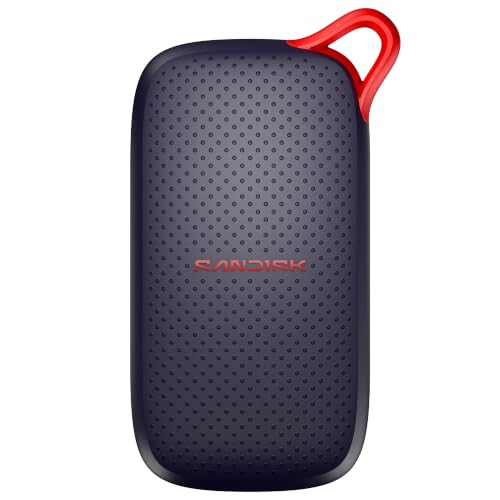
This is the all-rounder of the group. The title lists up to 2000MB/s transfer speeds, an IP65 water and dust rating and a drop rating of up to 3M, which together describe a pocketable drive meant to survive a camera bag. One terabyte fits a working library of photos plus a handful of projects.
- Strength: rugged rating plus high listed speed in a portable body.
- Strength: one terabyte is a practical size for most laptop owners.
- Trade-off: the full speed needs a fast USB port, so older ports will hold it back.
Skip it if you need a huge archive or if you only back up documents once a month; a slower, larger drive costs less per terabyte.
SanDisk Extreme Portable SSD 4TB
The same Extreme family with four terabytes of space. The title repeats the 2000MB/s ceiling and the IP65 and 3M drop language. It suits video editors, drone pilots and anyone who carries an entire year of footage between a laptop and a desktop.
- Strength: large capacity without giving up the rugged body.
- Strength: one device can replace several smaller drives.
- Trade-off: it sits in the premium tier, and all that data lives in one small enclosure, so a second backup is wise.
Skip it if your files total well under a terabyte; a smaller Extreme does the same job for less.
Kosbees 500 GB External Hard Drive
A plain, ultra slim spinning drive. The listing says it works with Windows, Mac, laptops, PS4 and Xbox One, so it is a convenient add-on for a console library or a basic backup. At 500 GB it is modest, and there is no speed figure in the title, so expect traditional hard-drive behavior.
- Strength: broad device compatibility listed in the title.
- Strength: slim form for a desk drawer or backpack pocket.
- Trade-off: a spinning mechanism is more sensitive to knocks than the solid-state options here.
Skip it if you move the drive often or need fast transfers of large video files.
SanDisk Extreme Portable SSD 500GB
The smallest Extreme keeps the same 2000MB/s ceiling and the IP65 dust and water protection, and the title lists a 3M drop rating. It suits a student, a casual photographer or someone who just wants a quick transfer drive for working files.
- Strength: lowest entry point into the Extreme line.
- Strength: same ruggedness language as the larger sizes.
- Trade-off: half a terabyte fills quickly once video enters the picture.
Skip it if you shoot video or keep a large game library; stepping up to one or two terabytes avoids a second purchase.
SanDisk Extreme Portable SSD 2TB
Two terabytes is the sweet spot for creators who have outgrown a laptop drive but do not need the top capacity. The title carries the same IP65 and speed lines as its siblings, so the choice here is purely about space and budget tier.
- Strength: roomy enough for a season of projects.
- Strength: rugged rating suits fieldwork.
- Trade-off: mid-range to premium cost for portable flash storage.
Skip it if you only need a few hundred gigabytes, or if you already own a large archive and want bulk capacity cheaply.
SanDisk Portable SSD 1TB (1000MB/s)
This one steps down in speed and ruggedness. The title lists up to 1000MB/s read speeds, laptop and tablet compatibility, and a drop rating of up to 2M. It is a sensible pick when you want solid-state quietness and reliability but do not need the Extreme specs.
- Strength: solid-state design with a lower entry point.
- Strength: explicit tablet and laptop compatibility.
- Trade-off: the title does not list an IP rating, so it is less suited to wet or dusty settings.
Skip it if you work outdoors or need the fastest possible offloads.
Seagate Enterprise Capacity 10TB (Renewed)
A bulk-storage disk from the server world. The title shows 10TB, 7200 RPM, a SATA 6.0Gb/s interface, 256MB of cache and 512e formatting in a 3.5-inch body. It fits a desktop or NAS where cost per terabyte matters more than speed or silence.
- Strength: very large capacity on a single disk.
- Strength: enterprise-class platform with a large cache.
- Trade-off: it is marked Renewed, so it is not new stock, and 7200 RPM disks run louder than laptop drives.
Skip it if you want a new retail drive, a quiet desk, or anything portable.
HGST Ultrastar 4TB (Renewed)
The model number in the title identifies a 4TB, 7200 RPM, 512e SATA 6Gb/s Ultrastar in the 3.5-inch size. It is a straightforward second drive for a tower, useful for backups, a media folder or a secondary game library.
- Strength: moderate capacity from a server-grade line.
- Strength: standard SATA connection works in most desktops.
- Trade-off: Renewed condition and no external case or adapter in the title.
Skip it if you need a laptop-friendly drive or a brand-new warranty path.
Western Digital WD Blue SN5000 4TB NVMe
The only true internal solid-state drive of the group. The title lists PCIe Gen 4.0, an M.2 2280 form factor and speeds up to 5,500 MB/s at 4TB. It is meant for a desktop or a laptop with an open M.2 slot, as a boot drive or a big game library.
- Strength: much faster than any SATA or USB option here.
- Strength: four terabytes in a tiny stick.
- Trade-off: it needs a compatible M.2 slot and does nothing for a machine without one.
Skip it if you want a plug-and-play external drive or if your board lacks Gen 4 support.
Which One Fits Your Situation
You travel with a camera and need rugged storage
Choose the SanDisk Extreme Portable SSD 1TB or 2TB. The IP65 rating and 3M drop language suit location work, and either size handles a long shoot.
You want the cheapest backup for a console or old laptop
The Kosbees 500 GB external hard drive covers PS4, Xbox One, Windows and Mac in one slim body. It is the simple, low-cost pick when speed is secondary.
You are building or upgrading a desktop
For a boot drive, the WD Blue SN5000 4TB is the modern choice. For bulk storage beside it, the Seagate Enterprise Capacity 10TB (Renewed) adds enormous space in a 3.5-inch bay.
You need a lot of portable space for video
The SanDisk Extreme Portable SSD 4TB keeps an entire project library in one rugged case. Pair it with a second backup so a lost drive is not a lost archive.
Common Mistakes
- Assuming “new model” in a title means new condition. Read for the word Renewed on internal disks.
- Buying a PCIe Gen 4.0 NVMe drive for a motherboard that only supports older slots.
- Trusting the speed ceiling without checking that the USB port or cable can carry it.
- Using one external drive as the only copy of important files.
- Ignoring noise and power: 7200 RPM 3.5-inch disks need a bay, a power connector and some tolerance for sound.
Related guides
- Logitech G Pro X Superlight 2 Vs Razer Viper V3 Pro
- Motherboard Io Panel And Back Connectors Explained
- How To Record Your Computer Screen With Audio
Frequently Asked Questions
Is a Renewed drive a bad idea?
Not automatically. It is a cost-saving route for archive storage, but it is not new stock. Keep a second copy of anything valuable, and treat it as secondary storage rather than your only drive.
Which is better for gaming, an SSD or an HDD?
Solid-state drives load faster and handle bumps better. The WD Blue NVMe suits an internal library, while a portable SanDisk works for consoles or laptops that accept external storage.
Do I need the Extreme line over the 1000MB/s model?
Only if you value the higher listed speed, the IP65 rating and the 3M drop spec. For documents and light media, the 1000MB/s model fits.
Why is the data recovery plan not included here?
It is a service plan, not a drive. It does not store anything, so it does not belong in a comparison of storage hardware.