
Key takeaways
- Photo printers split into two camps that barely overlap: pocket-size units that spit out a sticky-back snapshot from your phone.
Photo printers split into two camps that barely overlap: pocket-size units that spit out a sticky-back snapshot from your phone, and desktop inkjets that print documents on Monday and 4×6 prints on Saturday. Shopping for a new photo printer means deciding which camp matches your habits before looking at any single model, because the wrong camp wastes money in either direction.
This guide is for families sharing vacation pictures, crafters making stickers and journal pages, and home offices that want decent photos without a second machine. The nine models below span 2×3 mini printers, 4×6 dock and thermal printers, sticker-and-cutter hybrids, and wireless all-in-one inkjets. Everything here is judged from the specs in each listing, so check the details that matter to you before you buy in 2026.
Quick Picks
Our top picks




As an Amazon Associate we earn from qualifying purchases at no extra cost to you.
| Product | Best for | Key spec from the title |
|---|---|---|
| HP Envy Photo 7975 | Family all-rounder | Wireless color inkjet, print, scan, copy |
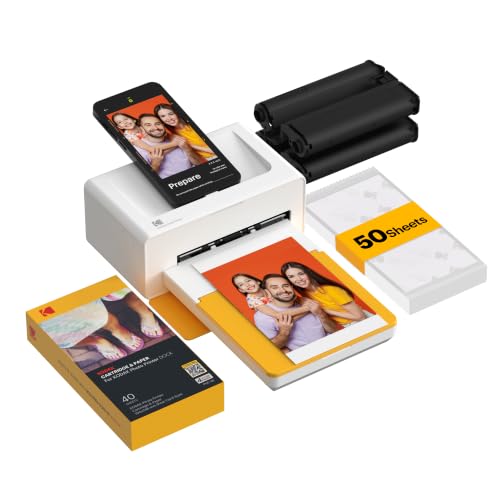
| Kodak Dock Plus | Quick 4×6 prints at parties | 4×6 prints, smartphone docking, charges while printing |
| Liene M100 | High-volume 4×6 from phones | 100 sheets and 3 cartridges, thermal |
| Canon PIXMA TR8620a | Home office plus photos | All-in-one with auto document feeder and fax |
| Canon PIXMA TS4320 | Light home use | Wireless color inkjet, print, copy, scan |
| Canon MAXIFY MB2720 | Small business that prints photos too | Wireless color with scanner, copier and fax |
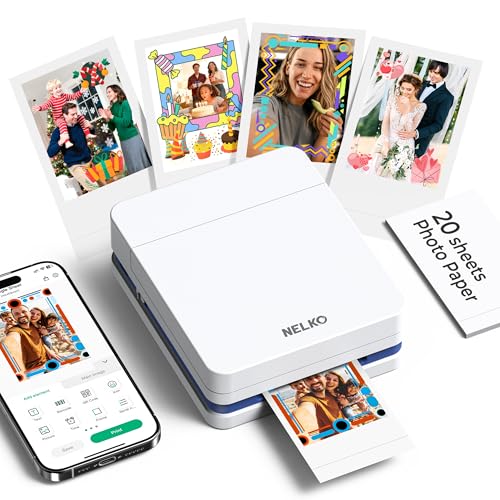
| Nelko PP01 | Pocket stickers | 2×3 portable, Bluetooth, sticky-back |
| Liene PixCut S1 | Crafters and label makers | Sticker printer with cutter, 300 DPI, dye-sublimation |
| Kodak Step | Casual instant snapshots | Zink 2×3 sticky-back, Bluetooth |
How to Choose
Print size and format
Decide on size first, ideally by looking at where the prints will live: a wallet, a fridge door, a scrapbook, or a wall frame. A 2×3 inch print fits a wallet or a phone case and suits stickers. A 4×6 inch print is the standard for frames and albums. Letter-size photos or documents need a full inkjet. Buying a 2×3 mini and expecting album-size prints is the most common size mistake, so match the format to where the pictures will end up.
Technology: inkjet, thermal, or Zink
Inkjets mix liquid ink and handle photos and documents but need regular use to keep nozzles clear. Thermal dye-sublimation machines, like the PixCut, transfer color in layers and tend to give smooth tones at a stated 300 DPI. Zink printers use special paper with color built in, so there is no ink to manage, but the paper is the recurring expense. Check which consumables the printer uses and how many prints come in the box.
Connectivity and phone support
For pocket printers, Bluetooth and a compatible app matter most; confirm iPhone and Android support in the listing. Docking models charge the phone while printing, which is handy at events. For desktop models, look for wireless, mobile printing, and AirPrint or Android printing support so you are not tethered to a computer.
Running costs and where budget models cut corners
Entry prices hide the real cost: ink tanks, cartridge packs, or sticky-back paper. Ignore the sticker price of the printer alone and check what is included, such as 50 or 100 sheets. Budget models may cap resolution, skip an auto document feeder, or lean on trial ink subscriptions you may not want. A subscription trial is not a feature unless you will keep the plan.
The 9 Best Options
HP Envy Photo 7975
This wireless color inkjet prints, scans, and copies, and the title leans on easy setup and mobile printing. It suits a household that prints school forms and holiday cards one day and photos the next, without wanting a dedicated photo device. The listing also mentions an ink trial, which can ease the early running cost, though you should decide whether you want to stay on that plan afterward.
- Strength: print, scan and copy in one wireless machine for the whole family.
- Strength: easy setup and mobile printing make it approachable for non-technical users.
- Trade-off: a full-size inkjet takes much more room than a pocket printer.
Skip it if you only want tiny sticky-back prints from a phone.
Kodak Dock Plus
The Dock Plus is a 4×6 printer built around a docking cradle for a smartphone, with Bluetooth and a stated charge-while-printing feature. It comes with 50 sheets, so you can start printing at the first birthday party or family reunion without a supply run. Because the dock holds the phone upright, it also works well as a countertop station where guests take turns choosing pictures.
- Strength: 4×6 output, the standard size for frames and albums.
- Strength: docking and charging while printing keeps your phone alive during long sessions.
- Trade-off: it is a phone-focused printer, so it does not handle documents.
Skip it if you also need to print letter-size pages.
Liene M100
The M100 is a portable 4×6 thermal printer sold with 100 sheets and three cartridges, aimed at iPhone and Android users. The large included supply makes it appealing to anyone planning a wall of prints, such as a travel collage, a graduation display, or a wedding table of memories, where running out halfway through would be frustrating.
- Strength: 100 sheets and three cartridges included for a ready start.
- Strength: full-color thermal output in the standard 4×6 size.
- Trade-off: a phone-only workflow means no scanner or document features.
Skip it if you want one machine for both the office and the photo wall.
Canon PIXMA TR8620a
This all-in-one lists a copier, scanner, fax, and auto document feeder, plus AirPrint and Android support. It is built for a home office that wants photo capability on the side, and the title names both photo and document printing. A freelancer who scans receipts in batches and then prints a few client photos would use every part of it.
- Strength: auto document feeder and fax cover paperwork-heavy households.
- Strength: AirPrint and Android support allow printing straight from phones.
- Trade-off: more features mean a larger body and a more involved setup.
Skip it if you want a simple, portable photo-only printer.
Canon PIXMA TS4320
A wireless color inkjet with print, copy, and scan, marketed as cost efficient for home use and described as handling photos and documents. It is a sensible fit for students, retirees, and families with modest needs who want one affordable printer for coursework, shipping labels, and the occasional snapshot rather than a feature-packed office machine.
- Strength: wireless print, copy and scan at an entry level.
- Strength: the title emphasizes cost efficiency for home users.
- Trade-off: it lists no fax or document feeder, so business tasks are limited.
Skip it if you plan to scan stacks of paper at once.
Canon MAXIFY MB2720
The MB2720 is a wireless color printer built for business, with a scanner, copier, and fax, and the listing still calls it a photo printer. It fits a small shop that prints invoices daily and the odd product photo or flyer, where durability and document handling matter more than gallery-grade prints.
- Strength: business-oriented wireless color with scanner, copier and fax.
- Strength: the title names photo printing, so one machine covers both jobs.
- Trade-off: its business focus means it is not tuned as a dedicated photo device.
Skip it if your priority is albums and framed prints.
Nelko PP01
This tiny 2×3 inch printer makes color sticky-back prints from a phone over Bluetooth. It is made for scrapbookers, teachers, and teens who want to turn pictures into stickers on a bus ride or at a desk. White, compact, and described as a mini printer, it slips into a bag beside a planner and a pencil case without adding noticeable weight.
- Strength: pocket-size and portable with Bluetooth connectivity.
- Strength: sticker-style prints work for journals and planners.
- Trade-off: the 2×3 format is too small for framing.
Skip it if you want 4×6 or larger prints.
Liene PixCut S1
The PixCut S1 combines a color sticker printer with a cutting function, using thermal dye-sublimation at 300 DPI. The title also pitches it as a label maker, making it a craft-room machine for custom stickers, tags, and decorations. A small shop owner making branded stickers for orders could use the print-and-cut flow every day.
- Strength: print-and-cut in one device, which saves scissors work.
- Strength: 300 DPI dye-sublimation for smoother color transitions.
- Trade-off: it is a niche sticker tool rather than an everyday photo printer.
Skip it if you only want standard rectangular prints.
Kodak Step
The Step is a portable Zink printer for 2×3 inch sticky-back photos over Bluetooth, described as a mini wireless mobile printer. It is the easy, ink-free route to party snapshots, locker decorations, and fridge magnets, since Zink media carries its own color and needs no cartridge changes between sessions.
- Strength: Zink paper means there is no ink to refill.
- Strength: compact and Bluetooth-compatible for quick sharing.
- Trade-off: small prints limit how you can display the pictures.
Skip it if you want large, frame-ready prints.
Which One Fits Your Situation
You print at birthday parties and trips
Go with the Kodak Dock Plus for 4×6 prints that look like proper photos, with the phone charging in the dock between shots.
You run a craft table or sell stickers
The Liene PixCut S1 prints and cuts, which turns a phone picture into a finished sticker without extra tools.
You need one machine for homework and photos
The HP Envy Photo 7975 handles print, scan, and copy for the family and prints pictures when you need them.
You want the smallest possible printer
Pick the Nelko PP01 or Kodak Step for pocket-size sticky-back output, and accept the 2×3 format as the price of portability. The Step avoids ink entirely, while the PP01 leans toward sticker and planner crafts. If you run a small shop, the Canon MAXIFY MB2720 keeps invoices, scans, and faxes under one roof and still handles the odd flyer or product picture.
Common Mistakes
- Expecting album-size prints from a 2×3 mini printer.
- Ignoring consumable costs such as paper packs and cartridges.
- Letting an inkjet sit unused for months, which can dry out nozzles.
- Buying a business inkjet and expecting it to behave like a dedicated photo printer.
- Forgetting to check whether the app supports your phone model.
Related guides
- Logitech G Pro X Superlight 2 Vs Razer Viper V3 Pro
- Motherboard Io Panel And Back Connectors Explained
- How To Record Your Computer Screen With Audio
Frequently Asked Questions
Are pocket photo printers worth it?
They are worth it if you want instant, shareable prints and accept small sizes. They are not a replacement for a desktop photo printer. Think of them as a social gadget: great at events, less useful for an archive of large, display-quality prints.
Do I need a computer?
Most of the portable models here print from a phone app. The desktop inkjets also connect wirelessly, so a computer is optional.
What is the difference between thermal and Zink?
Thermal dye-sublimation layers color onto special media, while Zink paper contains the color crystals and is activated by heat. Both avoid liquid ink tanks.
Can I print documents on a photo printer?
A desktop inkjet can print both. Pocket printers and dock printers are for pictures and stickers only.


