Our Top Picks
The best RGB gaming keyboard depends on what sits behind the lights, because a bright backlight on a basic membrane board and a bright backlight on a hot-swappable mechanical board are very different purchases. Ten listings are compared below, from an entry-level rainbow board to a wireless 75% build. If your priority is a budget full-size layout with colorful lighting, the TECKNET boards and Redragon K521 are the simplest fits. If you want proper mechanical switches, the Redragon hot-swap board and the K580 are more relevant, and the AULA F75 Pro adds wireless freedom.
Compare at a glance

Redragon K521 Upgrade Rainbow LED Gaming Keyboard, 104 Keys Wired Mechanical Feeling Keyboard with Multimedia Keys, One-Touch Backlit, Anti-Ghosting, Compatible with PC, Mac, PS4/5, Xbox



As an Amazon Associate we earn from qualifying purchases. Product prices and availability are accurate as of the date/time indicated.

TECKNET Wired Gaming Keyboard, RGB Backlit Keyboard with Metal Panel Design | 15-Zone RGB Illumination, Whisper Quiet Design, IP32 Water Resistance, 25 Anti-ghosting Keys, Ergonomic Design


As an Amazon Associate we earn from qualifying purchases. Product prices and availability are accurate as of the date/time indicated.

SteelSeries Apex 3 Gaming Keyboard - Black | 10-Zone RGB Illumination – IP32 Water Resistant – Premium Magnetic Wrist Rest (Whisper Quiet Gaming Switch)


As an Amazon Associate we earn from qualifying purchases. Product prices and availability are accurate as of the date/time indicated.

AULA F75 Pro Wireless Mechanical Keyboard,75% Hot Swappable Custom Keyboard with Knob,RGB Backlit,Pre-lubed Reaper Switches,Side Printed PBT Keycaps,2.4GHz/USB-C/BT5.0 Mechanical Gaming Keyboards


As an Amazon Associate we earn from qualifying purchases. Product prices and availability are accurate as of the date/time indicated.

Redragon Mechanical Gaming Keyboard Wired, 11 Programmable Backlit Modes, Hot-Swappable Red Switch, Anti-Ghosting, Double-Shot PBT Keycaps, Light Up Keyboard for PC Mac


As an Amazon Associate we earn from qualifying purchases. Product prices and availability are accurate as of the date/time indicated.

Logitech G213 Prodigy Wired RGB Gaming Keyboard - Black | Mech-Dome Keys, Palm Rest, Adjustable Feet, Media Controls, LIGHTSYNC RGB, USB, Compatible with Windows


As an Amazon Associate we earn from qualifying purchases. Product prices and availability are accurate as of the date/time indicated.

Redragon K580 Wired RGB Mechanical Gaming Keyboard, Macro Key & Media Wheel | 5 On-Board Keybinding Buttons for MMO MOBA Games, Dedicated Media Controls, Classic Tactile Blue Switch for Hype Typing Feel




As an Amazon Associate we earn from qualifying purchases. Product prices and availability are accurate as of the date/time indicated.

Redragon S101M-KS Gaming Keyboard and Mouse Wireless with Tri-Mode, RGB Keyboard and 4800 DPI Gaming Mouse, 10 Independent Multimedia Keys for Wins, PC, Computer, Wireless S101 Ideal for Gamer


As an Amazon Associate we earn from qualifying purchases. Product prices and availability are accurate as of the date/time indicated.

Gaming Keyboard and Mouse Combo, K1 RGB LED Backlit Keyboard with 104 Key for PC/Laptop(White)


As an Amazon Associate we earn from qualifying purchases. Product prices and availability are accurate as of the date/time indicated.
TECKNET Wired RGB Gaming Keyboard - 26-Key Anti-Ghosting, 13 Lighting Modes, Spill-Resistant, 108 Membrane Keys, Plug & Play - with Ergonomic Wrist Rest & Phone Holder for Windows/Mac (Black)


As an Amazon Associate we earn from qualifying purchases. Product prices and availability are accurate as of the date/time indicated.
| Model | Key point from the title | Price tier | Best for |
|---|---|---|---|
| Redragon K521 | Rainbow LED, 104 keys, mechanical feeling | Budget | First gaming board, console and PC use |
| TECKNET 15-zone | Metal panel, 15-zone RGB, IP32, whisper quiet | Budget | Quiet shared rooms |
| TECKNET 108-key | 26-key anti-ghosting, 13 modes, wrist rest, phone holder | Budget | Desk workers who also game |
| Redragon hot-swap red | Hot-swappable red switch, PBT keycaps, 11 modes | Budget | Upgradable mechanical on a budget |
| Logitech G213 | Mech-Dome keys, LIGHTSYNC RGB, palm rest | Mid-range | Windows players wanting brand software |
| Redragon K580 | Macro keys, media wheel, tactile blue switch | Mid-range | MMO and MOBA players |
| SteelSeries Apex 3 | 10-zone RGB, IP32, magnetic wrist rest | Mid-range | Comfort-focused players |
| Redragon S101M-KS | Keyboard and mouse combo, tri-mode wireless | Mid-range | Wireless starter bundle |
| AULA F75 Pro | 75% layout, knob, hot-swap, tri-mode | Premium | Compact wireless build |
| MageGee K1 combo | Keyboard and mouse combo, 104 keys, white | Budget | Cheapest full desk starter |
Reading RGB claims without getting dazzled
RGB on a keyboard can mean several things. Per-key lighting gives each key its own color. Zone lighting groups keys into bands. A rainbow LED board may simply cycle a fixed spectrum. Modes such as 11 or 13 patterns describe preset animations, not color control. Software and onboard storage decide whether your profile follows you to another computer.
The listings here mix all of these. Rather than assume per-key control, this guide marks what each title says and sends you back to the listing for the rest. Treat lighting as the decorative layer and judge the board on switch family, layout, connection and comfort first. Brightness control and an easy off switch deserve a mention too, because a board that cannot be dimmed becomes a nuisance in a dark room. Finally, check whether lighting settings survive when the board is unplugged and moved, since some boards store effects on board and others need software running.
How the list was assembled
Everything here rests on published specifications, manufacturer documentation and buyer reviews. Nobody on the team used or measured these units. Two listings are keyboard and mouse combos, which are not strict keyboard-only picks; they are included because buyers searching this phrase often land on them, and they are labeled as combos wherever they appear.
The ten picks
Redragon K521 Upgrade Rainbow LED Gaming Keyboard
The title lists a wired 104-key board with rainbow LED lighting, multimedia keys, one-touch backlight control, anti-ghosting and compatibility with PC, Mac, PS4, PS5 and Xbox. The phrase mechanical feeling signals a non-mechanical build designed to resemble the feel of one, which is worth knowing before you expect swappable switches. Rainbow LED also suggests a preset color pattern rather than full color control.
It suits a younger player or a console owner who wants a colorful full-size board at the lowest price in this set. Imagine a bedroom setup where a PS5 and a laptop share one keyboard: plug-in compatibility is the draw, not custom lighting. Multimedia keys and one-touch backlight control keep daily use simple, and the full-size layout includes a number pad.
Pros
- Lowest tier, wide platform compatibility
- One-touch backlight control
- Full-size with media keys
Cons
- Not a true mechanical board
- Lighting may be fixed patterns
Treat it as a gateway board. If the lighting turns out to be a fixed pattern, the rest of the package still works as a simple full-size keyboard, but do not buy it expecting to match a custom color scheme across a whole desk. Question to ask before buying: can brightness or color be adjusted, or does it only cycle a rainbow?
TECKNET Wired Gaming Keyboard with 15-Zone RGB
This listing mentions a metal panel design, 15-zone RGB illumination, a whisper quiet design, IP32 water resistance, 25 anti-ghosting keys and an ergonomic shape. The zone count is the clearest lighting spec in the set. The title does not state the key mechanism, so confirm whether it uses membrane or mechanical switches.
It fits a quiet household where the gamer plays in the evening, since the quiet claim is part of the headline. IP32 is a splash rating that helps with small drips but does not make the board spill-proof. A metal panel can improve the feel of the top surface and keep the frame stiff.
Pros
- 15 lighting zones named
- Quiet claim and splash rating
- Metal panel look
Cons
- Key mechanism not stated
- Anti-ghosting count is modest
Among budget boards it is one of the few that states both a lighting zone count and a splash rating, which makes comparison easier. Shoppers who dislike clacky keys will like the quiet positioning, although a quiet label in a title is still a seller claim. Question to ask before buying: is the layout full-size with a number pad?
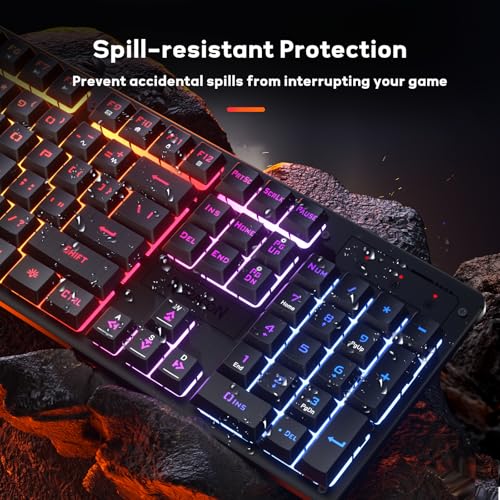
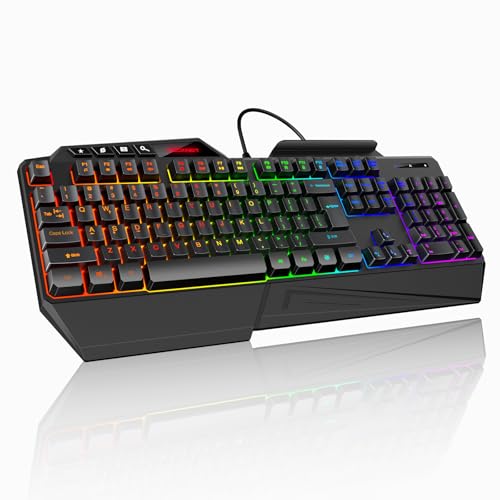
TECKNET Wired RGB Gaming Keyboard, 108 Membrane Keys
The second TECKNET listing is explicit about a membrane build with 108 keys, 26-key anti-ghosting, 13 lighting modes, spill resistance, plug and play use, a wrist rest and a phone holder, for Windows and Mac. Honest labeling like membrane is useful because it sets expectations: soft keys, low noise and a gentle price.
It suits someone who uses one keyboard for homework, spreadsheets and games. The phone holder is a quirk that turns the board into a desk station for a handset, while the wrist rest helps long sessions. The title does not name the lighting resolution, so the 13 modes should be read as animations.
Pros
- Clear membrane labeling
- Wrist rest and phone holder included
- Spill resistance mentioned
Cons
- No mechanical switches
- Extra attachments add clutter
Anyone with a tight desk should picture where the phone holder will sit relative to the monitor, because a holder that blocks the screen edge is more annoying than helpful. Question to ask before buying: are the wrist rest and holder detachable?
Redragon Mechanical Gaming Keyboard with Hot-Swappable Red Switch
This wired listing advertises 11 programmable backlit modes, a hot-swappable red switch, anti-ghosting, double-shot PBT keycaps and PC and Mac support. Red is the linear family, usually smooth for fast presses. Hot-swap and PBT caps are the features that usually cost more elsewhere.
It suits a budget builder who wants to try mechanical switches and later change to a heavier or clickier type. The title does not give a layout or key count, so check the images. Because PBT is a dense plastic that resists shine, the keycaps may age better than thin ABS ones.
Pros
- Hot-swap with linear red switch
- Double-shot PBT keycaps
- Programmable lighting modes
Cons
- Layout not stated
- Wired only
In a first mechanical purchase, hot-swap removes the fear of a wrong choice, since one set of replacement switches costs far less than a new keyboard. Question to ask before buying: which switch socket type is used, and are spare switches in the box?
Logitech G213 Prodigy Wired RGB Gaming Keyboard
The G213 title mentions Mech-Dome keys, a palm rest, adjustable feet, media controls, LIGHTSYNC RGB and USB, with Windows compatibility. Mech-Dome points to a dome-style mechanism rather than individual mechanical switches. The palm rest and adjustable feet make it a comfort-first design.
It suits a Windows player who values a known brand’s software and a built-in wrist rest. Because compatibility is stated as Windows only, Mac and console users should look elsewhere or confirm. Lighting is branded as LIGHTSYNC, and the title does not state per-key or zone, so check.
Pros
- Built-in palm rest, adjustable feet
- Brand software ecosystem
- Media controls
Cons
- Dome-style keys, not mechanical switches
- Windows compatibility only in the title
Older wired models like this one are often chosen precisely because they are plain and familiar, so a shopper who wants no surprises may value that more than a long feature list. Question to ask before buying: does the lighting offer per-key control in the software?
Redragon K580 Wired RGB Mechanical Gaming Keyboard
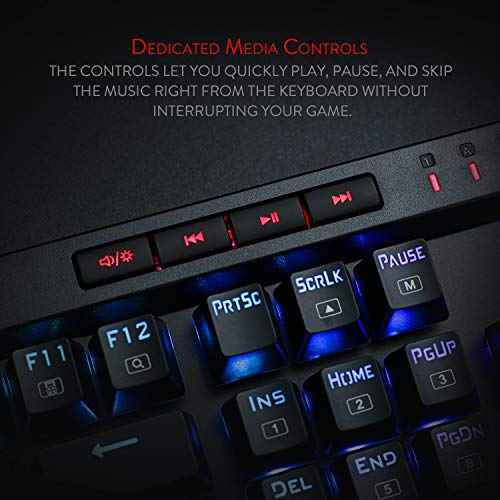
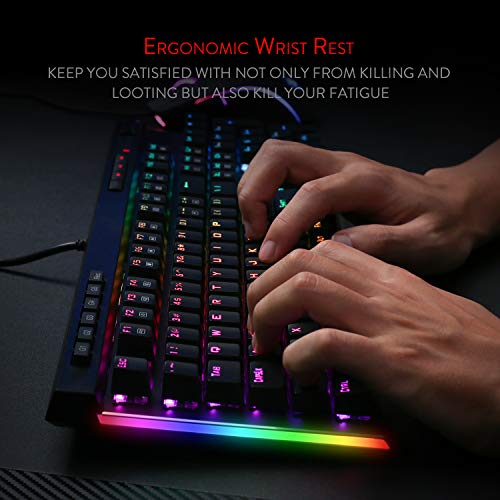
The K580 title lists a macro key, a media wheel, five on-board keybinding buttons for MMO and MOBA games, dedicated media controls and a classic tactile blue switch. Blue switches are normally clicky, so the title’s phrase about hype typing feel points toward loud feedback.
Think of an MMO player with many abilities who wants macros under the left hand without extra software. The tradeoff is noise, which suits a solo room. Because the macro keys sit in a column on the side, check the layout image for how much desk width it needs.
Pros
- Five on-board macro buttons
- Media wheel and controls
- Real mechanical switches
Cons
- Blue switch is loud
- Wide footprint with macro column
Another practical point is that a blue switch is audible through a headset microphone, so streamers and voice-chat players should weigh that before choosing it. Question to ask before buying: do the macros need software, or are they stored on board?
SteelSeries Apex 3 Gaming Keyboard
The title offers 10-zone RGB illumination, IP32 water resistance, a premium magnetic wrist rest and a whisper quiet gaming switch. The title does not call it mechanical. Ten zones is a modest lighting layout, and the magnetic wrist rest adds comfort.
It suits a player who spends long sessions at the desk and wants a board that stays fairly quiet. Its cost sits in the middle of this set, so the draw is comfort and brand rather than raw features. Our wireless versus wired keyboard comparison is useful if you wonder whether to pay for cordless instead.
Pros
- Wrist rest attaches magnetically
- Splash rating
- Quiet switch label
Cons
- Not described as mechanical
- Only 10 zones
Players who move between games will likely use the zones for broad effects such as a health-bar color or a team color rather than detailed key highlights. Question to ask before buying: does the listing confirm the switch design?
Redragon S101M-KS Wireless Gaming Keyboard and Mouse Combo
This is a combo, not a keyboard alone. The title lists a tri-mode wireless RGB keyboard, a 4800 DPI gaming mouse and 10 independent multimedia keys. Tri-mode normally means Bluetooth, a 2.4GHz receiver and a cable, though the title does not spell it out.
It suits someone starting from nothing who wants both devices in one box and a wireless desk. A keyboard in a bundle is usually a compromise relative to a stand-alone board, so look at the key mechanism on the listing. Compare it to the AULA F75 Pro if you want a better keyboard and plan to buy a mouse separately.
Pros
- Keyboard and mouse in one purchase
- Tri-mode wireless claim
- Multimedia keys
Cons
- Combo, so not a pure keyboard pick
- Key type not stated
Bundles save a trip through the product pages, but the mouse and keyboard may use different charging methods, so check whether one cable covers both devices. Question to ask before buying: which charging method does each device use?
AULA F75 Pro Wireless 75% Mechanical Keyboard
The F75 Pro title lists a 75% layout, hot-swappable sockets, a knob, RGB backlighting, pre-lubed Reaper switches, side-printed PBT keycaps, and 2.4GHz, USB-C and Bluetooth 5.0 modes. It is the only compact wireless board here and the highest tier in the set. The 2.4GHz mode is the one to use for fast games.
A player with limited desk space who swings the mouse widely will appreciate the shorter body. You lose the number pad, which can matter for spreadsheets. Because the sockets are hot-swappable, a switch you dislike is a minor annoyance rather than a reason to return the board, and the side-printed PBT keycaps keep legends readable under backlight.
Pros
- Compact layout with knob
- Three connections and hot-swap
- PBT keycaps
Cons
- No number pad
- Highest tier here
Recharging habits matter more on a wireless board with bright effects, so plan a charging routine or keep the cable plugged in during long sessions. Question to ask before buying: what is the stated battery life with lighting on?
MageGee K1 Gaming Keyboard and Mouse Combo
The K1 title is brief: a gaming keyboard and mouse combo with an RGB LED backlit 104-key keyboard in white, for PC and laptop. Almost nothing else is stated, which is a flag in itself. The key type, lighting detail, mouse specs and connection are all left to the listing.
It suits a buyer who only needs a cheap, bright desk starter. Expect basic quality and verify what is in the box. It is a combo, so it is not a clean keyboard-only recommendation.
Pros
- Low tier, complete set
- White color option
Cons
- Sparse title, many unknowns
- Combo listing
If you are shopping on a very tight budget, set your expectations accordingly and read the buyer comments for early failures before ordering. Question to ask before buying: what are the mouse DPI and keyboard switch type?
Buying guide
Match the switch family to your habits
Membrane and dome boards are quiet and cheap. Mechanical boards offer individual switches, and hot-swap boards let you change them. If you cannot decide, read our switch guide before ordering.
Think about layout and desk space
Full-size boards with a number pad and macro columns widen your keyboard area and push the mouse to the right. A 75% layout keeps the arrow keys and function row in a compact frame, which makes more room for sweeping mouse movements. Check the free space on your desk before ordering, and remember that wrist rests add depth.
Choose the right connection
Wired is simplest and avoids latency worries. Tri-mode boards add Bluetooth for laptops and a 2.4GHz receiver for gaming. Bluetooth is convenient for switching to a tablet or laptop but is the mode most likely to add noticeable delay in fast games.
| Spec concept | What to look for | Why it matters |
|---|---|---|
| Lighting resolution | Per-key, zone count or preset modes | Decides how much control you get |
| Switch family | Mechanical, dome or membrane | Feel, noise and upgrade path |
| Anti-ghosting | Key count or N-key claim | Reliable multi-key presses |
| Control path | On-board keys or software | Profiles without installing apps |
| Comfort | Wrist rest, adjustable feet | Long sessions |
Which pick suits which player
| Player | Likely fit | Reason |
|---|---|---|
| First-time buyer | Redragon K521 or TECKNET 108-key | Low tier, simple setup |
| Quiet-room player | TECKNET 15-zone or Apex 3 | Quiet claims in the title |
| Tinkerer | Redragon hot-swap or AULA F75 Pro | Swappable switches |
| MMO or MOBA player | Redragon K580 | On-board macro buttons |
| Small desk | AULA F75 Pro | 75% layout |
Worked example: how many keys share one light zone?
Assume a 104-key board and that its zones are split evenly across the keys. This is a simplification, because real zones are rarely equal. Divide the keys by the zones: 104 keys across 10 zones is about 10 keys per zone, and 104 keys across 15 zones is about 7 keys per zone. Fewer keys per zone means finer detail.
| Board (title claim) | Assumed keys | Zones | Approx. keys per zone |
|---|---|---|---|
| SteelSeries Apex 3 | 104 | 10 | 10.4 |
| TECKNET 15-zone | 104 | 15 | 6.9 |
| Per-key lighting (hypothetical) | 104 | 104 | 1 |
The same method works as a quick filter when you compare any two listings: write down the zone count, divide the key count by it, and pick the lower number if lighting detail is what you care about. Raw mode counts such as 11 or 13 do not belong in this calculation because they describe animations, not color resolution. Neither title states a key count for these two zone boards beyond what is shown, so treat the numbers as an illustration of the method.
Mistakes and compatibility traps
| Trap | Fix |
|---|---|
| Assuming RGB means per-key | Look for the zone count or per-key wording |
| Calling dome keys mechanical | Read the key mechanism line |
| Buying a combo for a good keyboard | Compare the keyboard alone first |
| Ignoring platform lists | Check Windows, Mac and console support |
| Wireless for esports | Prefer 2.4GHz or wired |
| Skipping the return policy | Read it before opening a budget board with unknown switches |
Verdict by player type
Keep the decision in order. Pick the connection first, then the switch family, then the layout, and let lighting break ties. A board that fits your hands and desk will be used for years, while lighting presets are changed in a week.
For the cheapest sensible start, pick the Redragon K521 or the TECKNET 108-key board. For upgrades, pick the hot-swap Redragon or the AULA F75 Pro. For MMO play, the K580 is the dedicated option. If you are assembling an entire desk, see our gaming PC bundles with monitors once the keyboard is chosen.
Frequently asked questions
Is per-key RGB better than zone lighting?
Per-key lighting lets each key take its own color, which suits detailed profiles and game-specific highlights. Zone lighting splits the board into a few bands, so effects are broader but still colorful. For most players the difference is cosmetic. Check which type the listing names, because several budget titles only say RGB without stating whether lighting is per key, per zone or a fixed pattern.
Do RGB lights add input lag?
Lighting is handled separately from keystroke signals, so a normal backlight should not slow your inputs. Wireless boards are different because the radio link can add delay, which is why tri-mode and 2.4GHz options matter. If you play competitive shooters, prefer a wired connection or a 2.4GHz dongle, and treat Bluetooth as a convenience mode for casual use and laptops.
Is a mechanical keyboard necessary for gaming?
No. Membrane and dome keyboards can work well for many games, and they are often quieter and cheaper. Mechanical boards offer individual switches, a more distinct feel and often replaceable parts. If you play fast-paced games or type a lot, the switch feel can matter. Otherwise, rely on responsiveness, layout and the features you will use every day.
What does anti-ghosting mean on a gaming keyboard?
Anti-ghosting lets the keyboard register several keys pressed at once, so a complex combination still arrives intact. Titles quote different numbers, such as 25 or 26 keys, and the term is not standardized across brands. Full N-key rollover is the most complete form. For everyday gaming a modest anti-ghosting claim is usually enough, though check how many keys are covered if you use heavy combos.
Can I turn the RGB lighting off?
Yes on most boards. Lighting is usually controlled by a function-key combination, a dedicated button or desktop software, and brightness can often be lowered or switched off. If you dislike bright lights, check that the listing mentions adjustable brightness or an off setting, since a board with a fixed rainbow pattern may offer fewer ways to calm it down.